Why Is My Seedbox Slow?
On this page ▾
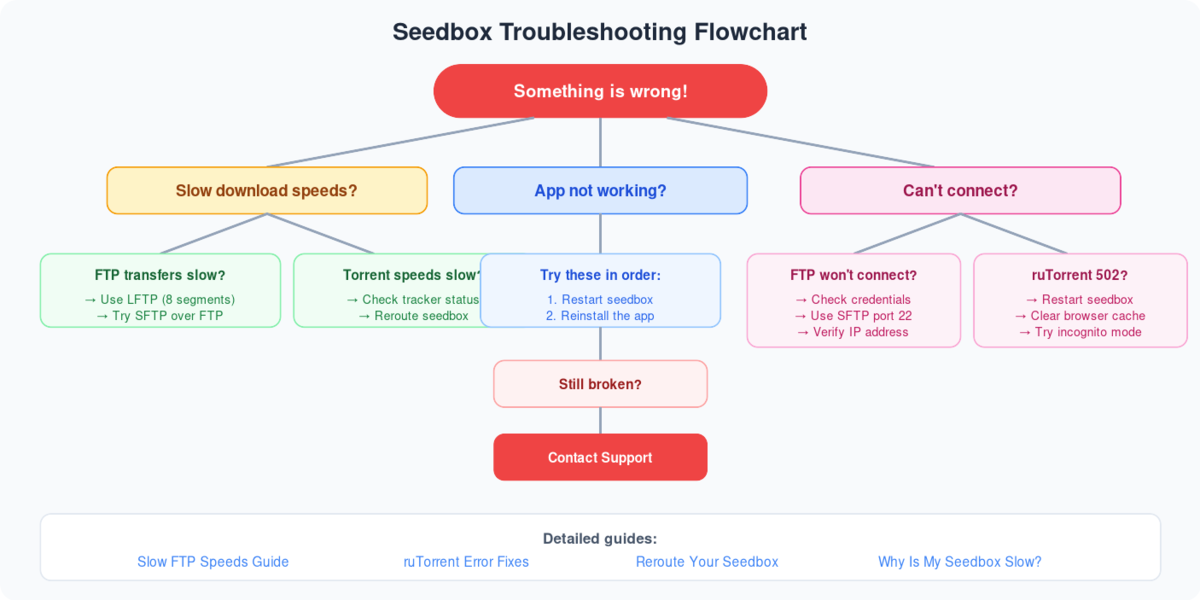
Diagnosing Slow Seedbox Performance
  SPEED DIAGNOSTIC CHECKLIST
  ═══════════════════════════════════════════════════════

  Is your seedbox slow? Check these in order:

  1. DISK SPACE
     └── Dashboard → Disk Usage
         ├── Over 95%? → Free space immediately
         └── Under 95%? → Continue to #2

  2. HIGH CPU / LOAD
     └── Dashboard → CPU / Load
         ├── Load > 8? → Too many apps running
         │   └── Stop unused Docker apps
         └── Load < 8? → Continue to #3

  3. DOWNLOAD SPEED
     └── Test with a well-seeded torrent
         ├── Fast? → Issue is with specific torrents
         │   └── Low seeds, tracker issues, or throttling
         └── Slow? → Continue to #4

  4. NETWORK / ROUTING
     └── Try LibreSpeed test from seedbox
         ├── Fast? → Issue is between you & server
         │   └── Try VPN or different route
         └── Slow? → Server network issue
             └── Contact support

  ┌──────────────────────────────────────────────────┐
  │  90% of "slow seedbox" issues are DISK FULL.     │
  │  Always check disk space first!                  │
  └──────────────────────────────────────────────────┘
  COMMON CAUSES & QUICK FIXES
  ═══════════════════════════════════════════════

  Cause                     Fix
  ─────                     ───
  Disk 95%+ full           Remove old torrents
  Too many Docker apps     Stop unused apps
  Public torrents seeding  Auto-stopped (normal)
  Low-seed torrents        Find better sources
  Monthly upload limit     Wait for reset, or upgrade
  Plex transcoding         Use Direct Play instead
  Network routing          Try WireGuard VPN
Understanding seedbox performance
During the normal operation of a seedbox, you might experience a slight performance downgrade, which can be because of the following:
- Input/output operations on the HDD storage
- CPU usage
- Network speed
- Memory utilized
Vital information! Every premium seedbox plan and Box + Plex seedbox plan we provide runs in a shared environment. A single server has finite resources shared by several users in parallel — so when a performance issue occurs, it often resolves by itself once the root cause is identified and fixed.
HDD I/O
Seedboxes do a lot of input/output work, which can affect storage performance significantly — but temporarily. When HDD usage is high due to heavy I/O, the seedbox may feel slow and laggy. Please be patient, as this usually resolves on its own after some time. If it doesn’t, contact our support team by raising a ticket.
CPU Usage
Our seedboxes run on modern server-grade processors that handle many operations concurrently. Sometimes users run CPU-intensive tasks — media transcoding, file compression, streaming — which raises contention for everyone else, mainly on premium network plans. It returns to normal after a while. If CPU usage stays very high for a long period, your seedbox may become unresponsive; in that case raise a support ticket and our team will reboot the server.
Network Speed
Upload and download speeds vary with how much data the server is moving. The more data being transferred, the more congestion on the server’s uplink. Even a fast network link is shared by many users performing various tasks at once. Wait a little and speeds normally recover once those tasks finish. If you see a drastic drop that lasts longer than a day or two, raise a support ticket. You can measure the box itself with the LibreSpeed test and learn how the numbers fit together in seedbox bandwidth explained.
Memory Consumption
The rarest cause. It happens when some users run high-memory tasks with many background processes. It’s resolved by shutting down unnecessary applications or rebooting the seedbox. If none of the above works for you, you can request migration to a less-populated server.
Torrent Demand and Peering
Some factors are beyond any provider’s control — the demand for a torrent and peering from your tracker. Torrent speeds rising and falling over days is normal. A new private-tracker torrent seeds fast at first because demand from peers is high; as days pass, peers become seeders themselves, supply rises, demand falls, and overall seeding drops.
Tracker Downtime
Tracker-side downtime can cause temporary peering problems. With hundreds of torrents being added constantly, tracker servers hit their own hardware limits from time to time.
Related Troubleshooting
Frequently Asked Questions
Why is one specific torrent slow while others are fast?
That’s almost always the swarm, not the seedbox: few seeders, a throttled tracker, or public-tracker peers with little upload. Test with a well-seeded torrent — if that’s fast, your box is healthy.
Does a full disk really slow everything down?
Yes — it’s the single most common cause. Above roughly 95% usage, torrent clients struggle to allocate pieces and the whole box feels sluggish. Delete finished content or upgrade storage via the pricing page.
Why is my download from the seedbox to home slow when torrents are fast?
The bottleneck is the route between the datacenter and your ISP. Try the built-in rerouting options, a parallel-connection FTP client (see maximum FileZilla speed), or syncing with Syncthing overnight.
When should I open a ticket instead of waiting?
If speeds stay drastically degraded for more than a day or two, or the box is unresponsive — raise a ticket. Include what you tested (disk %, LibreSpeed result, example torrent) and we can diagnose much faster.
Related Pages
Related articles
Put this into practice
EvoSeedbox ships with one-click app installs and up to 10 Gbps per box.


