Connect Your NAS *arr Stack to a Seedbox (Synology, QNAP, Unraid, TrueNAS)
On this page ▾
If your Sonarr, Radarr, or Prowlarr already run on a Synology, QNAP, Unraid, or TrueNAS box at home, you do not need to move them. Your NAS keeps the brains and the library; EvoSeedbox becomes the download engine. This guide covers the two things that are specific to that setup: getting the connection to rTorrent right, and getting finished files back to the NAS so imports work.
If you would rather run the whole stack on the seedbox instead, use the Quick *arr Stack setup — it skips everything on this page.
The connection settings that work
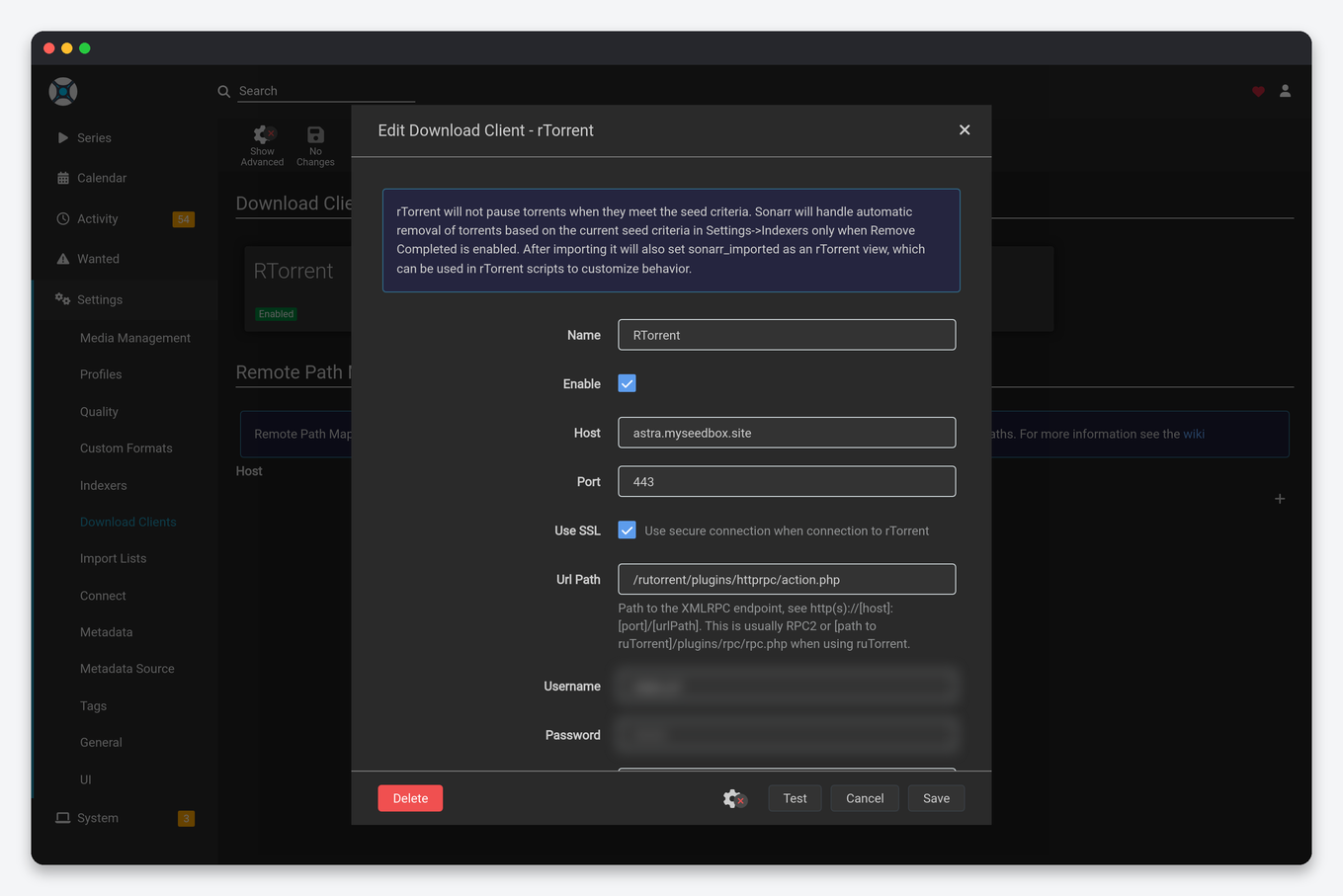
In Sonarr or Radarr go to Settings → Download Clients → + → rTorrent (ruTorrent) and enter exactly this:
 Download Client ── rTorrent (ruTorrent)
   Host ............ <yourbox>.myseedbox.site
   Port ............ 443
   Use SSL ......... Yes
   URL Path ........ rutorrent/plugins/httprpc/action.php
   Username ........ your seedbox username
   Password ........ your seedbox password
   Category ........ tv-sonarr   (or radarr, etc.)
   Directory ....... /home/<user>/downloads/tv
Replace <yourbox> with your actual server hostname — it is in your welcome email and at the top of your panel. Everything else above is literal.
If your guide says RPC2, that works too
Most rTorrent guides on the internet tell you to set URL Path to RPC2. That works on EvoSeedbox — we map RPC2 to the same endpoint, so you can follow a generic Sonarr or Radarr guide without translating anything. Either value is correct.
What does not work is localhost, 127.0.0.1, or port 8080. Your NAS is not the seedbox, so it has to reach it by hostname, and ruTorrent answers on 443 over HTTPS and nowhere else. If your download client test fails, check those three before anything else.
Test the connection before you configure anything
Rather than guessing in the Sonarr UI, prove the endpoint works first. From a terminal on your NAS (or any machine), run this with your own hostname and credentials:
curl -u 'YOURUSER:YOURPASS' \
  -H 'Content-Type: text/xml' \
  --data '<?xml version="1.0"?><methodCall><methodName>system.client_version</methodName><params></params></methodCall>' \
  https://YOURBOX.myseedbox.site/rutorrent/plugins/httprpc/action.php
A working seedbox replies with your rTorrent version:
<?xml version="1.0" encoding="UTF-8"?>
<methodResponse>
<params>
<param><value><string>0.15.7</string></value></param>
</params>
</methodResponse>
If you get that, the endpoint and your credentials are both fine and any remaining problem is inside Sonarr’s config. If you get 401, re-check the username and password you use for the ruTorrent web UI. If you get 404, your URL Path is wrong. If it hangs, something between your NAS and the seedbox is blocking outbound 443 — see the firewall note below.
Remote path mapping — not optional
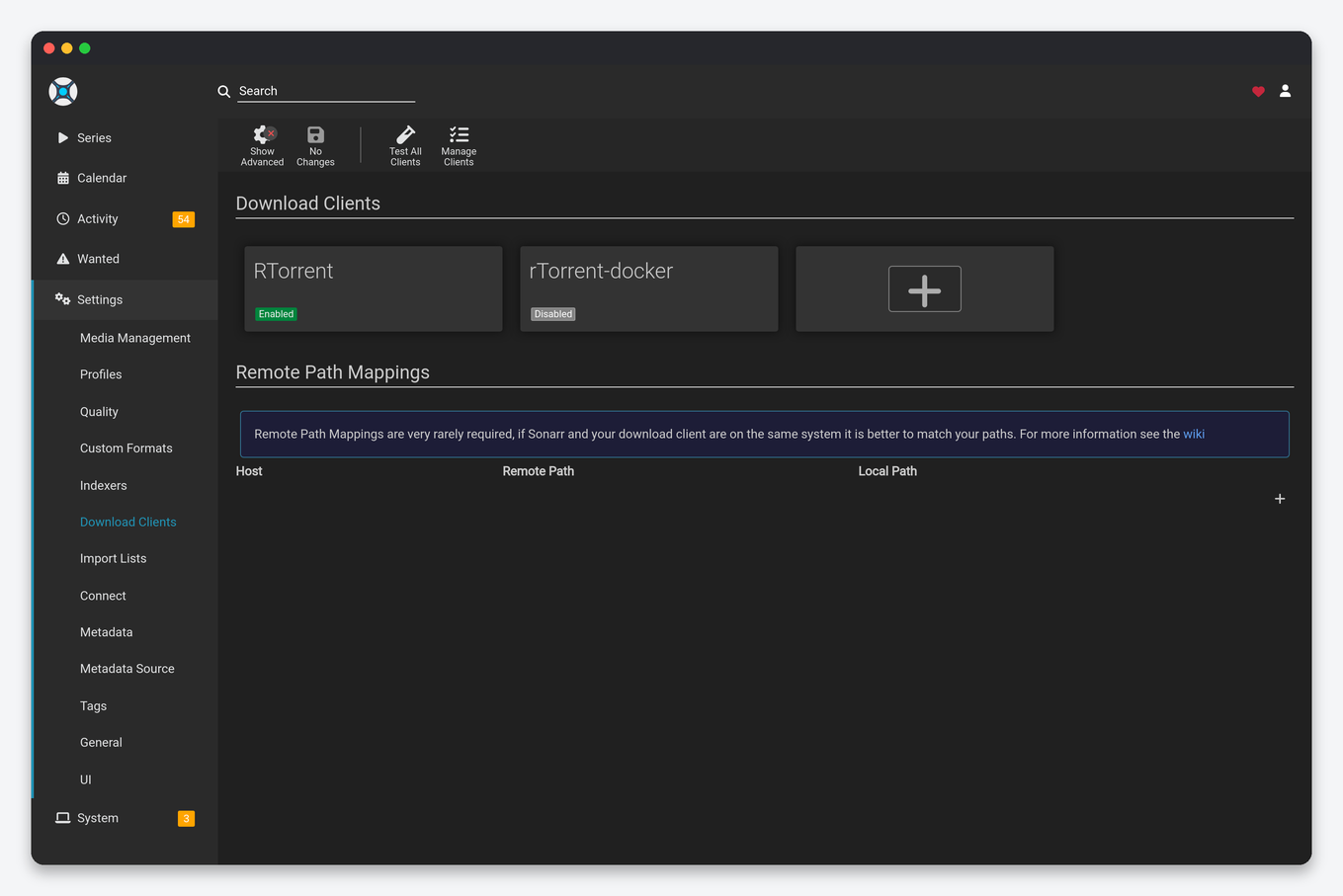
This is the step that separates a NAS setup from an all-on-seedbox one, and skipping it is why downloads complete but never import.
When rTorrent finishes a download it tells Sonarr where the file is as the seedbox sees it: /home/youruser/downloads/tv/. Your NAS has no such directory. Sonarr looks there, finds nothing, and the import fails — often with a “file not found” or a permanently stuck queue item.
Go to Settings → Download Clients → Remote Path Mappings → + and add:
   Host .......... yourbox.myseedbox.site     (must match the download client exactly)
   Remote Path ... /home/youruser/downloads/tv/
   Local Path .... /volume1/seedbox/downloads/tv/    (wherever the NAS sees those files)
The Host field has to be character-for-character identical to the Host in your download client, or the mapping is silently ignored. The Local Path is whatever mount point you set up in the next section. Both paths need their trailing slash.
For the full mental model, read Remote path mapping explained.
Getting the files onto your NAS
The Local Path above only works if the files actually appear there. Pick one:
- SSHFS or rclone mount — the seedbox download folder appears as a normal directory on the NAS. Sonarr imports straight from it and the path stays stable, which is exactly what remote path mapping wants. Best fit for this setup. See Mount your seedbox with SSHFS/WebDAV.
- Syncthing — well suited to NAS hardware, since most NAS platforms ship a Syncthing package. Files are copied down automatically as they complete, so imports read from local disk at full speed.
- Scheduled rclone or SFTP pull — simplest to reason about, no mount to keep alive. Fine at low volume; the trade-off is that Sonarr can try to import before the copy finishes.
A mount keeps the path live and predictable. A copy is more robust to a flaky home connection. Either works as long as the Local Path in your mapping matches where the files land.
Platform notes
- Synology — if Sonarr runs in Container Manager/Docker, the container needs the mount visible inside it. Mounting on the host DSM filesystem is not enough; add it as a volume in the container config, and use the container’s view of the path as your Local Path.
- Unraid — the same trap in a different shape. Your Local Path must be the path as the container sees it (
/data/downloads/…), not the Unraid share path (/mnt/user/…). This is the single most common Unraid remote-path-mapping mistake. - QNAP — Container Station follows the same rule; map the shared folder into the container and use the in-container path.
- TrueNAS — for jails or apps, confirm the dataset is mounted read-write for the user Sonarr runs as, or imports will fail with a permission error rather than a path error.
If your NAS cannot reach the seedbox at all
Some home routers, ISPs, and corporate or campus networks block outbound connections to non-standard ports, and a few filter unfamiliar hosts on 443. If the curl test above hangs rather than returning an error, that is what you are looking at — the seedbox is fine and the block is on your side of the connection.
The reliable way around it is to bring your NAS onto the seedbox’s private network with the WireGuard config from your panel, then point Sonarr at the seedbox’s internal address instead. See the WireGuard VPN setup guide. This also encrypts the whole path between your NAS and the box.
Troubleshooting
- 401 on test — check the username and password you use for the ruTorrent web UI. If those are definitely right, re-check the URL Path for a typo or a stray leading slash.
- 404 on test — URL Path typo, or a leading slash you need to remove.
- Test hangs, then times out — outbound 443 is blocked on your network. Try the WireGuard route above.
- Connects fine, downloads start, nothing ever imports — remote path mapping, every time. Confirm the files are visible from the NAS right now at your Local Path, then check the mapping Host matches the download client Host exactly.
- Imports work but files are duplicated — you have both a mount and a copy job running, or Sonarr is set to copy rather than hardlink. Pick one transfer method.
- Everything worked, then stopped — check your mount is still alive. A dropped SSHFS mount leaves an empty directory that looks identical to “nothing downloaded yet”.
Frequently asked questions
Do I have to run the *arr apps on the seedbox?
No. Running them on your NAS is fully supported and is the right choice if your media library and Plex/Jellyfin server already live at home. You are trading a little setup complexity for keeping library management next to your files.
Will this download faster than running everything on the seedbox?
The torrenting happens on the seedbox either way, at the seedbox’s speed. What changes is how quickly finished files reach your NAS, which is limited by your home connection.
Can I use the same seedbox with more than one NAS or *arr instance?
Yes. Point each one at the same endpoint with the same credentials, and give each app its own Category so their downloads stay separate in ruTorrent.
Does this work on every plan?
Yes. Remote HTTPS access to ruTorrent and SFTP access are on every plan. See pricing for storage and bandwidth tiers.
Is my seedbox password sent securely?
Yes, as long as Use SSL is on and the port is 443. The whole request, credentials included, is encrypted. Never turn SSL off to “simplify” a connection problem — it will not fix the path error that is usually the real cause.
Related articles
Put this into practice
EvoSeedbox ships with one-click app installs and up to 10 Gbps per box.
