Connect Emby to Dashboarr
On this page ▾
To connect Emby to Dashboarr, add an Emby instance with the Emby HTTPS address from your client area as the Remote URL and an API key created in Emby under Settings → Advanced → API Keys. The Emby tab mirrors the Jellyfin one: Now Playing, Recent, Continue Watching and Libraries. Part of the Dashboarr seedbox setup guide.
What you need
| Field in Dashboarr | Value on EvoSeedbox |
|---|---|
| Service | Emby (under Media servers) |
| Local URL | leave empty |
| Remote URL | Emby’s HTTPS address from the app card, https://SERVER.myseedbox.site:13xxx |
| API Key | Emby → Settings (gear) → Advanced → API Keys → New API Key → app name Dashboarr |
| Always use Remote URL | on |
As with Jellyfin, complete Emby’s setup wizard and add a library first.
Step by step
- Create the key in Emby (Settings → Advanced → API Keys) and copy it.
- Dashboarr → Settings → Integrations → Browse services → Emby.
- Remote URL = the HTTPS address, API Key = the key, Always use Remote URL on.
- Test Connection (probes
/System/Info/Public), then Save.
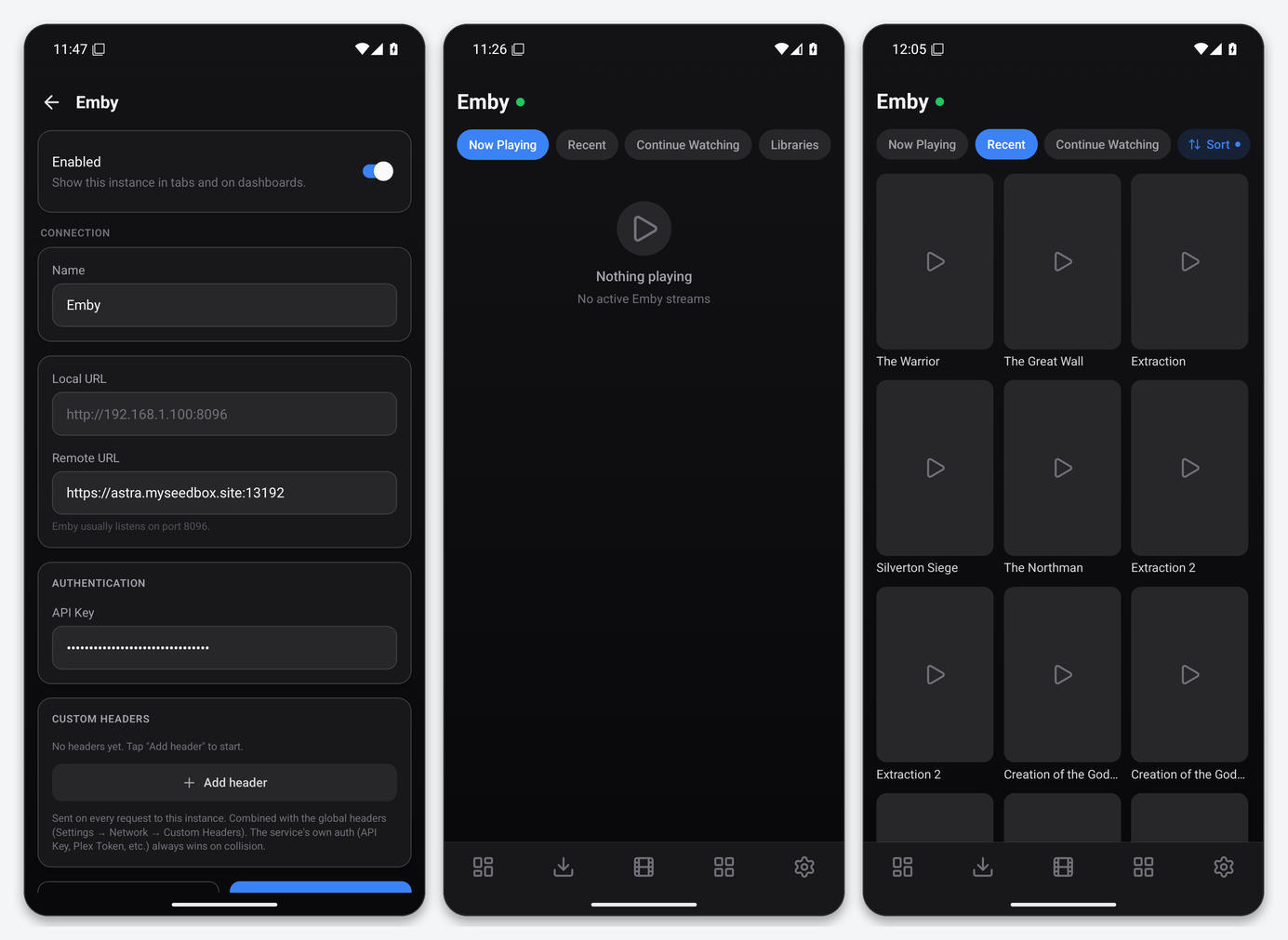
What the Emby tab gives you
- Now Playing with user, device and progress; Recent, sortable; Continue Watching; Libraries.
- Dashboard widgets: Emby Now Playing, Combined Now Playing, Service Health.
Emby Premiere is not needed for any of this: the API endpoints Dashboarr uses are part of the free server.
Troubleshooting
| Symptom | Fix |
|---|---|
| Test passes, tabs empty | Setup wizard incomplete or no library. Finish in Emby Web. |
| 401 | Key revoked in Emby. Create a new one. |
| Wrong server appears | You entered the Jellyfin address by mistake; both listen on port 8096 inside their containers but have different HTTPS ports on your card. |
FAQ
Emby Connect sign-in?
Not used. Dashboarr authenticates with the server-side API key only.
Does the Emby key expire?
No. Keys created under Advanced → API Keys stay valid until you delete them there; Dashboarr keeps using the same one after app updates.
Related articles
Put this into practice
EvoSeedbox ships with one-click app installs and up to 10 Gbps per box.
