Seerr (Overseerr) Settings Explained: Permissions, Limits, Services and Jobs
On this page ▾
This is the setting-by-setting reference for Seerr (the merged successor of Overseerr and Jellyseerr) as installed on an EvoSeedbox: every page under Settings, what each option does, its default, and the value that suits a seedbox where Seerr, Plex, Sonarr and Radarr share one server. Labels come from the running app. The first sign-in and the Sonarr and Radarr links are in the Seerr setup guide; this page is for the permissions, limits, jobs and override rules that make a shared request system behave.
General
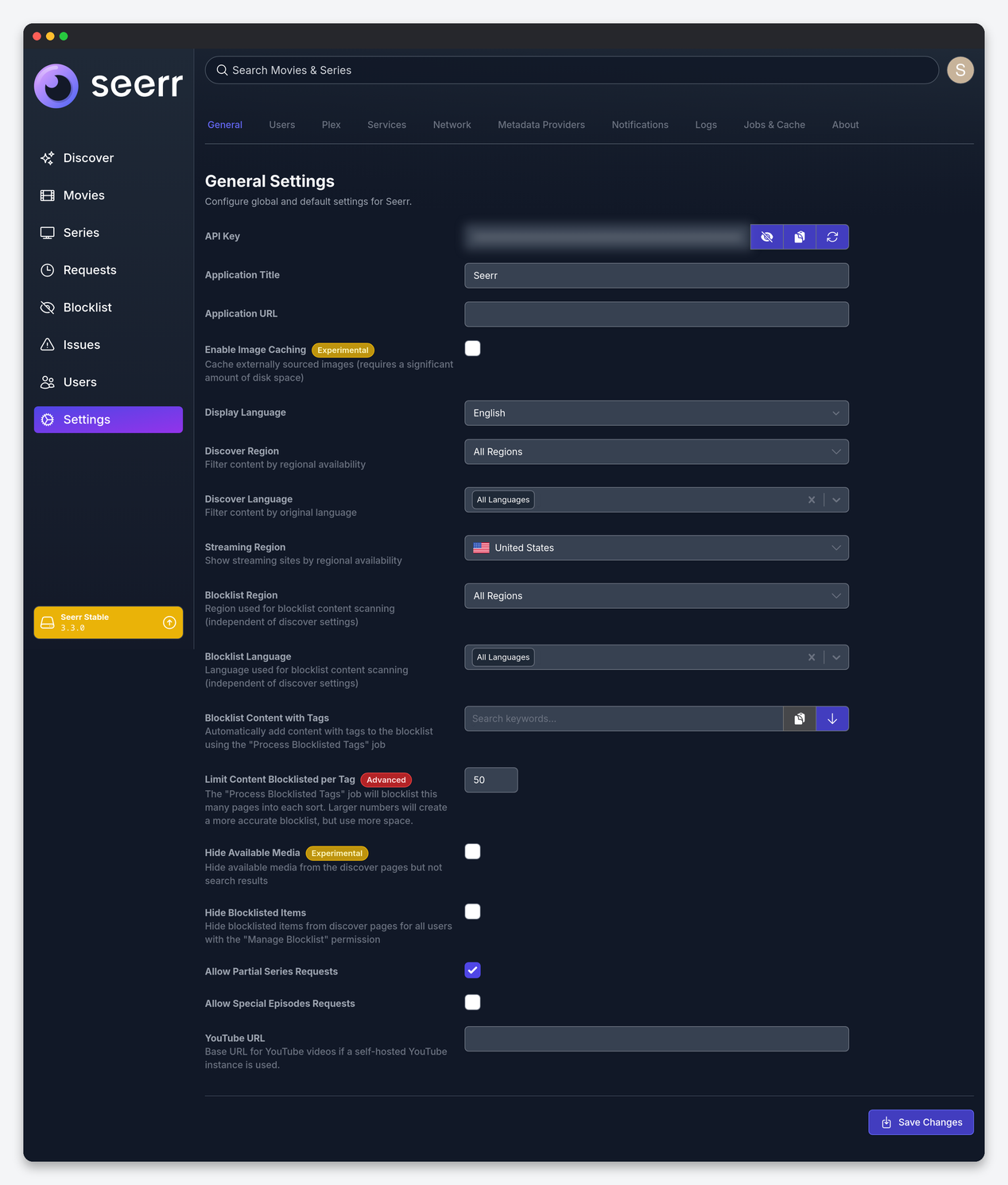
| Setting | What it does | Seedbox |
|---|---|---|
| API Key | The key used by Dashboarr, Requestrr and scripts. | Regenerate on a leak and update every consumer. |
| Application Title / Application URL | Name shown in the UI and emails; the public address used in notification links. | Your Seerr HTTPS address from the client area, so links in Discord and email open. |
| Enable Image Caching | Cache posters and backdrops locally instead of hot-linking TMDb. | Off. It is marked experimental and uses a lot of quota for a cosmetic gain. |
| Display Language | Interface language. | Yours. |
| Discover Region / Discover Language | Filter Discover rows by regional availability and original language. | Your region; keep language at All unless you only want one-language content surfacing. |
| Streaming Region | Which country’s streaming providers are shown on title pages. | Your country. |
| Blocklist Region / Language / Content with Tags / Limit per Tag | Automatically blocklist titles carrying chosen TMDb keywords, scanned by the “Process Blocklisted Tags” job. | Use it to keep content you never want (for example a keyword) out of Discover for everyone; the limit controls how deep the job scans. |
| Hide Available Media | Remove titles already in Plex from Discover (they still appear in search). | On for a request-focused Discover page; off if people use Seerr to browse what exists. |
| Hide Blocklisted Items | Hide blocklisted titles from users who can manage the blocklist. | On. |
| Allow Partial Series Requests | Let users request single seasons rather than a whole series. | On. A whole-series request for a long-running show is the quickest way to fill a seedbox. |
| Allow Special Episodes Requests | Let users request season 0. | Off. |
| YouTube URL | Base URL for trailers if you self-host a YouTube front end. | Empty. |
Users
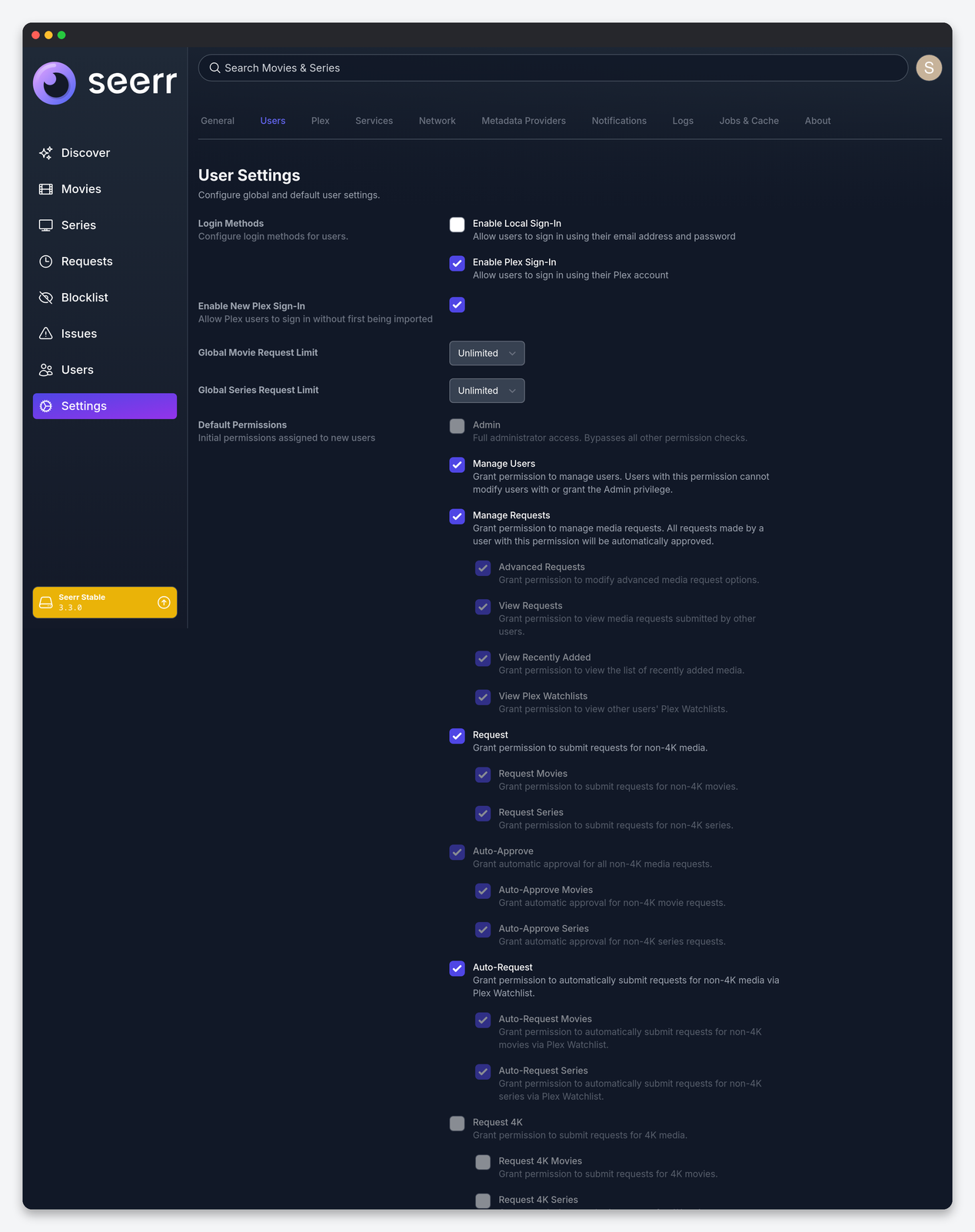
| Setting | What it does | Seedbox |
|---|---|---|
| Enable Local Sign-In | Allow email and password accounts you create in Seerr. | On if you have users without Plex accounts; off keeps Plex as the only identity. |
| Enable Plex Sign-In / Enable New Plex Sign-In | Allow Plex accounts, and allow Plex users you have not imported to sign in on their own (they must be shared on your server). | Plex on; New Plex Sign-In on if you want friends to self-onboard, off if you prefer to import them by hand. |
| Global Movie / Series Request Limit | Requests per user per period, applied unless a user has their own limit. | 5 movies and 2 series per week for a shared server. This is the disk-quota control. |
| Default Permissions | Permissions every new user gets; the same list exists per user. | See the table below. |
| Permission | Effect | Give to |
|---|---|---|
| Admin | Everything, bypassing all other checks. | You only. |
| Manage Users / Manage Requests | Edit users; approve, decline and edit requests (own requests auto-approve). | One trusted co-admin. |
| Advanced Requests | Pick server, profile, root folder and tags on a request. | Co-admin only. |
| View Requests / View Recently Added / View Plex Watchlists | Read-only visibility into other users’ requests, the recently added row, and others’ watchlists. | View Requests and Recently Added for everyone. |
| Request, Request Movies, Request Series | Submit non-4K requests, or only one media type. | Request for household; Request Movies only for casual friends. |
| Auto-Approve (all / Movies / Series) | Requests skip the approval queue. | Household only. |
| Auto-Request (all / Movies / Series) | Titles a user adds to their Plex Watchlist are requested automatically by the Watchlist Sync job. | Household only; it is the single largest source of surprise downloads. |
| Request 4K / Auto-Approve 4K / Auto-Request 4K | The same three for the 4K servers. | Nobody until a 4K Radarr exists. |
| Manage Issues / Report Issues / View Issues | The issue tracker for “audio out of sync” style reports. | Report Issues for everyone; Manage for the co-admin. |
| Manage Blocklist / View Blocklist | Edit or see the blocklist. | Admins. |
Per-user overrides live on each user’s page under Settings → Users → user → Permissions, together with a per-user request limit and a per-user quality profile if their requests should land in a different Radarr profile.
Plex
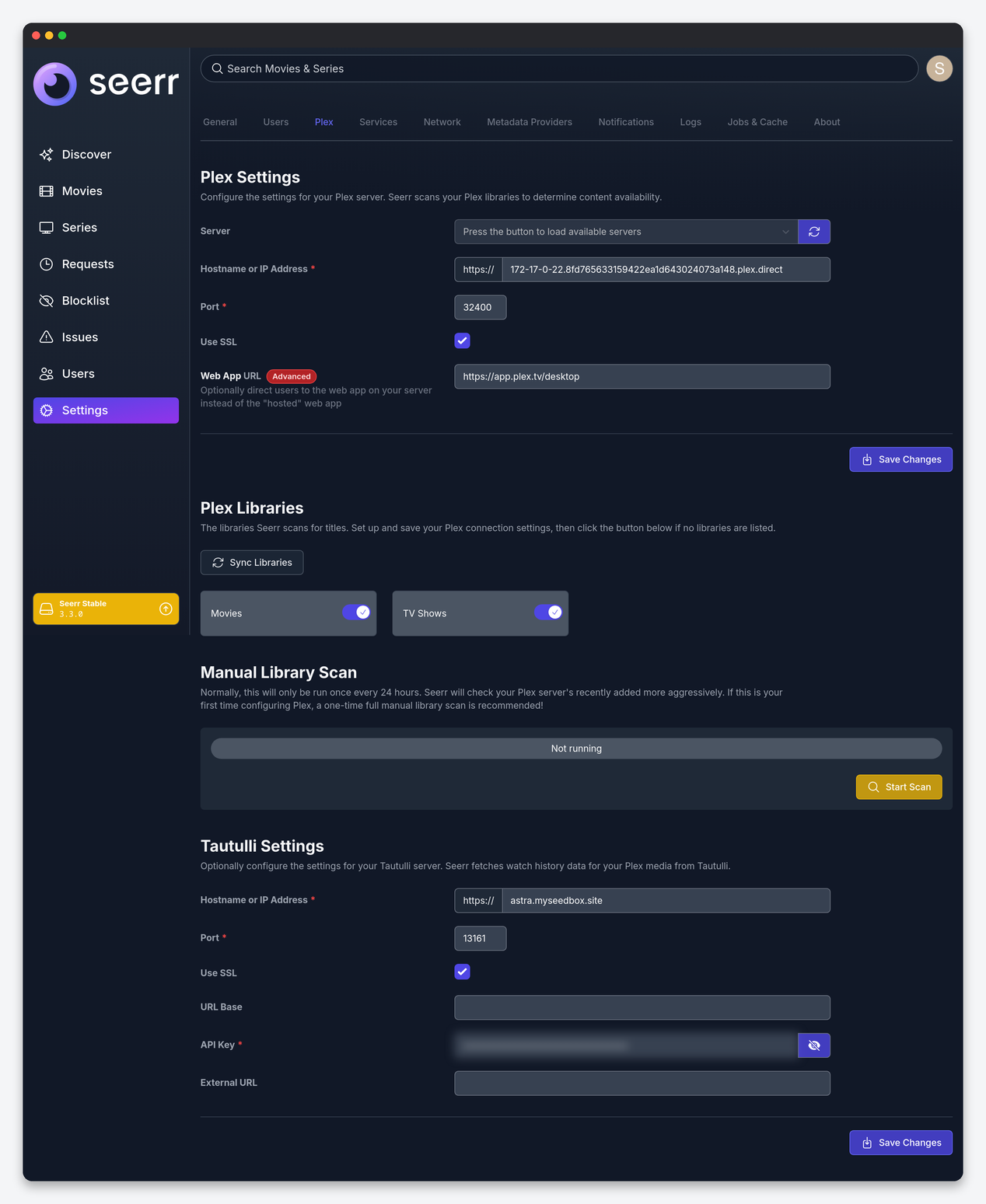
| Setting | What it does | Seedbox |
|---|---|---|
| Server / Hostname / Port / Use SSL | Which Plex server Seerr scans; the server picker fills the fields from your Plex account. | Pick your seedbox server; the installer’s local address is fastest. |
| Web App URL | Send users to your own Plex Web instead of app.plex.tv when they click “Play on Plex”. | Your Plex HTTPS address from the client area. |
| Plex Libraries | Which libraries are scanned for availability. | Movies and TV Shows; leave music and photos unticked. |
| Manual Library Scan | Full scan on demand; the automatic one runs every 24 hours plus a frequent recently-added check. | Run once after setup and after any large import. |
| Tautulli Settings | Connect Tautulli so title pages show watch history. | Fill it if Tautulli is installed; API key from Tautulli → Settings → Web Interface. |
Services
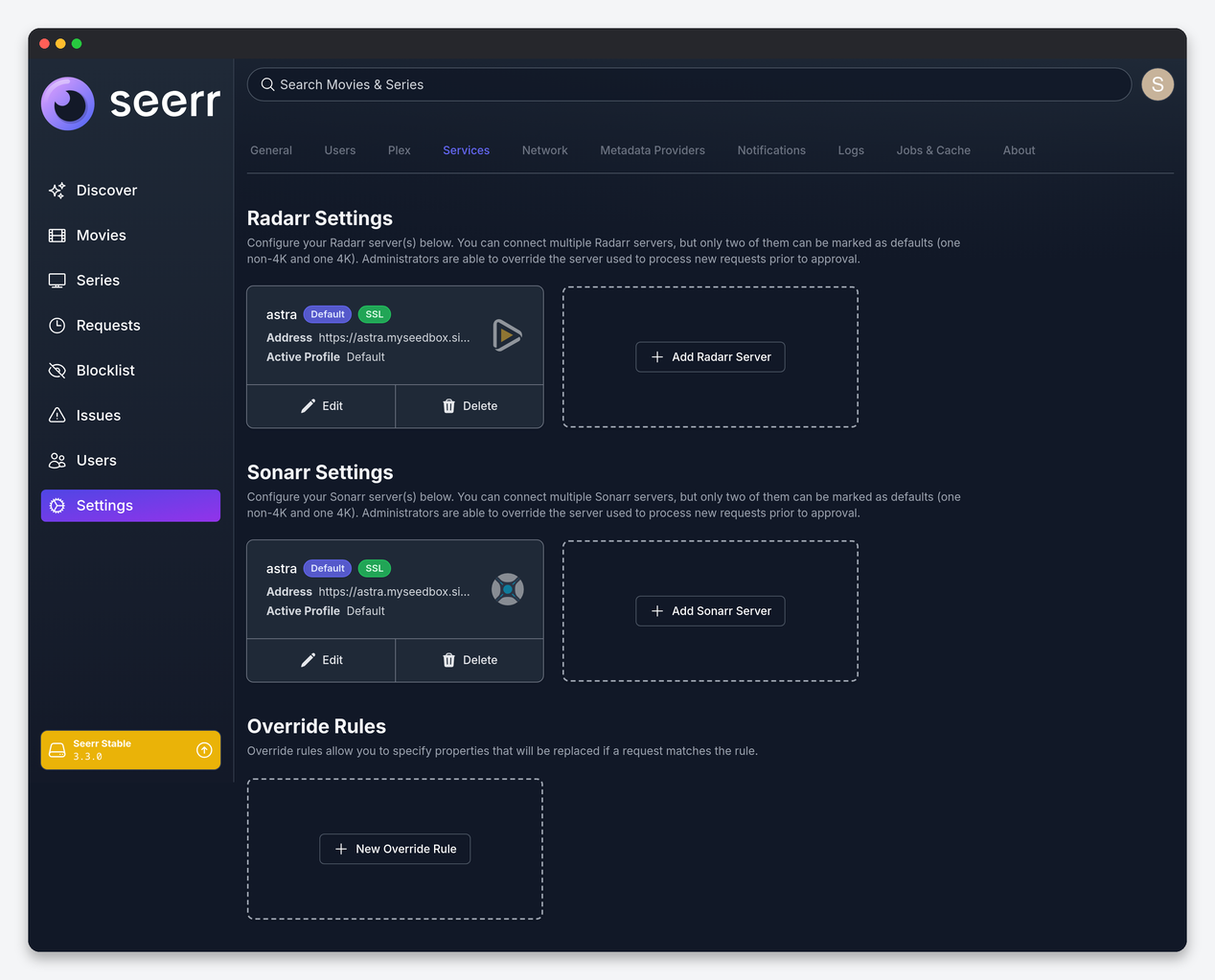
Each Radarr and Sonarr entry carries: Default Server (one non-4K and optionally one 4K default per type), 4K Server flag, Server Name, Hostname, Port, Use SSL, API Key, URL Base, Quality Profile, Root Folder, Minimum Availability (Radarr: Announced, In Cinemas, Released), Language Profile (Sonarr v3 only), Tags applied to everything Seerr adds, Anime Quality Profile, Root Folder and Tags (Sonarr), External URL for the link on request pages, Enable Scan (let Seerr read the app’s library to mark titles as processing or available) and Enable Automatic Search (tell the app to search immediately after adding). Seedbox values: your everyday HD profile, the root folder Radarr already uses, Minimum Availability Released, a seerr tag so you can see which titles came from requests, Scan and Automatic Search both on.
Override Rules replace properties on requests that match conditions: for example, requests from a given user or for a given genre, language or keyword go to a different root folder, profile or tags. A common seedbox rule sends anime (original language Japanese) to the anime profile and folder, and another sends requests from children in the household to a kids folder.
Network
This page holds Enable Proxy Support (trust X-Forwarded headers from a reverse proxy; needed for correct client IPs behind our HTTPS proxy), Enable CSRF Protection (leave off: with it on, every API client including Dashboarr and Requestrr gets 403 “invalid csrf token”), Trusted Proxies, and an outbound HTTP(S) Proxy with a bypass list, which stays off on a seedbox.
Metadata Providers
Choose the source for series metadata (TMDb by default, with TheTVDB as an option for series) and the images source. Keep TMDb unless a specific series is mismatched; changing the provider changes IDs and can re-map existing requests.
Notifications
Agents: Email (SMTP with sender name and “allow self-signed”), Discord (webhook URL, bot username and avatar), Telegram (bot token and chat ID, with silent option), Pushbullet, Pushover, Slack, Gotify, LunaSea, Web Push and a generic Webhook with a JSON payload template. Each agent has a per-type toggle: request pending approval, approved, auto-approved, available, declined, failed, issue reported, issue commented, issue resolved. On a shared server enable Discord for everything and give users Web Push so they get their own “available” notices; the webhook agent is what Dashboarr’s optional backend consumes.
Jobs and Cache
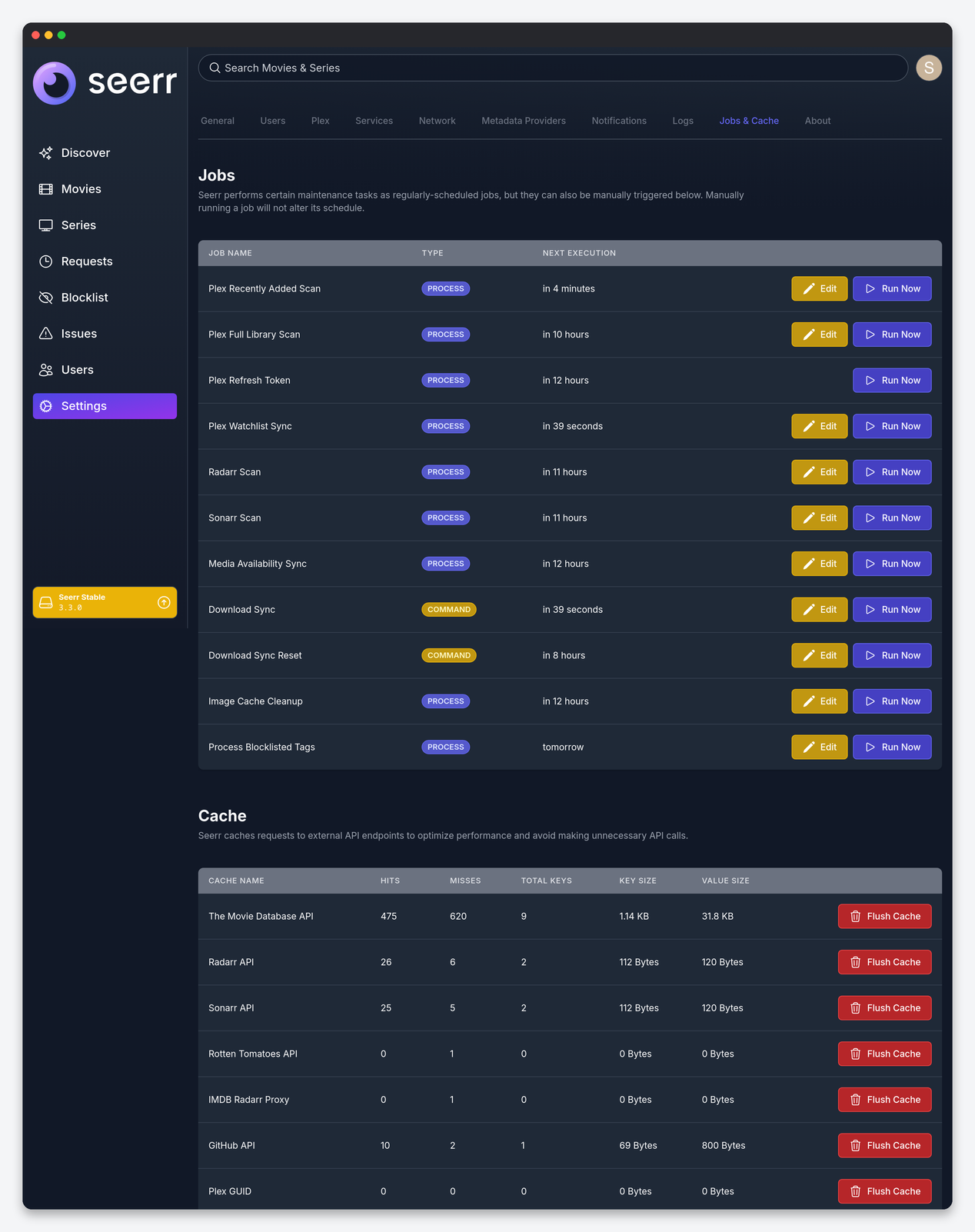
| Job | What it does | Default cadence |
|---|---|---|
| Plex Recently Added Scan | Checks Plex’s recently added list to mark requests available quickly. | Every 5 minutes |
| Plex Full Library Scan | Walks every library to reconcile availability. | Every 24 hours |
| Plex Refresh Token | Keeps the Plex auth token valid. | Every 24 hours |
| Plex Watchlist Sync | Reads users’ watchlists and creates auto-requests for users with that permission. | Every 10 minutes |
| Radarr Scan / Sonarr Scan | Reads the apps’ libraries so requested titles show as processing. | Every 24 hours |
| Media Availability Sync | Removes availability for media deleted from Plex. | Every 24 hours |
| Download Sync / Download Sync Reset | Pulls queue progress from Radarr and Sonarr for the request cards. | Every minute / every hour |
| Image Cache Cleanup | Purges stale cached images when image caching is on. | Every 24 hours |
| Process Blocklisted Tags | Applies the tag blocklist from General. | Daily |
Edit lets you change each job’s interval; leave the defaults on a seedbox, with one exception: if Discover feels stale after a big import, run Plex Full Library Scan by hand rather than shortening its interval. The Cache section shows hit and miss counts for TMDb, Radarr, Sonarr, Plex and GitHub calls; Flush Cache is the fix when a title page shows outdated information.
FAQ
Which defaults should every seedbox user change?
Set global request limits, keep Auto-Approve and Auto-Request off by default, allow partial series requests, disable special episode requests, confirm CSRF protection is off, and set the Application URL so notification links work.
Where do quality profiles for requests come from?
From the Radarr or Sonarr entry under Services (or an override rule), never from the user; per-user profiles are set on the user’s page.
Can I stop one user from filling the disk?
Set a per-user request limit on their page and remove Auto-Approve; their requests then wait in the queue.
Related: Seerr setup on a seedbox · Radarr settings · Sonarr settings · Seerr in Dashboarr
Related articles
Put this into practice
EvoSeedbox ships with one-click app installs and up to 10 Gbps per box.
