ruTorrent: Complete Guide, Plugins & Setup
On this page ▾
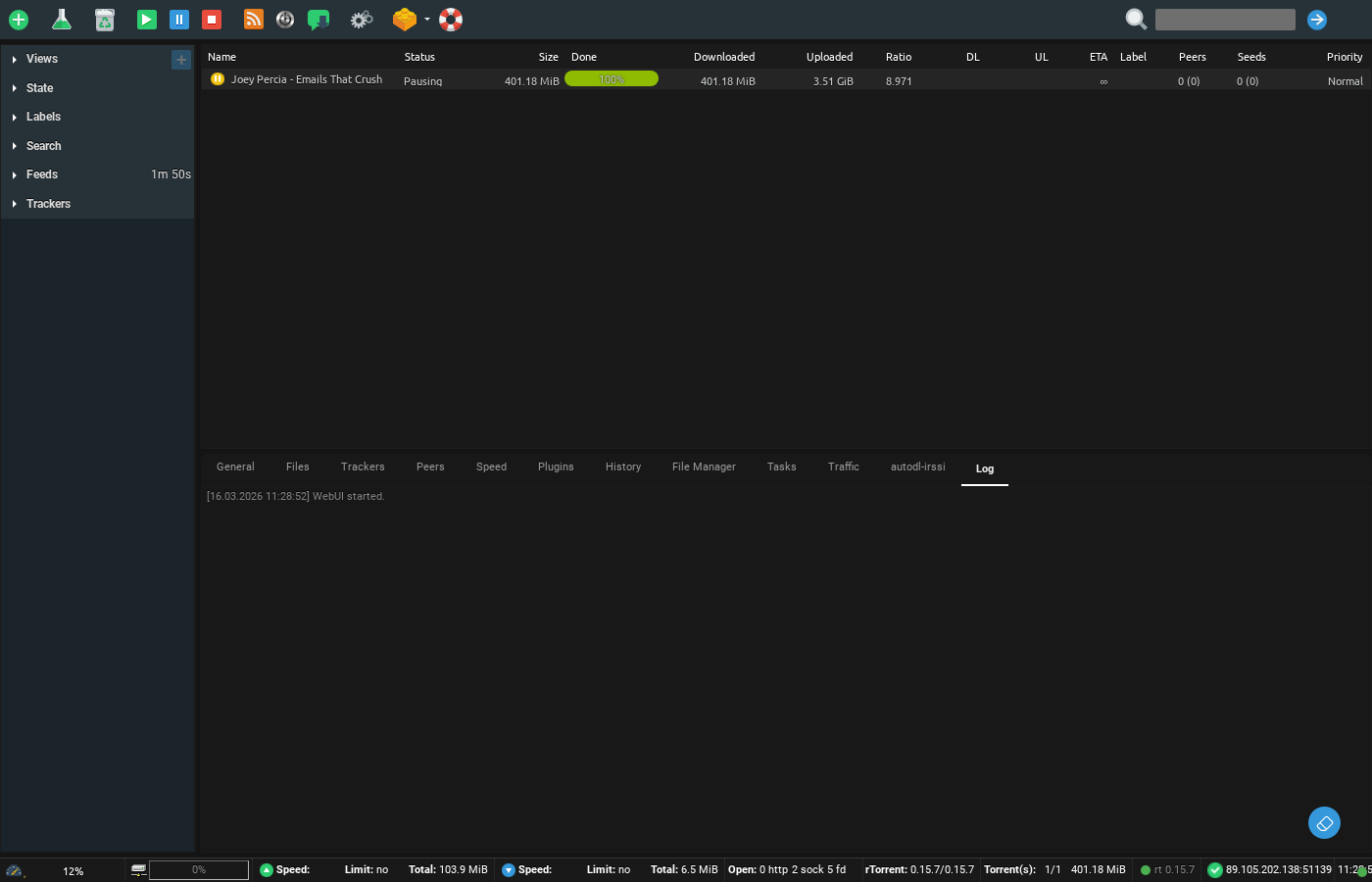
In this tutorial, I will explain the basics of using ruTorrent.
Topics covered will be:
1. What is ruTorrent?
2. How to load up the ruTorrent interface in EvoSeedbox
3. Adding torrents to ruTorrent
4. Removing torrents in ruTorrent
I have been using seedboxes for the past 10 years, I have personally tried various different programs and come to the conclusion that ruTorrent is one of the most user-friendly applications as a front end to seedboxes. Keep in mind this document is constantly updated based on user inputs, queries and doubts — the idea is to make your experience smooth and make your learning curve as small as possible.
So let us begin:
1. What is ruTorrent?
ruTorrent is a front end — a web interface — for a torrent program called rtorrent that runs in Linux.
So you might be thinking, why do you need a separate interface for rtorrent? rtorrent is an extremely resource-efficient program, so it runs in the terminal interface. That’s great for servers, but it’s not the most user-friendly interface for most users, and remote access makes it even more challenging for regular users.
Enter Novik — the developer who built ruTorrent. Here is his Git repo: https://github.com/Novik/ruTorrent
What ruTorrent does is create a web interface for rtorrent. It collects data from rtorrent and puts it in your web browser, along with the option to control rtorrent (which runs on your Linux seedbox) in a much more user-friendly manner. If you have used programs like uTorrent or Vuze, the interface will look quite familiar — the only difference is that it runs from your web browser.
2. How to load up the ruTorrent interface in EvoSeedbox
Once you have signed up for a seedbox account (in case you have not, you can pick a plan at our pricing page), check your email — you will find a link to your client area.
In your client area, find the ruTorrent section and click the green Open button — your ruTorrent interface opens immediately. We have already preconfigured the setup for you, so you don’t have to do much.
You might notice it did not ask for your user ID or password: your credentials are already embedded in the Open button, which saves you the hassle of entering them every time.
Now that you have ruTorrent open, let’s move to step 3.
3. Adding torrents to ruTorrent
In this guide we cover the methods within the ruTorrent interface. There are more advanced methods — adding torrents remotely from your browser or an Android device, watch folders, autodl-irssi — but the basics come first.
Method 1: Drag and drop. Yes, it’s that easy — drag your .torrent file onto ruTorrent and it starts loading immediately.
Method 2: The add button. In the top-left toolbar you’ll see a + sign. It lets you browse to the folder where you downloaded your .torrent file, select one or more (up to 20 at a time), and click Add File.
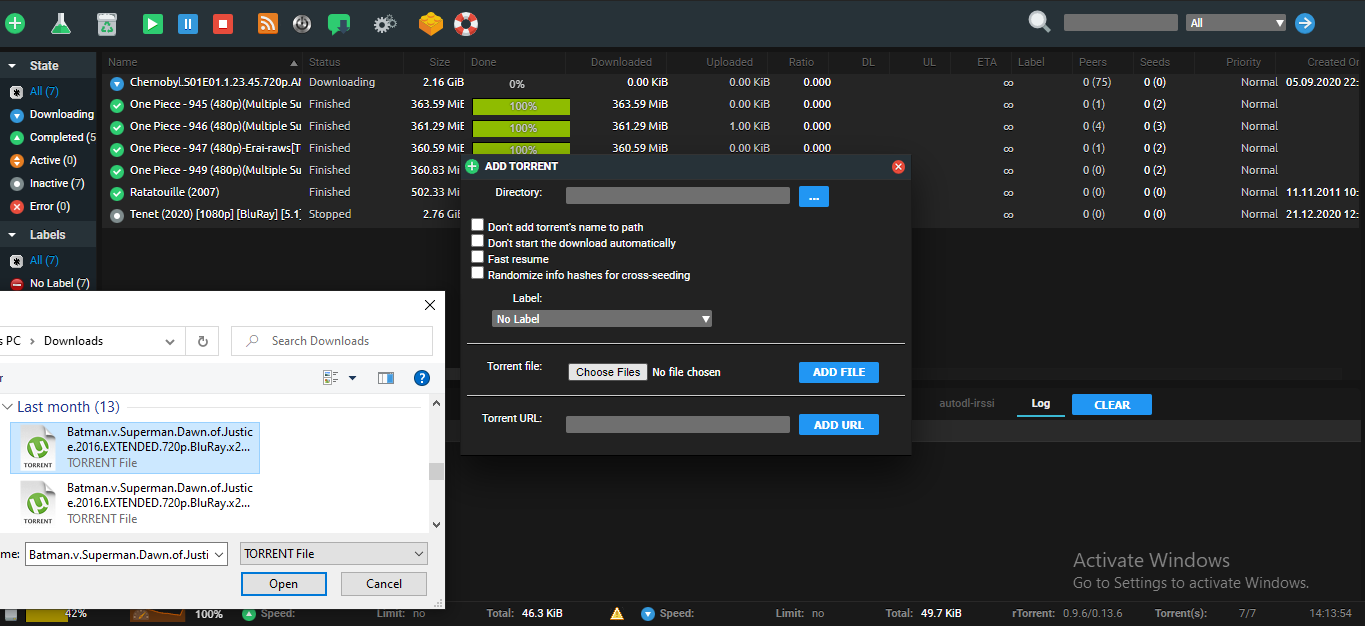
Method 3: Torrent URL. Instead of downloading the .torrent file, copy its link from your tracker website, paste it into the Torrent URL field and press Add. Note that on some public trackers behind cache proxies this method might not work — magnet links can be converted to .torrent files first if needed. See adding torrents for more options.
These are the most basic methods; other ways of adding torrents are covered in separate tutorials.
As you add torrents you may eventually approach your seedbox’s disk capacity (you can always upgrade via a bigger plan) — but don’t fret, you can make space by removing torrents. Which brings us to our next topic.
4. Removing torrents in ruTorrent
There are primarily two ways to remove torrents from ruTorrent.
Method 1: Remove the torrent only. Right-click the torrent and choose Remove. This removes just the torrent from the list — the downloaded data stays on disk, so you can still access it or delete it later with the file manager.
Method 2: Remove and delete data. For torrents you don’t want at all any more, right-click and select Remove and delete data. This removes the torrent AND frees the disk space.
Well, that is the basics you need on your journey to becoming a ruTorrent ninja. May the force of seedbox be with you, shinobi.
PS: If the second method doesn’t free the space, restart rtorrent — see restarting ruTorrent.
The ruTorrent plugins on your seedbox
Most of what people want from ruTorrent lives in its plugins, and every EvoSeedbox account ships with the full set already enabled — there is nothing to install. These are the ones worth knowing:
- File Manager — browse, rename, move, delete and archive files straight from the ruTorrent tab, without opening an SFTP client.
- AutoTools — the plugin behind “watch folders”. Point it at a directory and anything dropped in is loaded automatically; it can also move completed downloads into a folder of your choosing based on label.
- Create — build a new
.torrentfrom any file or folder on your box, ready to upload to a tracker. - RSS and RSS URL Rewrite — subscribe to tracker feeds and auto-download matching releases.
- autodl-irssi — the serious racing tool: it watches tracker IRC announce channels and grabs matching releases within seconds of them being posted.
- Scheduler and Throttle — cap or schedule bandwidth by time of day.
- Set Ratio — enforce per-torrent or global seeding ratio rules.
- Unpack — automatically extract completed archives.
- MediaInfo, Screenshots and Seeding Time — inspect a release without downloading it locally.
- Quota Space — shows your real remaining disk allowance inside the interface.
There are also a few we build ourselves and you will not find on other hosts — including Stremio, TorSearch and TorrentClaw for searching and streaming directly from the interface.
ruTorrent vs rTorrent: which is which?
They are two halves of the same setup, and the names being one letter apart causes endless confusion.
rTorrent is the actual BitTorrent client. It has no graphical interface at all — it is a command-line program that runs continuously on your seedbox, and it is what actually downloads and seeds. EvoSeedbox runs rTorrent 0.15.7.
ruTorrent is a web interface that talks to rTorrent over SCGI. It is the page you log into. Everything you click in ruTorrent is translated into an instruction for rTorrent underneath.
The practical consequence: if ruTorrent will not load but your torrents are still seeding, the web interface is the problem, not your downloads. If ruTorrent loads but shows an empty or frozen list, rTorrent is the part that needs attention. See common ruTorrent errors for the specific fixes.
Every option on every settings page, with defaults and seedbox values, is in the ruTorrent settings reference.
Next Steps
- Add Your First Torrent
- Set Up autodl-irssi
- Troubleshoot Errors
- Create Your Own Torrents
- Optimize Queue Settings
Frequently Asked Questions
Is ruTorrent the same thing as rTorrent?
They’re two halves of one system: rtorrent is the torrent engine running on the Linux server, ruTorrent is the web interface you use to control it. Your EvoSeedbox has both preconfigured.
Why does my torrent sit at 0% after adding?
Usually the tracker hasn’t delivered peers yet, the torrent is dead (no seeders), or the tracker requires registration. Check the Trackers tab for error messages — and see common ruTorrent errors.
Does removing a torrent delete my ratio on the tracker?
No — ratio you’ve already earned stays recorded with the tracker. But private trackers may require you to seed each torrent for a minimum time; removing too early can trigger hit-and-run warnings, so check your tracker’s rules.
Can apps like Sonarr and Radarr add torrents to ruTorrent automatically?
Yes — that’s the recommended automation route: they push downloads straight to rtorrent. Start with the quick *arr stack setup.
Related articles
Put this into practice
EvoSeedbox ships with one-click app installs and up to 10 Gbps per box.


