Connect rTorrent / ruTorrent to Dashboarr
On this page ▾
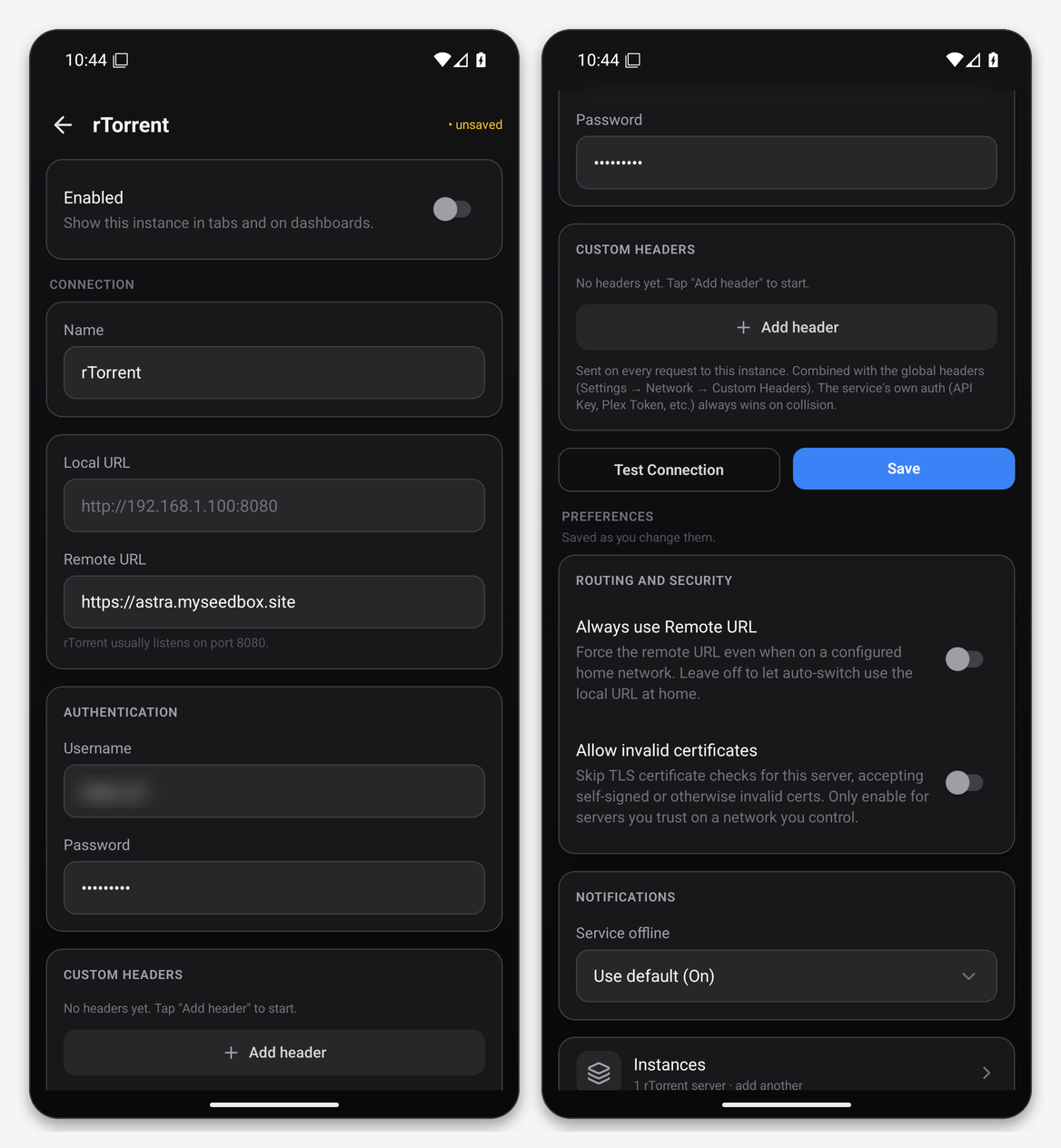
To connect rTorrent to Dashboarr on an EvoSeedbox, add an rTorrent instance, set the Remote URL to https://SERVER.myseedbox.site with no port and no path, and enter your ruTorrent username and password. Dashboarr appends the standard /RPC2 XML-RPC path itself, and our web server maps that path onto ruTorrent’s httprpc handler for your account, so it works on every plan without any change on the server. This page is part of the Dashboarr seedbox setup guide.
What you need
| Field in Dashboarr | Value on EvoSeedbox |
|---|---|
| Service | rTorrent (under Download clients) |
| Local URL | leave empty |
| Remote URL | https://SERVER.myseedbox.site, the same address you open ruTorrent on, without /rutorrent |
| Username | your ruTorrent login (your seedbox username) |
| Password | your ruTorrent password |
| Always use Remote URL | on |
| Allow invalid certificates | off (our certificates are publicly trusted) |
The credentials are the ones the browser asks for when you open ruTorrent, which are not necessarily the client-area password. If you have changed the ruTorrent password, that is the value to use.
Step by step
- Open Settings → Integrations → Browse services and tap rTorrent.
- Leave Local URL empty. In Remote URL type
https://SERVER.myseedbox.site. Do not add/rutorrent,/RPC2or a port: Dashboarr adds/RPC2on its own, and any other path returns the ruTorrent HTML page, which the app rejects as “not an XML-RPC endpoint”. - Enter the username and password.
- Scroll down and switch on Always use Remote URL.
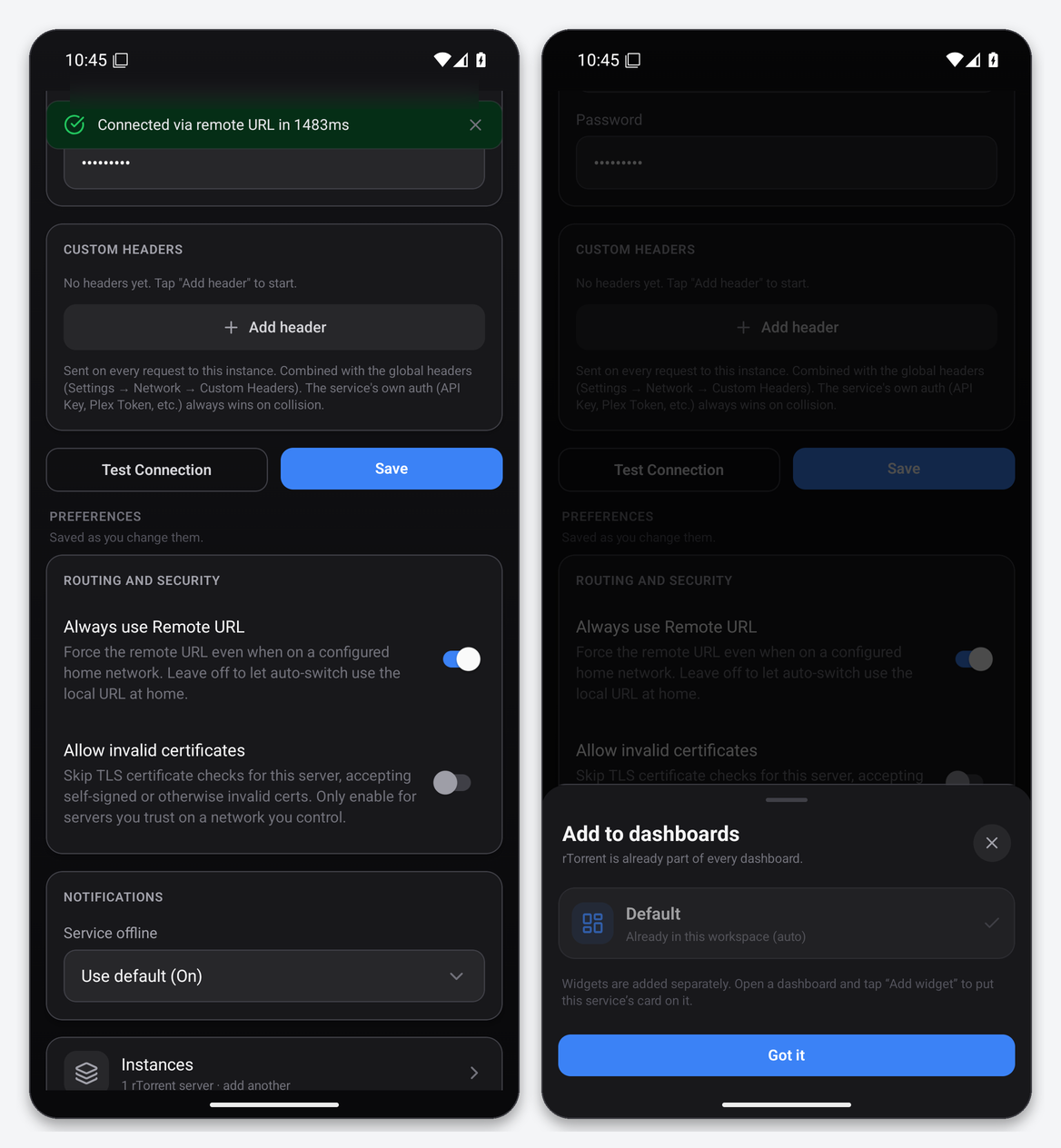
- Tap Test Connection. The expected result is a green “Connected via remote URL in NNN ms”.
- Tap Save, then Got it on the dashboards sheet.
How the connection actually works
Dashboarr’s rTorrent client speaks XML-RPC over HTTP and posts every call to <Remote URL>/RPC2 with HTTP Basic authentication (Digest is also supported since 1.17.0, and the app answers whichever the server asks for). On EvoSeedbox servers, /RPC2 is a rewrite onto ruTorrent’s plugins/httprpc/action.php, which forwards the request to your own rtorrent process over its per-account SCGI socket. That is why:
- the same username routes to the right rtorrent on a shared server;
- no “SCGI port” is ever needed in the app;
- anything ruTorrent can do through httprpc, Dashboarr can do too, including reading labels and setting global speed limits.
The torrent list is fetched with a single d.multicall2 on the main view, so the app downloads your whole library each refresh (every few seconds while the tab is open) and filters and sorts on the phone. On a library of several hundred torrents this is a few hundred kilobytes per refresh, which is fine on mobile data.
What you can do from the Downloads tab
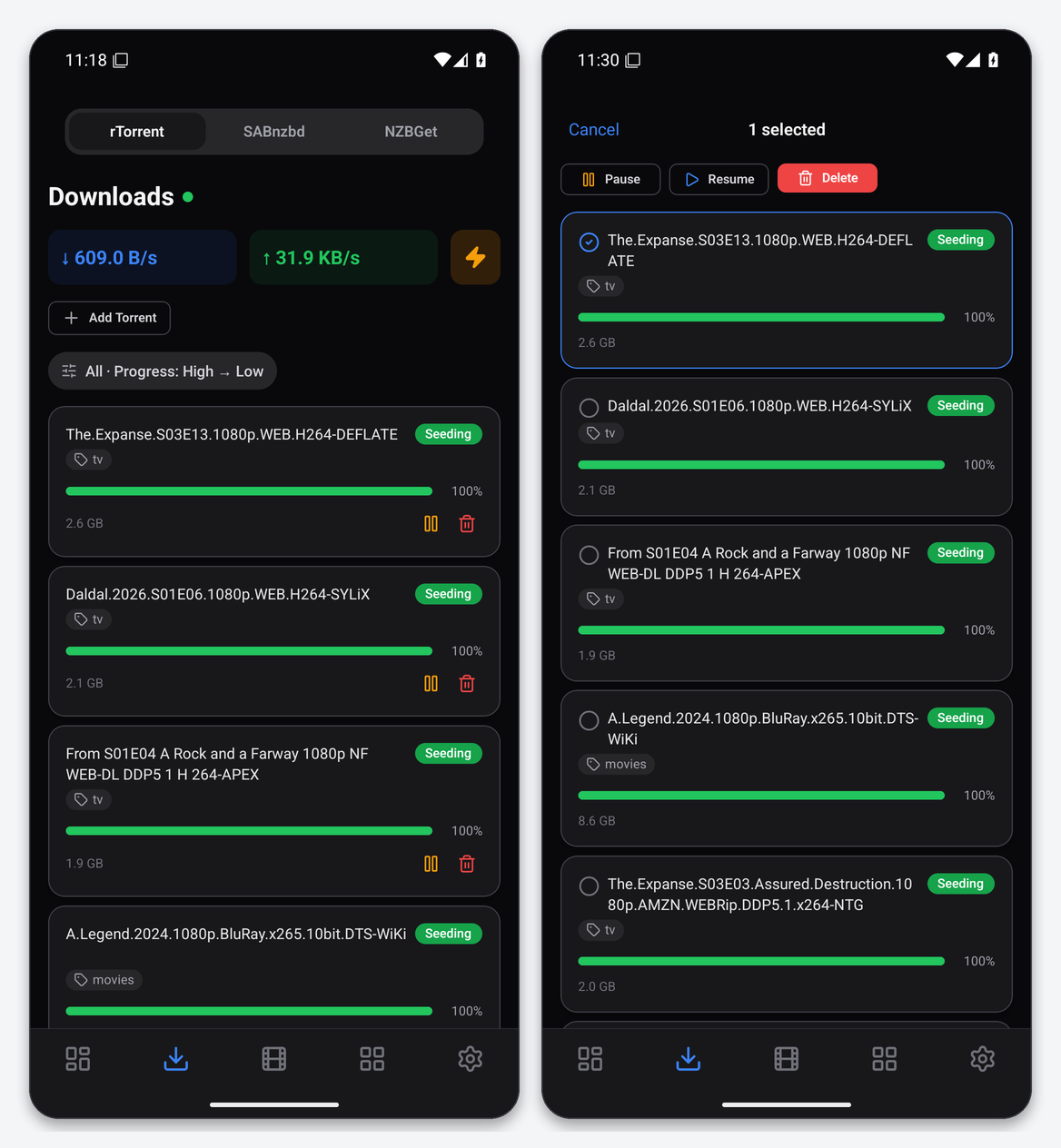
- Queue with status, label, size, progress and per-torrent speeds. The label chip is rtorrent’s
custom1, which is the label ruTorrent, Autotools and the *arr apps set. - Global speed pills at the top show live download and upload totals.
- Pause, resume and delete, singly from the row icons or in bulk after a long-press. Delete asks Delete or Delete + Files.
- Add Torrent pastes a magnet link into rtorrent’s
load.start; the download begins immediately in your default directory. The Add sheet accepts magnet links only for rTorrent; add a.torrentfile through ruTorrent or your watch folder instead. - Filter and sort: All, Downloading, Seeding, Done, Paused; sort by progress, name, size or date added.
- Speed limits sets rtorrent’s global download and upload caps in KB/s (0 means unlimited).
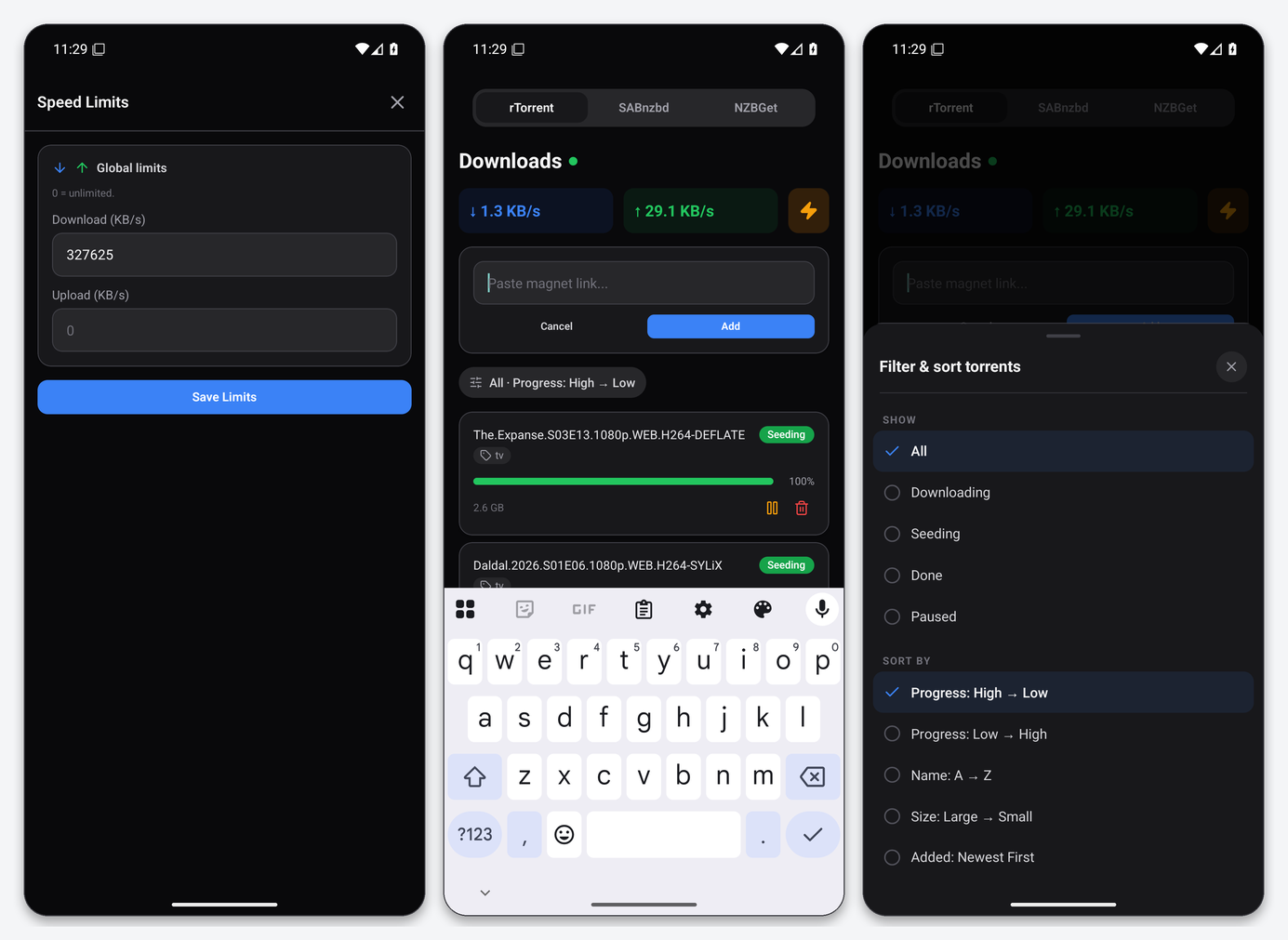
The download limit you see in the Speed Limits sheet is not something Dashboarr invented: it reads the global cap that your plan sets in rtorrent. You can lower it temporarily, for example to leave bandwidth for a Plex stream, but setting it higher than your plan has no effect.
Limits to know about
| Works | Does not (yet) |
|---|---|
| Queue, pause, resume, delete, delete with files, labels display, add magnet, global speed limits, dashboard Downloads and Speed Stats widgets, torrent-completed notifications | Per-torrent file list, per-torrent speed limits, tracker list, setting a label from the app, uploading a .torrent file, categories (rtorrent has labels, not categories) |
Delete + Files works because our ruTorrent build includes the erasedata plugin, which Dashboarr relies on: the app sets rtorrent’s custom5 marker and erases the torrent, and the plugin removes the data. If you ever see the torrent disappear but the data stay, that plugin has been disabled in your ruTorrent.
The rTorrent detail screen does not open per-torrent files, so the row itself is the whole view. For file-level work, use ruTorrent or the Files app.
Troubleshooting
| Message or symptom | Fix |
|---|---|
| Wrong username or password | You are using the client-area password, not the ruTorrent one, or the username has a typo. Test the pair in a browser at https://SERVER.myseedbox.site/rutorrent/ first. |
| Not an XML-RPC endpoint / HTML returned | The Remote URL has a path or a port. It must be exactly https://SERVER.myseedbox.site. |
| Connection test passes but the list is empty | rtorrent is running but has no torrents in the main view. Add one in ruTorrent and refresh. |
| Timed out | rtorrent is stopped or hash-checking a very large library. Check ruTorrent; if it also fails to load, open a ticket. |
| Every torrent shows “errored” | Dashboarr only marks a torrent errored when it is active, incomplete, making no progress and carries a tracker message. Usually it is a dead tracker on public torrents rather than an app problem. |
FAQ
Should I use the SCGI port from my ruTorrent config?
No. That port only listens on the server itself. Dashboarr must go through the web server, which is what the /RPC2 path does.
Does this work with Digest authentication?
Yes since Dashboarr 1.17.0, but EvoSeedbox uses Basic authentication over HTTPS for ruTorrent, so it never comes up.
Can I control two seedboxes?
Yes. Add a second rTorrent instance with the other server’s address, give each a name, and switch between them with the segment control at the top of the Downloads tab.
Will pausing in Dashboarr stop seeding?
Yes. Dashboarr’s Pause is rtorrent’s stop and close, the same as ruTorrent’s stop button, so ratio stops accruing until you resume.
Related articles
Put this into practice
EvoSeedbox ships with one-click app installs and up to 10 Gbps per box.
