Transfer profiles: Balanced, Long distance, Fast fiber, Gentle
On this page ▾
By the end of this page you will have picked whichever of the four evoftp transfer profiles fits your connection. A profile sets four numbers at once — segments per file, files at once, total connections and data in flight per connection — so you rarely need to touch the sliders underneath.
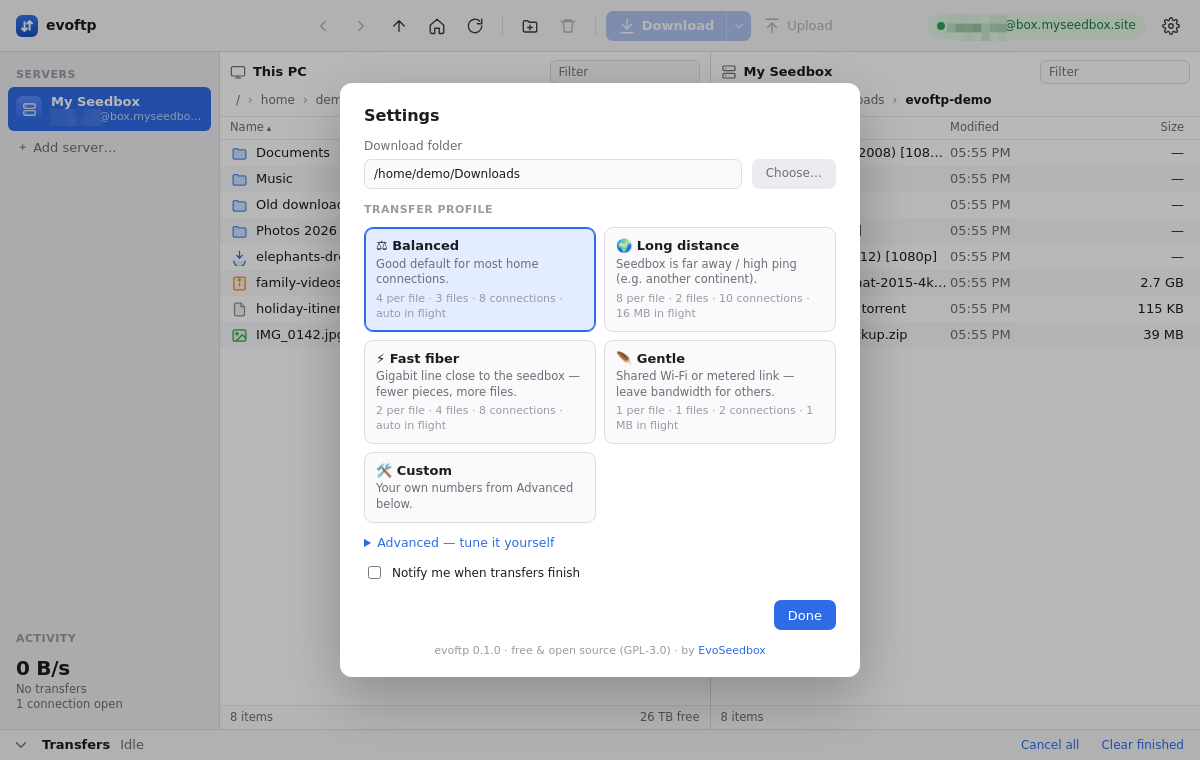
Choosing a profile
- Click the gear icon at the top right.
- Click a profile card. The card highlights and the Advanced sliders below are set to its numbers.
- Click Done. A toast repeats what you chose, for example “Profile: Balanced — 4 per file · 3 files · 8 connections · auto in flight”.
The profile applies to files that start after you press Done. A file already transferring keeps the segments it started with.
What the four profiles do
| Profile | Segments per file | Files at once | Total connections | Data in flight | Pick it when |
|---|---|---|---|---|---|
| Balanced (default) | 4 | 3 | 8 | Auto | Ordinary home broadband in the same region as the seedbox. |
| Long distance | 8 | 2 | 10 | 16 MB | The seedbox is far away or your ping to it is high — another continent, for example. |
| Fast fiber | 2 | 4 | 8 | Auto | A gigabit line close to the seedbox, where one connection is already quick — fewer pieces, more files. |
| Gentle | 1 | 1 | 2 | 1 MB | Shared Wi-Fi or a metered link — leave bandwidth for other people and apps. |
| Custom | Your own numbers from Advanced | You know what you want. Clicking Custom opens the Advanced section. | |||
Segments per file — how many pieces a large file is split into, each pulled over its own connection. Files at once — how many files transfer in parallel when you queue a folder. Total connections — the hard cap on SSH connections open to the seedbox. Data in flight — how much each connection keeps requested ahead; Auto sizes it from the measured ping.
Deciding by symptom
- Sidebar speed is far below what your line can do, and the seedbox is not nearby: try Long distance.
- One big file is slow but a folder of files is fast: your connection is being limited per stream — more segments is the fix, so Long distance again.
- Speed already sits at your line’s limit: more connections cannot help. Balanced or Fast fiber; the difference is only how many files move together.
- Other people on the network complain, or you want to keep browsing comfortably: Gentle.
- Any of the above but with one number you want different: edit the slider and the profile becomes Custom (see the next page).
Overriding a single download
You do not need to change profile for one large file. Download ▾ (or the right-click menu) offers 8, 4, 2 or 1 connections for that download only; the profile’s total connection cap still applies.
Note: profiles shape downloads only. Uploads always use a single connection per file.
Overview: evoftp guide.
Related articles
Put this into practice
EvoSeedbox ships with one-click app installs and up to 10 Gbps per box.
