Connect Home Sonarr/Radarr to Your Remote Seedbox
On this page ▾
Most EvoSeedbox customers should run their whole arr stack on the seedbox — it is faster, needs no home hardware, and skips the single hardest concept in this entire guide. If that is you, stop here and follow the Quick Arr Stack setup instead. This page is for the minority who deliberately want Sonarr and Radarr running at home while using the seedbox purely as a fast, private remote download client.
Why run *arr at home?
Running Sonarr and Radarr on the seedbox itself is simpler and covered in the Sonarr setup and Radarr setup guides. This page is for the case where they stay at home.
There are two legitimate reasons. First, local library control: your media library, Plex/Jellyfin server, and NAS already live at home, and you want Sonarr/Radarr sitting right next to the files they manage — same filesystem, instant imports, no second copy of your metadata. Second, you already have a home server (a Synology, an Unraid box, a mini-PC) that runs 24/7, so the *arr apps cost you nothing extra to host. What your home connection can’t give you is a fast, always-on, privacy-respecting seedbox pipe — so you offload the actual torrenting to EvoSeedbox and keep the brains at home.
The architecture
The data path looks like this:
Home Sonarr/Radarr → (grabs release, sends to) → seedbox ruTorrent/rTorrent → (downloads over the seedbox’s fast line) → files synced back home → (imported into your local library).
Sonarr and Radarr never touch a torrent themselves. They send the magnet/.torrent to ruTorrent on the seedbox over HTTPS, poll it for completion, and then need to find the finished file to import it. That last step is where this setup earns its complexity: the file that finished at /home/youruser/downloads/ on the seedbox has to be visible at some path on your home machine, and the two paths never match. That mismatch is solved by remote path mapping — the one thing that makes this topology harder than running everything on the box.
Honest trade-off: the all-on-seedbox path in the Quick Arr Stack guide has zero remote path mapping, zero sync tooling, and nothing to keep running at home. You are trading that simplicity for local library control. Only take the trade if you actually need it.
Step 1 — Connect home Sonarr/Radarr to seedbox ruTorrent
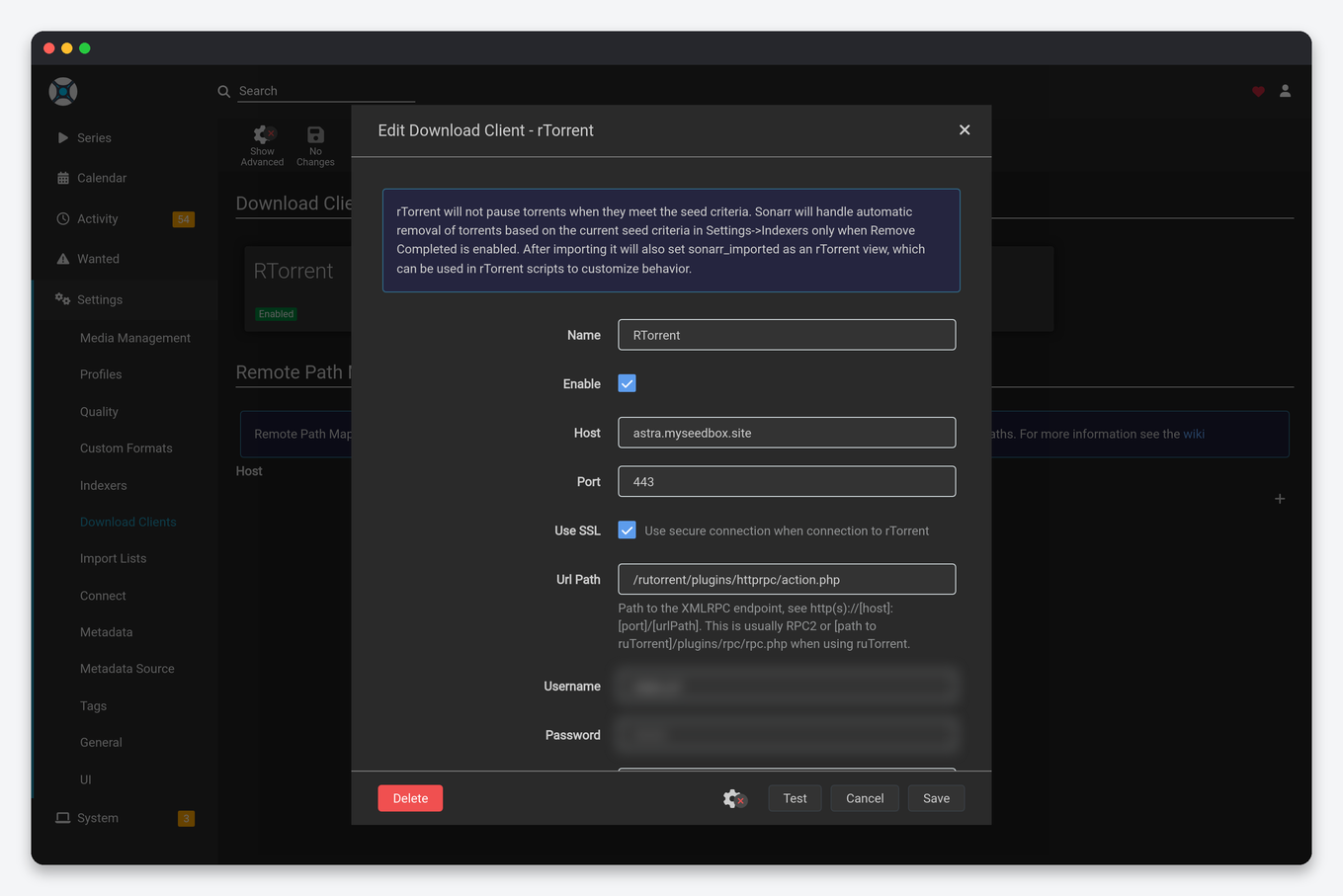
In Sonarr, go to Settings → Download Clients → + → rTorrent (ruTorrent). Radarr is identical. Fill in:
- Host: your seedbox hostname (e.g.
yourbox.myseedbox.site) — notlocalhostand not an IP you use for a local client. This is the single most common mistake. - Port:
443. That is the only port ruTorrent answers on —8080is closed on every EvoSeedbox server. - Use SSL: Yes. EvoSeedbox ruTorrent is reachable remotely over HTTPS, so SSL must be on.
- URL Path:
rutorrent/plugins/httprpc/action.php, with no leading slash.RPC2works too — we map it to the same endpoint — so either value is fine. - Username / Password: your seedbox login (the same credentials you use for the ruTorrent web UI).
Click Test. A green tick means Sonarr can reach and authenticate to ruTorrent. If it fails, jump to troubleshooting below — it is almost always host, SSL, or port. See Setting up Sonarr and using Radarr with your seedbox for the surrounding configuration.
Step 2 — The critical remote path mapping step
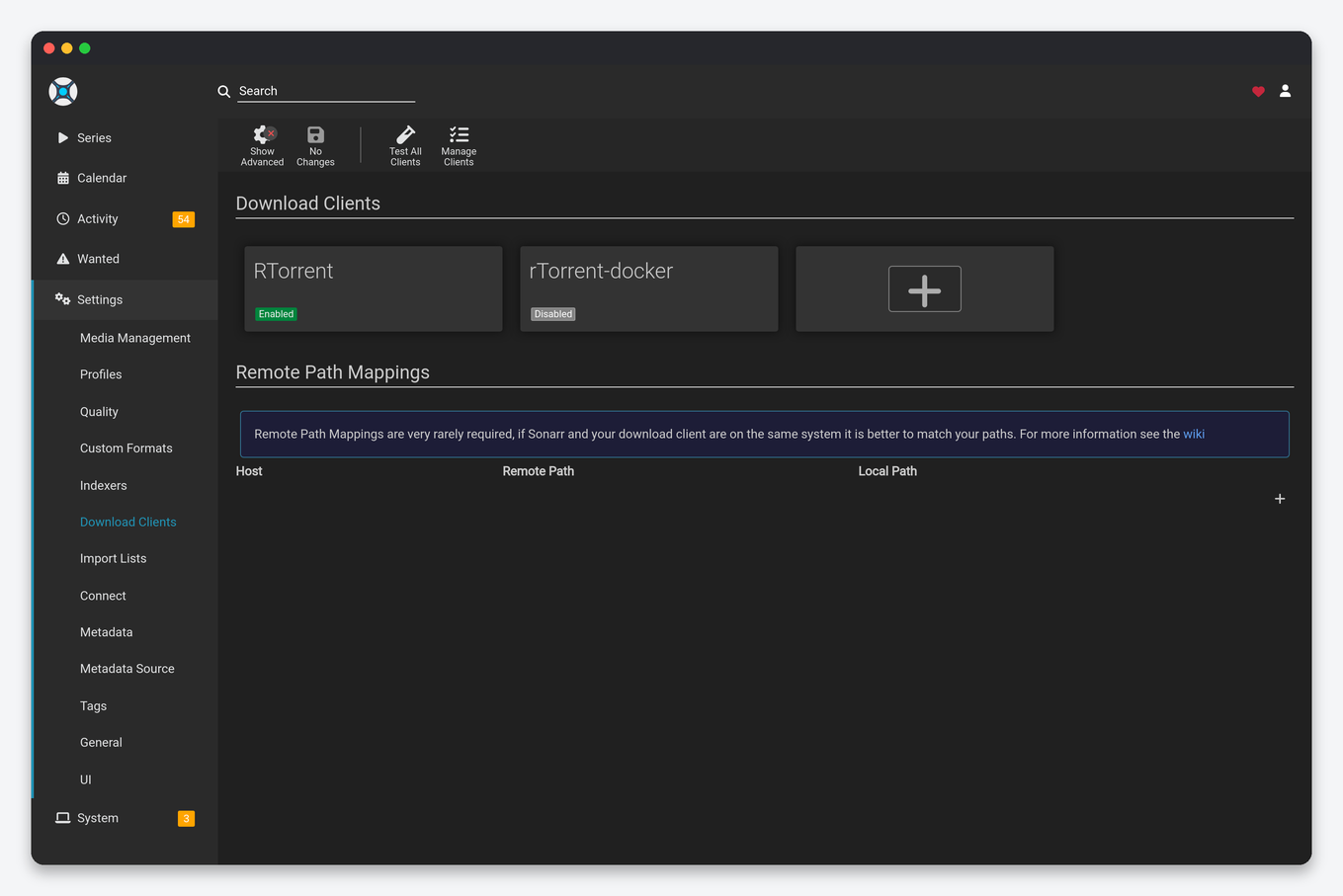
This step is not optional and is the reason imports fail if you skip it. When ruTorrent reports a completed download, it hands Sonarr a path as the seedbox sees it — for example /home/youruser/downloads/Show.S01E01/. But your home Sonarr can only import from a path it can read, which is wherever you’ve mounted or synced the seedbox files locally — for example /mnt/seedbox/downloads/Show.S01E01/. Sonarr needs to be told how to translate one into the other.
Go to Settings → Download Clients → Remote Path Mappings → + and add:
- Host:
yourbox.myseedbox.site(must match the download client host exactly) - Remote Path:
/home/youruser/downloads/(the seedbox-side path) - Local Path:
/mnt/seedbox/downloads/(your SSHFS mount or rclone target at home)
Now when ruTorrent says a file finished at the remote path, Sonarr rewrites it to the local path and imports successfully. Read Remote path mapping explained for the full mental model — it is worth ten minutes to get this right once.
Step 3 — Sync finished files home
The local path above only works if the seedbox files actually appear there. Three ways to make that happen:
- SSHFS mount (recommended for path mapping): mount the seedbox download directory as a local folder over SSH. Sonarr treats it like local disk and imports directly — no copy needed. Setup in Mount your seedbox with SSHFS/WebDAV.
- rclone: run
rclone mount(behaves like SSHFS) orrclone syncon a schedule to pull completed files down in bulk. Also the route if you want a Google Drive tier in the middle — see rclone + Google Drive setup. - Plain SFTP: simplest, no mount — an SFTP client or scripted transfer copies finished files home, then a local folder feeds Sonarr. Fine for low volume; see the SFTP setup guide.
A mount (SSHFS or rclone) is the cleanest fit here because the local path stays live and predictable, which is exactly what remote path mapping needs.
Troubleshooting
- “Download client test failed” / can’t connect: check the URL Path first — it should be
rutorrent/plugins/httprpc/action.php(orRPC2), with no typo and no leading slash. Then check Host is your seedbox hostname (not localhost, not an IP), Use SSL is on, and Port is443. A401with a path that is definitely correct means the username or password is wrong. - Downloads complete but imports fail / “file not found”: this is always remote path mapping. Your mount isn’t present, the remote path doesn’t match ruTorrent’s actual download directory, or the local path is wrong. Check the mount is alive and the two paths line up.
- Wrong download directory reported: make sure ruTorrent’s configured download path and Sonarr’s remote-path
Remote Pathvalue are the same string, trailing slash and all.
Frequently Asked Questions
Do I really need remote path mapping?
Yes, for this specific topology. Because Sonarr/Radarr run on a different machine than ruTorrent, the two see the finished file at different paths. Remote path mapping is the translation layer, and imports will fail without it. It is the one setup that requires it — running the full stack on the seedbox avoids it entirely.
Why can’t I just use localhost as the host?
Because ruTorrent isn’t running on your home machine — it’s on the seedbox. Your home *arr app has to reach it over the network by hostname over HTTPS. localhost would point Sonarr at itself and the connection test will fail immediately.
Should I use SSHFS, rclone, or SFTP to sync?
Use an SSHFS or rclone mount if you want Sonarr to import directly with a stable local path — best for remote path mapping. Use rclone sync or plain SFTP if you’d rather copy finished files down in batches. Mounts are cleaner for automation; copies are simpler and fine at low volume.
Is this faster than running everything on the seedbox?
No — the actual downloading happens on the seedbox either way, at the seedbox’s speed. Running *arr at home doesn’t make torrents faster; it just puts the library management next to your home media server. If speed and simplicity are your goals, the all-on-seedbox stack is the better choice.
My downloads finish but nothing imports — what’s wrong?
Almost certainly remote path mapping or a dropped mount. Confirm the seedbox files are actually visible at your local path right now, then check that the mapping’s Remote Path matches ruTorrent’s download directory and the Local Path matches your mount point exactly.
Can I do this on any EvoSeedbox plan?
Yes. Every plan gives you remote HTTPS access to ruTorrent plus SFTP for syncing, which is all this setup needs. Larger plans just give you more download headroom and storage before you pull files home. See pricing for the current tiers.
Related articles
Put this into practice
EvoSeedbox ships with one-click app installs and up to 10 Gbps per box.


