Connect Cleanuparr to Dashboarr
On this page ▾
To connect Cleanuparr to Dashboarr, add a Cleanuparr instance with the Cleanuparr HTTPS address from your client area as the Remote URL and the API key from Cleanuparr’s Account settings. Dashboarr then shows strike, removal and cleanup statistics over 24 hours, 7 or 30 days, the scheduled jobs with a run-now button, download-client health and the event feed. Part of the Dashboarr seedbox setup guide.
What you need
| Field in Dashboarr | Value on EvoSeedbox |
|---|---|
| Service | Cleanuparr (under Monitoring / automation) |
| Local URL | leave empty |
| Remote URL | Cleanuparr’s HTTPS address from the app card, https://SERVER.myseedbox.site:13xxx |
| API Key | Cleanuparr → your account menu → Account settings → API key (a 64-character hex string) |
| Always use Remote URL | on |
Step by step
- Log in to Cleanuparr, open Account settings and copy the API key.
- Dashboarr → Settings → Integrations → Browse services → Cleanuparr.
- Remote URL = the HTTPS address, API Key = the key, Always use Remote URL on.
- Test Connection (probes the public
/healthendpoint), then Save.
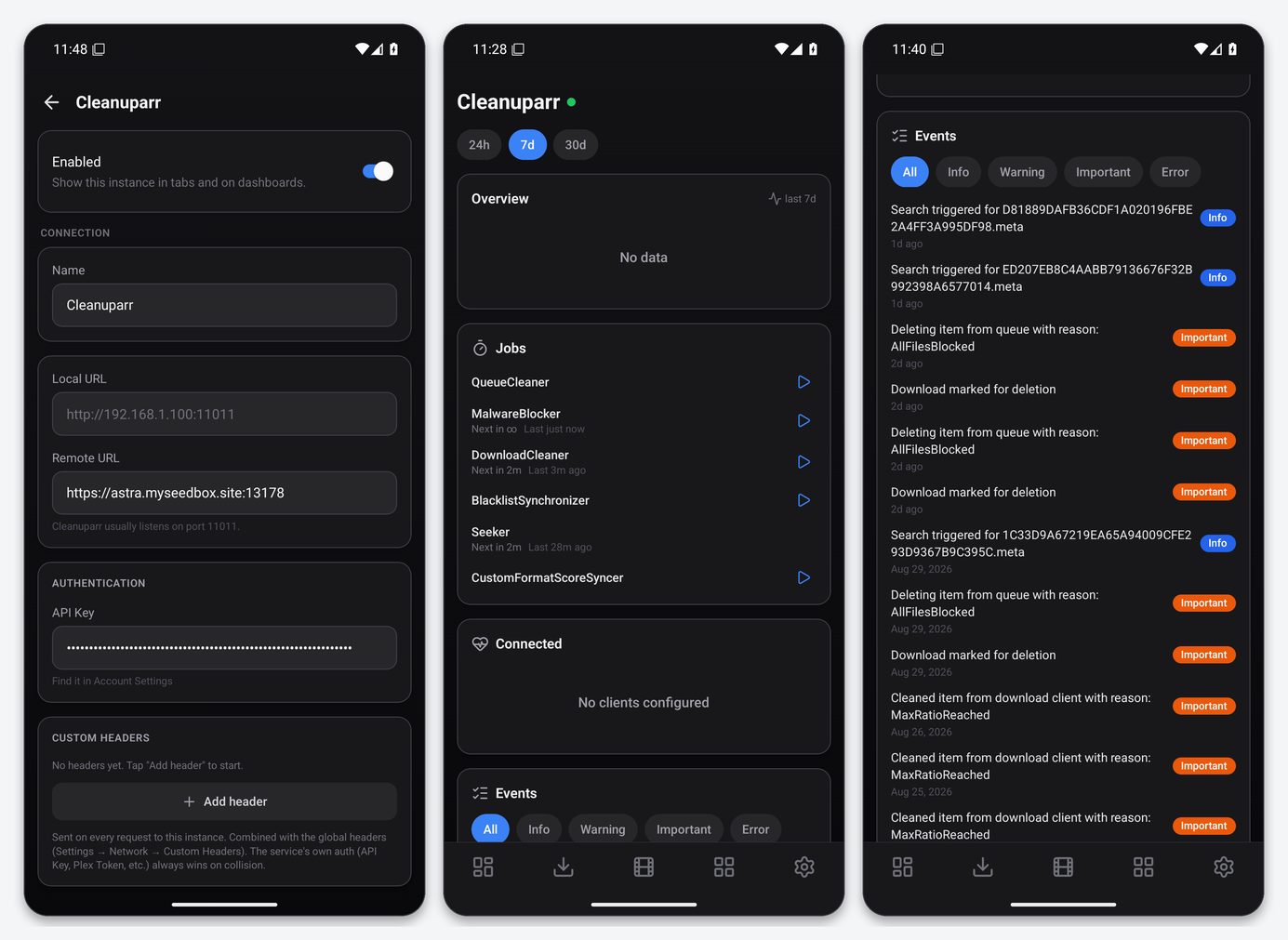
What the Cleanuparr tab gives you
- Overview: strikes, removals and cleanups for the selected window (24h, 7d, 30d).
- Jobs: QueueCleaner, MalwareBlocker, DownloadCleaner, BlacklistSynchronizer and the others, each with next run, last run and a run-now button.
- Connected: the download clients Cleanuparr manages and their health.
- Events: the log with All / Info / Warning / Important / Error chips, for example “Deleting item from queue with reason: AllFilesBlocked”.
The key authenticates every Cleanuparr controller with the standard X-Api-Key header; the app reads v2 statistics, since the v1 stats endpoint was retired upstream on 2026-09-01.
Widgets
Cleanuparr Stats on the dashboard, and Service Health.
Troubleshooting
| Symptom | Fix |
|---|---|
| Test passes, tabs show “No data” | Cleanuparr has not recorded strikes yet, or no download client is configured in it. |
| 401 on stats | Wrong or regenerated key. Copy it again from Account settings. |
| Jobs show “Next in ∞” | That job is disabled in Cleanuparr; enable it there. |
FAQ
Can Dashboarr change Cleanuparr rules?
No. It reads statistics and events and triggers jobs; the rules live in Cleanuparr’s web UI.
What does “run now” actually trigger?
The same job Cleanuparr runs on its schedule, immediately. It shows up in the Events feed within a few seconds, and the next scheduled run is unaffected.
Related articles
Put this into practice
EvoSeedbox ships with one-click app installs and up to 10 Gbps per box.
