Connect Autobrr to Dashboarr
On this page ▾
To connect Autobrr to Dashboarr, add an Autobrr instance with the Autobrr HTTPS address from your client area as the Remote URL and an API key created in Autobrr under Settings → API keys. Dashboarr then shows push statistics (approved, rejected, errors), the release feed with retry, filter on/off switches and IRC network health with restart. Part of the Dashboarr seedbox setup guide.
What you need
| Field in Dashboarr | Value on EvoSeedbox |
|---|---|
| Service | Autobrr (under Monitoring / automation) |
| Local URL | leave empty |
| Remote URL | Autobrr’s HTTPS address from the app card, https://SERVER.myseedbox.site:13xxx |
| API Key | Autobrr → Settings → API keys → Add new key → copy the 32-character key |
| Always use Remote URL | on |
Step by step
- Log in to Autobrr, open Settings → API keys, create a key named Dashboarr and copy it. Autobrr shows the key once.
- Dashboarr → Settings → Integrations → Browse services → Autobrr.
- Remote URL = the HTTPS address, API Key = the key, Always use Remote URL on.
- Test Connection, then Save. The test validates the key against the release-stats endpoint on purpose: Autobrr’s health endpoint answers OK even with a wrong key.
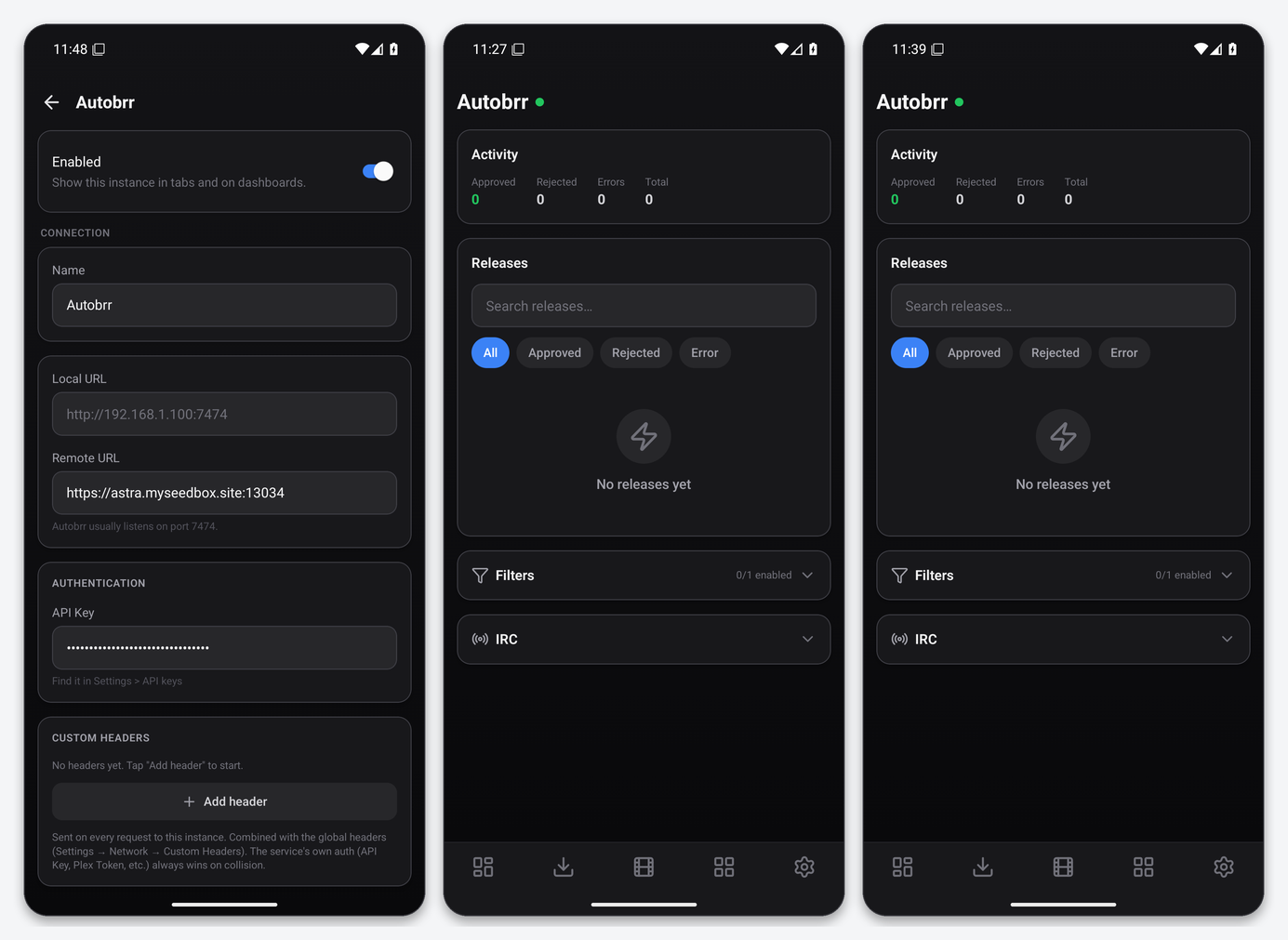
What the Autobrr tab gives you
- Activity: approved, rejected, errors and total pushes.
- Releases: the feed with a search box and All / Approved / Rejected / Error chips; a failed push can be retried from its row.
- Filters: every filter with an enable switch, so you can pause a filter from your phone when a tracker misbehaves.
- IRC: each network with its connection state and a restart action.
The key is sent as the X-API-Token header rather than a query parameter, so it does not appear in URLs.
Widgets
Autobrr Stats shows the counters on the dashboard; Service Health includes Autobrr.
Troubleshooting
| Symptom | Fix |
|---|---|
| Invalid API key | Create a fresh key in Settings → API keys; Autobrr does not show existing keys again. |
| No releases yet | Autobrr has not matched anything since it started; the feed is Autobrr’s own release table. |
| IRC shows disconnected | Use the restart action, then check the network’s credentials in Autobrr if it does not come back. |
FAQ
Can I edit filters from Dashboarr?
Only enable or disable them. Filter conditions and actions stay in Autobrr’s web UI.
Does Dashboarr show which tracker a release came from?
Yes. Each row in the release feed carries the indexer name, the filter that matched and the push status, the same fields Autobrr’s own release table shows.
Related articles
Put this into practice
EvoSeedbox ships with one-click app installs and up to 10 Gbps per box.
