Downloads are slow
On this page ▾
An evoftp slow download is almost always one of four things: the profile does not suit your distance from the box, your ISP caps each connection, your own line or Wi-Fi is the limit, or the disk you are writing to cannot keep up. This page tells them apart. Start by reading the speed in the sidebar while a large file is running: that figure is what evoftp is actually pulling, and everything below is about pushing it towards the speed of your line. Overview: evoftp guide.
The sidebar speed already matches your line
Compare the sidebar figure with what your connection can do; a speed test from the same computer gives you the number. If evoftp is within a little of it, evoftp is done and the line is the limit. Nothing in Settings makes a line faster. If there is a clear gap, continue.
The profile is wrong for the distance
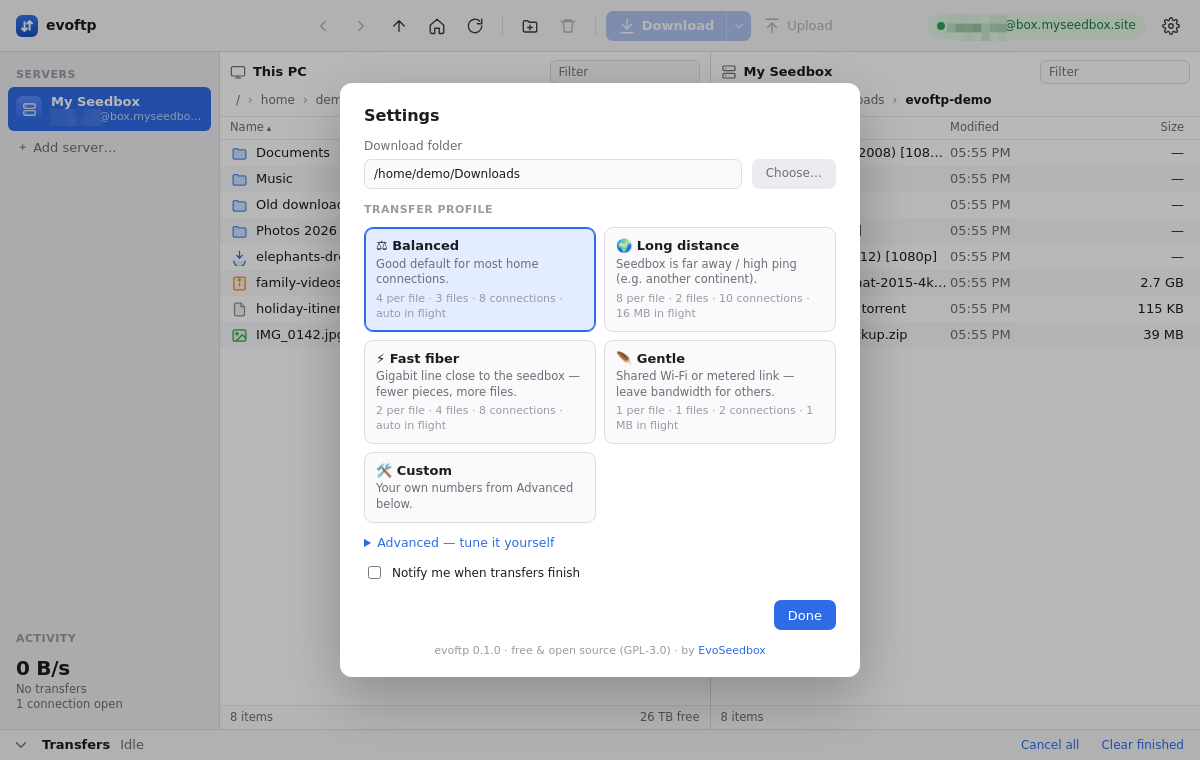
- Open Settings and choose Long distance.
- Download one large file (a few gigabytes) and watch the sidebar speed.
- If it climbs, keep the profile. If it does not change, go back to Balanced and read on.
Long distance uses more segments per file, fewer files at once and a larger in-flight window, which is what a far-away server needs. Fast fiber does the opposite and suits a short, fat link.
One file is slow but several together are fast
This is the signature of a per-connection cap: your ISP, or a middlebox on the way, limits each TCP connection but not the total. More segments is exactly the fix, because each segment is its own connection. Click the arrow next to Download and pick 8 for that file, or set Custom in Settings with 8 segments and up to 12 connections. If eight segments on one file is still slow, queue a folder: evoftp runs several files at once and the total goes up.
Everything is slow, in every app
If a speed test is slow too, the cause is outside evoftp. Check, in order: a VPN (try without it), Wi-Fi (plug in an Ethernet cable, or move next to the router), and other programs using the line — a torrent client, a cloud backup, a game update. Pause them and watch the sidebar.
The disk cannot keep up
Segmented downloads write to several places in the file at once. An external spinning hard disk, or a slow USB stick, handles that badly and the sidebar speed sits well below the line. Download to an internal SSD first (Settings → download folder), then move the file.
Note: segments and the window only apply to downloads. Uploads use a single connection per file.
For the general picture, including what to expect from a seedbox at different distances, read how to download from a seedbox faster and why FTP download speeds are slow.
Overview: evoftp guide.
Related articles
Put this into practice
EvoSeedbox ships with one-click app installs and up to 10 Gbps per box.
