Choosing how many connections a download uses
On this page ▾
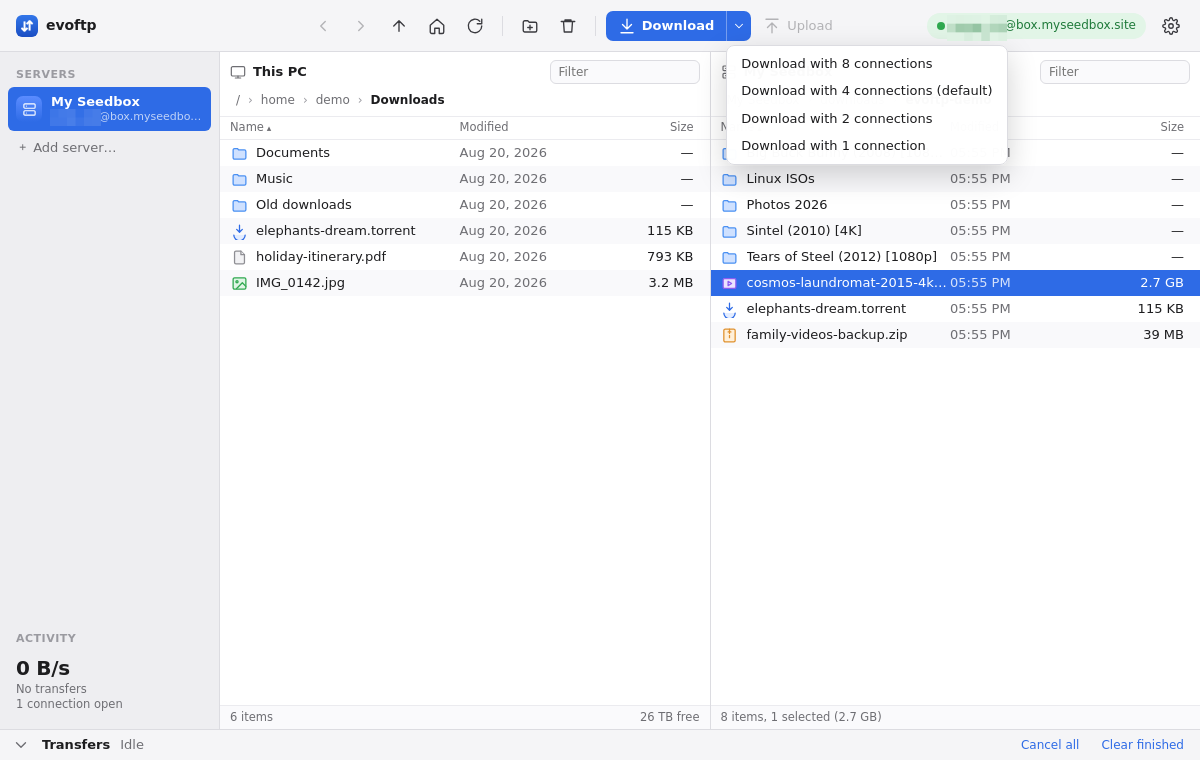
By the end of this page you will know how to give one download more connections than usual, or fewer, without touching Settings. evoftp connections per download default to your transfer profile (4 in Balanced); the Download ▾ menu changes that number for one download only.
Picking the number for one download
- Select the files or folders in the seedbox pane.
- Click the small arrow on the right of the Download button, or right-click the selection.
- Choose Download with 8 connections, 4, 2 or 1 connection. The entry matching your profile is marked (default).
The confirmation message at the bottom repeats your choice, for example Downloading 1 item to D:\Media using 8 connections per file. Your profile is not changed; the plain Download button and Ctrl/⌘+D keep using the profile number.
What the number actually does
- Per file, not per download. If you selected a folder, every file inside it gets the number you chose. Three files with 8 each would want 24 connections, which brings in the next point.
- The profile’s total still caps it. evoftp never opens more SSH connections than the profile’s total (8 in Balanced, up to 12 in Custom). Segments wait for a free connection, so asking for 8 on many files at once means they take turns rather than open a flood.
- Small files ignore it. Files under 8 MB always use one connection, and evoftp never makes a segment smaller than 4 MB — a 20 MB file asked for 8 gets 5.
When to choose 8
One large file from a seedbox that is far away. A single SSH connection is limited by the round trip to the server, and a long round trip means a low ceiling per connection; eight segments lift that ceiling eight times. If the sidebar speed for one big file sits well below what your line can do, this is the first thing to try. Why evoftp splits files into segments explains the mechanism.
When to choose 1
Shared Wi-Fi, a metered link, or a file you want in the background while someone else on the network is on a call. One connection behaves like any ordinary SFTP client and leaves room for everything else. If you want this permanently, pick the Gentle profile in Settings instead of choosing 1 each time.
When 2 or 4 is enough
A gigabit line close to the seedbox, where one connection is already fast. Extra segments then only add CPU work for encryption on both ends; the Fast fiber profile uses 2 for this reason.
Note: Uploads always use one connection. The menu only affects downloads.
Overview: evoftp guide.
Related articles
Put this into practice
EvoSeedbox ships with one-click app installs and up to 10 Gbps per box.
