Quick Setup: Complete *arr Stack (Sonarr + Radarr + Prowlarr + ruTorrent)
On this page ▾
This is the master guide to the automated media stack every EvoSeedbox box is built to run. Prowlarr, Sonarr, Radarr, a download client, and a media server together form a hands-off pipeline: you ask for a show or movie once, and the stack finds it, downloads it, sorts it, renames it, and drops it into Plex or Jellyfin ready to watch. This page is the overview that ties the whole chain together — each app below has its own deep-dive pillar, and this hub is where they connect.
You don’t have to take our word that it works. Across our 47-server fleet the *arr stack is among the most-installed things we run: Radarr sits on 129 installs, Sonarr on 94, Prowlarr on 53, with Lidarr (28), SABnzbd (19), NZBGet (17) and Bazarr (13) filling out the edges. This is a proven, popular setup — not an experiment. And because every app is one-click from the app catalog, the 30-minute figure is real: most of that time is configuration, not installation.
What the Stack Does
Each app owns one job. Wire them together and they cover the entire lifecycle of a media file:
- Prowlarr — the indexer manager. It holds all your trackers and Usenet indexers in one place and pushes them out to the other apps, so you configure indexers once. Runs on port 9696.
- Sonarr — TV automation. Tracks your series, watches for new episodes, and grabs them at the quality you asked for. Runs on port 8989. Full walkthrough in the Sonarr setup guide.
- Radarr — the same thing for movies. Runs on port 7878. See how to use Radarr with your seedbox.
- Download client — the app that actually pulls the file. On a seedbox this is usually ruTorrent (port 8080) for torrents, or SABnzbd / NZBGet for Usenet.
- Plex (or Jellyfin) — the media server that streams the finished library to your TV, phone, and browser.
The flow is a straight line: Prowlarr feeds indexers to Sonarr/Radarr → they search and send a release to your download client → the client downloads it → Sonarr/Radarr import, rename, and file it → Plex or Jellyfin picks it up and streams it. Once configured, you interact only with the front end — add a show, forget about it, watch it later.
Torrents or Usenet — the *arr apps work with both
A key point most guides skip: the download client is pluggable. Sonarr and Radarr don’t care whether the file arrives over BitTorrent or Usenet — they just hand a release to whatever client you connect. On a seedbox the default path is ruTorrent, which is already tuned and running on every box (see getting started with ruTorrent). But if you have a Usenet subscription, add SABnzbd or NZBGet instead — or alongside — and Prowlarr will feed your Usenet indexers to the same stack. Usenet is bring-your-own: you supply the provider and indexer credentials, and the apps handle the rest. Many users run both and let the *arr apps prefer whichever source has the better release.
Install Order
Order matters because Prowlarr connects out to the others, so they need to exist first — but in practice one-click install is fast enough that you just deploy them all and configure in this sequence:
- Prowlarr — port 9696
- Sonarr — port 8989
- Radarr — port 7878
- ruTorrent (or SABnzbd/NZBGet) — the download client
- Plex or Jellyfin — the media server
Install everything from the app catalog before you start configuring. Each app launches with a health check, and App Doctor begins watching it immediately.
Step 1 — Configure Prowlarr
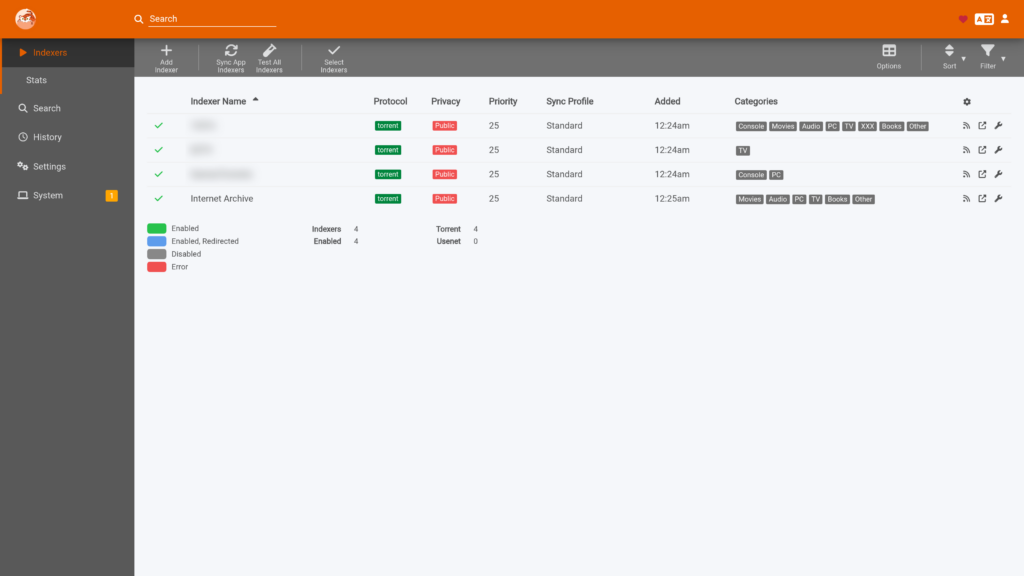
Open Prowlarr on port 9696. Two things to do here:
- Add your indexers. Go to Indexers → Add Indexer and add the public trackers, private trackers, or Usenet indexers you use. Enter credentials or API keys where the tracker requires them.
- Connect Prowlarr to the *arr apps. Go to Settings → Apps → Add, choose Sonarr, and paste Sonarr’s API key (found in Sonarr under Settings → General). Repeat for Radarr. From now on, every indexer you add in Prowlarr is pushed automatically to both apps — you never touch indexer config in Sonarr or Radarr again.
Prowlarr is the piece that makes the whole stack low-maintenance, so it’s worth setting up carefully. For indexer strategy, sync troubleshooting, and advanced tricks, read the ultimate Prowlarr guide, plus the seedbox-specific Prowlarr setup guide.
Step 2 — Configure the Download Client
In each *arr app, go to Settings → Download Clients → Add.
- ruTorrent / rTorrent: add a client of type rTorrent. Set Host to your seedbox hostname (
yourbox.myseedbox.site), Port to443, turn Use SSL on, and set the URL Path torutorrent/plugins/httprpc/action.php. Add your seedbox username and password. This is the same whether the *arr app runs on the seedbox or at home.RPC2works as an alternative URL path, butlocalhostnever does — the app has to reach the seedbox by hostname. - Usenet: for SABnzbd or NZBGet, add that client type instead and point it at the local port — see the SABnzbd and NZBGet guides for exact values.
Do this in both Sonarr and Radarr so each has somewhere to send its grabs. They can safely share one download client — see the FAQ below.
Step 3 — Set Root Folders
Root folders tell the *arr apps where to file finished media. In Sonarr set a root folder like /downloads/tv-shows/; in Radarr use /downloads/movies/. Then point your Plex (or Jellyfin) libraries at those same folders so the media server sees imports the moment they land.
Because every app on an EvoSeedbox box runs on the same machine and sees the same filesystem, you do not need remote path mapping — the path Sonarr writes to is the exact path the download client and Plex read from. Remote path mapping only becomes relevant when apps live on different machines with different mount points. If you run some apps at home against a remote seedbox, that’s exactly the case that needs it: see remote path mapping explained and the walkthrough for connecting a home Sonarr to a remote seedbox. Mismatched paths are the single most common reason imports silently fail, so get this right before troubleshooting anything else.
Step 4 — Set Quality Profiles
Quality profiles decide what “good enough” means. In Settings → Profiles, pick the resolutions and formats the app is allowed to grab. For most people HD-1080p is the sweet spot — excellent quality without the enormous file sizes and bandwidth of 4K. If you do want 4K/UHD, be deliberate about it: read Sonarr & Radarr quality settings for 4K before flipping it on, because 4K profiles fill disks fast and need indexers that actually carry those releases.
Step 5 — Add Content
You’re done configuring. In Sonarr, search for a series and click Add; in Radarr, do the same for a movie. Choose the root folder and quality profile, and the stack takes over — Prowlarr’s indexers get searched, the best matching release is sent to your download client, the file downloads, and Sonarr/Radarr import and rename it into your library. Plex or Jellyfin shows it a minute or two later. From here on, adding media is a single click.
Manage the whole stack from your phone: the whole stack in Dashboarr, the free Android and iOS app that connects straight to your seedbox apps.
Optional Extras
Once the core stack runs, these bolt on cleanly and each has its own guide:
- Bazarr — automatic subtitles for everything Sonarr and Radarr manage, in the languages you choose. Bazarr setup guide.
- Overseerr — a polished request front end so friends and family can request titles without touching Sonarr/Radarr; approved requests flow straight into the stack. Overseerr setup guide.
- Lidarr — the same automation for music. How to use Lidarr with your seedbox.
- Readarr — books and audiobooks. Readarr setup guide.
For the media server itself, see setting up Plex or connecting Jellyfin with your seedbox.
App Doctor Keeps the Chain Alive
A stack is only as reliable as its weakest link — if Prowlarr goes down, searches stop; if the download client stalls, nothing imports. On EvoSeedbox, App Doctor monitors every app in the chain and self-heals it: it detects a crashed, unreachable, or misbehaving container and restarts or repairs it automatically, usually before you notice. That’s why a multi-app pipeline stays hands-off here — the automation you build on top is itself kept running by automation underneath.
Quick Troubleshooting
- Grabbed but not downloading? The download client isn’t reachable. Recheck host/port/URL path in Settings → Download Clients and confirm the client is running.
- Downloaded but not imported? Almost always a path problem. On a single seedbox, confirm the root folder matches the download folder; across machines, check remote path mapping.
- Imported but not showing in Plex? Your Plex library isn’t pointed at the same folder, or needs a scan. Point the library at the *arr root folder and enable automatic library updates.
- Nothing found at all? Prowlarr has no working indexers, or they aren’t synced. Test each indexer in Prowlarr and confirm the Sonarr/Radarr apps are connected under Settings → Apps.
Related Guides
- Per-app deep dives: Sonarr · Radarr · Prowlarr (ultimate guide)
- App landing pages: Sonarr seedbox · Radarr seedbox · Prowlarr seedbox · Plex seedbox
- Download clients: ruTorrent · SABnzbd · NZBGet
- Extras & servers: Bazarr · Overseerr · Lidarr · Readarr · Plex · Jellyfin
- See all one-click apps and plans: app catalog
Frequently Asked Questions
Do I still need Jackett, or does Prowlarr replace it?
Prowlarr replaces Jackett for the *arr stack. It does everything Jackett does — managing torrent and Usenet indexers — but adds direct sync to Sonarr, Radarr, Lidarr, and Readarr, so you configure indexers once and never copy them app to app. There’s no reason to run Jackett alongside a modern Prowlarr setup.
Can Sonarr and Radarr share one download client?
Yes. Point both at the same ruTorrent (or SABnzbd/NZBGet) instance using the same host, port, and credentials. Each app tracks its own grabs and imports only its own files, so there’s no conflict. This is the normal setup on a seedbox.
Can I use Usenet instead of torrents?
Absolutely. Sonarr and Radarr are source-agnostic — install SABnzbd or NZBGet, add your Usenet indexers in Prowlarr, and connect the client the same way you’d connect ruTorrent. You bring your own Usenet provider and indexer subscriptions; the stack handles everything else. You can also run torrents and Usenet together.
How much disk space will this use?
It depends entirely on your quality profile and how much you keep. HD-1080p libraries are very manageable; 4K/UHD fills disks fast. Set sensible quality profiles, and use Sonarr/Radarr’s own cleanup and monitoring settings so the stack doesn’t hoard releases you’ll never watch. Check your plan’s storage on the pricing page.
Does this work with Jellyfin instead of Plex?
Yes. The *arr apps don’t care which media server you run — they just file media into folders. Point your Jellyfin libraries at the same root folders you gave Sonarr and Radarr, exactly as you would with Plex.
Why aren’t my downloads importing?
On a single EvoSeedbox box, this is almost always a root-folder mismatch — the folder the *arr app expects doesn’t match where the download client saved the file. If you’re mixing a home *arr app with a remote seedbox, it’s a path-mapping issue: see remote path mapping explained and connecting home Sonarr to a remote seedbox.
What happens if one of these apps crashes?
App Doctor is watching. Every app in the stack is monitored continuously and self-healed — a crashed or unreachable container is restarted or repaired automatically, usually before it affects your downloads. That’s what keeps a five-app pipeline running hands-off on EvoSeedbox.
Related articles
Put this into practice
EvoSeedbox ships with one-click app installs and up to 10 Gbps per box.


