Resuming an interrupted download
On this page ▾
To resume an interrupted download in evoftp, download the same file into the same local folder again. There is no setting and no dialog: evoftp finds the partial file, reads the progress it saved, and continues from where it stopped.
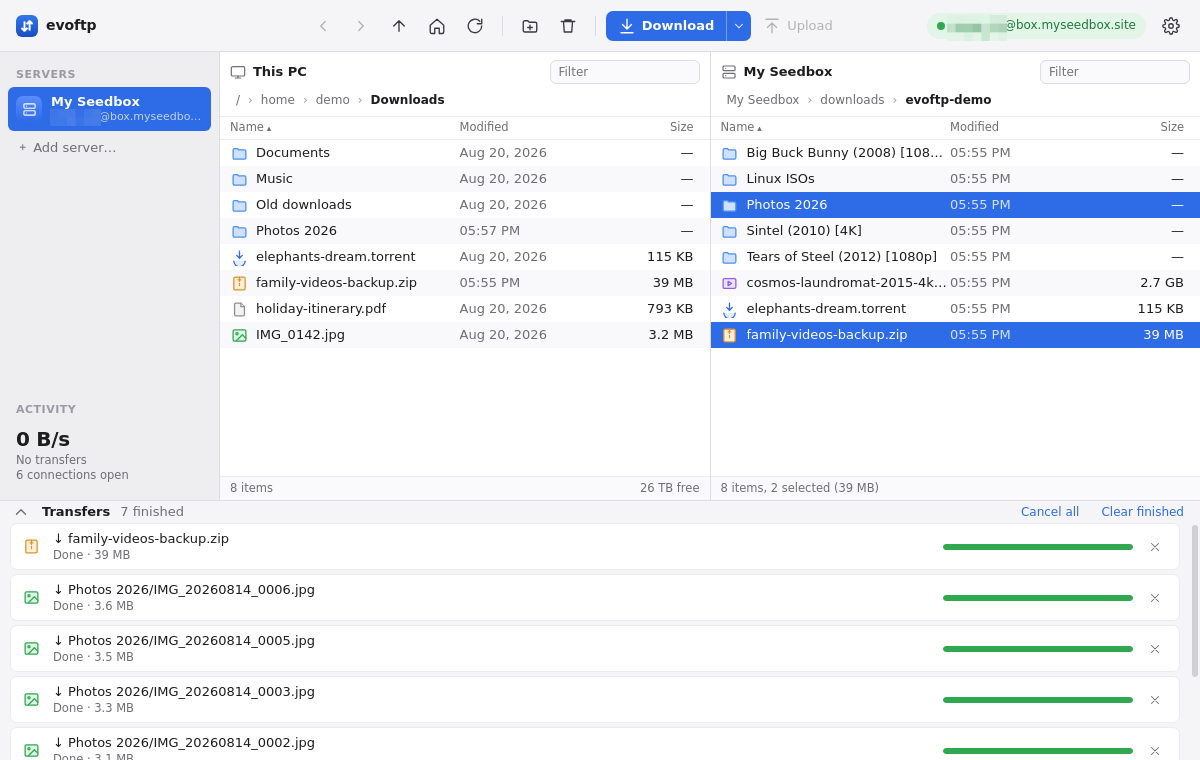
Resuming the download
- Connect to the same server and browse to the same file in the right pane.
- In the left pane, open the folder that holds the partial file.
- Download the file again: double-click it, press Ctrl/⌘+D, or click Download.
The row in the Transfers drawer jumps straight to the amount already downloaded and carries on. If the row is still in the drawer as Failed or Cancelled, clicking its Retry arrow does the same thing.
Resuming a whole folder works the same way: download the folder into the same parent folder and each file inside either resumes or, if it was already complete, is re-downloaded (see the note below).
How the evoftp resume download works
While a file downloads, evoftp keeps a small sidecar named filename.evoftp-part next to it. The sidecar records which byte ranges each segment has finished, is rewritten about once a second, and is written one last time when a download is cancelled or fails. A crash or power cut therefore loses at most the last second or so of progress.
Do not judge a partial file by its size. evoftp reserves the full length on disk before it starts, so a half-finished file already looks full size in Explorer or Finder. The sidecar is what tells you, and evoftp, that the file is incomplete. When the last byte lands, the sidecar is deleted.
Resume only kicks in when all of these match what the sidecar recorded:
- Same local folder — the sidecar must be next to the partial file.
- Same remote path — the same file on the same server, in the same folder.
- Same size — if the file on the seedbox has grown or shrunk since, for example a torrent that was still downloading, the old bytes cannot be trusted.
If any of them differ, or the sidecar is missing, evoftp starts the file again from zero. That is deliberate: continuing into a file that has changed would produce a corrupt download. You can read more about the protocol side in SFTP resume download.
Note: evoftp has no overwrite dialog yet. A file without a sidecar is treated as new and re-downloaded over the existing copy, even if that copy was complete.
If it starts from zero instead
- Check the
.evoftp-partfile is still there. Cleanup tools and “delete partial downloads” habits remove it. - Check the left pane is showing the folder that holds the partial file. Each time evoftp opens, the left pane starts in the Download folder from Settings, which may not be where you saved it.
- Check the file on the seedbox is finished. A torrent still downloading changes size; wait for 100% in ruTorrent and download once.
Overview: evoftp guide.
Related articles
Put this into practice
EvoSeedbox ships with one-click app installs and up to 10 Gbps per box.
