Jackett Settings Explained: Server Config, Indexers and Feeds
On this page ▾
This is the setting-by-setting reference for Jackett as installed on an EvoSeedbox: the server configuration block on the dashboard, the indexer picker, and the per-indexer configuration dialog, with what each option does and the value that suits a seedbox where Jackett feeds Sonarr, Radarr, Lidarr and ruTorrent. Labels were captured from the running app. Adding your first indexer and copying the Torznab feed into Sonarr is in how to use Jackett with your seedbox; this page is for everything on the dashboard after that. If you also run Prowlarr, see the note at the end about which one to use.
How Jackett is laid out on the seedbox
Jackett runs as your user in a container with its configuration in /home/<user>/.config/jackett: ServerConfig.json for the settings below and an Indexers folder with one JSON file per configured tracker, including the credentials you enter. A FlareSolverr container is installed next to it and pre-filled into the FlareSolverr field, so trackers behind Cloudflare challenges work without setup. The interface is reached through the HTTPS link in the client area; the port and base path shown on the dashboard are internal and already correct.
Dashboard and server configuration
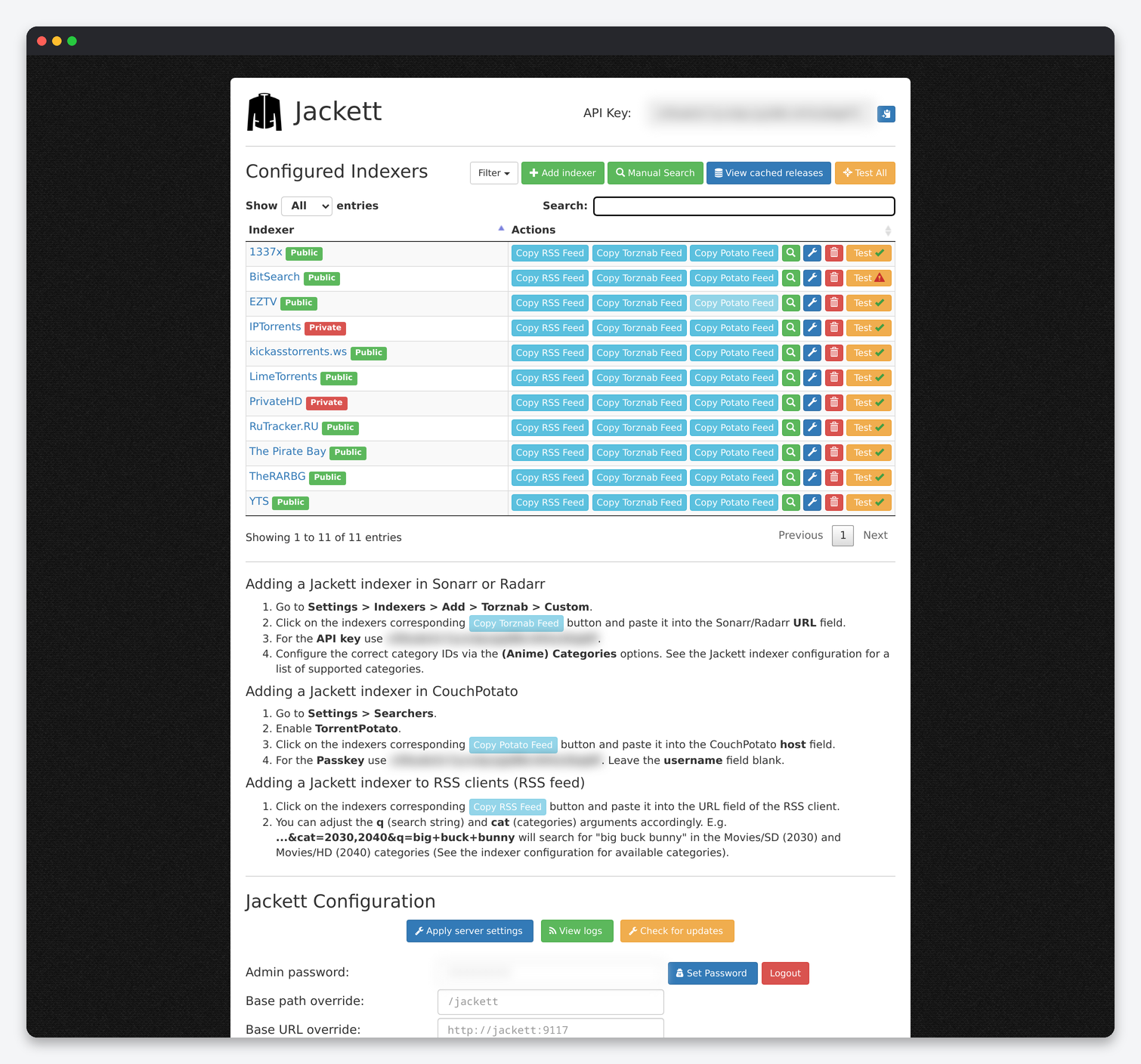
| Setting | What it does | Default | Seedbox |
|---|---|---|---|
| API Key | The key every Torznab consumer (Sonarr, Radarr, Lidarr, Dashboarr) sends with each request. The copy button is next to it. | Generated | One key for all indexers. It cannot be regenerated from the interface; stop Jackett, delete the key from ServerConfig.json and restart if it leaks. |
| Admin password | Login for the dashboard. | Set by the installer | Keep it set; the dashboard is reachable from the internet and contains your tracker passwords. Set Password saves it immediately. |
| Base path override | Path prefix when served under a subfolder. | /jackett | Leave the installer value. Feeds copied from the dashboard already include it. |
| Base URL override | The URL written into copied feed links. | Internal | Set it to your public Jackett HTTPS URL from the client area so Copy Torznab Feed gives a link that works from outside the box. Sonarr and Radarr on the same seedbox can use either. |
| Server port | Internal listening port. | 9117 | Leave it. |
| Blackhole directory | Where the “download to blackhole” button in Manual Search saves .torrent files. |
– | /home/<user>/downloads/watch, the folder ruTorrent’s AutoWatch loads from. The installer sets it. |
| Proxy type / URL / port / username / password | Route tracker requests through an HTTP, SOCKS4 or SOCKS5 proxy. | Disabled | Disabled unless a tracker blocks the server’s country; then a SOCKS5 proxy in the right country, for that reason only. |
| External access | Accept connections from addresses other than localhost. | On | On. Every connection to a seedbox container is external. |
| Local bind address | Interface Jackett binds to. | 127.0.0.1 shown, all interfaces effective | Leave it; the container network makes it reachable. |
| Allow CORS | Let browser apps on other origins call the API. | Off | Off. Dashboarr calls the API from the app, not from a browser. |
| Disable auto update / Update to pre-release | Jackett’s self-updater. | Off / Off | Disable auto update on. The container image is replaced from the client area; a self-update inside the container is lost at the next restart and can break the installation in between. |
| Enhanced logging | Debug output including full tracker responses. | Off | Off except while a tracker fails; the log then contains page HTML and your session cookies. |
| Cache enabled / Cache TTL / Cache max results per indexer | Serve repeated identical searches from memory for TTL seconds, keeping up to N results per indexer. | On / 2100 / 1000 | On, 2100 seconds, 1000. Sonarr’s RSS sync and Radarr’s searches repeat the same queries; the cache is what keeps you under trackers’ rate limits. |
| FlareSolverr API URL / Max Timeout | Address of the FlareSolverr service that solves Cloudflare challenges, and how long to wait for it. | Pre-filled / 55000 | Leave both. The installer points it at your own FlareSolverr container. |
| OMDB API key / URL | Enrich movie searches with IMDb data via OMDb. | Empty | Optional; a free OMDb key improves IMDb-ID searches on trackers that lack them. |
| Apply server settings | Save the block above. | – | Press it after every change; nothing above saves itself. |
The toolbar buttons: Add indexer opens the picker below, Manual Search queries selected indexers and shows results with download and blackhole buttons, View cached releases lists what the cache holds, and Test All runs a test query against every configured indexer. Per indexer, the row buttons copy the RSS, Torznab and Potato feed URLs, search that indexer, open its configuration, delete it, or test it.
Adding an indexer
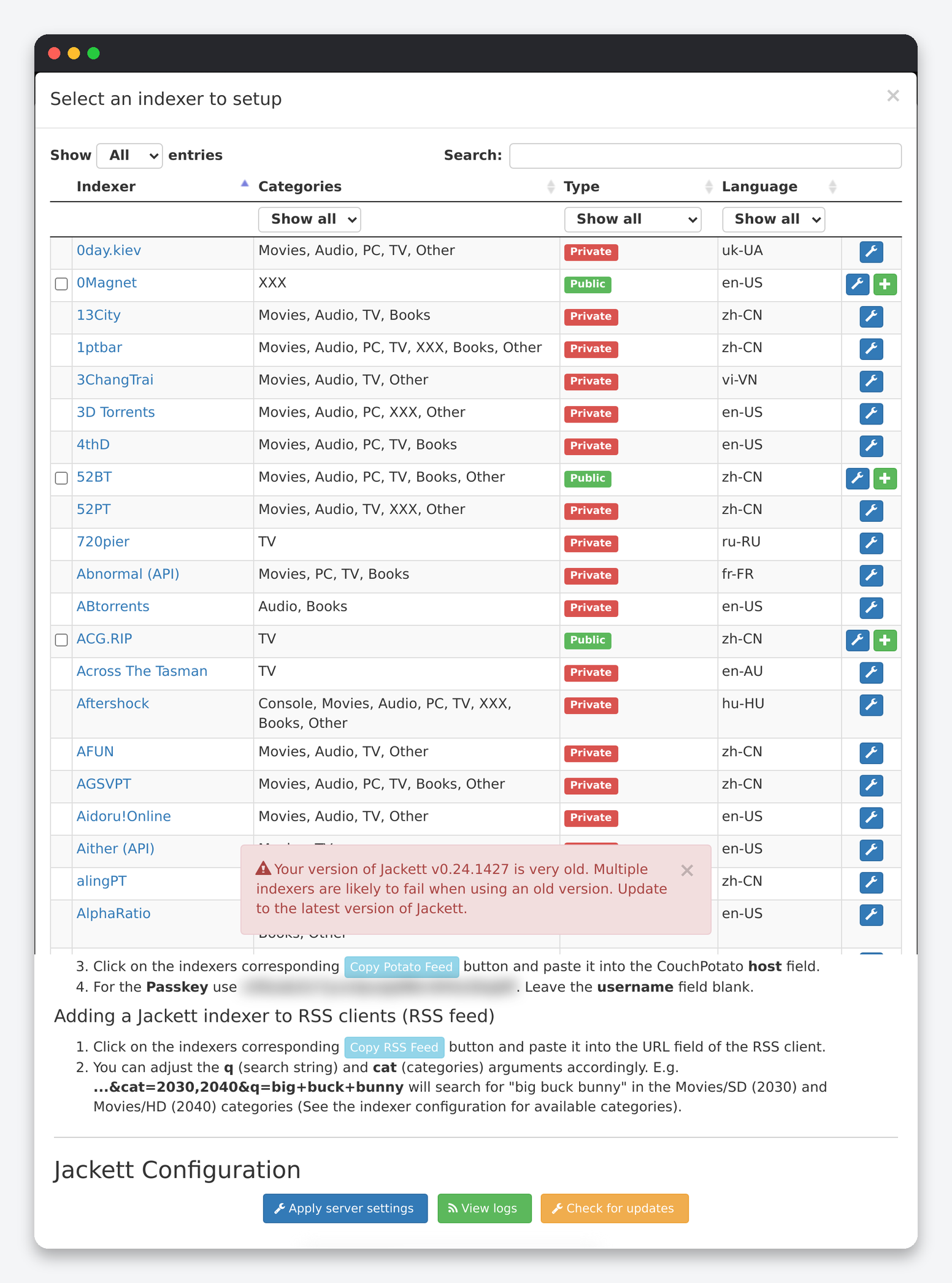
The picker lists several hundred trackers with their categories, type and language. Filter by Type first: Public indexers need no account, Private ones need the credentials you already use on the site, and Semi-private ones need a free registration. The + button adds a public indexer with defaults, the wrench opens the configuration dialog, and ticking several rows then pressing Add Selected adds public indexers in bulk. Add only trackers you actually use: Sonarr and Radarr query every enabled indexer on every search, and a dead or rate-limited tracker slows the whole stack and fills the log with failures.
Indexer configuration
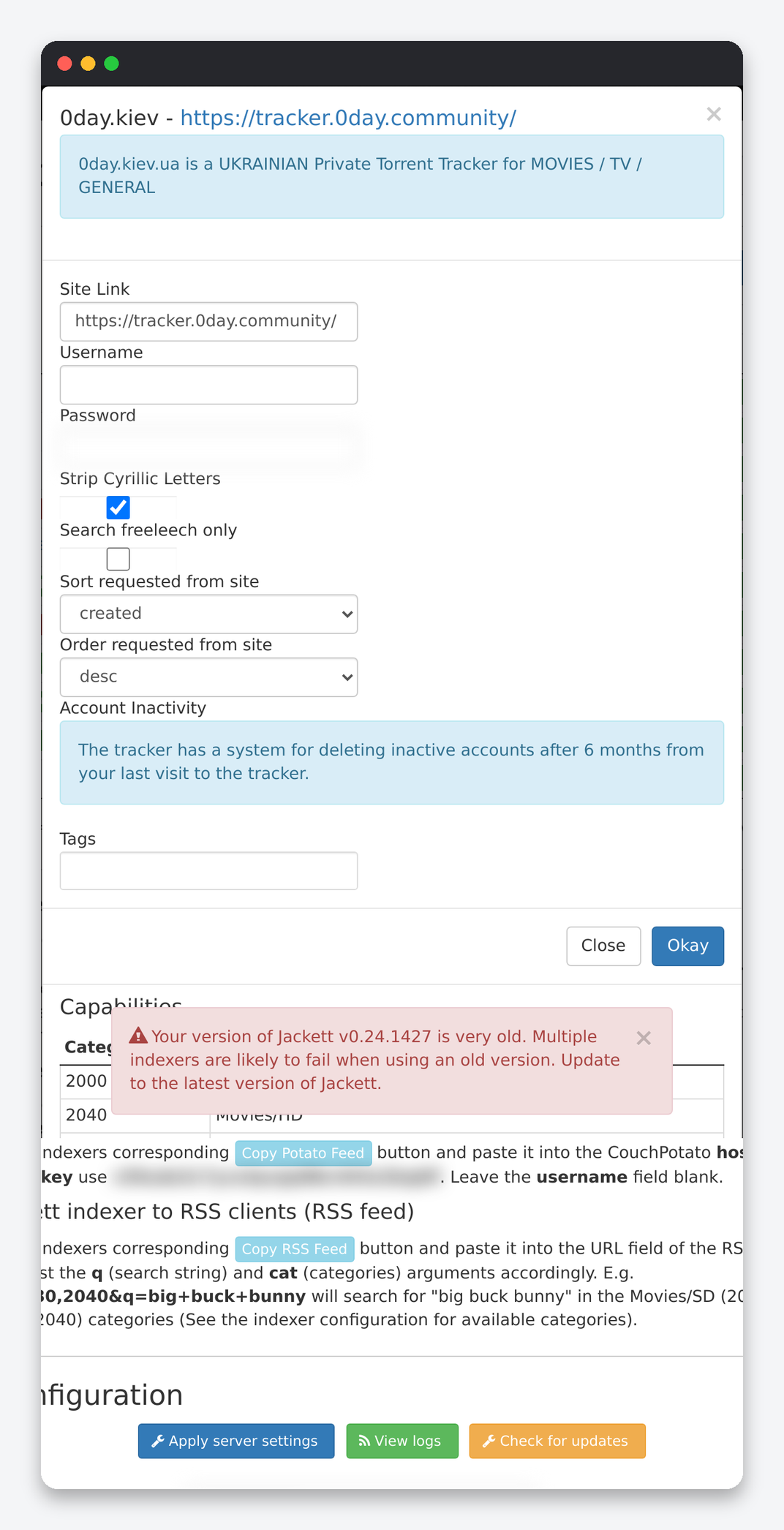
| Setting | What it does | Seedbox |
|---|---|---|
| Site Link | The tracker URL. A dropdown appears when the tracker has several mirrors. | Pick the mirror that resolves from the server; test after saving. |
| Username / Password, or API key, or cookie | How Jackett logs in. Cookie-based trackers need the cookie string from your browser; API trackers need a key from your tracker profile. | Use a dedicated API key where the tracker offers one, so a leak can be revoked without changing your password. Trackers that limit sessions may log your browser out when Jackett logs in. |
| Search freeleech only | Return only freeleech releases. | On for the indexer copy you give a ratio-sensitive app; add the same tracker twice (one freeleech-only, one normal) if you want both. |
| Sort requested from site / Order | Sort field and direction sent to the tracker. | created, desc. Sorting by seeders can hide new releases on the first page. |
| Tracker-specific options | Strip Cyrillic, language filter, minimum seeders, category mapping, “search in description”, 2FA fields. | Read the description under each; they are written by the person who maintains that tracker definition. |
| Account Inactivity | Informational: the tracker’s policy on deleting inactive accounts. | Note it; Jackett logging in does not count as a visit on most trackers. |
| Tags | Labels shown on the dashboard. | Optional. |
| Capabilities | The category table: which Torznab category IDs the tracker maps to, for example 2040 Movies/HD or 5040 TV/HD. | Use these IDs in Sonarr’s and Radarr’s indexer settings when the default category list returns nothing. |
Feeds and how the apps use them
Copy Torznab Feed gives .../api/v2.0/indexers/<id>/results/torznab/, which is what Sonarr, Radarr and Lidarr take under Settings → Indexers → Torznab → Custom together with the API key. A special indexer id all aggregates every configured tracker into one feed; it is convenient but every search then hits every tracker, and a single failing tracker marks the whole feed as failed in Sonarr. Prefer one Torznab entry per tracker. Copy RSS Feed is the same results as an RSS feed for ruTorrent’s RSS panel, with q and cat parameters you can edit in the URL. Copy Potato Feed is the legacy CouchPotato format.
Jackett or Prowlarr?
Both are installed with one click. Prowlarr syncs indexers into Sonarr, Radarr and Lidarr by itself and keeps per-indexer statistics; Jackett gives you a feed per tracker and is the one to use for ruTorrent RSS and for trackers whose definitions only exist in Jackett. Running both is fine, but do not add the same tracker to Sonarr twice (once from each), or every release is found twice. The Prowlarr side is in the Prowlarr settings reference.
FAQ
Which settings should every seedbox user change?
Base URL override set to the public HTTPS address, Disable auto update on, cache on with the defaults, blackhole pointing at the watch folder, and one Torznab entry per tracker in Sonarr and Radarr instead of the aggregate feed.
A tracker shows a red test result. What first?
Open its configuration and press OK again to re-login, check the site link mirror, then look at View logs for the reason (login failed, Cloudflare, rate limited, category parse error). Cloudflare errors mean the FlareSolverr container is stopped; restart Jackett from the client area, which starts both.
Where are my tracker passwords stored?
In plain JSON under .config/jackett/Indexers. That is why the admin password must stay set and why Enhanced logging should be off.
Related: Jackett setup on a seedbox · Prowlarr settings reference · Sonarr settings reference · Jackett in Dashboarr
Related articles
Put this into practice
EvoSeedbox ships with one-click app installs and up to 10 Gbps per box.
