How to Add a Magnet Link in ruTorrent (and .torrent Files)
On this page ▾
There are five ways to get a torrent onto your seedbox, and which one you reach for depends on what you were handed: a .torrent file, a magnet link, or a page in your browser. All of them end up in the same place — ruTorrent, running on the box, downloading whether your own machine is on or not.
Five Ways to Add a Torrent
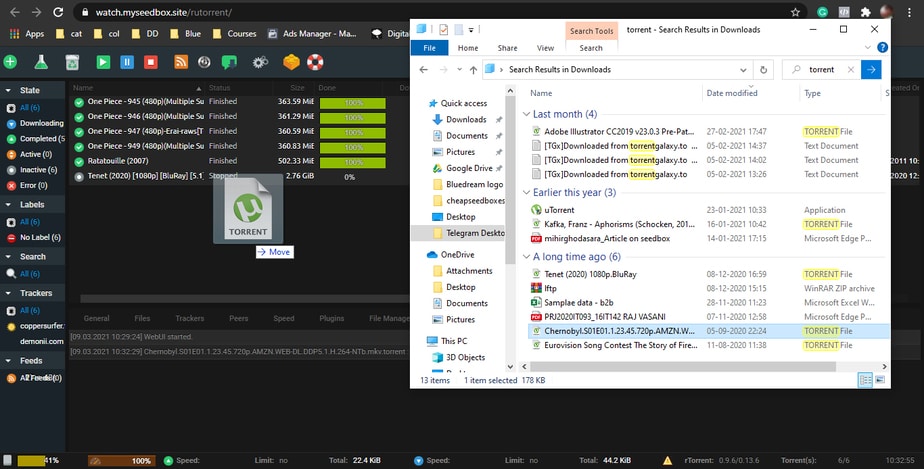
Method 1: Drag and drop a .torrent file
The fastest route. Drag a .torrent file straight from your desktop into the ruTorrent window and it starts immediately, using your default download directory.
Method 2: The Add Torrent dialog
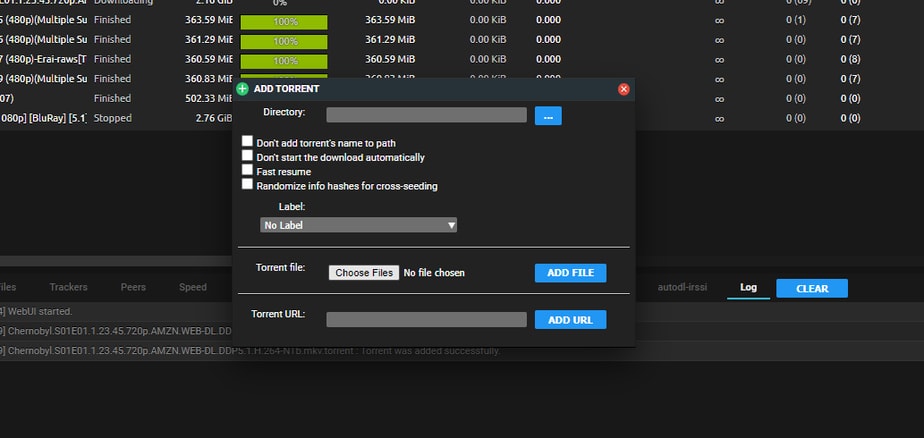
Use this when you want control over where the download lands.
- Click the Add Torrent button in the ruTorrent toolbar.
- Either Choose File to browse for a
.torrent, or paste a magnet link into the URL field. - Optionally set a download directory and a label — labels are worth the two seconds, because they are what the *arr apps and your own filters key off later.
- Click OK.

Method 3: Adding a magnet link
A magnet link is the one people get stuck on, because it behaves differently from a file. Copy the magnet from wherever you found it, click Add Torrent in ruTorrent, paste it into the URL field and confirm. There is no file to download first.
Why it sometimes sits at 0% doing nothing. A magnet link does not contain the file list — only an info-hash, which is effectively an ID. Before anything can download, your client has to go and find the actual torrent metadata from other peers. That happens over DHT and peer exchange, or via a tracker named in the link. Until that metadata arrives you will see the torrent listed with no files and no progress, which looks broken but is normal for the first few seconds.
When it never resolves at all, the usual cause is that the swarm cannot be reached:
- Private tracker magnets. Most private trackers disable DHT and peer exchange deliberately. A magnet from one often cannot resolve on its own — download the
.torrentfile from the tracker and use Method 1 or 2 instead. This is the single most common reason a magnet “does not work” on a seedbox. - A dead swarm. If nobody is seeding, there is nothing to fetch the metadata from. An old magnet from a long-abandoned torrent will simply hang.
- A truncated link. Magnets are long and copy badly out of chat apps and forum posts. If it fails instantly, check the link starts with
magnet:?xt=urn:btih:and was not cut short.
Method 4: The watch folder
Anything you drop into ~/downloads/watch is picked up and started automatically, without you opening ruTorrent at all. It is the method to use when you are uploading several .torrent files over SFTP, or when another tool is producing them for you. See using the watch folder for large torrents for the details.
Method 5: Remote add from your browser
Extensions such as Remote Torrent Adder let you right-click a torrent link on any site and send it straight to your seedbox, so you never open the web interface. Handy once configured; the setup is a one-off.
Tips
- Label as you add. Retro-fitting labels across a few hundred torrents is miserable; adding one at the point of entry costs nothing.
- Check the destination before confirming if you stream from the box — media apps only see the folders they were pointed at.
- A torrent stuck on “Queued” is not the same as a stuck magnet. Queued means it is waiting its turn; a magnet with no metadata has not started at all.
Related articles
Put this into practice
EvoSeedbox ships with one-click app installs and up to 10 Gbps per box.


