Bazarr Settings Explained: Scoring, Languages, Providers and Sync
On this page ▾
This is the setting-by-setting reference for Bazarr as installed on an EvoSeedbox: every page under Settings, what each option does, its default, and the value that suits a seedbox where Bazarr sits next to Sonarr and Radarr on the same disk. Labels and help text were captured from the running app. The initial connection to Sonarr and Radarr and the first language profile are in the Bazarr setup guide; this page is for everything after that, and in particular for the two areas that decide whether Bazarr feels reliable: scoring and the subtitle options.
How Bazarr decides what to download
Bazarr does not search on its own schedule for everything. It receives each new episode or movie from Sonarr and Radarr, looks up the language profile assigned to that series or movie, asks every enabled provider for candidates, scores each candidate against the video (release group, resolution, source, hash match) and downloads the best one only if its score reaches the minimum set on the Sonarr and Radarr pages. Almost every “Bazarr found nothing” case is a minimum score set too high, a profile not assigned, or providers without accounts.
General
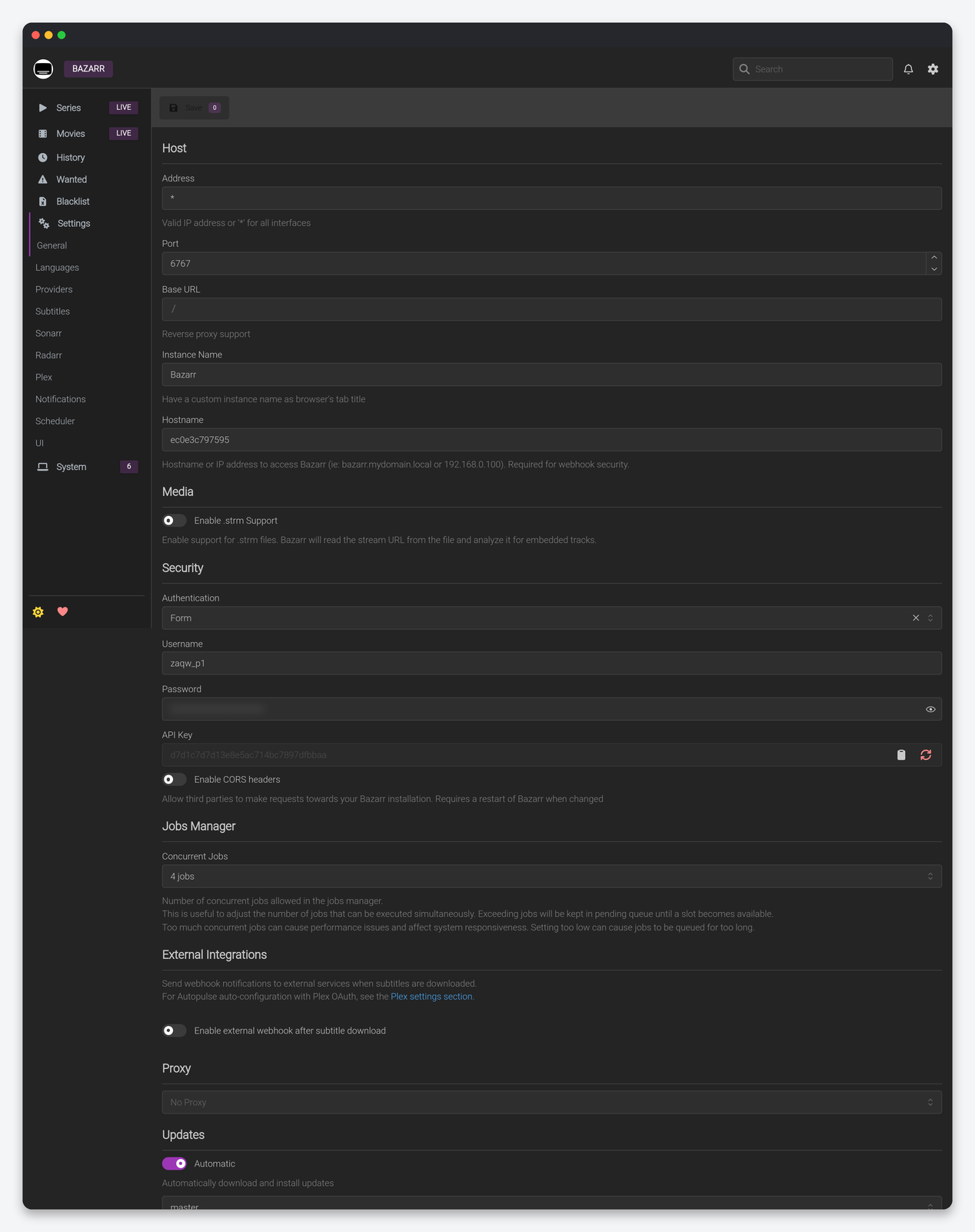
| Setting | What it does | Seedbox |
|---|---|---|
| Address / Port / Base URL | Where Bazarr listens inside its container and the path prefix for a reverse proxy. | Leave as installed. The client-area HTTPS port depends on it. |
| Instance Name | Browser tab title. | Optional. |
| Hostname | The address other services use to reach Bazarr; required for webhook security. | Your Bazarr HTTPS hostname from the client area. |
| Enable .strm Support | Read stream URLs from .strm files and analyse the stream for embedded tracks. |
Off unless you keep .strm stubs. |
| Authentication / Username / Password | Form or Basic login for the web UI. | Form, set by the installer. |
| API Key | Used by Dashboarr and by the Sonarr/Radarr webhook commands shown on those pages. | Regenerate on a leak and update Dashboarr. |
| Enable CORS headers | Let browser apps on other origins call the API. Needs a restart. | Off. |
| Concurrent Jobs | How many search or download jobs run at once; the rest queue. | 2. Providers rate-limit per account, so more parallel jobs mostly produce throttling. |
| External webhook after subtitle download | Notify an external service (Autopulse, Plex refresh) when a subtitle lands. | On if you use Plex, with the Plex settings on the same page, so the new subtitle shows without a library refresh. |
| Proxy | Route provider traffic through a proxy. | Off; enable only if a provider is blocked from the server’s region. |
| Updates: Automatic / Branch | Self-update. | Off. Updates come with the container through the client area. |
| Logging: Debug / filters | Verbose logging with include or exclude filters, optionally regex. | Debug off except while diagnosing a provider; the log grows fast. |
| Backups: Folder / Retention | Where and how long database and config backups are kept. | Leave the folder; 7 days retention. |
| Analytics | Anonymous usage data to the developers. | Your choice. |
Languages
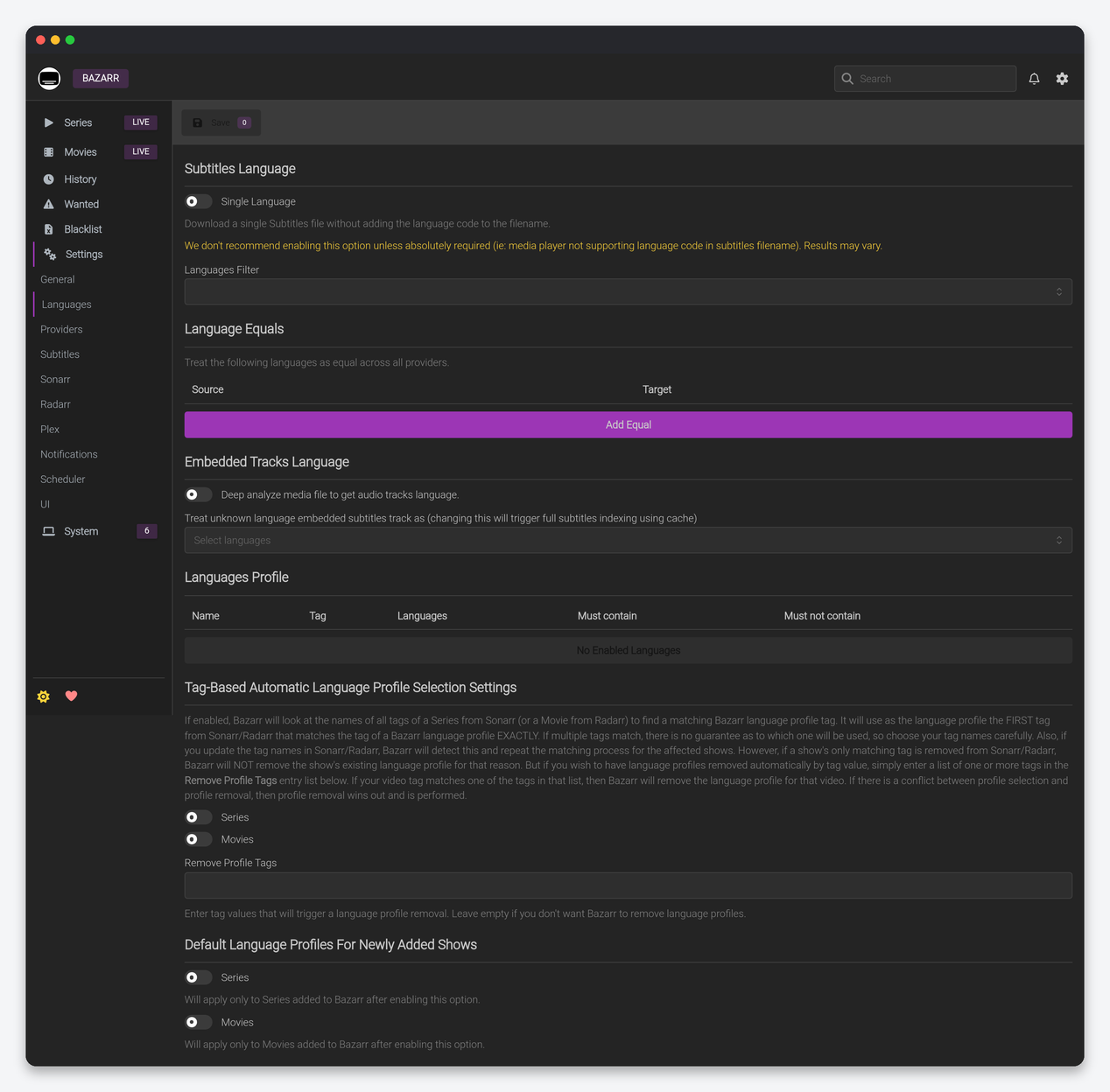
| Setting | What it does | Seedbox |
|---|---|---|
| Single Language | Save subtitles without the language code in the file name (video.srt instead of video.en.srt). |
Off. Plex, Jellyfin and Kodi all read the code; without it a second language overwrites the first. |
| Languages Filter | The languages available for profiles. | Tick only what you use; every language in a profile is searched on every provider. |
| Language Equals | Treat two languages as the same across providers (Portuguese and Brazilian Portuguese, Spanish and Latin American Spanish). | Add the pair when your first choice is rare. |
| Embedded Tracks Language: Deep analyze media file | Read the audio track languages from the file itself. | On. It is what lets “audio language” conditions in profiles work. |
| Treat unknown language embedded subtitles track as | Assume a language for embedded tracks with no tag. | Your main language, if your releases usually carry untagged English tracks. |
| Languages Profile | Named list of wanted languages with Forced (only, never, also), HI (hearing impaired: only, never, also), “must contain” and “must not contain” audio-language conditions, and a cutoff. | One profile “English” with English, forced also, HI never, cutoff English. Add “Original + English” with a must-contain condition for foreign-language series. |
| Tag-Based Automatic Language Profile Selection | Assign a profile to a series or movie when a Sonarr or Radarr tag matches the profile’s tag exactly; Remove Profile Tags removes it. | On, with a tag such as subs-en on Sonarr’s and Radarr’s side, so new titles get a profile automatically. |
| Default Language Profiles For Newly Added Shows / Movies | Profile applied to anything added after the setting is saved. | Set both. Without a default, new titles have no profile and are never searched. |
Providers
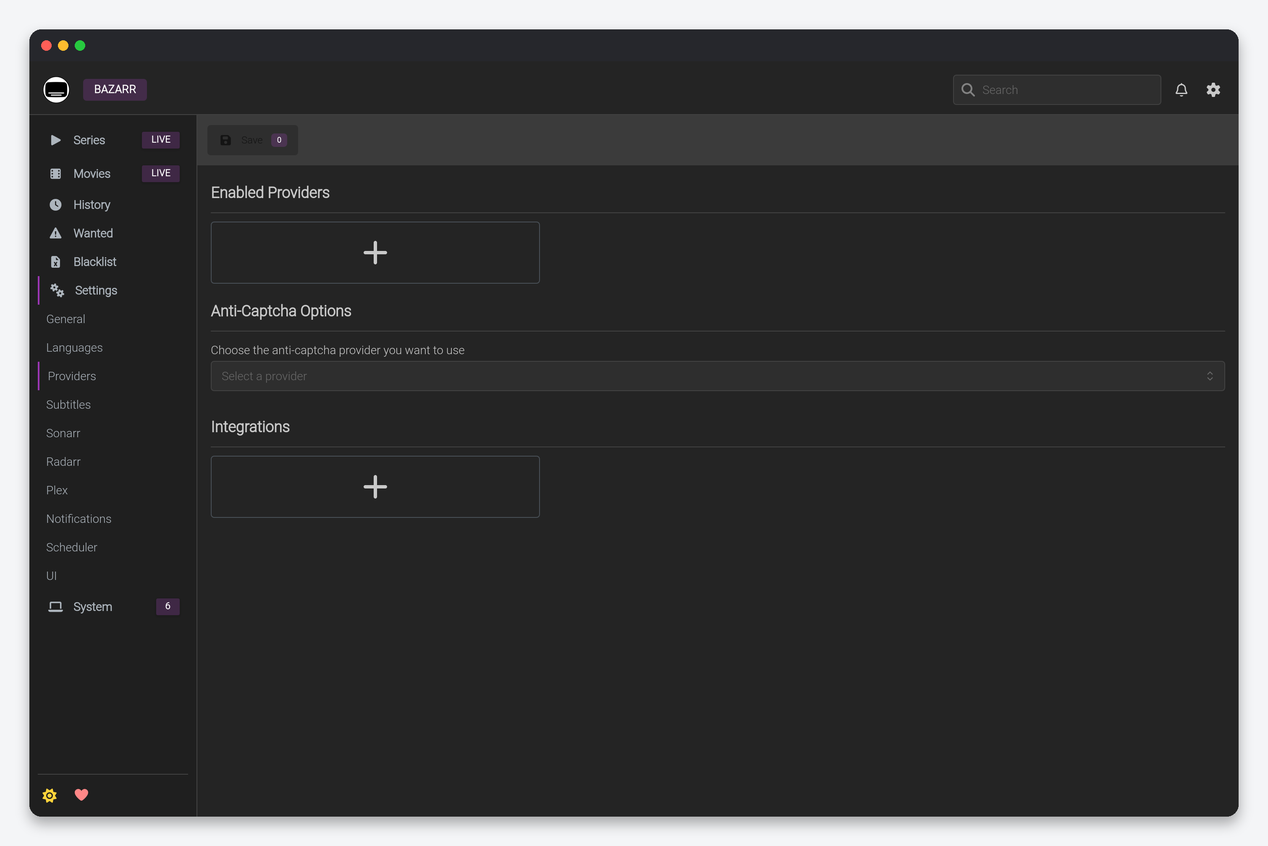
Enabled Providers is the list Bazarr queries; each provider has its own fields (account, API key, options). A working starter set: OpenSubtitles.com (free account required; the paid tier lifts the daily download cap), Podnapisi, Addic7ed (TV, needs an account), Subf2m and Gestdown. More providers raise the hit rate but multiply queries per search. Anti-Captcha Options connects a solving service for providers that challenge with captchas; leave it empty unless a provider you rely on demands it. Integrations holds tokens for services such as Whisper-based transcription providers, which generate subtitles when none exist; these are CPU-heavy and run on the provider’s side, so they are fine on a seedbox but slow.
Subtitles
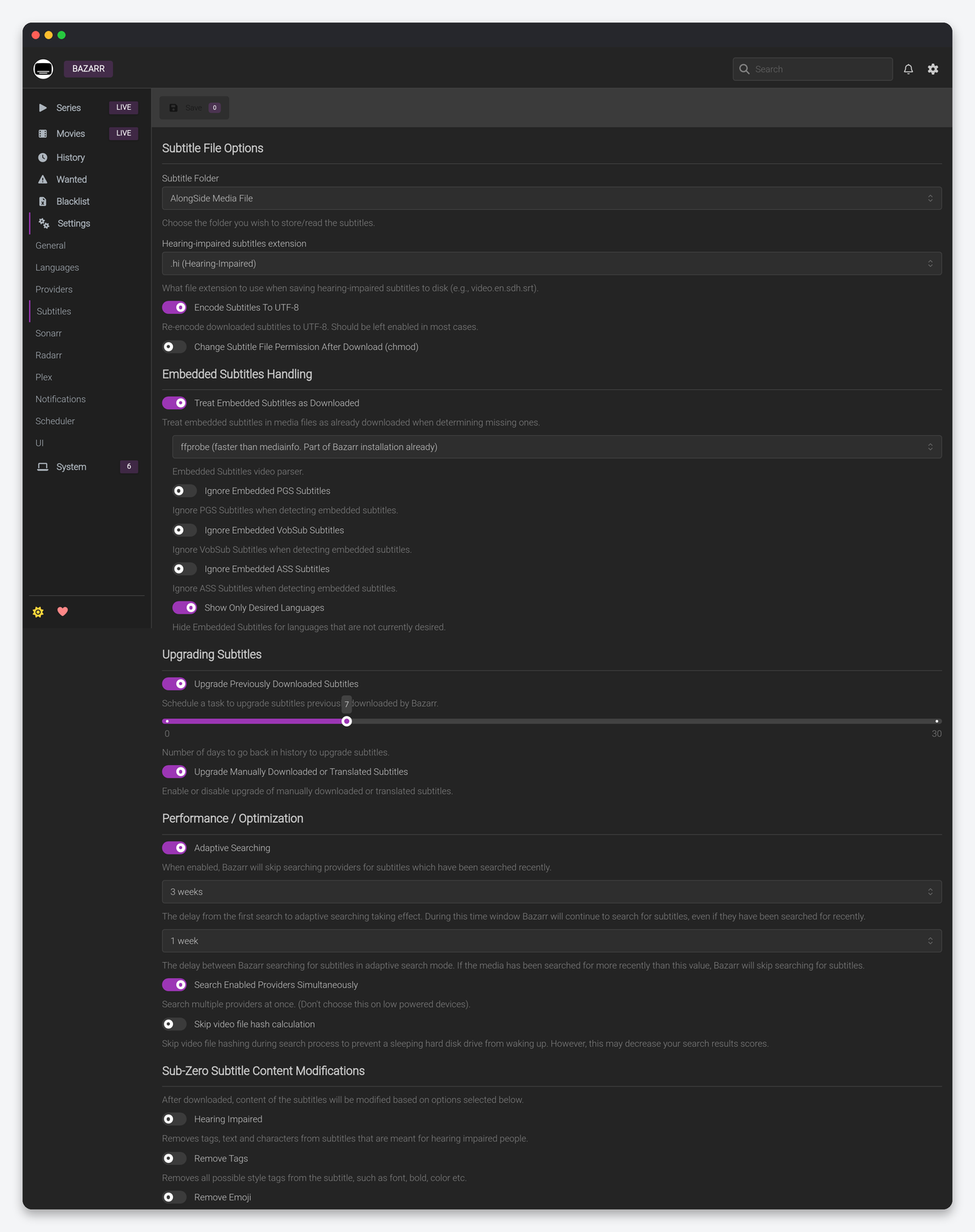
| Setting | What it does | Seedbox |
|---|---|---|
| Subtitle Folder | Store subtitles next to the video (“AlongSide Media File”), in a relative subfolder, or an absolute folder. | AlongSide. Players expect it, and hardlink-based imports keep working. |
| Hearing-impaired subtitles extension | Suffix for HI files, for example .en.sdh.srt. |
Keep the default. |
| Encode Subtitles To UTF-8 | Re-encode downloads to UTF-8. | On. Fixes garbled accents in most players. |
| Change Subtitle File Permission (chmod) | chmod after download. | Off. Files are created as your user already. |
| Treat Embedded Subtitles as Downloaded | Count subtitle tracks inside the MKV as satisfying the profile. | On. Otherwise Bazarr downloads external subtitles for files that already carry them. |
| Ignore Embedded PGS / VobSub / ASS | Do not count image-based (PGS, VobSub) or styled (ASS) embedded tracks. | Ignore PGS and VobSub on: many players cannot render them, so a text subtitle is still wanted. Keep ASS counted for anime. |
| Show Only Desired Languages | Hide embedded tracks for languages you do not want in the UI. | On. |
| Upgrade Previously Downloaded Subtitles | Periodically look for a better-scoring subtitle for recent downloads, going back N days. | On, 7 days. Good subtitles for new episodes often appear a day or two after release. |
| Upgrade Manually Downloaded or Translated Subtitles | Include manual picks in upgrades. | Off; a manual pick was a choice. |
| Adaptive Searching | Skip re-searching titles searched recently, after an initial window. | On with the defaults. It cuts provider queries by most of the total on a large library. |
| Search Enabled Providers Simultaneously | Query providers in parallel. | On. The seedbox has the CPU for it; the warning is for Raspberry Pi class hardware. |
| Skip video file hash calculation | Do not hash the video (hash matches give the best scores) to avoid waking a sleeping disk. | Off. Disks never sleep on a seedbox and the hash match is worth the read. |
| Sub-Zero modifications: Hearing Impaired, Remove Tags, Remove Emoji, OCR Fixes, Common Fixes, Fix Uppercase, Reverse RTL, Colors | Post-process the downloaded text. | Common Fixes and OCR Fixes on, Remove Tags on for Plex (it ignores styling anyway), the rest off. |
| Automatic Subtitles Synchronization | Run subsync on downloads to fix timing against the audio track, with score and duration thresholds. | On, “only for subtitles with score below 90”. It is CPU-bound but the seedbox handles it; leave it off only if Sonarr imports hundreds of episodes at once. |
| Custom Post-Processing | Run a shell command after each download. | Off. |
Sonarr and Radarr
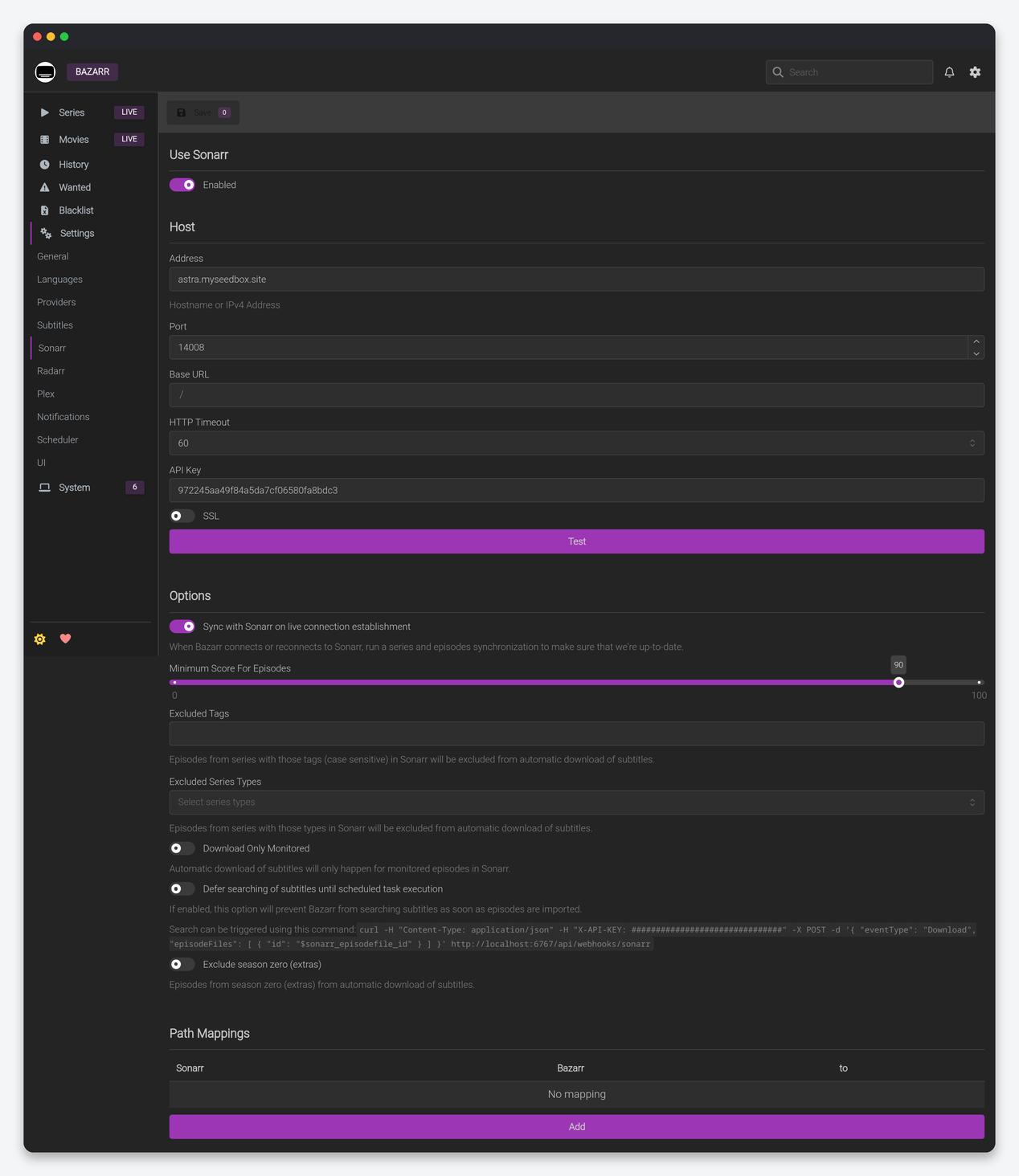
| Setting | What it does | Seedbox |
|---|---|---|
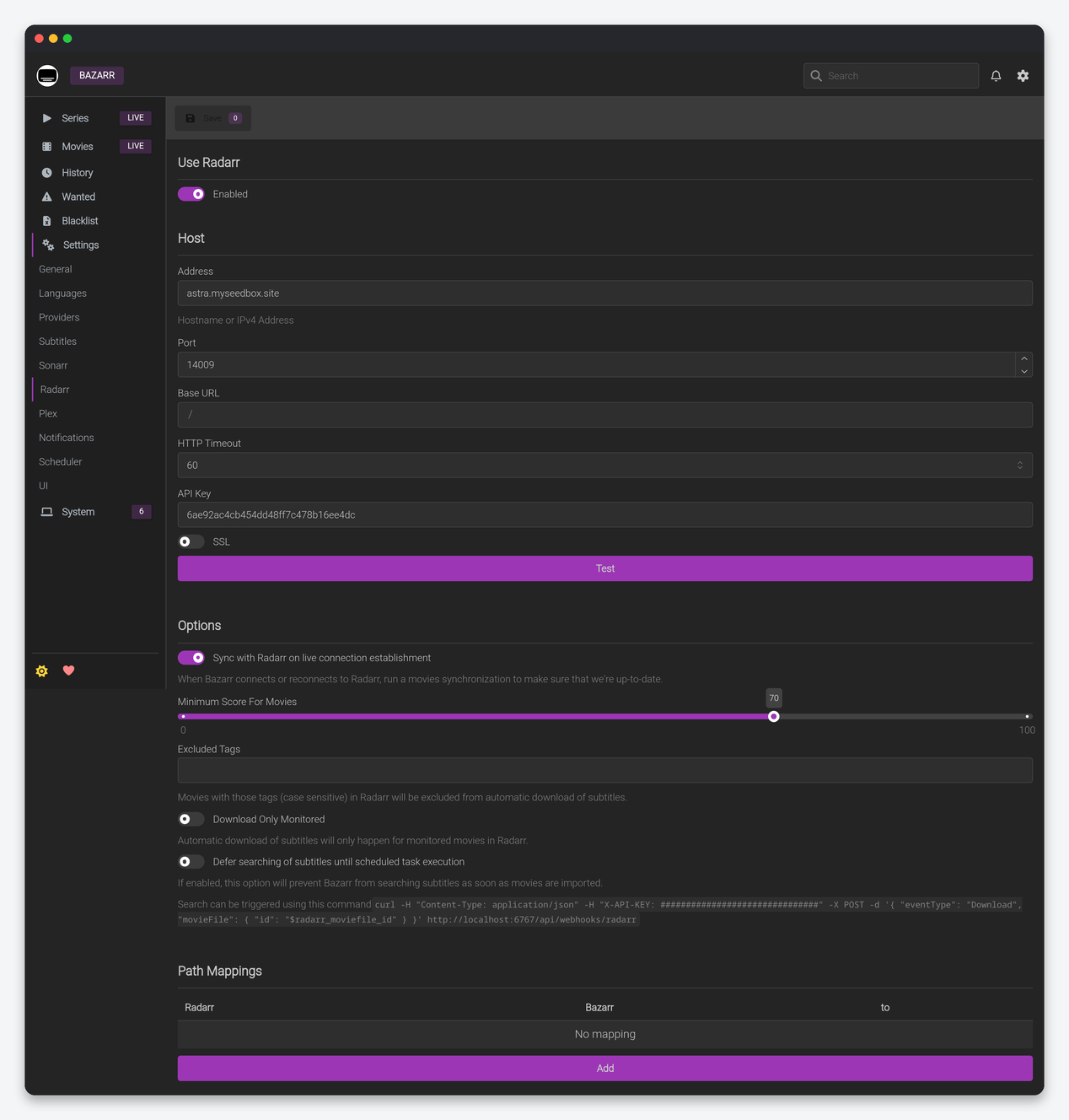
| Address / Port / Base URL / SSL / API Key | How Bazarr reaches Sonarr or Radarr. | Internal address and port pre-filled by the installer; key from the app’s Settings → General. |
| HTTP Timeout | Seconds to wait for the app. | 60. Raise to 120 on a large library, where the initial sync is slow. |
| Sync on live connection establishment | Full series or movie sync whenever Bazarr reconnects. | On. |
| Minimum Score For Episodes / Movies | The candidate score (0 to 100) a subtitle needs before Bazarr downloads it automatically. | Episodes 80, Movies 70 (the defaults are 90 and 70). 90 for episodes rejects most non-hash matches; drop it if Wanted never shrinks. |
| Excluded Tags / Excluded Series Types | Skip series or movies carrying these Sonarr or Radarr tags, or of these types (anime, daily). | Exclude a nosubs tag; exclude Daily if talk shows do not need subtitles. |
| Download Only Monitored | Only search for monitored items. | On. |
| Defer searching until scheduled task | Do not search on import; wait for the scheduled search and rely on the webhook command shown on the page. | Off. On-import search is the whole point. |
| Exclude season zero | Skip specials. | On. |
| Path Mappings | Translate paths when Bazarr sees the disk at a different path than Sonarr or Radarr. | Empty. All apps on the seedbox share the same paths; this is only for Bazarr at home. |
Notifications
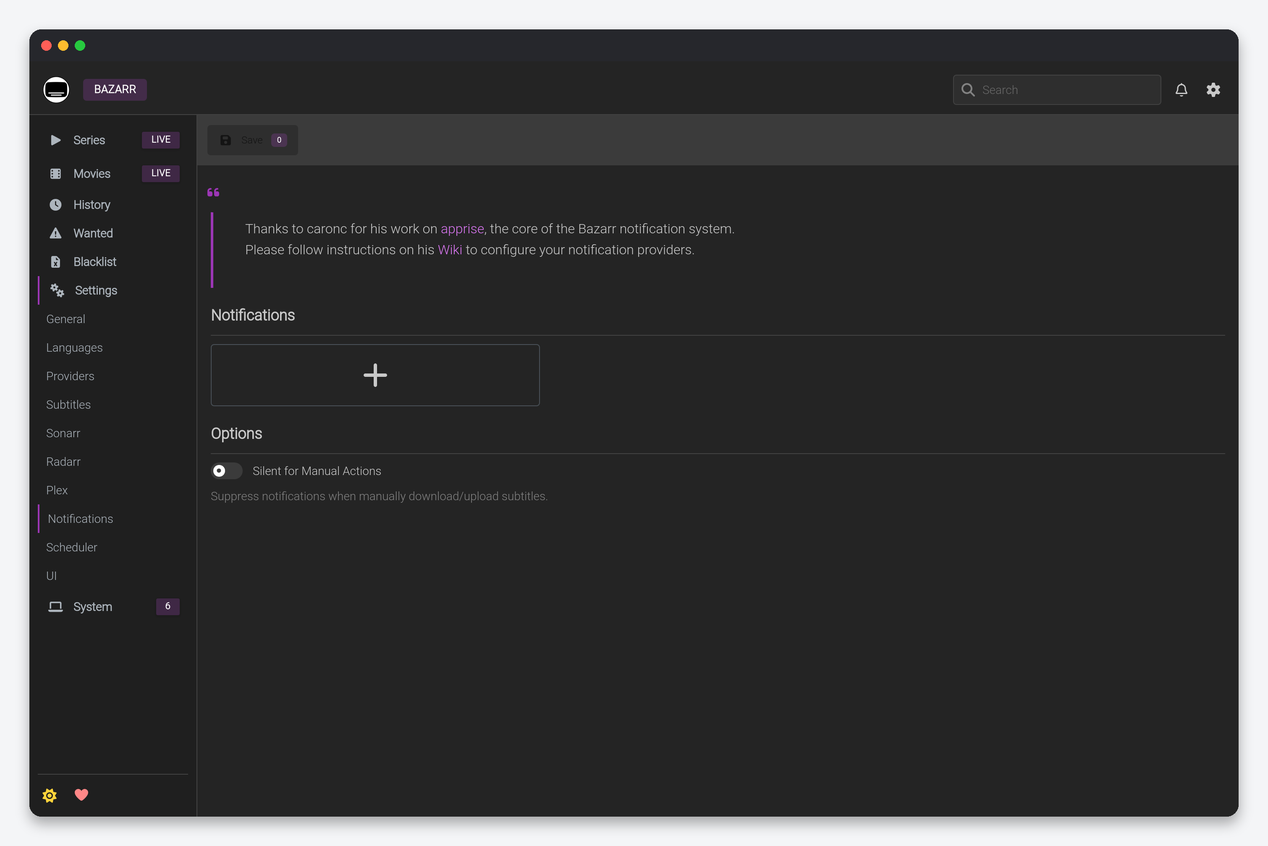
Bazarr’s notifications are Apprise URLs: one line per destination in the form discord://webhook_id/webhook_token, tgram://bot_token/chat_id, mailto://user:[email protected] and so on; the Apprise wiki lists every service. Silent for Manual Actions suppresses messages for downloads you trigger by hand. One Discord or Telegram target is enough to know when subtitles arrive.
Scheduler
| Setting | What it does | Seedbox |
|---|---|---|
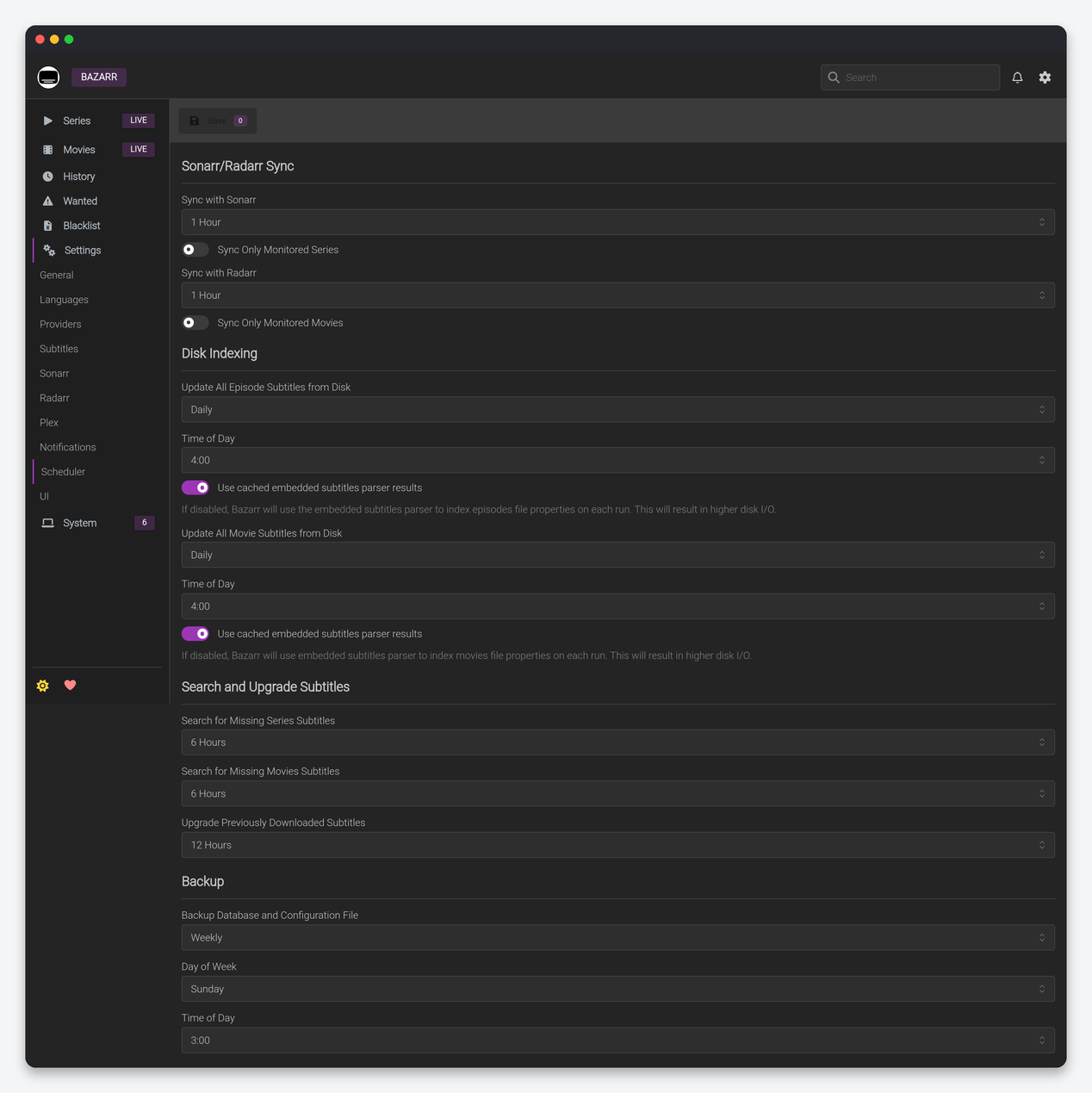
| Sync with Sonarr / Radarr | How often the series and movie lists are refreshed; Sync Only Monitored limits it. | Every 1 hour, Sync Only Monitored on. Bazarr also learns about new items instantly through the app’s webhook, so the sync is a safety net. |
| Update All Episode / Movie Subtitles from Disk | Full re-index of subtitle files on disk, with a time of day. “Use cached embedded subtitles parser results” avoids re-reading every file. | Weekly, at night, cache on. A daily full index of a multi-terabyte library is hours of disk reads. |
| Search for Missing Series / Movies Subtitles | How often Wanted items are retried. | Every 6 hours. Adaptive searching already skips items searched recently. |
| Upgrade Previously Downloaded Subtitles | The upgrade pass from the Subtitles page. | Every 12 hours. |
| Backup Database and Configuration File | Weekly backup, day and time. | Weekly, matching Sonarr’s schedule so a restore is consistent. |
FAQ
Which defaults should every seedbox user change?
Set default language profiles for new shows and movies, lower the episode minimum score from 90 to about 80, switch on Treat Embedded Subtitles as Downloaded with PGS and VobSub ignored, enable UTF-8 encoding and Common Fixes, and move disk indexing to weekly.
Why does the Wanted list never shrink?
In order of likelihood: no language profile on those items, providers without accounts or with exhausted daily quotas, a minimum score above what non-hash matches can reach, or a rare language with no equivalence set.
Does Bazarr work with Plex?
Yes. Bazarr writes the subtitle next to the file and, with the external webhook enabled, refreshes the item in Plex so the new track appears without waiting for a scan.
Related: Bazarr setup on a seedbox · Sonarr settings · Radarr settings · Bazarr in Dashboarr
Related articles
Put this into practice
EvoSeedbox ships with one-click app installs and up to 10 Gbps per box.
