Connect Jackett to Dashboarr
On this page ▾
To connect Jackett to Dashboarr, add a Jackett instance with the Jackett HTTPS address from your client area as the Remote URL and the API key shown at the top of Jackett’s own dashboard. Dashboarr then lists your indexers with per-indexer Search and Test buttons, searches all of them at once through Jackett’s Torznab aggregate feed, and sends a chosen release to your rTorrent. Part of the Dashboarr seedbox setup guide.
What you need
| Field in Dashboarr | Value on EvoSeedbox |
|---|---|
| Service | Jackett (under Indexers) |
| Local URL | leave empty |
| Remote URL | Jackett’s HTTPS address from the app card, https://SERVER.myseedbox.site:13xxx |
| API Key | the “API Key” field at the top of the Jackett dashboard (a 32-character lowercase string) |
| Always use Remote URL | on |
Jackett’s admin password, if you set one, protects the indexer configuration pages. Dashboarr does not need it and cannot add, configure or disable indexers; the API key alone covers listing, searching, testing and grabbing.
Step by step
- Open Jackett, copy the API key from the top of the page.
- Dashboarr → Settings → Integrations → Browse services → Jackett.
- Remote URL = the HTTPS address, API Key = the key, Always use Remote URL on.
- Test Connection probes the aggregate Torznab endpoint (
/api/v2.0/indexers/all/results/torznab/api), then Save.
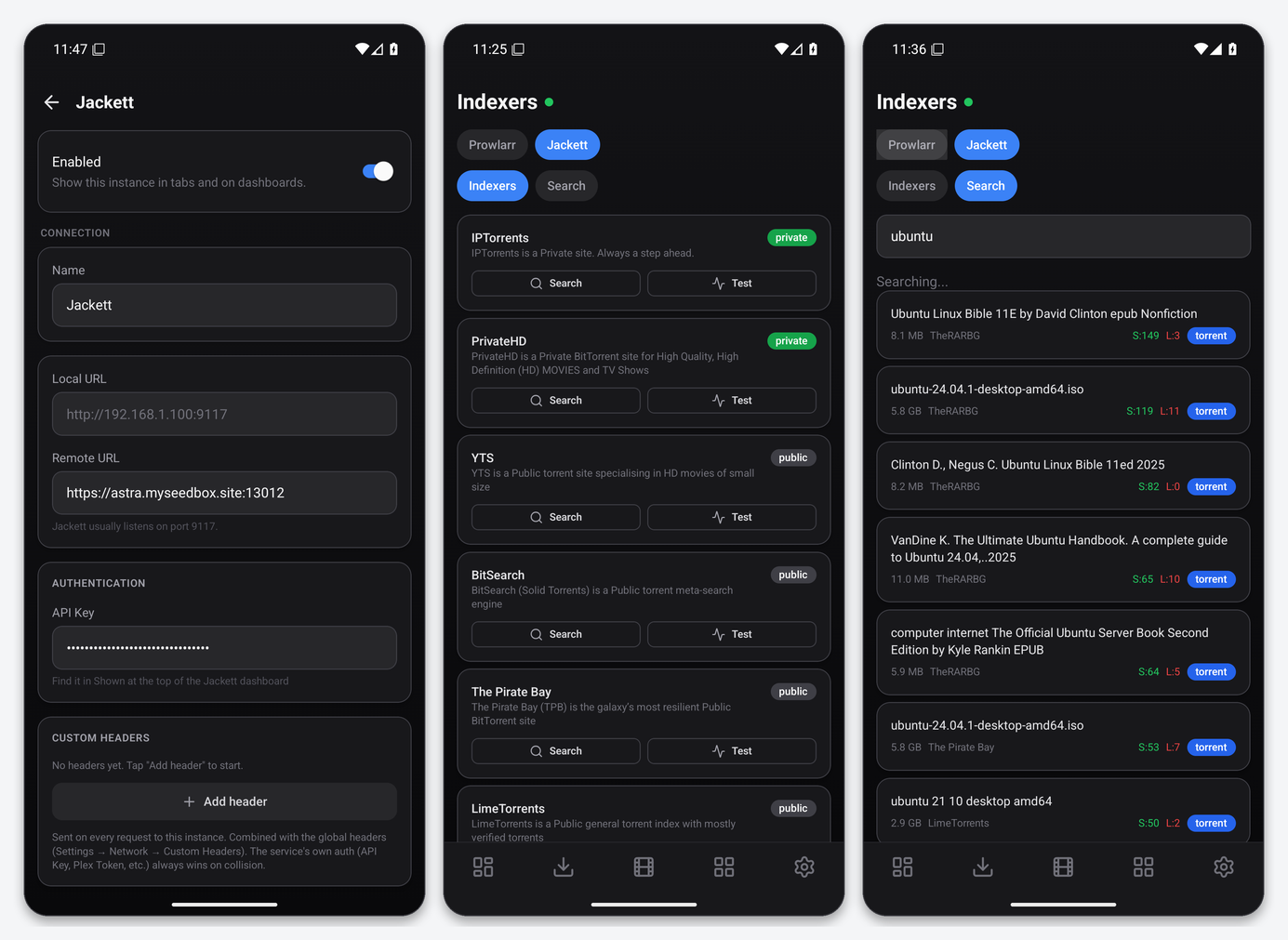
What the Indexers tab gives you
- Indexers: every configured indexer with its type (public, private, semi-private) and description. Search pins that one tracker on the Search tab; Test runs Jackett’s test and reports back.
- Search: one query across all indexers with size, indexer, seeders and leechers. Tap a result to send it to a torrent client you have set up in Dashboarr (your rTorrent instance) or to open its details page.
Because the API key travels in the query string of every Torznab request, Jackett’s URLs are visible to anything that logs URLs. On EvoSeedbox the only party between the phone and Jackett is our TLS proxy, which does not log query strings, but avoid pasting Jackett URLs into chats or tickets with the key attached.
Grabbing to rTorrent
Unlike Prowlarr, Jackett has no download-client concept, so Dashboarr does the hand-off itself: the grab sheet lists your torrent clients and adds the release to the one you pick. The torrent starts in rtorrent’s default download directory with no label; if you use Autotools or label-based sorting in ruTorrent, set the label there afterwards.
Troubleshooting
| Symptom | Fix |
|---|---|
| Invalid API key | Copy it again from the Jackett dashboard header, not from an indexer’s Torznab URL, which carries the same key but is easy to truncate. |
| Search returns nothing | Try one indexer with its Search button. If a single indexer works, another one is timing out; test them one by one. |
| Grab shows no client | Add your rTorrent instance in Dashboarr first (see the rTorrent page); the grab sheet lists only configured torrent clients. |
| Indexer Test fails | Cookie or login expired for a private tracker. Fix it in Jackett’s web UI. |
FAQ
Can I use Jackett and Prowlarr together?
Yes. Both appear under the Indexers tab with a source switcher. Most users migrate to Prowlarr for the health checks and the *arr sync, and keep Jackett for a tracker Prowlarr does not support.
Does Dashboarr show Jackett’s FlareSolverr status?
No. FlareSolverr is configured and monitored in Jackett’s own UI.
← Prowlarr · Dashboarr setup guide · Next: Seerr / Overseerr →
Related articles
Put this into practice
EvoSeedbox ships with one-click app installs and up to 10 Gbps per box.
