Connect SABnzbd to Dashboarr
On this page ▾
To connect SABnzbd to Dashboarr, add a SABnzbd instance with the SABnzbd HTTPS address from your client area as the Remote URL and the API key (not the NZB key) from SABnzbd’s Config → General → Security. The Downloads tab then gains a SABnzbd segment with queue, history, pause/resume, add NZB by URL or file, and a speed limit control. Part of the Dashboarr seedbox setup guide; for setting SABnzbd itself up, see the SABnzbd setup guide.
What you need
| Field in Dashboarr | Value on EvoSeedbox |
|---|---|
| Service | SABnzbd (under Download clients) |
| Local URL | leave empty |
| Remote URL | SABnzbd’s HTTPS address from the app card, https://SERVER.myseedbox.site:13xxx, no /api |
| API Key | SABnzbd → Config → General → Security → API Key. The NZB Key next to it only allows adding jobs and will fail the connection test. |
| Always use Remote URL | on |
SABnzbd’s own login (username and password in Config → General) protects the web UI only; API calls authenticate with the key, so Dashboarr does not need those credentials. Our SABnzbd installs expose the API externally (inet_exposure 4) and accept requests arriving through our HTTPS proxy, which is why no hostname whitelist change is needed.
Step by step
- Copy the API key from SABnzbd → Config → General → Security.
- Dashboarr → Settings → Integrations → Browse services → SABnzbd.
- Remote URL = the HTTPS address, API Key = the key, Always use Remote URL on.
- Test Connection (calls
/api?mode=version), then Save.
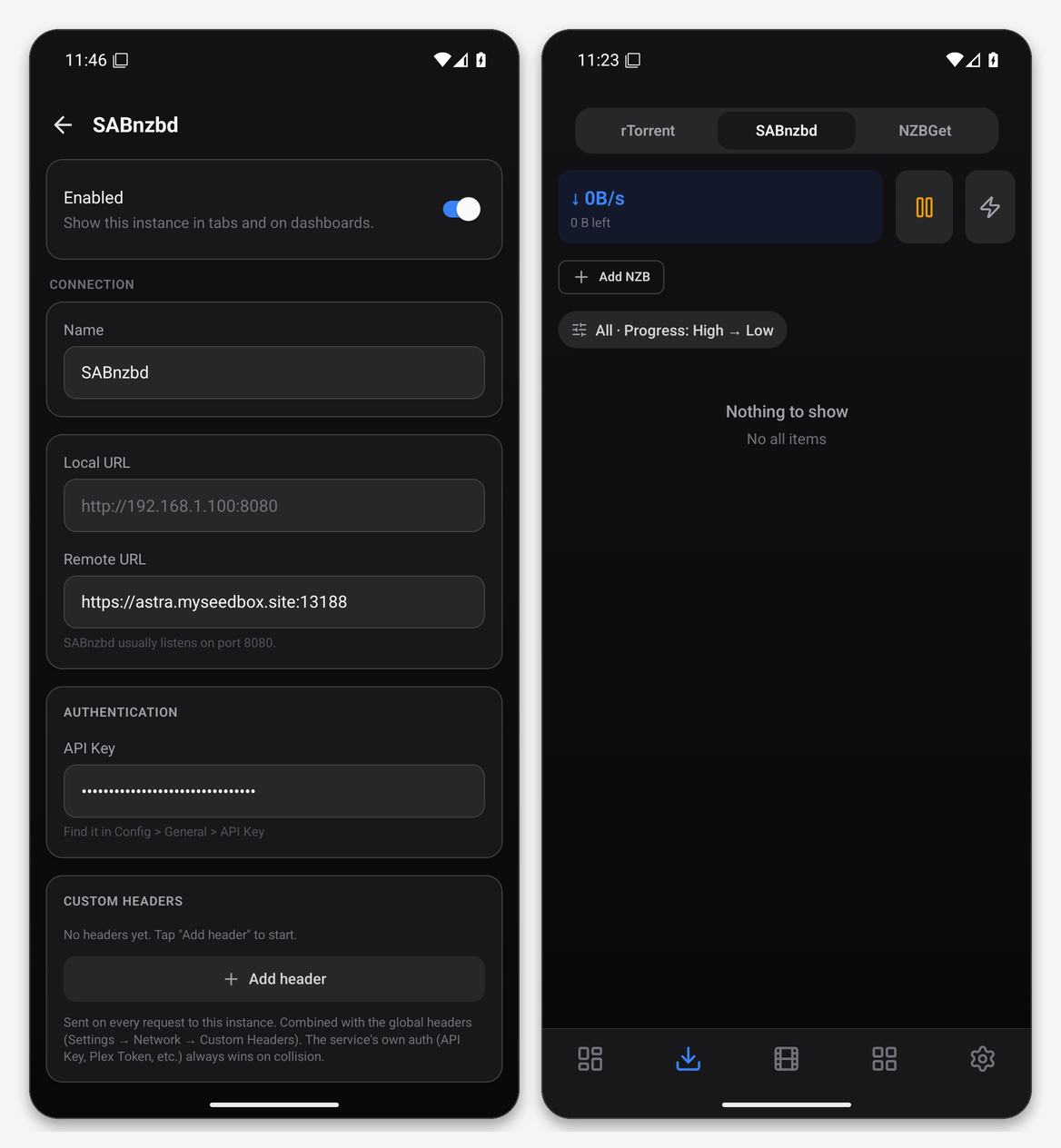
What the Downloads tab gives you
- Queue and history in one list with filter and sort, showing size left, progress and status.
- Speed pill and a Speed limit control (percentage or absolute, as SABnzbd allows).
- Add NZB by URL or by uploading a file from the phone.
- Queue-wide pause and resume plus per-job pause, resume and delete.
Because the API key travels in the query string, treat SABnzbd URLs like passwords when sharing logs or screenshots.
Widgets and notifications
SABnzbd Queue and Usenet Queue (SABnzbd and NZBGet combined) widgets, Speed Stats, and a SABnzbd completed notification when a job finishes while the app is open. Jobs in the radarr and sonarr categories are skipped by that notification because the *arr apps announce them.
Troubleshooting
| Symptom | Fix |
|---|---|
| Invalid API key | You copied the NZB key. Use the API key above it. |
| Access denied / hostname verification failed | You typed the plain-IP address. Use the HTTPS address from the client area. |
| Add NZB by URL fails | SABnzbd itself could not fetch the URL (indexer key or rate limit). Check SABnzbd’s status page. |
FAQ
Categories?
Adding an NZB lets you choose a category from those SABnzbd defines; the list itself is edited in SABnzbd.
SABnzbd 4.x and 5.x?
Both. The test account runs 5.1.
Related articles
Put this into practice
EvoSeedbox ships with one-click app installs and up to 10 Gbps per box.
