Updating evoftp
On this page ▾
An evoftp update is a file swap: download the new build, put it where the old one was, and your servers and settings carry over. evoftp tells you when a new version exists, and you can ask it to check at any time.
Overview: evoftp guide.
What the startup check does
A couple of seconds after the window opens, evoftp fetches one small file, latest.json, from the download folder at neo.myseedbox.site/share/evoftp/. That file lists the newest version number, its date and release notes. The only thing sent with the request is the app’s own version, operating system and CPU type — no account name, no server list, no usage data. If the check fails (offline, firewall) evoftp says nothing and carries on.
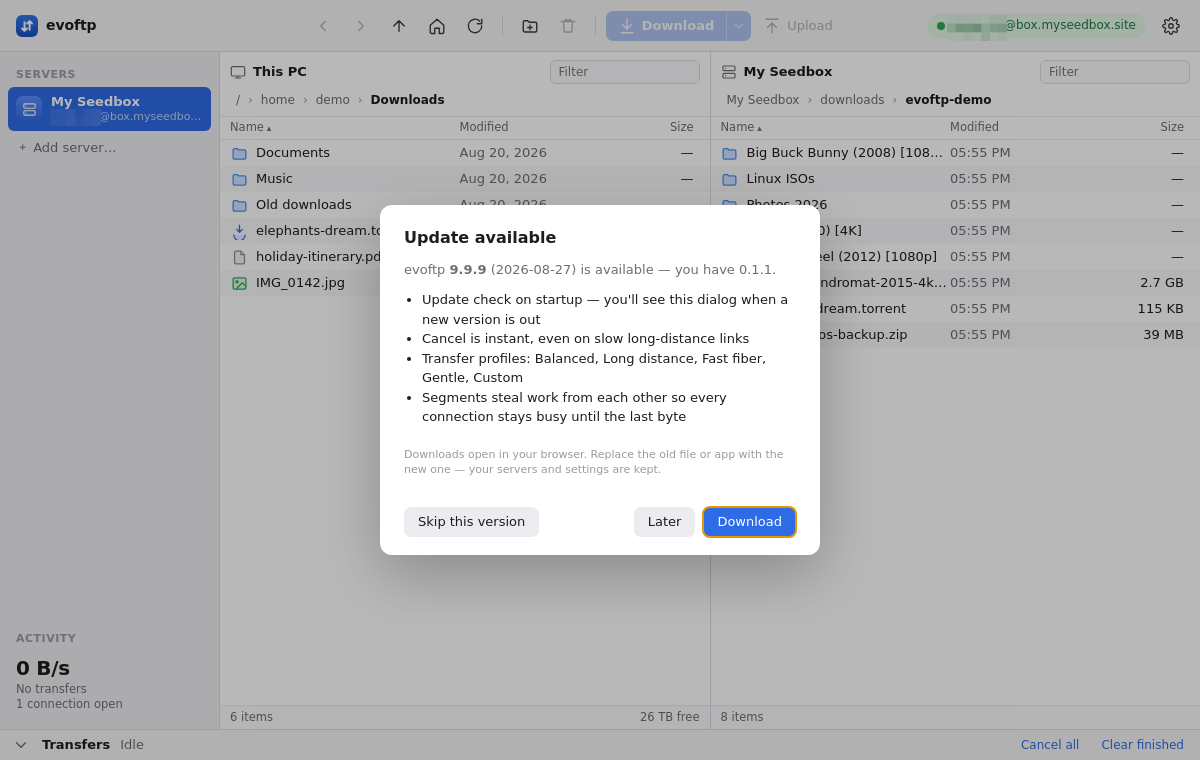
Choosing what to do
When a newer version exists you get a dialog with the release notes and three buttons:
- Download — opens the build for your platform in your browser. Nothing is installed for you.
- Later — closes the dialog; it comes back next time you start the app.
- Skip this version — stays quiet about this version. The dialog returns when the one after it is released.
Installing the new build
- Quit evoftp.
- Windows — replace your
evoftp-windows.exewith the downloaded one, in the same place. Keeping the same location matters:.evoftpfiles point at the exe you launched last. - macOS — unzip, drag the new evoftp app into Applications, and choose Replace. The first launch needs the same right-click → Open (or Open Anyway) as your first install, because the build is not notarised.
- Linux — replace the old
.AppImagewith the new one and make sure it is still executable. - Start evoftp. Your sidebar, settings and saved passwords are all still there — they live in the config folder, not in the program file.
Checking by hand
Open Settings (the gear icon) and click Check for updates at the bottom. This ignores any version you skipped, so it is also the way to get a skipped update back. If you are already current, you get a short “You’re on the latest version” message.
Note: evoftp does not update itself. There is no auto-download or in-place install; you always replace the file.
Overview: evoftp guide.
Related articles
Put this into practice
EvoSeedbox ships with one-click app installs and up to 10 Gbps per box.
