Connect NZBGet to Dashboarr
On this page ▾
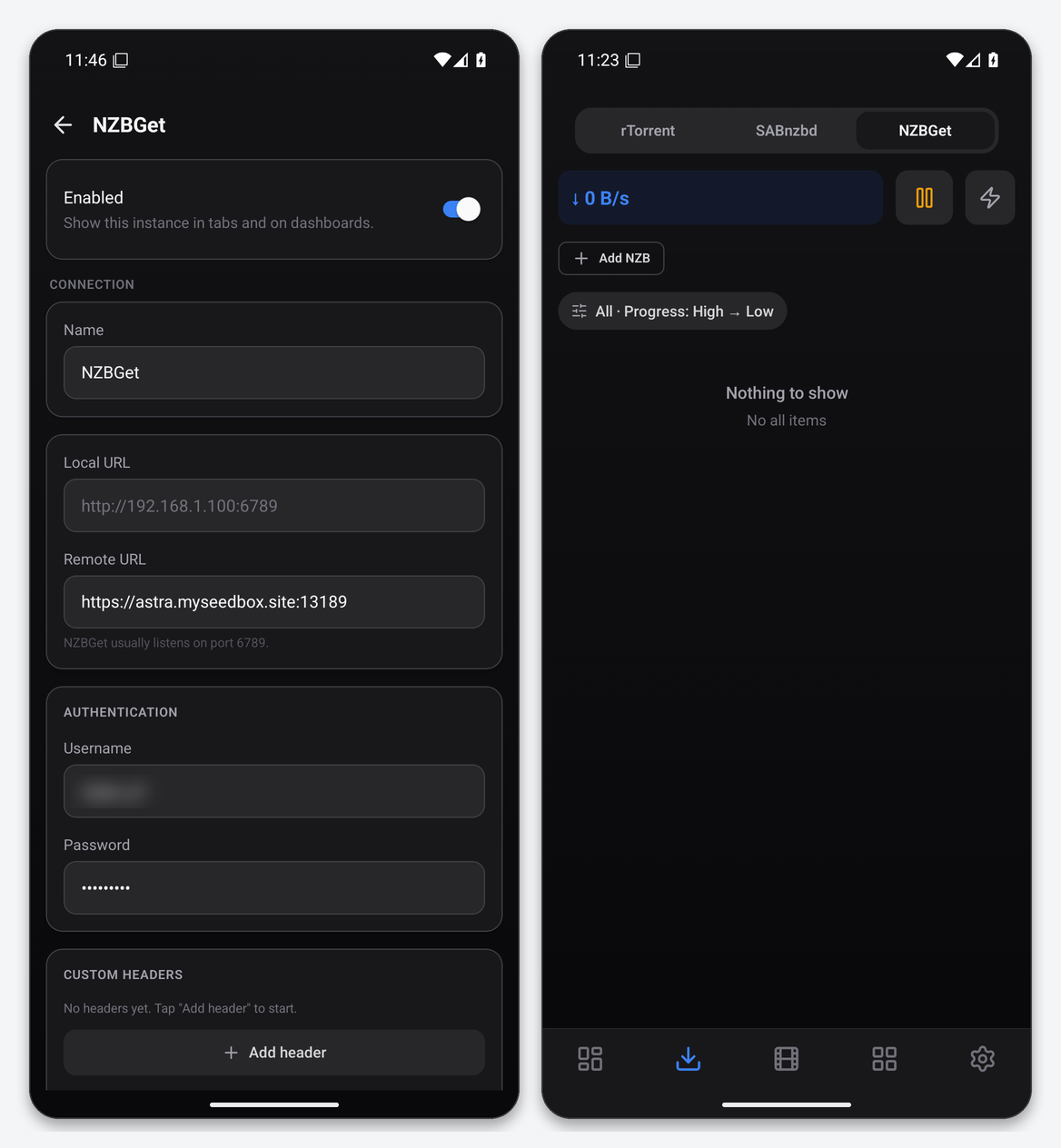
To connect NZBGet to Dashboarr, add an NZBGet instance with the NZBGet HTTPS address from your client area as the Remote URL and the ControlUsername and ControlPassword from NZBGet’s Settings → Security (the same pair the web UI asks for). The Downloads tab gains an NZBGet segment with queue, history, add NZB and a speed limit. Part of the Dashboarr seedbox setup guide; for NZBGet itself see the NZBGet setup guide.
What you need
| Field in Dashboarr | Value on EvoSeedbox |
|---|---|
| Service | NZBGet (under Download clients) |
| Local URL | leave empty |
| Remote URL | NZBGet’s HTTPS address from the app card, https://SERVER.myseedbox.site:13xxx, no /jsonrpc |
| Username / Password | NZBGet → Settings → Security → ControlUsername and ControlPassword. On a fresh EvoSeedbox install these match your seedbox username and password. |
| Always use Remote URL | on |
NZBGet has no API key. Dashboarr sends the control credentials as HTTP Basic (or Digest if asked) on every JSON-RPC call to /jsonrpc. Do not use the RestrictedUsername or AddUsername accounts; they cannot read the full queue.
Step by step
- Confirm the control credentials in NZBGet → Settings → Security.
- Dashboarr → Settings → Integrations → Browse services → NZBGet.
- Remote URL = the HTTPS address, then the username and password, Always use Remote URL on.
- Test Connection (posts the JSON-RPC
versionmethod), then Save.
What the Downloads tab gives you
- Queue and history with progress, size left and status; filter and sort.
- Speed pill and a Speed limit control mapped to NZBGet’s rate setting.
- Add NZB by URL or file upload, with category choice.
- Pause and resume the whole queue, or pause, resume and delete single jobs.
Widgets and notifications
NZBGet Queue and Usenet Queue widgets, Speed Stats, and an NZBGet completed notification for jobs finishing with SUCCESS or WARNING while the app is open (radarr and sonarr categories excluded).
Troubleshooting
| Symptom | Fix |
|---|---|
| Wrong username or password | You changed ControlPassword in NZBGet after installation. Use the current value from Settings → Security. |
| Test passes, queue empty | Nothing is downloading; the history filter shows completed jobs. |
| Speed limit not applied | NZBGet caps at the value in Settings → Connection; the app cannot exceed it. |
FAQ
SABnzbd or NZBGet with Dashboarr?
Feature parity is close: both get queue, history, add, speed limit and completion alerts. Pick by your own preference; the SABnzbd and NZBGet guides compare them.
Can I use a restricted NZBGet user instead of the control account?
No. Dashboarr needs the full queue and history, which only ControlUsername can read. RestrictedUsername and AddUsername accounts fail the connection test.
Related articles
Put this into practice
EvoSeedbox ships with one-click app installs and up to 10 Gbps per box.
