Evoseedbox Evoseedbox Evoseedbox Evoseedbox
  • English
    • Nederlands (Dutch)
    • Français (French)
    • Deutsch (German)
    • 日本語 (Japanese)
    • 한국어 (Korean)
    • Português (Portuguese (Portugal))
    • Español (Spanish)
    • العربية (Arabic)
    • Русский (Russian)
    • Türkçe (Turkish)
  • Home
  • Wiki
  • Forum
  • Pricing
Client Area

Getting Started

12
  • Basics of Getting Started
  • Login Details
  • FTP Credentials
  • Choosing a Seedbox Plan
  • How to Use Your Seedbox Dashboard
  • How to Reset Your Seedbox
  • How to Restart Your Seedbox
  • Unavailable Applications in Seedbox
  • Getting Started with One-Click Installs
  • How to Update an App
  • What Is a Seedbox? Complete Beginner’s Guide
  • Understanding Seedbox Architecture

ruTorrent

18
  • ruTorrent – Getting Started
  • How to Log into ruTorrent
  • Adding a Torrent to Your Seedbox
  • Fix Torrent with a Red Cross Error
  • Guide to Increase Download and Upload Queues in ruTorrent
  • Restarting ruTorrent on Seedbox
  • How to Change Your ruTorrent Client Password
  • How to Create Torrents Using ruTorrent
  • Extracting an Archive with ruTorrent
  • Creating an Archive with ruTorrent
  • Using Watch Folder for Large Torrents
  • Setting Up Irssi with ruTorrent
  • Chrome Remote Torrent Adder
  • Firefox Torrent Control Remote Torrent Adder
  • MediaStream Plugin User Guide
  • AutoTools: Auto-Move Completed rTorrent Downloads
  • Torrent Seeding Rules and Upload Limits Explained
  • Common ruTorrent Errors and How to Fix Them

File Management

17
  • How to Transfer Data from a Previous Provider to Your Seedbox via FTP
  • How to Get Faster FTP Downloads
  • How to Get Maximum Transfer Speed Using FTP in FileZilla
  • Why Do I Have Slow FTP Download Speeds?
  • Sync Files Between Your Seedbox and PC
  • How to Access Your Seedbox Files Using HTTP Access
  • How to Transfer Files from Your Seedbox to Google Drive
  • Rclone Google Drive Setup
  • Duplicati Backup Setup
  • FileBot – Renaming Files
  • SCP File Transfer Guide: Copy Files To and From Your Seedbox
  • Rclone Browser: Visual File Management for Cloud Sync
  • Create Additional FTP Users on Your Seedbox
  • Mount Your Seedbox via SSHFS and WebDAV
  • Filegator: Web File Manager for Your Seedbox
  • SFTP Setup Guide: Secure File Transfer for Your Seedbox
  • How to Use BTSync with Your Seedbox

Streaming

20
  • How to Use Secure Server Connections in Plex
  • How to Add Libraries in Plex and Synchronize Your Streaming Content
  • Synclounge Setup Guide
  • Tautulli Setup Guide
  • How to Stream Videos from Seedbox on VLC
  • How to Use Emby with Your EvoSeedbox
  • How to Use Peerflix with Your EvoSeedbox
  • How to Stream from Seedbox with Kodi (Complete Setup Guide)
  • Improving Plex Server Performance on Your Seedbox
  • 4K Plex Streaming Guide for Seedbox Users
  • Automatic Plex Collections: Organize Your Library in 6 Steps
  • Plex Library Permissions and User Management on Seedbox
  • HandBrake Guide: Video Encoding on Your Seedbox
  • Understanding Video Codecs: H.264 vs H.265 for Seedbox Users
  • Create a Self-Hosted Streaming Service on Your Seedbox
  • Naming Your Plex Media Server Correctly
  • Audiobookshelf: Self-Hosted Audiobook Server on Your Seedbox
  • Navidrome: Self-Hosted Music Streaming on Your Seedbox
  • How to Connect Jellyfin with Your Seedbox
  • Setting Up Plex on Your Seedbox

Automation

18
  • How to Use Lidarr with Your EvoSeedbox
  • What is Medusa and How to Use It with Your Seedbox
  • Ombi Setup Guide
  • Requestrr Part 1 – Setting Up the Discord Bot
  • Getting Started with Overseerr on Your Seedbox
  • Bazarr Setup Guide: Automatic Subtitles for Your Seedbox
  • Readarr Setup Guide: Automate Ebook Downloads on Your Seedbox
  • Remote Path Mapping Explained: Fix Sonarr and Radarr Import Errors
  • Sonarr and Radarr Quality Settings Guide (Including 4K)
  • Quick Setup: Complete *arr Stack (Sonarr + Radarr + Prowlarr + Deluge)
  • Connect Home Sonarr/Radarr to Your Remote Seedbox
  • Prowlarr Setup: Unified Indexer Manager for Your Seedbox
  • Autobrr Setup: Automated Torrent Grabbing for Your Seedbox
  • Jellyseerr Setup: Media Requests for Jellyfin on Your Seedbox
  • How to Use Radarr with Your Seedbox
  • Setting Up Sonarr on Your Seedbox
  • How to Use Jackett with Your Seedbox
  • How to Use CouchPotato with Your Seedbox

Apps & Tools

24
  • Beginner’s Guide to Nextcloud
  • Calibre Setup Guide
  • How to Set Up ZNC
  • Electorrent Setup Guide
  • What is JDownloader and How to Use It
  • What is Pyload and How to Use It
  • Mattermost Guide
  • Setting Up TeamSpeak
  • NZB360 Android App Setup
  • Installing and Setting Up Clarkson
  • Evobot User Guide
  • The Definitive Guide to Deluge on Your Seedbox (2026)
  • Seedbox Remote Desktop: X2Go and noMachine Setup Guide
  • Docker for Beginners: A Seedbox User’s Guide
  • NZBGet Setup Guide: Usenet Downloads on Your Seedbox
  • SyncThing Setup: Peer-to-Peer File Sync for Your Seedbox
  • Portainer Setup: Manage Docker Containers on Your Seedbox
  • SABnzbd Setup Guide: Usenet Downloads on Your Seedbox
  • Homarr: Dashboard for All Your Seedbox Apps
  • Calibre-Web: Access Your Ebook Library from Anywhere
  • Docker App Management: How Your Seedbox Apps Work
  • Deemix Setup Guide
  • OwnCloud Setup Guide
  • How to Use Subsonic with Your EvoSeedbox

Networking & VPN

13
  • OpenVPN Connect Setup
  • Reroute Your Seedbox
  • OpenSSH Tutorial
  • WireGuard VPN Setup: Complete Guide for Every Platform
  • Linux Basics for Seedbox Users: Essential Commands
  • SSH Key Authentication: Passwordless Login to Your Seedbox
  • Nano Text Editor Guide for Seedbox Users
  • SSL Certificate Setup for Seedbox Web Services
  • Seedbox Speed Test: Monitor Your Performance with LibreSpeed
  • Understanding and Managing Your Seedbox Bandwidth
  • Split Tunneling with WireGuard on Android
  • Authelia: How Authentication Works on Your Seedbox
  • WireGuard VPN Setup: Connect Securely to Your EvoSeedbox

Troubleshooting

4
  • Why You Are Not Able to Access Your Seedbox
  • 5 Quick Troubleshooting Tips for Your Seedbox
  • Understanding Disk Usage and Quotas on Your Seedbox
  • Why Is My Seedbox Slow?

Account & Billing

1
  • How to Terminate My Service
View Categories
  • Home
  • Docs
  • Getting Started
  • Basics of Getting Started

Basics of Getting Started

2 min read

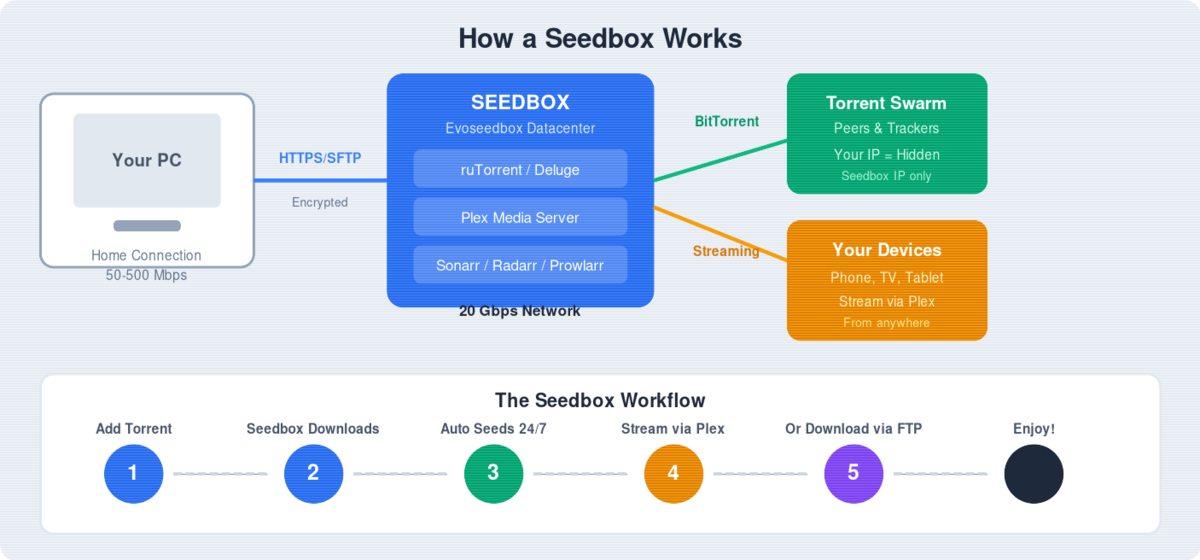
Diagram showing how a seedbox works

All apps including rutorrent interface have the same username and password as hidden in the image below.

Please ensure to copy your credentials properly to ensure smooth login.

Login Details

The seedbox control dashboard is the place from where you can access your seedbox. You can add/ remove apps, use rutorrent , monitor your seedbox.Through this article we’ll guide you how to use seedbox dashboard.

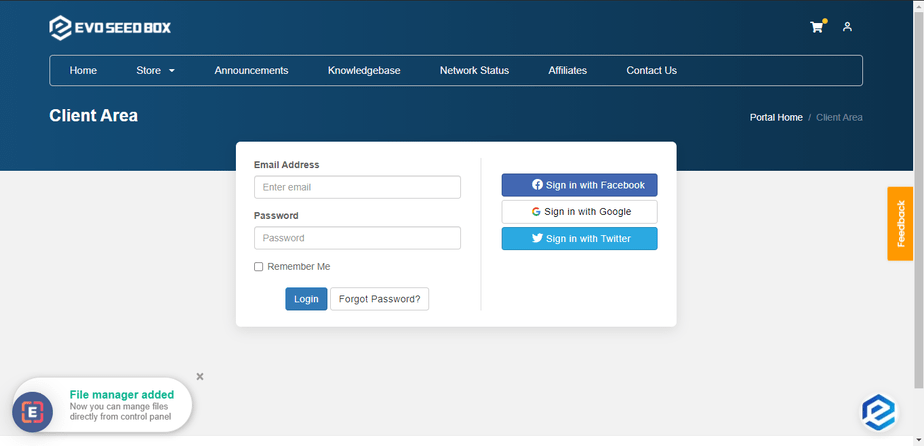
  • You can access your dashboard using the link and password provided in the Welcome to Evoseedbox email.

    Login window is shown as below:

How To Use Your Seedbox Dashboard

Enter your login credentials as provided in the email and press on log-in

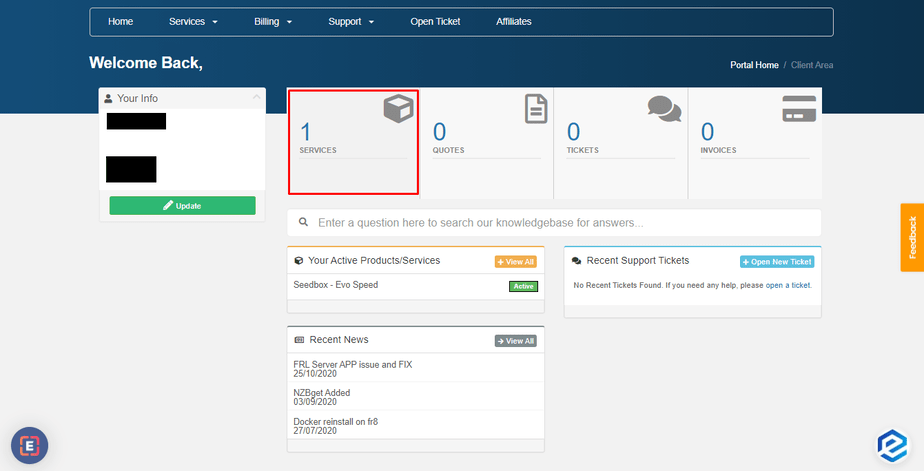
After successful login, you will see the client area where you can see the overview of your account. Details like a number of services, product quotes, support tickets opened, and invoices provided in the client area.

How To Use Your Seedbox Dashboard

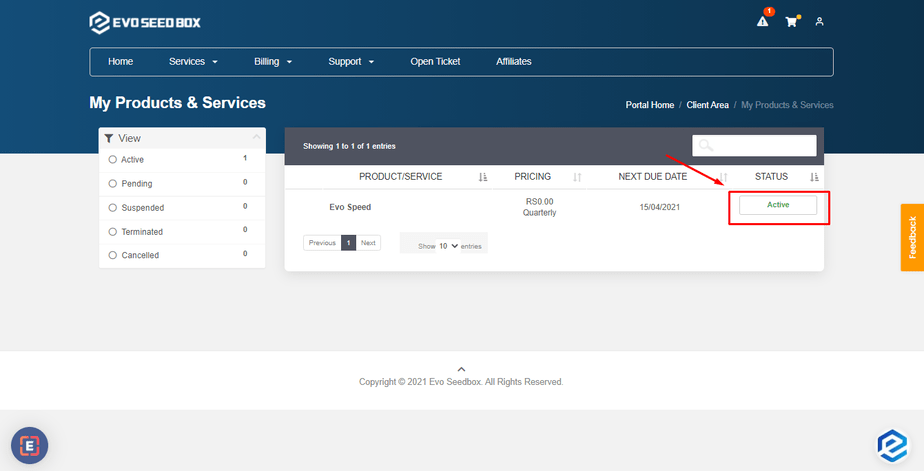
Click on the services tab to open the currently available services and click on the service status to open the desired service.

How To Use Your Seedbox Dashboard

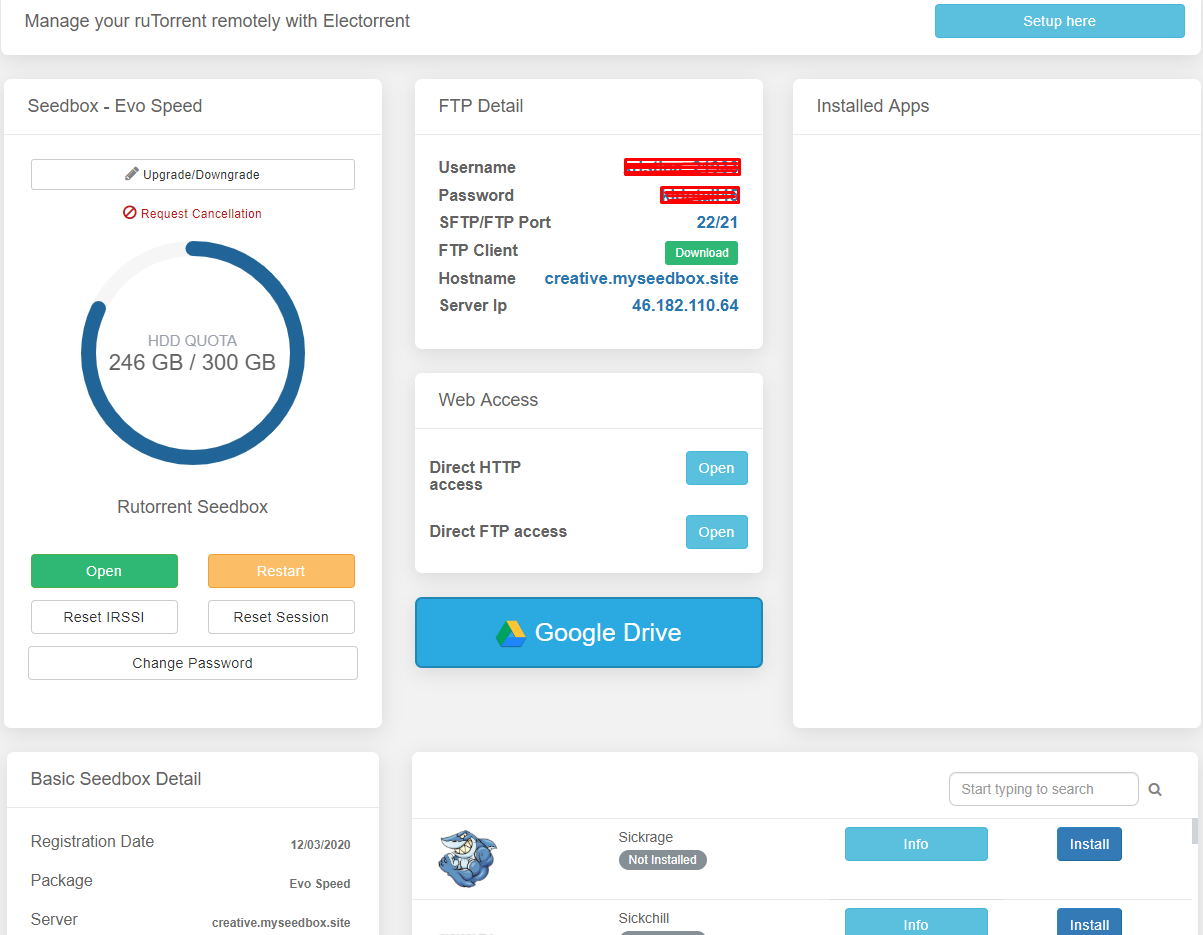
The next window that you see is the dashboard of your seedbox where you can look and access  various details from your plan  to the HDD quota and other useful information

  • Upload data limit details.

How To Use Your Seedbox Dashboard

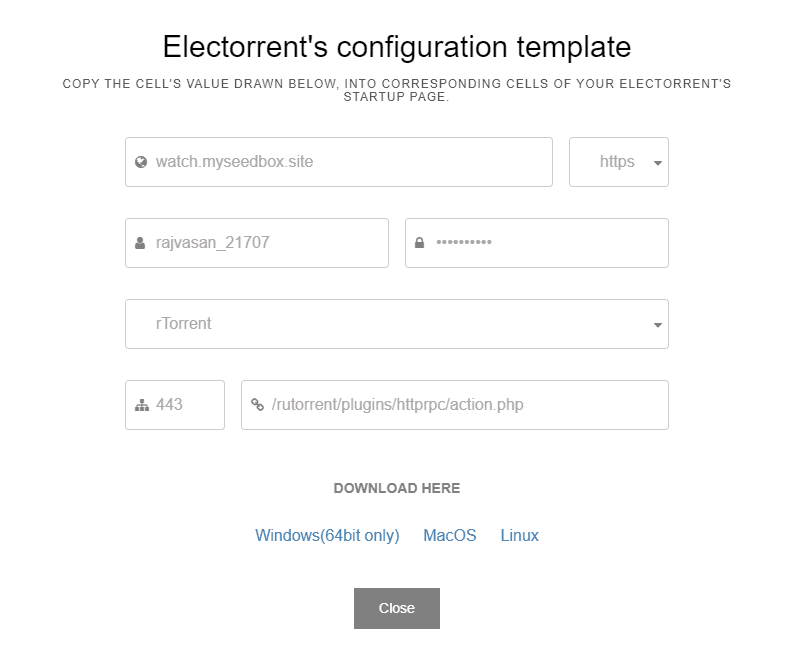
  •  Setting up Electorrent – Guide to setup electorrent on your PC connected to rutorrent on the seedbox so that you can manage your torrents without explicitly accessing rutorrent.

How To Use Your Seedbox Dashboard

How To Use Your Seedbox Dashboard

  • Accessing your control panel.
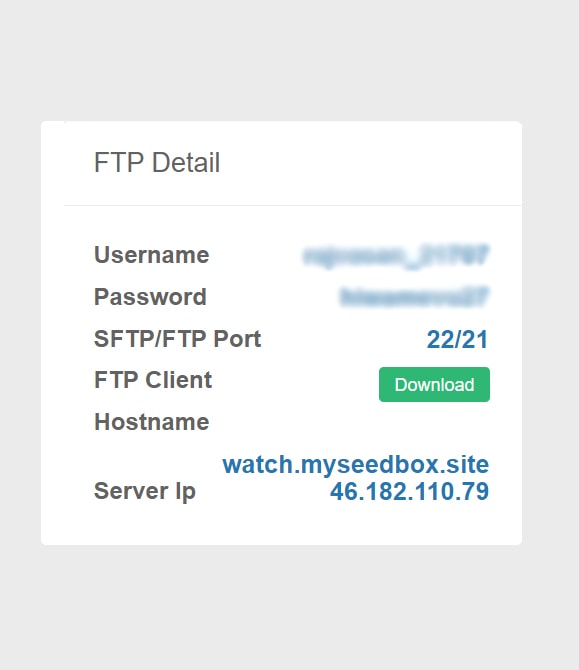
    • FTP details
      • Username
      • Password
      • SFTP/FTP port
      • FTP client – You can download LFTP client for seedbox access by clicking on the download button.
      • Hostname

How To Use Your Seedbox Dashboard

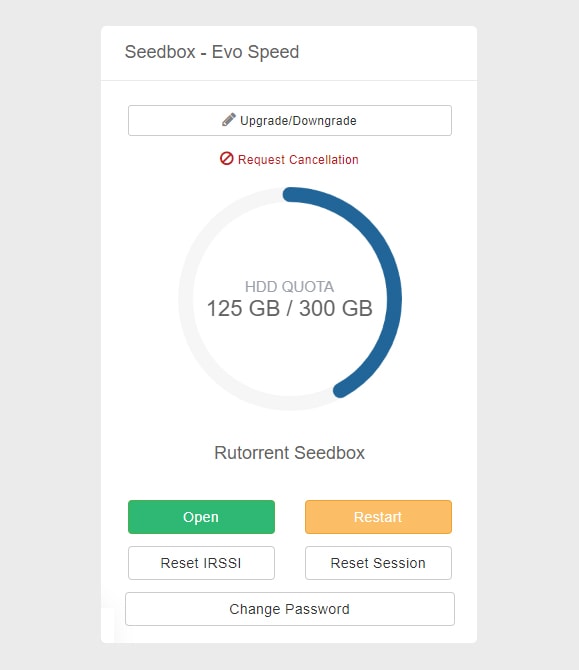
Ru-torrent

  • Upgrade/Downgrade – Used for plan upgrade and downgrade.
  • HDD Quota – Gives details about the current HDD usage.
  • Open/ Restart rutorrent 
  • Reset IRSSI – Used for any error pertaining to torrent download
  • Reset Session – Resets rutorrent which clears currently added torrents
  • Change Password – Used for resetting Rutorrent password.

How To Use Your Seedbox Dashboard

  • Web Access:It provides all the methods by which you can access the files on the seedbox directly from your machine.
    • File Manager – Opens file gator file manager
    • Direct HTTP access – Provides direct browser-based HTTP access to your seedbox.
    • Direct FTP access –  Provides FTP client-based access to your seedbox. In our current plans, Filezilla and lftp(Winscp) are being offered.
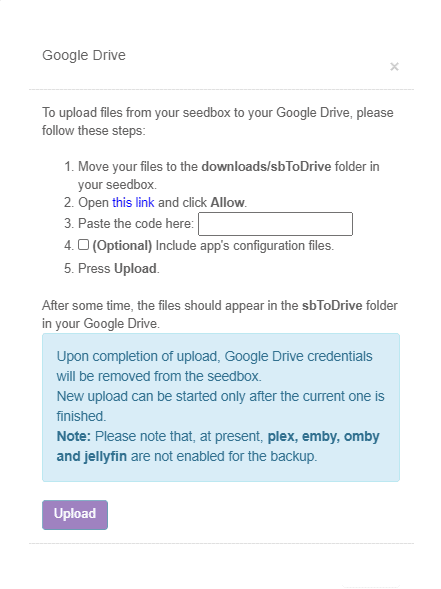
  • Google Drive:  This button is used o setup google drive for uploading files from seedbox to your google drive.

How To Use Your Seedbox Dashboard

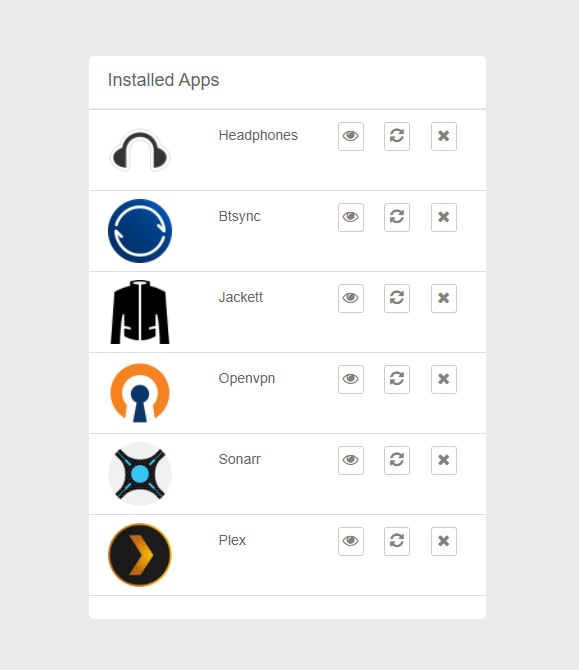
Installed Apps: It lists and provides access to the installed apps.You can also restart and remove the apps from this section itself. 

How To Use Your Seedbox Dashboard

Help/Knowledge Base: Opens the starters guide to Evoseedbox. It gets you along with the basics of rutorrent , Apps Tutorials, and common error fixes.

How To Use Your Seedbox Dashboard

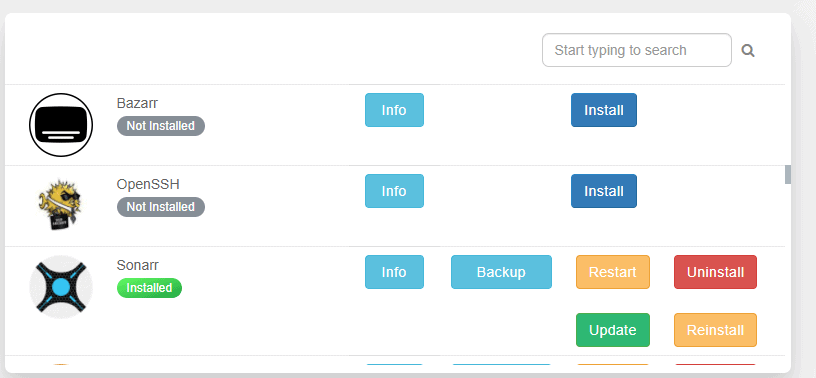
Apps Section: It provides all the apps available in your plan and you can install any app with one-click.You can also search for an using the search section. It also has options to install, reinstall, and uninstall the app while keeping the config and removing the existing config.
You can also update the app from here just with one-click. If you want to back-up the existing config you can do so by clicking on the back-up option.

How To Use Your Seedbox Dashboard

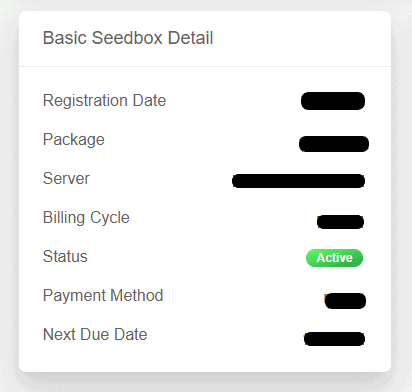
Basic Seedbox details:

  • Registration Date
  • Package
  • Server
  • Billing cycle
  • Status
  • Payment method
  • Next due date

How To Use Your Seedbox Dashboard

Services Tab: It lists all the services available and you can also order new services from here.
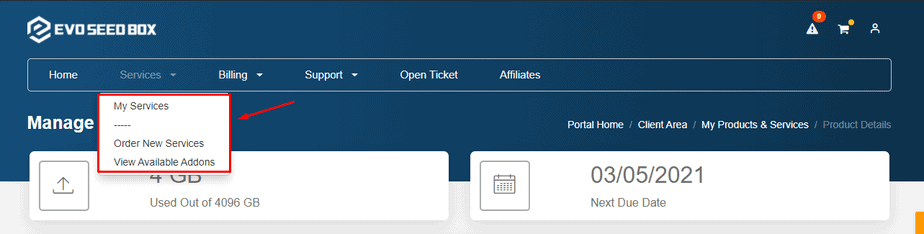
How To Use Your Seedbox Dashboard

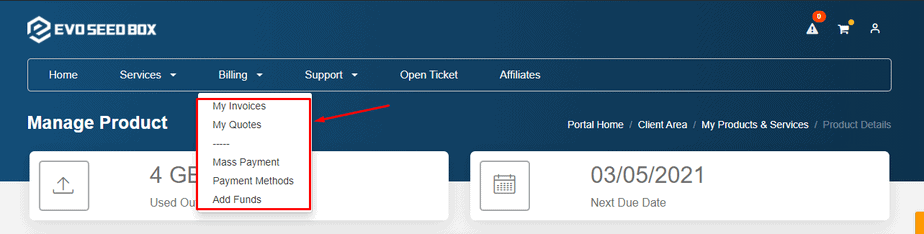
Billing Tab: It provides details of all the invoices, your quotes,  mass payment and payment methods. You can also add funds from here.

How To Use Your Seedbox Dashboard

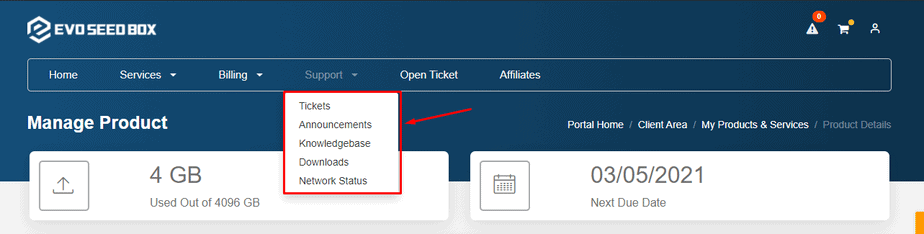
Support Tab :  From this tab you can see the status of all the tickets raised .See the latest announcements and refer to our knowledge base for guidance. You can also see the network status and downloads.

How To Use Your Seedbox Dashboard

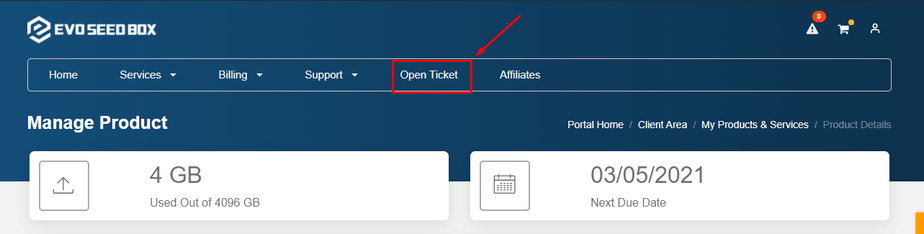
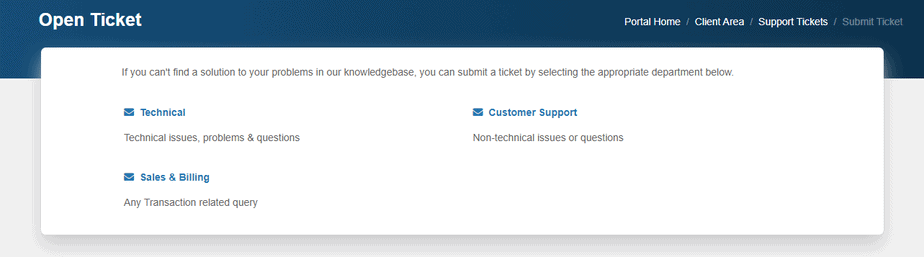
Open Ticket: From  here you can raise  a ticket if you have any technical issue or a billing related query or a general customer support query.

How To Use Your Seedbox Dashboard

How To Use Your Seedbox Dashboard

Updated on March 15, 2026

What are your Feelings

  • Happy
  • Normal
  • Sad

Share This Article :

  • Facebook
  • X
  • LinkedIn
  • Pinterest
Understanding Seedbox ArchitectureLogin Details

We create amazing Seedboxes
for everyone to use 😊

Important Links

Scholarship for CS

Refund Policy

Privacy Policy

Terms of service

Cookie Policy

Acceptable Use Policy

Get in Touch

Contact Us

[email protected]

© 2025 Evoseedbox | All rights reserved. By Evo Created with ❤️

  • Nederlands (Dutch)
  • English
  • Français (French)
  • Deutsch (German)
  • 日本語 (Japanese)
  • 한국어 (Korean)
  • Português (Portuguese (Portugal))
  • Español (Spanish)
  • العربية (Arabic)
  • Русский (Russian)
  • Türkçe (Turkish)
Evoseedbox
  • English
    • Nederlands (Dutch)
    • Français (French)
    • Deutsch (German)
    • 日本語 (Japanese)
    • 한국어 (Korean)
    • Português (Portuguese (Portugal))
    • Español (Spanish)
    • العربية (Arabic)
    • Русский (Russian)
    • Türkçe (Turkish)
  • Home
  • Wiki
  • Forum
  • Pricing
Client Area