evoads on Linux: systemd-resolved DNS-over-TLS Setup
On this page ▾
Linux has no evoads app with a window, and it does not need one. Every current distribution ships systemd-resolved, which speaks DNS-over-TLS natively and can present your ClientID to the resolver. This page covers the systemd-resolved setup for Ubuntu, Debian, Fedora and Arch, the NetworkManager variant, the evoads command-line resolver for distributions without resolved, and how to verify.
Your keys
From the evoads panel in your client area you need the Private DNS hostname, which looks like evo-….dns.evoseedbox.com. The part before .dns.evoseedbox.com is your ClientID; the resolver refuses lookups that arrive without it, which is what keeps it from being an open resolver.
Option 1: systemd-resolved (recommended)
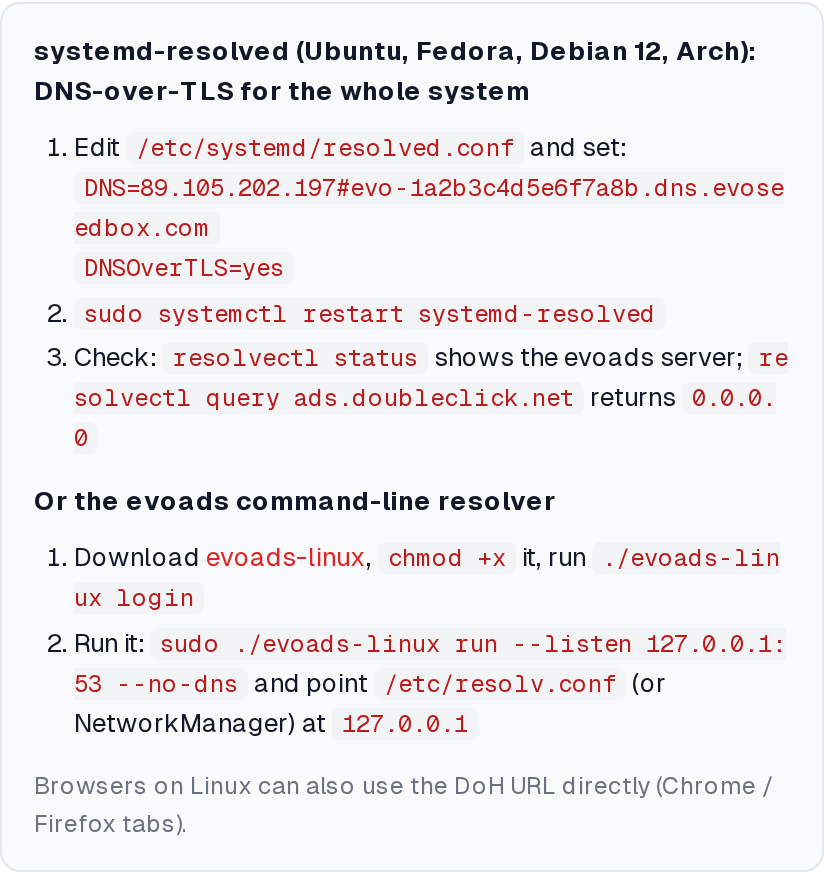
systemd-resolved accepts a DNS server as IP#hostname, where the hostname is used for the TLS certificate check and sent as the server name. evoads reads the ClientID from that server name.
- Edit
/etc/systemd/resolved.conf(or drop a file in/etc/systemd/resolved.conf.d/evoads.conf) and set, replacing the hostname with yours:[Resolve] DNS=89.105.202.197#evo-YOURID.dns.evoseedbox.com FallbackDNS= DNSOverTLS=yes Cache=yes - Restart:
sudo systemctl restart systemd-resolved - Make sure the system actually uses resolved:
ls -l /etc/resolv.confshould point at/run/systemd/resolve/stub-resolv.conf. On distributions where it does not, runsudo ln -sf /run/systemd/resolve/stub-resolv.conf /etc/resolv.conf.
DNSOverTLS=yes is strict: if the resolver is unreachable, lookups fail rather than falling back to plain DNS from your ISP. Use DNSOverTLS=opportunistic if you prefer availability over guaranteed filtering.
You can list several evoads nodes for redundancy, each with the same hostname suffix, for example 89.105.202.197#evo-YOURID.dns.evoseedbox.com 89.105.202.138#evo-YOURID.dns.evoseedbox.com.
NetworkManager per connection
If NetworkManager manages your connections and hands DNS servers to resolved, set them on the connection instead so they are not overwritten by DHCP:
nmcli connection modify "Wi-Fi name" ipv4.dns "89.105.202.197#evo-YOURID.dns.evoseedbox.com" ipv4.ignore-auto-dns yes
nmcli connection modify "Wi-Fi name" ipv6.ignore-auto-dns yes
nmcli connection up "Wi-Fi name"
With DNSOverTLS=yes set globally in resolved.conf, resolved uses TLS for those servers.
Option 2: the evoads command-line resolver
For systems without systemd-resolved, or when you want DNS-over-HTTPS instead of TLS, the same resolver that powers the desktop apps is available as a single static binary:
curl -L -o evoads https://evoseedbox.com/dl/evoads/linux && chmod +x evoads(x86-64)./evoads loginand enter your seedbox username and password; the ClientID is stored under~/.config/evoads/.- Run it as a local resolver:
sudo ./evoads run --listen 127.0.0.1:53 --no-dns. The--no-dnsflag tells it not to try to change system settings, which it only knows how to do on Windows and macOS. - Point the system at it:
nameserver 127.0.0.1in/etc/resolv.conf, or127.0.0.1as the DNS server in NetworkManager with auto-DNS ignored.
To keep it running, wrap it in a systemd unit:
[Unit]
Description=evoads local resolver
After=network-online.target
[Service]
ExecStart=/usr/local/bin/evoads run --listen 127.0.0.1:53 --no-dns
Restart=always
[Install]
WantedBy=multi-user.target
Verify
resolvectl status            # shows the evoads server and "DNSOverTLS: yes"
resolvectl query ads.doubleclick.net   # -> 0.0.0.0
dig example.com               # normal answer
Or open evoseedbox.com/evoads-check in a browser. Firefox’s own DNS-over-HTTPS setting (Settings → Privacy & Security → DNS over HTTPS) bypasses the system resolver if enabled; set it to Off or use your evoads DoH URL as a custom provider.
Browsers only
If you only want one browser filtered, paste your DNS-over-HTTPS URL from the panel into Firefox (Max Protection → Custom) or Chrome (Use secure DNS → Custom). Nothing else on the machine changes.
Troubleshooting
resolvectl shows “DNSSEC validation failed” or timeouts
Check the hostname: a typo in the ClientID makes the TLS name mismatch and resolved refuses the server. Copy it from the panel again.
Docker or a VPN keeps rewriting resolv.conf
Set the servers on the NetworkManager connection (above) or lock resolv.conf to the resolved stub. WireGuard to your seedbox already uses evoads inside the tunnel.
Servers hosted elsewhere
The same systemd-resolved configuration works on a VPS or home server. Do not point a whole office or a public hotspot at your personal ClientID; it is tied to your account and subject to the per-account rate limit.
Related articles
Put this into practice
EvoSeedbox ships with one-click app installs and up to 10 Gbps per box.
