Prowlarr Settings Explained: Indexers, Apps, Sync Profiles and Limits
On this page ▾
This is the setting-by-setting reference for Prowlarr as installed on an EvoSeedbox: the indexer options you see when adding a tracker, the Apps tab that pushes indexers to Sonarr, Radarr and Lidarr, sync profiles, download clients, indexer proxies, notifications and the General tab, each with its default and the value that suits a seedbox. Labels and help text were captured from the running app with Show Advanced on. Choosing indexers and the first Prowlarr-to-app link are covered in the Prowlarr guide; this page explains every knob after that.
How Prowlarr’s settings fit together
Prowlarr holds one copy of each indexer. The Apps tab lists the *arr applications it pushes those indexers to, and a Sync Profile on each indexer decides which of the three search paths (RSS, automatic, interactive) the apps may use it for. Nothing you set on an indexer inside Sonarr or Radarr survives the next sync; change it in Prowlarr.
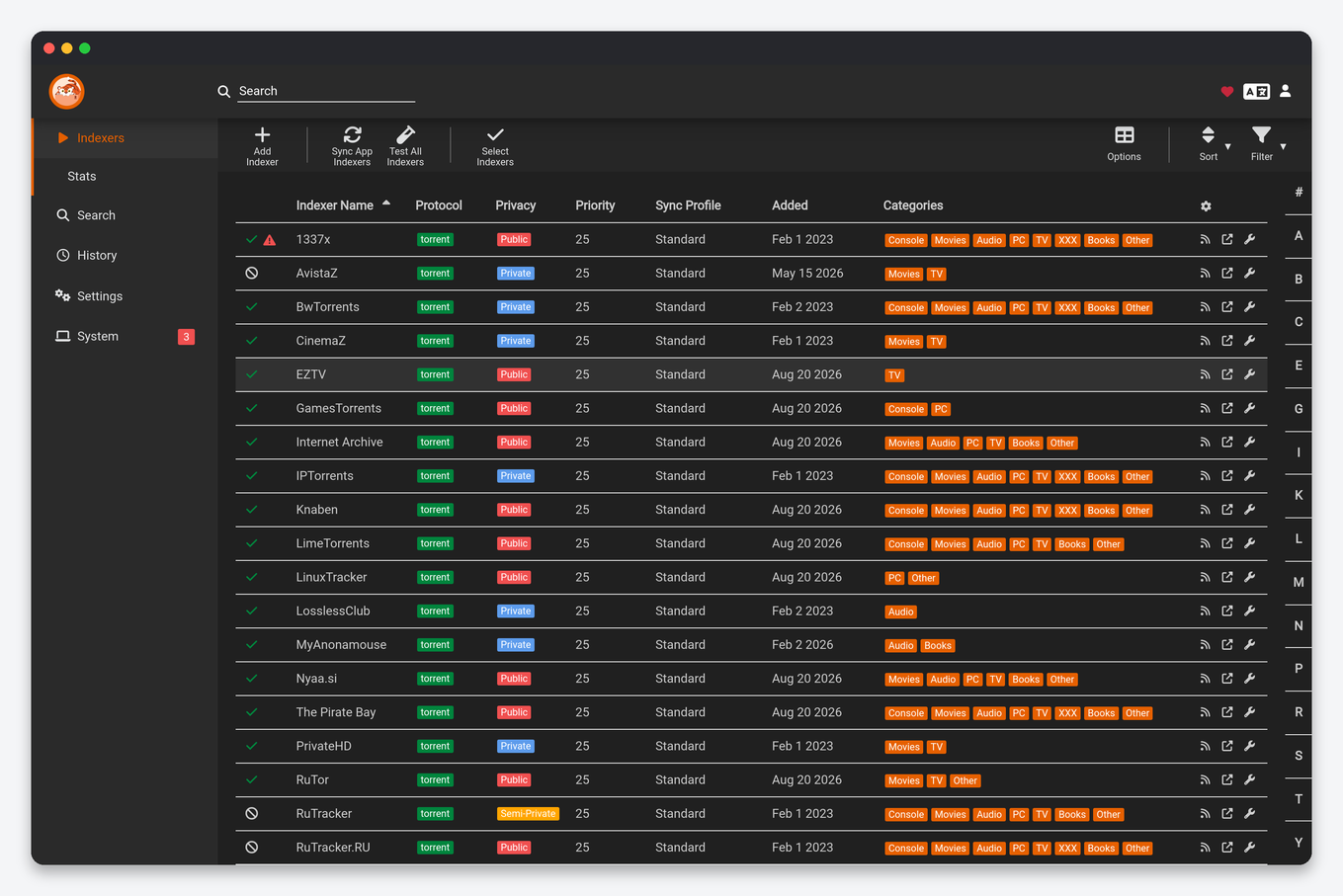
Indexer settings (when adding or editing a tracker)
| Setting | What it does | Seedbox |
|---|---|---|
| Enable | Whether Prowlarr queries this indexer at all. | Disable a broken tracker instead of deleting it; the apps keep their copy disabled too. |
| Redirect | Send the app straight to the tracker’s download link instead of proxying the grab through Prowlarr. | Off. Proxying through Prowlarr keeps stats and lets it retry. |
| Sync Profile | Which profile (below) governs RSS, automatic search and interactive search for this indexer. | Standard for private trackers; a “search only” profile for slow public ones. |
| Base URL | The tracker mirror to use, from the definition’s list. | Leave; change only when a mirror dies. |
| Username / Password / API key / Cookie | The tracker credentials, which vary per definition. Some trackers need a passkey or RSS key rather than a login. | Use a dedicated API or RSS key where the tracker offers one, so a leak does not expose your login. |
| Freeleech only | Only return releases flagged freeleech (definition-dependent). | On for ratio-sensitive private trackers until your buffer is comfortable. |
| Minimum Seeders | Reject releases with fewer seeders; pushed to the apps. | 3 public, 1 private. |
| Seed Ratio / Seed Time / Pack Seed Time | Seeding targets pushed to the apps and on to rTorrent; empty uses the client’s defaults. | Set to the tracker’s rule so nothing stops seeding early. Packs (season, discography) longer. |
| Indexer Priority | 1 (highest) to 50; used as a tiebreaker by the apps between otherwise equal releases. | Private 10, public 30. |
| Query Limit / Grab Limit / Limits Unit | Cap the number of searches and grabs per day or per hour that Prowlarr will send to this indexer. | Match the tracker’s published API limits (for example 100 queries and 50 grabs per day). Prowlarr stops at the cap; without it a mis-configured Radarr can get you banned. |
| Download Client | Pin grabs from this indexer to one client. | Empty. |
| Tags | Only apps whose Apps entry carries the same tag receive this indexer. | Tag an anime tracker anime and give the tag to Sonarr’s Apps entry only, so Radarr never sees it. |
The definition-specific block (categories, search type, language, “search by IMDb id”) comes from Prowlarr’s Cardigann YAML and differs per tracker; the “Test” button validates credentials and shows how many results a probe search returned.
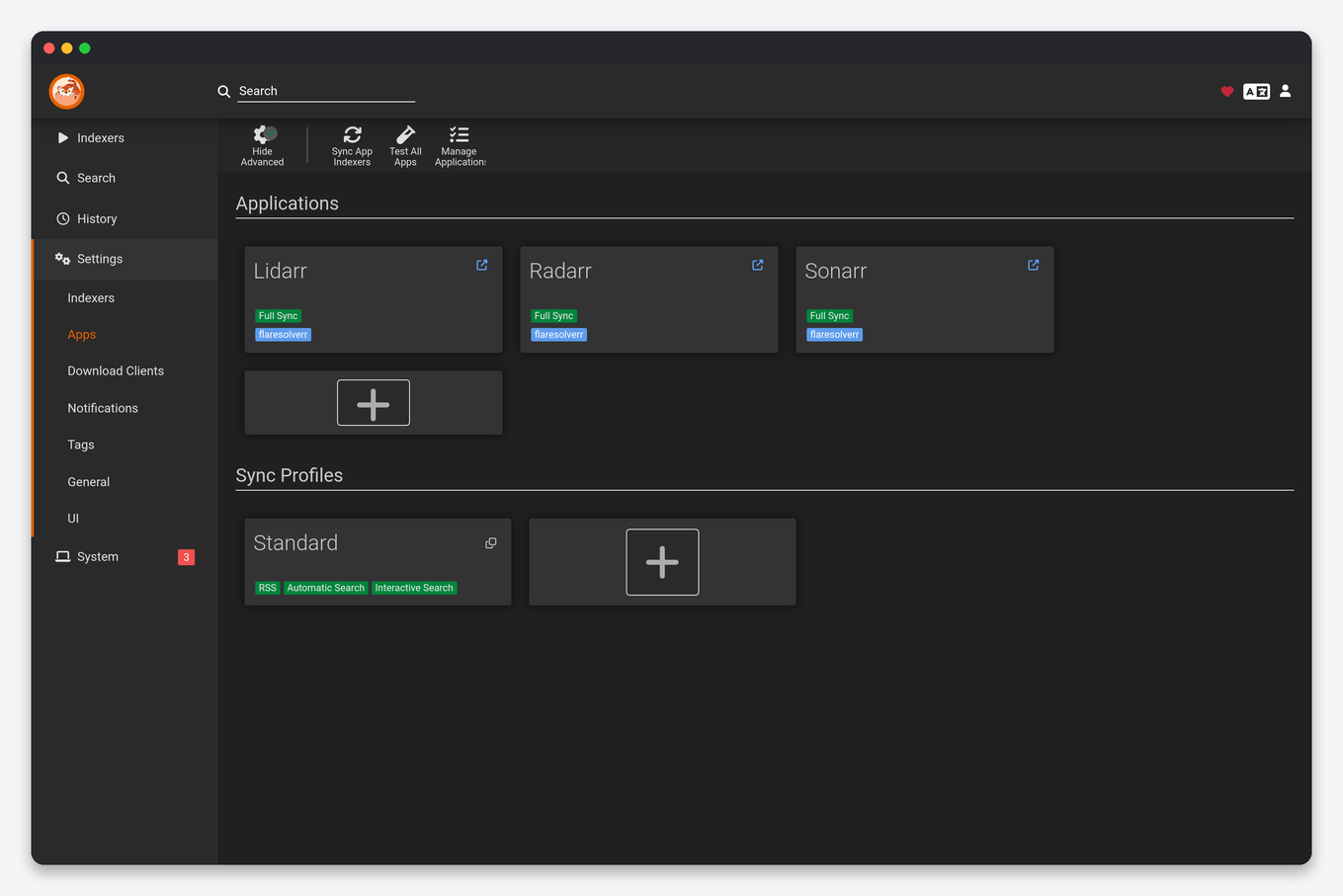
Apps
| Setting | What it does | Seedbox |
|---|---|---|
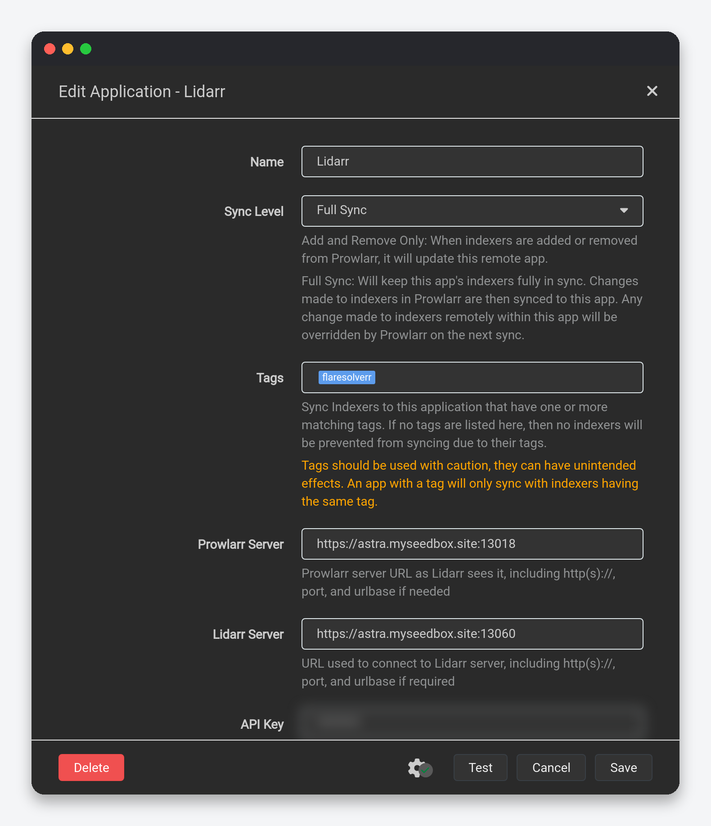
| Sync Level | Disabled (no sync), Add and Remove Only (Prowlarr adds and deletes indexers in the app), Full Sync (also overwrites every indexer setting in the app on each sync). | Full Sync. It is what makes Prowlarr the single source of truth. |
| Tags | Only indexers with one of these tags are synced to this app; empty means all indexers. | Empty for Sonarr and Radarr; use tags only for special cases like an anime-only tracker. |
| Prowlarr Server | Prowlarr’s URL as the app sees it. | The installer fills this with the internal address; leave it. |
| Sonarr / Radarr / Lidarr Server | The app’s URL as Prowlarr sees it. | Also pre-filled; if you reinstall an app and its port changes, this is the field to fix. |
| API Key | The app’s key from its Settings → General. | Update here after regenerating a key in the app. |
| Sync Categories | Only indexers supporting these Torznab categories are synced. Sonarr wants TV categories, Radarr movie ones, Lidarr audio. | Defaults are right. Add TV/Anime to Sonarr’s entry if you use anime trackers. |
| Anime Sync Categories (Sonarr) | Categories treated as anime by Sonarr. | TV/Anime. |
| Sync Reject Blocklisted Torrent Hashes | Push the “reject blocklisted hashes while grabbing” flag to the app. | On. |
Sync Profiles (same tab) are named sets of three switches, Enable RSS, Enable Automatic Search, Enable Interactive Search, plus a Minimum Seeders. The default Standard profile enables all three. Create “Interactive only” for a public indexer you want available in manual searches without it polluting RSS and automatic grabs, and assign it on the indexer.
Download Clients
| Setting | What it does | Seedbox |
|---|---|---|
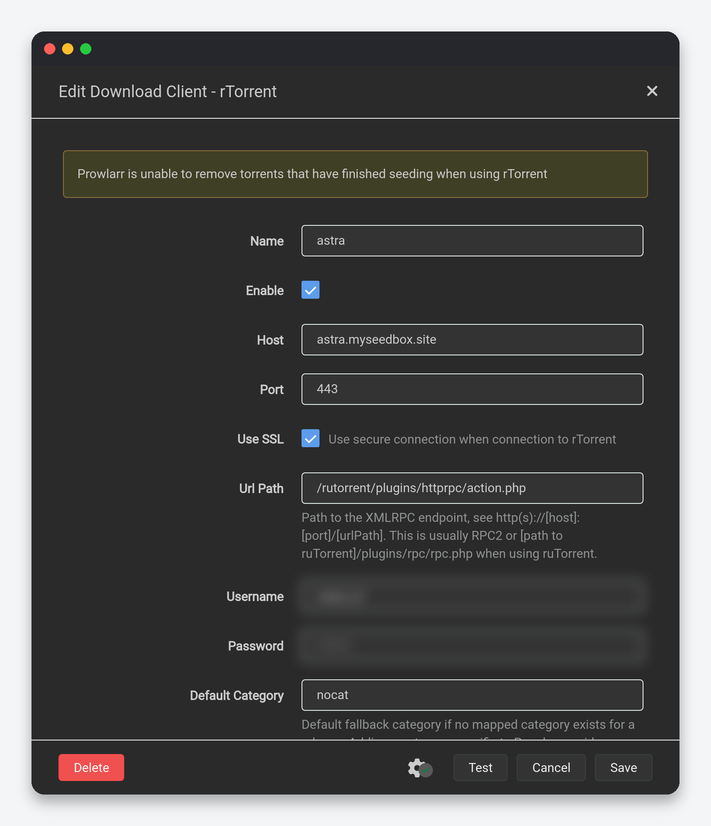
| Host, Port, Use SSL, Url Path, Username, Password | rTorrent through the web server, as in the apps. | Server name, 443, SSL on, /rutorrent/plugins/httprpc/action.php, ruTorrent login. |
| Default Category | rTorrent label for grabs with no mapped category. | prowlarr so manual grabs are visibly separate from the apps’ torrents. |
| Mapped Categories | Torznab category ranges mapped to rTorrent labels (Movies → movies, TV → tv). |
Map Movies, TV and Audio to the same labels the apps use, so Autotools rules apply to manual grabs too. |
| Directory, Priority, Add Stopped, Client Priority | As in the apps. | Empty, Normal, Off, 1. |
This client only serves grabs you start from Prowlarr’s Search page (and from Dashboarr’s Prowlarr search). Sonarr and Radarr grab through their own client entries, which is why a release grabbed here is never renamed or imported by them.
Indexer Proxies
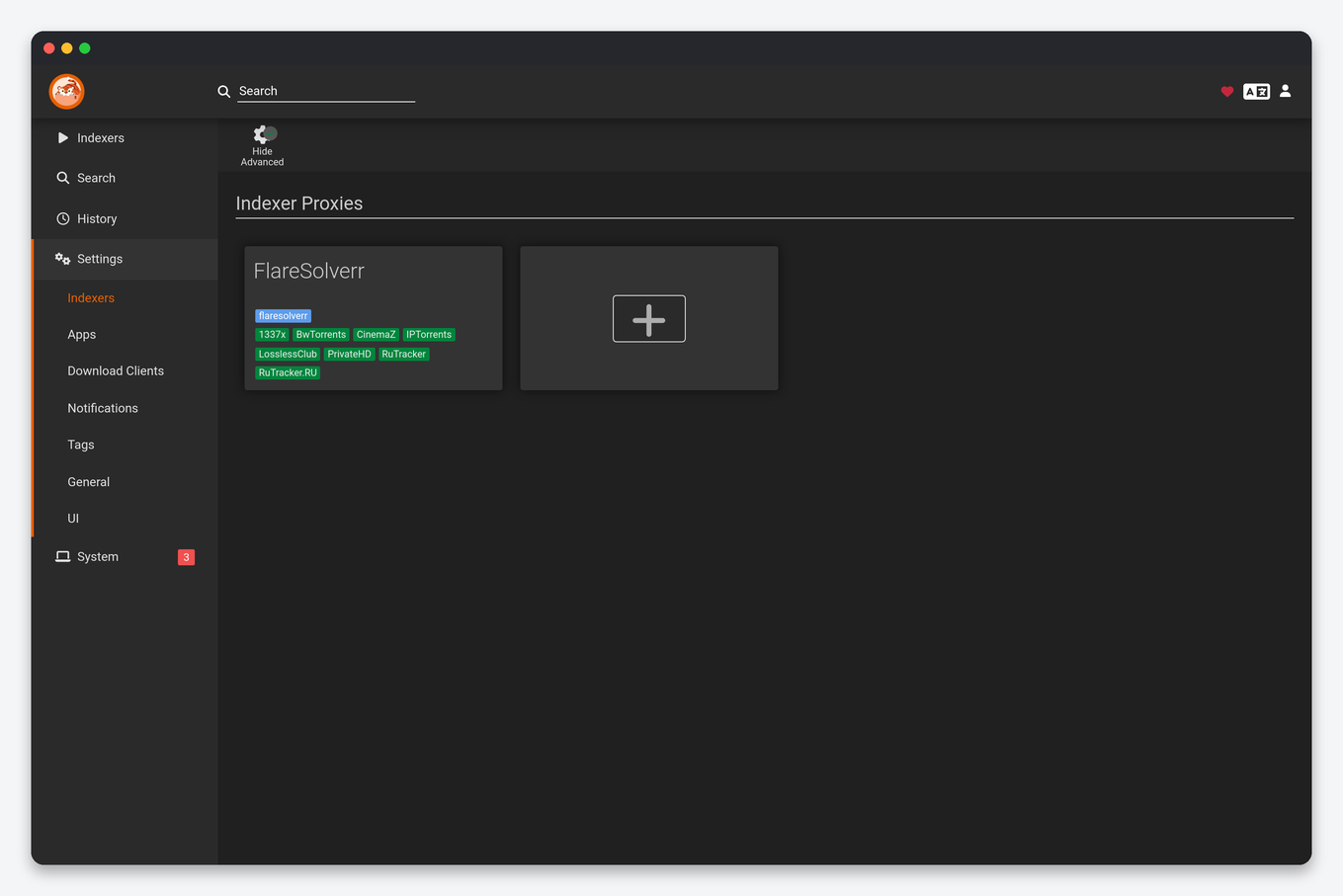
A proxy is applied per indexer through tags. FlareSolverr solves Cloudflare challenges for trackers that need it; the EvoSeedbox installer runs a FlareSolverr sidecar and registers it here, so tag a Cloudflare-protected tracker with the proxy’s tag and Prowlarr routes it through automatically. Request Timeout of 60 seconds is right; raise it to 120 for trackers that challenge on every request. HTTP and SOCKS5 proxies are for trackers blocked in the server’s country; leave them unless a tracker returns 403s.
Notifications
Events are On Health Issue (an indexer or app failing), On Application Update and On Grab (Prowlarr-initiated grabs only). The one worth wiring on a seedbox is health issues to Discord, Telegram or email, because a tracker that has silently failed for days is the usual cause of “Sonarr finds nothing”. Tick Include Manual Grabs only if you want every search-page grab announced.
Tags
Tags connect indexers, apps, proxies and notifications: an indexer tagged anime goes only to apps tagged anime; an indexer tagged flaresolverr uses the proxy with that tag. Keep the set small; two or three tags cover almost every setup.
General
| Setting | What it does | Seedbox |
|---|---|---|
| Bind Address / Port Number / URL Base | Listener inside the container. | Leave as installed; the client-area HTTPS port depends on it. |
| Instance Name / Application URL | Tab title; external URL for notifications. | Your HTTPS app address. |
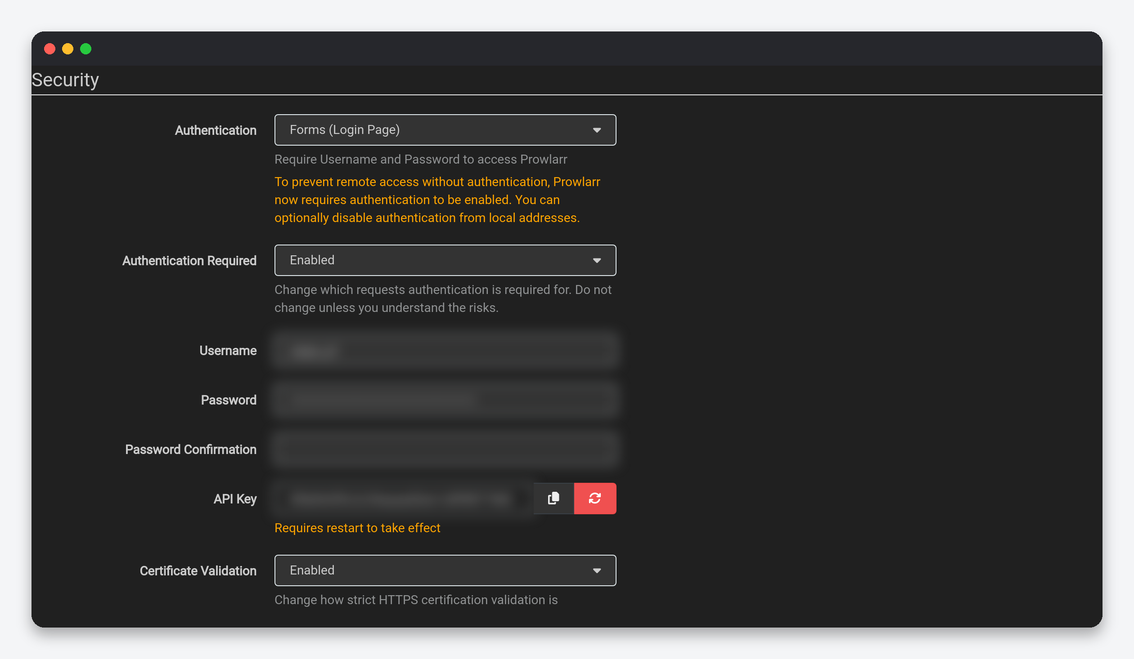
| Authentication / Authentication Required | Login method and scope. | Forms, Enabled. |
| API Key | Used by the apps’ Prowlarr entries and by Dashboarr. | Regenerate on a leak; then update the “Prowlarr Server” API key inside each app’s indexer entries by re-syncing. |
| Certificate Validation | Strictness for HTTPS to trackers. | Enabled. Set Disabled for Local Addresses only if a tracker mirror has a broken certificate. |
| Proxy | Route all outbound traffic through one proxy. | Off; use Indexer Proxies per tracker instead. |
| Logging | Log Level and size limit. | Info, 1 MB. Trace is verbose enough to fill your quota in a day if left on. |
| Updates / Backups | Branch master, mechanism Docker; backups 7 days, 28 retained. | Update through the client area; download a backup before re-adding many trackers. |
Reading the Stats and History pages
Prowlarr’s Stats page shows per-indexer queries, grabs, failures and average response time, and per-app the number of queries each *arr sends. An indexer with hundreds of queries and zero grabs is worth removing; one with failures climbing is about to be auto-disabled. History records every query and grab with the app that made it, which answers “why did Radarr grab that” faster than Radarr’s own history.
FAQ
Which defaults should every seedbox user change?
Set query and grab limits on every private tracker, set seed ratio and time per tracker, use Full Sync on every app, map download-client categories to the labels your apps use, and send health notifications somewhere you read.
Why does an indexer work in Prowlarr but not in Sonarr?
The app’s Sync Categories exclude the indexer’s categories, or the indexer’s tag does not match the app’s tags. Prowlarr → Indexers → the indexer’s “Apps” column shows which apps received it.
Can I use Prowlarr and Jackett together?
Yes: add Jackett’s indexers to Prowlarr as generic Torznab indexers with Jackett’s URL and key, then let Prowlarr push them. Most people migrate fully and retire Jackett.
Related: Prowlarr guide and best indexers · Sonarr settings · Radarr settings · Prowlarr in Dashboarr
Related articles
Put this into practice
EvoSeedbox ships with one-click app installs and up to 10 Gbps per box.
