What Is a Plex Seedbox?
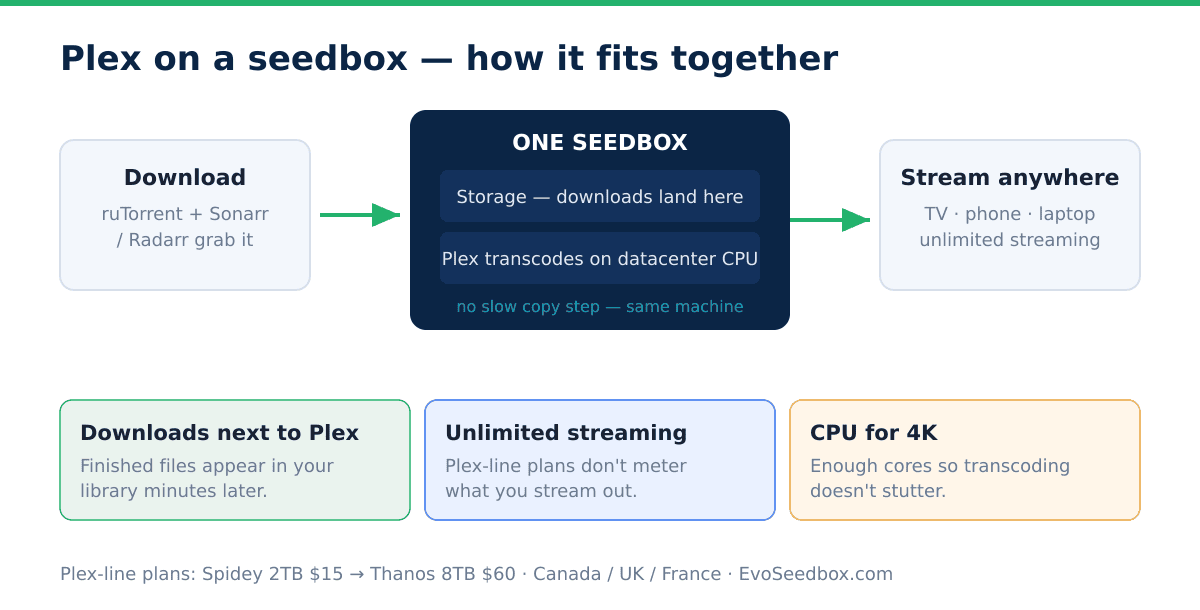
A Plex seedbox is a remote server that combines a torrent client with a Plex Media Server — your downloads land on the server and stream instantly to any device, without ever touching your home connection. At EvoSeedbox, Plex is a one-click app: it installs in under a minute, gets its own HTTPS-secured address, and runs 24/7 on our 10Gbps network.
Why Run Plex on a Seedbox Instead of at Home?
- No home hardware: no NAS to buy, no PC left running. Your library lives in the datacenter.
- Datacenter upload speeds: home connections choke when two people stream remotely. A seedbox serves your family and friends from a 10Gbps uplink.
- Instant library growth: downloads complete at datacenter speed and appear in Plex immediately — no transferring files home first.
- Privacy: your home IP never appears in any torrent swarm.
What to Look For in a Plex Seedbox
Whichever provider you choose, running a Plex server well needs more than disk space. Here’s what genuinely matters, roughly in order:
- Storage — and the right kind. A media library grows fast; 4K films are 40–80 GB each. You want generous HDD storage (SSD is wasted money for a media library) and room to grow.
- Unlimited, uncapped streaming bandwidth. Every stream to every device pulls data out of the server. A provider that counts streaming against a bandwidth cap will throttle your Netflix‑at‑home dream. This is the detail most people miss.
- Enough CPU for transcoding. When a device can’t play a file natively, Plex transcodes it on the fly — which is CPU‑heavy. Underpowered plans stutter on 4K.
- Server location near you (or your viewers). Streaming latency depends on distance. A server on the right continent matters for a smooth start and seeking.
- Downloads and Plex on the same box. If your torrent client and Plex live together, finished downloads appear in your library in minutes — no slow copy step.
- One‑click setup and self‑healing. Plex plus the automation stack shouldn’t require a weekend of Docker.
Plex on EvoSeedbox: What You Get
- One-click install from your dashboard — Plex runs in its own isolated Docker container with automatic updates.
- Self-healing: our App Doctor monitors every Plex instance and automatically repairs common failures before you notice them.
- Full *arr stack alongside it: Sonarr, Radarr, Overseerr, Bazarr and the rest of our 100+ one-click apps install the same way and feed your Plex library automatically.
- Proven at scale: over 160 active Plex servers run on our fleet right now — it’s our single most-installed app.
Dedicated Plex Plans
We built a dedicated Plex plan line around exactly those criteria — big HDD storage, unlimited Plex streaming, and servers placed for streaming:
| Plan | Storage | Upload bandwidth | Price |
|---|---|---|---|
| Spidey | 2 TB HDD | 5 TB | $15/mo |
| IronMan | 4 TB HDD | 10 TB | $30/mo |
| Hulk | 6 TB HDD | 15 TB | $45/mo |
| Thanos | 8 TB HDD | 20 TB | $60/mo |
- Unlimited downloads and unlimited Plex streaming on every Plex plan — stream as much as you like to as many devices as you like.
- Hosted in the Netherlands on a 10 Gbps Tier-1 network.
Which plan should you pick?
- Starting out / a focused library: Spidey’s 2 TB holds a lot of well‑encoded content and is the natural entry point.
- A serious, growing library: IronMan (4 TB) or Hulk (6 TB) give room for a big TV + film collection in good quality.
- 4K everything / a household of viewers: Thanos (8 TB) plus the headroom for multiple simultaneous streams.
You can always start smaller and upgrade — your library and settings come with you.
Set Up in Three Steps
- Pick any plan — every EvoSeedbox plan supports Plex, starting at $5/month.
- Click Install Plex in your dashboard and claim the server with your Plex account.
- Point Plex at your downloads folder (or let Sonarr/Radarr organize it) and press play.
Our step-by-step guide walks through every screen: Setting up Plex.
Guides Our Plex Users Rely On
- Setting up Plex on your seedbox
- Adding libraries in Plex
- 4K streaming on Plex
- Tuning Plex server performance
- Secure server connections
- Quick *arr stack setup — automate your library end to end
- Automatic collections and media naming
Frequently Asked Questions
Do I need Plex Pass?
No. Plex works on a free account with an EvoSeedbox server. Plex Pass adds extras like hardware transcoding on supported setups and mobile downloads, but streaming from your seedbox works without it.
Can multiple people stream at once?
Yes — that’s exactly what datacenter bandwidth is for. Concurrent streams are limited by your plan’s resources rather than a hard cap; direct play (no transcoding) is the most efficient way to serve several viewers.
Can Sonarr and Radarr add downloads straight into Plex?
Yes. Install them from the same dashboard, connect them to your torrent client, and new episodes and movies appear in your Plex library automatically. See the arr stack guide.
What happens if Plex crashes or misbehaves?
Our App Doctor checks every app continuously and auto-repairs the common failure modes. If something needs a human, support is available around the clock.
Can I really stream unlimited Plex from a seedbox?
Yes — every EvoSeedbox Plex plan includes unlimited downloads and unlimited Plex streaming. The key is choosing a provider that doesn’t count streaming against a bandwidth cap, which is exactly why we built a dedicated Plex line.
How much storage do I need for Plex?
It depends on quality and library size: 1080p films run ~4–15 GB each, 4K films 40–80 GB. A 2 TB plan holds a large well‑encoded library; go to 4–8 TB for big or 4K‑heavy collections. You can start smaller and upgrade.
Will 4K transcoding work on a seedbox?
4K plays best when it direct plays (no transcoding), which our 4K guide helps you set up. For transcoding, pick a plan with enough CPU headroom — underpowered plans are where 4K stutters.
Where are the Plex servers located?
Our Plex plans are hosted in the Netherlands, on the same Tier-1 network as our other seedboxes.
Start Streaming Today
Every plan includes Plex support, one-click app installs, and 24/7 support — from $5/month. See plans and pricing →
