Evoseedbox Evoseedbox Evoseedbox Evoseedbox
  • English
    • Nederlands (Dutch)
    • Français (French)
    • Deutsch (German)
    • 日本語 (Japanese)
    • 한국어 (Korean)
    • Português (Portuguese (Portugal))
    • Español (Spanish)
    • العربية (Arabic)
    • Русский (Russian)
    • Türkçe (Turkish)
  • Home
  • Wiki
  • Forum
  • Pricing
Client Area

Getting Started

12
  • Basics of Getting Started
  • Login Details
  • FTP Credentials
  • Choosing a Seedbox Plan
  • How to Use Your Seedbox Dashboard
  • How to Reset Your Seedbox
  • How to Restart Your Seedbox
  • Unavailable Applications in Seedbox
  • Getting Started with One-Click Installs
  • How to Update an App
  • What Is a Seedbox? Complete Beginner’s Guide
  • Understanding Seedbox Architecture

ruTorrent

18
  • ruTorrent – Getting Started
  • How to Log into ruTorrent
  • Adding a Torrent to Your Seedbox
  • Fix Torrent with a Red Cross Error
  • Guide to Increase Download and Upload Queues in ruTorrent
  • Restarting ruTorrent on Seedbox
  • How to Change Your ruTorrent Client Password
  • How to Create Torrents Using ruTorrent
  • Extracting an Archive with ruTorrent
  • Creating an Archive with ruTorrent
  • Using Watch Folder for Large Torrents
  • Setting Up Irssi with ruTorrent
  • Chrome Remote Torrent Adder
  • Firefox Torrent Control Remote Torrent Adder
  • MediaStream Plugin User Guide
  • AutoTools: Auto-Move Completed rTorrent Downloads
  • Torrent Seeding Rules and Upload Limits Explained
  • Common ruTorrent Errors and How to Fix Them

File Management

17
  • How to Transfer Data from a Previous Provider to Your Seedbox via FTP
  • How to Get Faster FTP Downloads
  • How to Get Maximum Transfer Speed Using FTP in FileZilla
  • Why Do I Have Slow FTP Download Speeds?
  • Sync Files Between Your Seedbox and PC
  • How to Access Your Seedbox Files Using HTTP Access
  • How to Transfer Files from Your Seedbox to Google Drive
  • Rclone Google Drive Setup
  • Duplicati Backup Setup
  • FileBot – Renaming Files
  • SCP File Transfer Guide: Copy Files To and From Your Seedbox
  • Rclone Browser: Visual File Management for Cloud Sync
  • Create Additional FTP Users on Your Seedbox
  • Mount Your Seedbox via SSHFS and WebDAV
  • Filegator: Web File Manager for Your Seedbox
  • SFTP Setup Guide: Secure File Transfer for Your Seedbox
  • How to Use BTSync with Your Seedbox

Streaming

20
  • How to Use Secure Server Connections in Plex
  • How to Add Libraries in Plex and Synchronize Your Streaming Content
  • Synclounge Setup Guide
  • Tautulli Setup Guide
  • How to Stream Videos from Seedbox on VLC
  • How to Use Emby with Your EvoSeedbox
  • How to Use Peerflix with Your EvoSeedbox
  • How to Stream from Seedbox with Kodi (Complete Setup Guide)
  • Improving Plex Server Performance on Your Seedbox
  • 4K Plex Streaming Guide for Seedbox Users
  • Automatic Plex Collections: Organize Your Library in 6 Steps
  • Plex Library Permissions and User Management on Seedbox
  • HandBrake Guide: Video Encoding on Your Seedbox
  • Understanding Video Codecs: H.264 vs H.265 for Seedbox Users
  • Create a Self-Hosted Streaming Service on Your Seedbox
  • Naming Your Plex Media Server Correctly
  • Audiobookshelf: Self-Hosted Audiobook Server on Your Seedbox
  • Navidrome: Self-Hosted Music Streaming on Your Seedbox
  • How to Connect Jellyfin with Your Seedbox
  • Setting Up Plex on Your Seedbox

Automation

18
  • How to Use Lidarr with Your EvoSeedbox
  • What is Medusa and How to Use It with Your Seedbox
  • Ombi Setup Guide
  • Requestrr Part 1 – Setting Up the Discord Bot
  • Getting Started with Overseerr on Your Seedbox
  • Bazarr Setup Guide: Automatic Subtitles for Your Seedbox
  • Readarr Setup Guide: Automate Ebook Downloads on Your Seedbox
  • Remote Path Mapping Explained: Fix Sonarr and Radarr Import Errors
  • Sonarr and Radarr Quality Settings Guide (Including 4K)
  • Quick Setup: Complete *arr Stack (Sonarr + Radarr + Prowlarr + Deluge)
  • Connect Home Sonarr/Radarr to Your Remote Seedbox
  • Prowlarr Setup: Unified Indexer Manager for Your Seedbox
  • Autobrr Setup: Automated Torrent Grabbing for Your Seedbox
  • Jellyseerr Setup: Media Requests for Jellyfin on Your Seedbox
  • How to Use Radarr with Your Seedbox
  • Setting Up Sonarr on Your Seedbox
  • How to Use Jackett with Your Seedbox
  • How to Use CouchPotato with Your Seedbox

Apps & Tools

24
  • Beginner’s Guide to Nextcloud
  • Calibre Setup Guide
  • How to Set Up ZNC
  • Electorrent Setup Guide
  • What is JDownloader and How to Use It
  • What is Pyload and How to Use It
  • Mattermost Guide
  • Setting Up TeamSpeak
  • NZB360 Android App Setup
  • Installing and Setting Up Clarkson
  • Evobot User Guide
  • The Definitive Guide to Deluge on Your Seedbox (2026)
  • Seedbox Remote Desktop: X2Go and noMachine Setup Guide
  • Docker for Beginners: A Seedbox User’s Guide
  • NZBGet Setup Guide: Usenet Downloads on Your Seedbox
  • SyncThing Setup: Peer-to-Peer File Sync for Your Seedbox
  • Portainer Setup: Manage Docker Containers on Your Seedbox
  • SABnzbd Setup Guide: Usenet Downloads on Your Seedbox
  • Homarr: Dashboard for All Your Seedbox Apps
  • Calibre-Web: Access Your Ebook Library from Anywhere
  • Docker App Management: How Your Seedbox Apps Work
  • Deemix Setup Guide
  • OwnCloud Setup Guide
  • How to Use Subsonic with Your EvoSeedbox

Networking & VPN

13
  • OpenVPN Connect Setup
  • Reroute Your Seedbox
  • OpenSSH Tutorial
  • WireGuard VPN Setup: Complete Guide for Every Platform
  • Linux Basics for Seedbox Users: Essential Commands
  • SSH Key Authentication: Passwordless Login to Your Seedbox
  • Nano Text Editor Guide for Seedbox Users
  • SSL Certificate Setup for Seedbox Web Services
  • Seedbox Speed Test: Monitor Your Performance with LibreSpeed
  • Understanding and Managing Your Seedbox Bandwidth
  • Split Tunneling with WireGuard on Android
  • Authelia: How Authentication Works on Your Seedbox
  • WireGuard VPN Setup: Connect Securely to Your EvoSeedbox

Troubleshooting

4
  • Why You Are Not Able to Access Your Seedbox
  • 5 Quick Troubleshooting Tips for Your Seedbox
  • Understanding Disk Usage and Quotas on Your Seedbox
  • Why Is My Seedbox Slow?

Account & Billing

1
  • How to Terminate My Service
View Categories
  • Home
  • Docs
  • Apps & Tools
  • The Definitive Guide to Deluge on Your Seedbox (2026)

The Definitive Guide to Deluge on Your Seedbox (2026)

5 min read

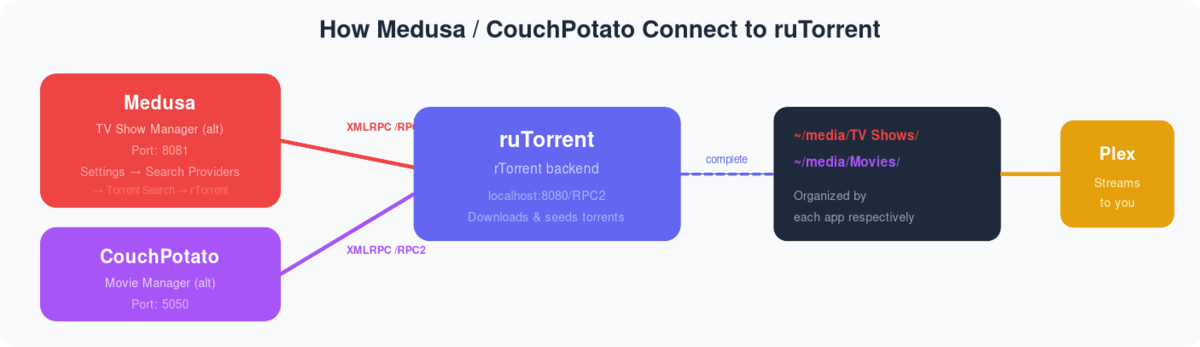
How Deluge connects to automation apps on your seedbox

What Is Deluge? #

Deluge is a lightweight, open-source BitTorrent client that runs on your seedbox. It offers a clean web UI, a desktop thin client for remote management, and plugin support for automation. While ruTorrent is the most popular seedbox client, Deluge is preferred by users who want a simpler interface or need specific features like label-based automation and the YaRSS2 RSS plugin.

Installing Deluge on Evoseedbox #

  1. Log in to your Evoseedbox client area
  2. Open your seedbox dashboard
  3. Find Deluge in the apps section
  4. Click Install — Deluge deploys in seconds
  5. Click Open to launch the Deluge Web UI

Your Deluge username and password are the same as your seedbox credentials (same as ruTorrent, FTP, and all other apps).

Deluge Web UI Overview #

The Deluge Web UI consists of:

  • Toolbar: Add torrent, remove, pause, resume, and preferences buttons
  • Torrent list: All active, downloading, seeding, and paused torrents with status, progress, speed, ratio, and ETA
  • Bottom panel: Details for the selected torrent — Status, Details, Files, Peers, Options, and Trackers tabs
  • Sidebar filters: Filter by state (All, Downloading, Seeding, Paused, Error), tracker, or label

Adding Torrents in Deluge #

Method 1: Upload .torrent File #

  1. Click the Add button (+ icon) in the toolbar
  2. Click File and browse for a .torrent file on your computer
  3. Optionally set a download location and label
  4. Click Add to start downloading

Method 2: Magnet Link #

  1. Click the Add button
  2. Click URL and paste a magnet link
  3. Click Add

Method 3: Watch Folder #

Upload .torrent files to your seedbox’s watch folder via FTP. Deluge automatically detects and starts downloading them. Configure the watch folder in Preferences → Downloads → Auto-add .torrents from.

Configuring Deluge for Maximum Performance #

Connection Settings #

Go to Preferences → Network:

  • Incoming Port: Leave as default (random) or set a specific port if your tracker requires it
  • Outgoing Ports: Leave as random
  • Encryption: Set to Forced for maximum privacy
  • Peer TOS: Leave default

Bandwidth Settings #

Go to Preferences → Bandwidth:

  • Maximum Download Speed: -1 (unlimited) — your seedbox handles the speed
  • Maximum Upload Speed: -1 (unlimited)
  • Maximum Connections: 200 (increase to 500 for heavy use)
  • Maximum Upload Slots: -1 (unlimited)
  • Maximum Half-Open Connections: 50
  • Maximum Connections Per Torrent: 50

Queue Settings #

Go to Preferences → Queue:

  • Total Active Torrents: 50 (adjust based on your plan’s storage)
  • Total Active Downloading: 10
  • Total Active Seeding: -1 (unlimited — seed everything)
  • Share Ratio Limit: Set to 2.0 for private trackers, -1 for no limit
  • Seed Time Ratio: Set based on your tracker requirements

Using Labels to Organize Torrents #

The Label plugin helps organize torrents by category (movies, TV, music) and set different download paths per label:

  1. Go to Preferences → Plugins
  2. Enable the Label plugin
  3. Right-click any torrent → Label → Create or assign a label
  4. To set auto-move paths per label: Right-click the label in the sidebar → Label Options → Set move completed path

Labels are essential when integrating Deluge with Sonarr/Radarr — each *arr app uses a label to identify its downloads.

RSS Feeds with YaRSS2 Plugin #

YaRSS2 lets Deluge automatically download new torrents from RSS feeds — essential for private tracker automation:

  1. Go to Preferences → Plugins → Enable YaRSS2
  2. Go to Preferences → YaRSS2 → RSS Feeds tab
  3. Click Add Feed → enter your tracker’s RSS URL
  4. Set the update interval (15 minutes recommended)
  5. Go to the Subscriptions tab → Add subscription
  6. Select the RSS feed, set regex filters for content you want (e.g., .*1080p.*)
  7. Optionally set a label and download path

YaRSS2 checks your RSS feeds at the set interval and auto-downloads matching content.

Connecting Deluge to Sonarr/Radarr #

To use Deluge as the download client for Sonarr or Radarr:

  1. In Sonarr/Radarr, go to Settings → Download Clients → Add
  2. Select Deluge
  3. Enter:
    • Host: localhost
    • Port: 8112 (Deluge Web UI default)
    • Password: your seedbox password
    • Category/Label: sonarr or radarr
  4. Click Test → Save

Sonarr/Radarr will now send downloads to Deluge with the appropriate label. After download completion, they automatically rename and move files to your Plex library folder.

Deluge Thin Client (Remote Management) #

The Deluge Thin Client lets you manage your seedbox’s Deluge from a desktop app on your local computer — faster and more responsive than the web UI for heavy use:

  1. Download and install Deluge desktop client on your PC
  2. Open Deluge → Preferences → Interface → Uncheck “Classic Mode”
  3. Restart Deluge → You’ll see the Connection Manager
  4. Click Add and enter:
    • Hostname: your seedbox IP
    • Port: 58846 (Deluge daemon port)
    • Username and Password: your seedbox credentials
  5. Click Connect

The thin client connects to your seedbox’s Deluge daemon directly, giving you a native desktop experience for managing torrents remotely.

Changing Your Deluge Password #

Your Deluge Web UI password is the same as your seedbox password. To change it:

  1. Open the Deluge Web UI
  2. Go to Preferences → Interface
  3. Enter the current password and new password
  4. Click Change

Note: If you change the password via the Evoseedbox dashboard’s password reset, the Deluge password updates automatically since they share the same credentials.

Deluge vs ruTorrent: Which to Use? #

Feature Deluge ruTorrent
Interface Clean, minimal Feature-rich, complex
Resource usage Moderate (Python) Low (rTorrent is C++)
Plugin ecosystem Good (Label, YaRSS2, Execute) Excellent (autodl-irssi, RSS, ratio groups, 50+)
Private tracker racing Good Better (autodl-irssi real-time IRC)
Desktop thin client Yes (native) No (web only)
Sonarr/Radarr support Yes Yes (via rTorrent XMLRPC)
Best for Beginners, automation fans Power users, private trackers

Both are fully supported on Evoseedbox as one-click installs.

Common Deluge Issues and Fixes #

Deluge Web UI won’t load #

Try restarting your seedbox from the dashboard. If that doesn’t work, clear your browser cache or try incognito mode.

Torrents stuck at “Checking” #

This happens after a restart. Wait for the check to complete — it verifies file integrity. For large torrents, this can take several minutes.

Slow speeds in Deluge #

Check Preferences → Bandwidth — ensure all limits are set to -1 (unlimited). Also check Preferences → Network → Encryption is not set to “Full Stream” which can slow some connections.

Related Guides #

  • ruTorrent Getting Started — if you prefer ruTorrent instead
  • Setting Up Sonarr — automate TV show downloads via Deluge
  • Setting Up Radarr — automate movie downloads via Deluge
  • Setting Up Plex — stream your Deluge downloads
Updated on March 16, 2026

What are your Feelings

  • Happy
  • Normal
  • Sad

Share This Article :

  • Facebook
  • X
  • LinkedIn
  • Pinterest
Evobot User GuideSeedbox Remote Desktop: X2Go and noMachine Setup Guide
Table of Contents
  • What Is Deluge?
  • Installing Deluge on Evoseedbox
  • Deluge Web UI Overview
  • Adding Torrents in Deluge
    • Method 1: Upload .torrent File
    • Method 2: Magnet Link
    • Method 3: Watch Folder
  • Configuring Deluge for Maximum Performance
    • Connection Settings
    • Bandwidth Settings
    • Queue Settings
  • Using Labels to Organize Torrents
  • RSS Feeds with YaRSS2 Plugin
  • Connecting Deluge to Sonarr/Radarr
  • Deluge Thin Client (Remote Management)
  • Changing Your Deluge Password
  • Deluge vs ruTorrent: Which to Use?
  • Common Deluge Issues and Fixes
    • Deluge Web UI won't load
    • Torrents stuck at "Checking"
    • Slow speeds in Deluge
  • Related Guides

We create amazing Seedboxes
for everyone to use 😊

Important Links

Scholarship for CS

Refund Policy

Privacy Policy

Terms of service

Cookie Policy

Acceptable Use Policy

Get in Touch

Contact Us

[email protected]

© 2025 Evoseedbox | All rights reserved. By Evo Created with ❤️

  • Nederlands (Dutch)
  • English
  • Français (French)
  • Deutsch (German)
  • 日本語 (Japanese)
  • 한국어 (Korean)
  • Português (Portuguese (Portugal))
  • Español (Spanish)
  • العربية (Arabic)
  • Русский (Russian)
  • Türkçe (Turkish)
Evoseedbox
  • English
    • Nederlands (Dutch)
    • Français (French)
    • Deutsch (German)
    • 日本語 (Japanese)
    • 한국어 (Korean)
    • Português (Portuguese (Portugal))
    • Español (Spanish)
    • العربية (Arabic)
    • Русский (Russian)
    • Türkçe (Turkish)
  • Home
  • Wiki
  • Forum
  • Pricing
Client Area