Best Seedbox for Usenet: How to Choose (2026)
On this page ▾
Usenet and seedboxes are a natural pairing: direct, encrypted downloads with no seeding and no ratio, pulled at the full speed of a datacenter pipe and filed automatically into your media library. But “best seedbox for Usenet” comes down to a few specific things — and one important clarification about what a seedbox does and doesn’t include. Here’s how to judge any provider, and how EvoSeedbox fits.
If you’re new to Usenet on a server, read our full Usenet on a seedbox guide first — this page is about choosing the right plan for it.
First, the honest clarification
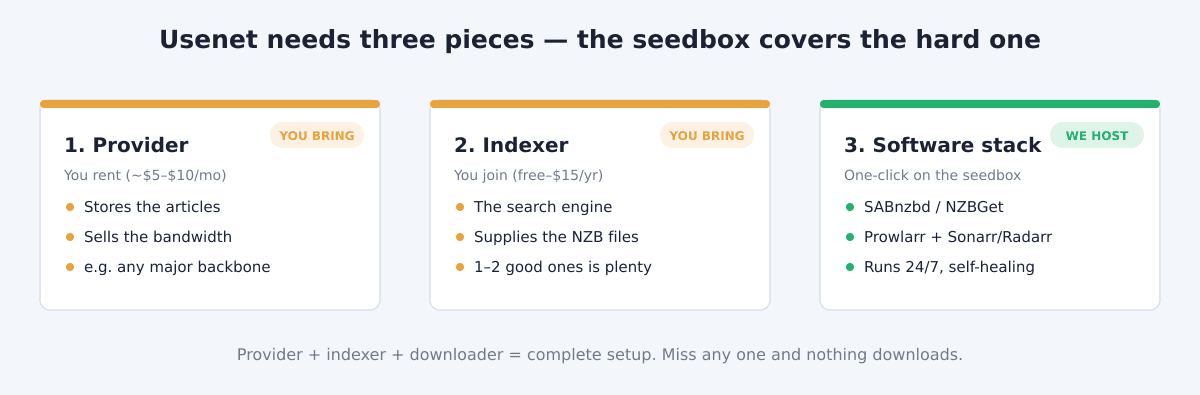
A seedbox provides the downloader and automation software — SABnzbd or NZBGet, Prowlarr, the *arr apps — not Usenet access itself. To download from Usenet you also need two things you buy separately: a Usenet provider (where files come from) and an indexer (the search engine that finds them). That’s true of every seedbox host; anyone claiming otherwise is being loose with the truth. What a good seedbox does is make the software layer effortless. On EvoSeedbox, the whole stack installs in one click and self‑heals — you just paste in your provider and indexer details.
What makes a seedbox good for Usenet
- The one‑click automation stack. SABnzbd/NZBGet, Prowlarr, Sonarr, Radarr, NZBHydra — installed and updated for you, not a Docker project.
- Fast, uncapped bandwidth. Usenet rewards raw download speed more than almost anything; a datacenter pipe pulls a full release in seconds. Downloads should be unlimited.
- Enough storage for your library. Finished, unpacked media adds up — storage is the main variable, just like with torrents.
- Good CPU for repair and unpack. PAR2 repair and un‑RAR are CPU tasks; underpowered plans slow the last step.
- Support that understands the stack. The tricky part of Usenet is the *arr integration, not the download — a host that knows the common gotchas saves you hours.
- Encrypted access to your files. Once a release is downloaded and repaired, you want fast, private ways to reach it — SFTP, FTP, and HTTPS — or to stream it straight from the box via Plex or Jellyfin.
Here’s a quick checklist to judge any host against:
| Criterion | Why it matters for Usenet |
|---|---|
| One-click SABnzbd/NZBGet + *arr | The value is in the automation layer being effortless, not a Docker project |
| Fast, uncapped download bandwidth | Usenet pulls direct from a provider — raw speed decides how fast releases land |
| Storage sized to your library | Finished, unpacked media is the main variable; pick disk to match |
| CPU headroom | PAR2 repair and un-RAR are CPU-bound; underpowered plans stall the last step (and Plex transcoding if you stream) |
| Encrypted transfer (SFTP/FTP/HTTPS) | Get finished files off the box privately, or stream them in place |
| Support that knows the *arr stack | Integration gotchas — not downloads — are where people get stuck |
SABnzbd vs NZBGet: which downloader?
Your downloader is the engine that turns an NZB into finished, repaired files. Both options are one click on a seedbox, and across our fleet the two are used almost evenly — roughly 19 users on SABnzbd and 17 on NZBGet, which tells you neither is a clear winner; it’s a genuine preference.
| SABnzbd | NZBGet | |
|---|---|---|
| Interface | Friendlier, more visual | Minimal, efficient |
| Resource use | Heavier (Python) | Very light (C++) — kinder to smaller/CPU-tight plans |
| Best for | Beginners | Squeezing performance on a busy box |
| *arr compatibility | Excellent | Excellent |
Our steer: start with SABnzbd if you’re new; move to NZBGet if you want the lightest footprint. The *arr apps don’t care which sits behind them, so you can even run both.
How much storage and speed do you actually need?
Two honest rules of thumb. Speed: Usenet is bandwidth-hungry, but our standard datacenter plans already saturate any provider connection you’re likely to have — you only need the 2 Gbps SSD or 10 Gbps lines if you pull huge volumes daily. Storage: this is the real variable. A lean automated setup that rotates content is happy on 150–300 GB; a growing Plex library fed by Usenet wants 1 TB and up; a serious 4K collection lives on the 2–8 TB tiers. Unlike torrenting there’s no seeding obligation, so you can delete freely and keep your working set small.
How EvoSeedbox measures up
Because Usenet doesn’t need seeding, every EvoSeedbox plan runs the full Usenet stack — you’re choosing based on storage and speed, not a special “Usenet plan”:
- The complete stack in one click: SABnzbd or NZBGet as your downloader, Prowlarr to manage indexers, and the *arr apps for automation — each in its own container, kept alive by App Doctor.
- Unlimited downloads on every plan, on a Tier‑1 network — exactly what Usenet speed depends on.
- Storage to match your library: from the $5 Blitz (150 GB) for a lean setup, up through 1 TB ($26) on the torrent line, or the 2–8 TB Plex tiers ($15–$60) if you’re building a big streaming library fed by Usenet.
- Support that runs a desk: the most common Usenet issue — a “downloaded but not imported” remote path mapping mismatch — is something we document and fix daily.
Which plan for Usenet?
- Automation‑first, modest library: Blitz ($5) or Speed ($10) run the whole stack comfortably — Usenet’s speed doesn’t need a big plan, only enough disk for what you keep.
- Feeding a Plex library: the Plex tiers (2–8 TB) with unlimited streaming, filled automatically from Usenet.
- Maximum throughput: the SSD (2 Gbps) or 10 Gbps lines if you want releases down the instant they’re posted.
Setting it up
Once you have a provider and an indexer, the flow is quick: install your downloader (SABnzbd or NZBGet), add your indexers in Prowlarr, and let it sync into the *arr apps via the quick *arr stack setup. From then on it’s hands‑off.
In concrete steps, for a fresh box:
- Install SABnzbd from the dashboard, run its wizard with your provider credentials — port 563, SSL on, 20+ connections.
- Test one NZB by hand (download it from your indexer, drop it on SABnzbd) before touching automation — it isolates provider problems from automation problems.
- Add your indexer(s) to Prowlarr with their API keys; Prowlarr syncs them into Sonarr and Radarr automatically.
- In each *arr app, add SABnzbd as the download client (API key from SABnzbd → Config → General) and click Test before Save — a silently wrong port here is the #1 “my downloads never import” cause we fix in support.
- Add one show to Sonarr and watch it flow end to end. After that, it runs itself.
The full walkthrough with screenshots lives in our Usenet on a seedbox pillar guide.
Frequently Asked Questions
Does a seedbox include Usenet access?
No — a seedbox provides the downloader and automation apps (SABnzbd, NZBGet, Prowlarr, the *arr suite). You supply your own Usenet provider and at least one indexer separately. This is true of every seedbox host; the value is that the software layer is one‑click and self‑healing.
Which plan do I need for Usenet?
Any plan runs the full stack, because Usenet doesn’t require seeding. Choose based on how much storage your library needs and how much speed you want — the $5 entry plan is enough for a lean automated setup.
SABnzbd or NZBGet for a seedbox?
Both work identically with the *arr apps. SABnzbd is friendlier for beginners; NZBGet is lighter on resources. You can install either (or both) in one click and switch later.
Is Usenet faster than torrenting on a seedbox?
Usually, because Usenet downloads directly from a provider instead of waiting on peers, so it saturates the datacenter pipe immediately. It also avoids seeding and ratio entirely.
Why did my download finish but not appear in Plex?
That’s the classic remote path mapping mismatch between the downloader and the *arr app — our guide walks through the fix. It’s the most common Usenet setup issue we help with.
Do I need a Usenet subscription?
Yes — two, in fact: a Usenet provider (your download source and retention) and at least one indexer (the search that produces NZBs). A seedbox provides the software that uses them, not the access itself. Both are bought separately from the seedbox, and you drop the credentials into SABnzbd/NZBGet and your indexer manager.
How much disk space do I need for a Usenet seedbox?
It depends on how much you keep. Because there’s no seeding, you can rotate content aggressively — a lean setup runs happily on 150–300 GB, while a Plex library fed by Usenet wants 1 TB or more, and a 4K collection the 2–8 TB tiers.
Can I run NZBGet alongside SABnzbd?
Yes. Both install in one click and can run side by side, though most people settle on one. The *arr apps connect to whichever you set as the download client, so there’s no conflict in running both while you decide.
Is using a Usenet seedbox legal?
A seedbox and Usenet are legal tools — what matters is the content you download, not the method. We cover the full picture in is torrenting and seeding legal; the same principle applies to Usenet. This isn’t legal advice, and a seedbox doesn’t change the legality of anything.
Ready to automate a Usenet library? Pick a plan, one‑click the stack, and point it at your provider — or read the full Usenet on a seedbox guide first.
{“@context”: “https://schema.org”, “@type”: “FAQPage”, “mainEntity”: [{“@type”: “Question”, “name”: “Does a seedbox include Usenet access?”, “acceptedAnswer”: {“@type”: “Answer”, “text”: “No — a seedbox provides the downloader and automation apps (SABnzbd, NZBGet, Prowlarr, the *arr suite). You supply your own Usenet provider and at least one indexer separately. This is true of every seedbox host; the value is that the software layer is one‑click and self‑healing.”}}, {“@type”: “Question”, “name”: “Which plan do I need for Usenet?”, “acceptedAnswer”: {“@type”: “Answer”, “text”: “Any plan runs the full stack, because Usenet doesn’t require seeding. Choose based on how much storage your library needs and how much speed you want — the $5 entry plan is enough for a lean automated setup.”}}, {“@type”: “Question”, “name”: “SABnzbd or NZBGet for a seedbox?”, “acceptedAnswer”: {“@type”: “Answer”, “text”: “Both work identically with the *arr apps. SABnzbd is friendlier for beginners; NZBGet is lighter on resources. You can install either (or both) in one click and switch later.”}}, {“@type”: “Question”, “name”: “Is Usenet faster than torrenting on a seedbox?”, “acceptedAnswer”: {“@type”: “Answer”, “text”: “Usually, because Usenet downloads directly from a provider instead of waiting on peers, so it saturates the datacenter pipe immediately. It also avoids seeding and ratio entirely.”}}, {“@type”: “Question”, “name”: “Why did my download finish but not appear in Plex?”, “acceptedAnswer”: {“@type”: “Answer”, “text”: “That’s the classic remote path mapping mismatch between the downloader and the *arr app — our guide walks through the fix. It’s the most common Usenet setup issue we help with.”}}, {“@type”: “Question”, “name”: “Do I need a Usenet subscription?”, “acceptedAnswer”: {“@type”: “Answer”, “text”: “Yes — two, in fact: a Usenet provider (your download source and retention) and at least one indexer (the search that produces NZBs). A seedbox provides the software that uses them, not the access itself. Both are bought separately from the seedbox, and you drop the credentials into SABnzbd/NZBGet and your indexer manager.”}}, {“@type”: “Question”, “name”: “How much disk space do I need for a Usenet seedbox?”, “acceptedAnswer”: {“@type”: “Answer”, “text”: “It depends on how much you keep. Because there’s no seeding, you can rotate content aggressively — a lean setup runs happily on 150–300 GB, while a Plex library fed by Usenet wants 1 TB or more, and a 4K collection the 2–8 TB tiers.”}}, {“@type”: “Question”, “name”: “Can I run NZBGet alongside SABnzbd?”, “acceptedAnswer”: {“@type”: “Answer”, “text”: “Yes. Both install in one click and can run side by side, though most people settle on one. The *arr apps connect to whichever you set as the download client, so there’s no conflict in running both while you decide.”}}, {“@type”: “Question”, “name”: “Is using a Usenet seedbox legal?”, “acceptedAnswer”: {“@type”: “Answer”, “text”: “A seedbox and Usenet are legal tools — what matters is the content you download, not the method. We cover the full picture in is torrenting and seeding legal; the same principle applies to Usenet. This isn’t legal advice, and a seedbox doesn’t change the legality of anything.”}}]}
