Evoseedbox Evoseedbox Evoseedbox Evoseedbox
  • Türkçe
    • Nederlands (Hollandaca)
    • English (İngilizce)
    • Français (Fransızca)
    • Deutsch (Almanca)
    • 日本語 (Japonca)
    • 한국어 (Kore dili)
    • Português (Portekizce, Portekiz)
    • Español (İspanyolca)
    • العربية (Arapça)
    • Русский (Rusça)
  • Wiki
  • Forum
  • Pricing
Client Area
View Categories
  • Home
  • Dokümanlar
  • Nasıl Use Jackett with Seedbox’unuz

Nasıl Use Jackett with Seedbox’unuz

1 min read

Note: While Jackett still works, Prowlarr is the recommended modern replacement. Prowlarr automatically syncs indexers to all your *arr apps — no more configuring each app separately. See our Prowlarr migration guide.
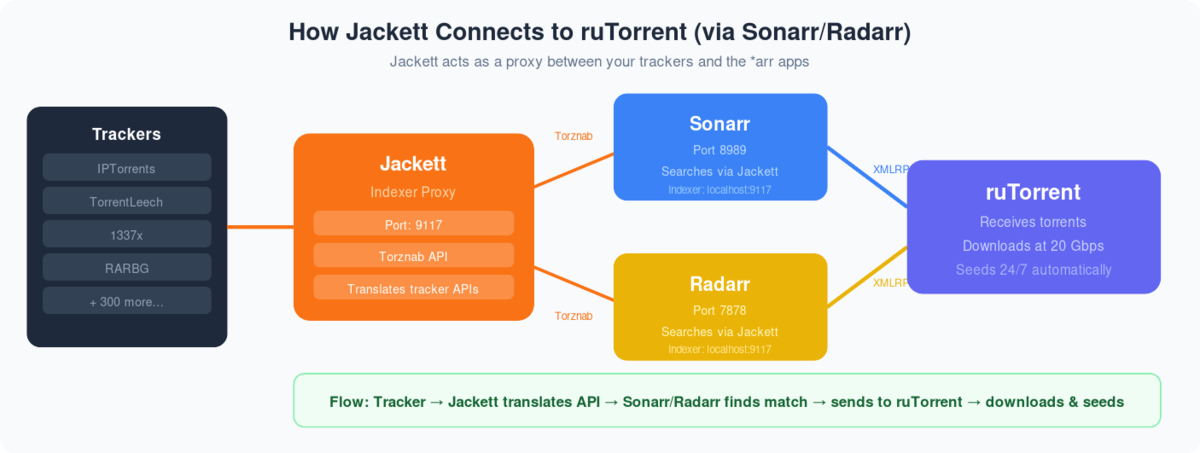
Diagram showing Jackett translating tracker APIs via Torznab to Sonarr and Radarr which send downloads to ruTorrent

What is Jackett? Jackett is a ‘Bit-torrent’ indexer service that can be used along with radarr and Sonarr to add torrent indexing sites all at one place without needing to visit multiple sites for finding the right torrent.

Nasıl setup jackett  and add indexer on evoseedbox?

Adım 1. Login içinde müşteri alanı:
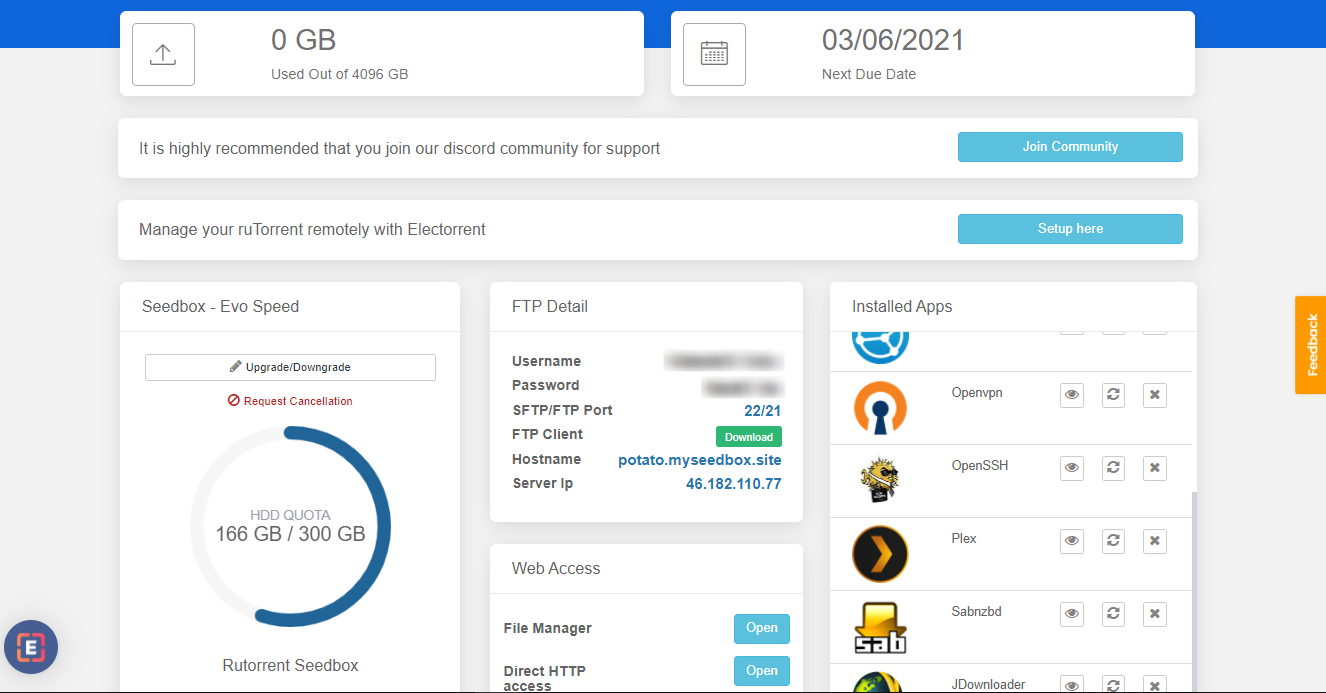
How To Use Jackett With Seedbox'unuz

Adım 2. Arayın for jackett app in uygulamas section and install uygulama.
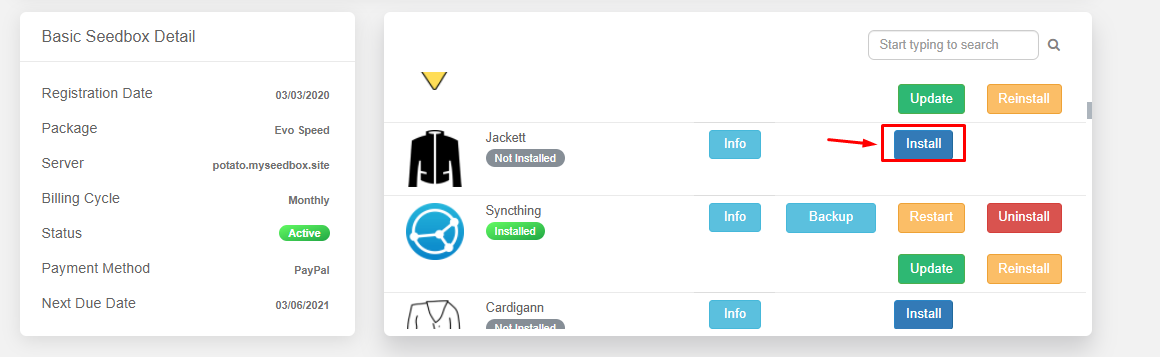
How To Use Jackett With Seedbox'unuz

Adım 3. From the installed apps section open the Jackett app.
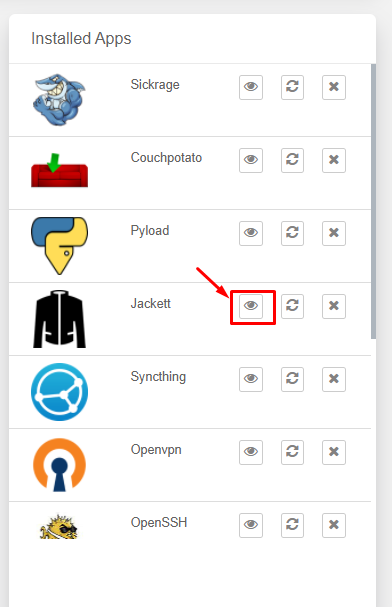
How To Use Jackett With Seedbox'unuz

Step 4.  You will see the Jackett interface as aşağıda gösterilmiştir:
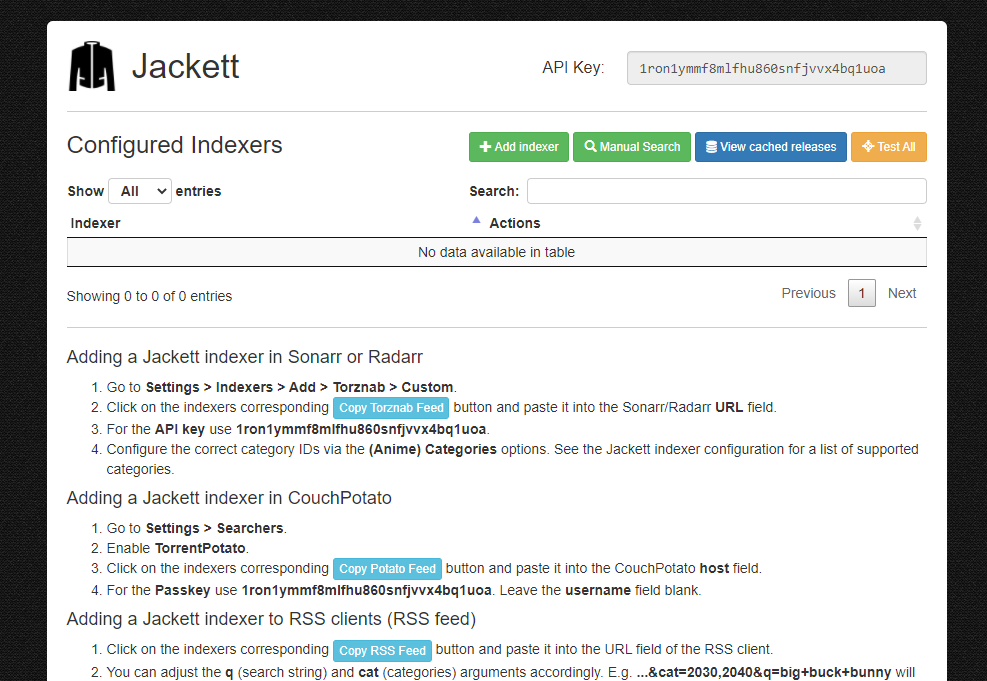
How To Use Jackett With Seedbox'unuz

Step 5. To add an index click on the ‘ADD Indexer ‘ in the top menu as aşağıda gösterilmiştir.
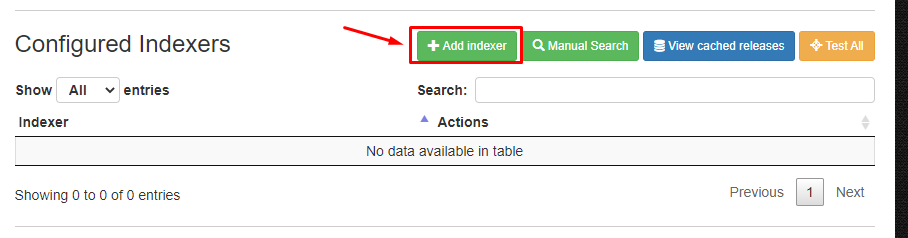
How To Use Jackett With Seedbox'unuz

Step 6. A new window will open where yapabilirsiniz filter indexers based on type of trackers and search for specific name.
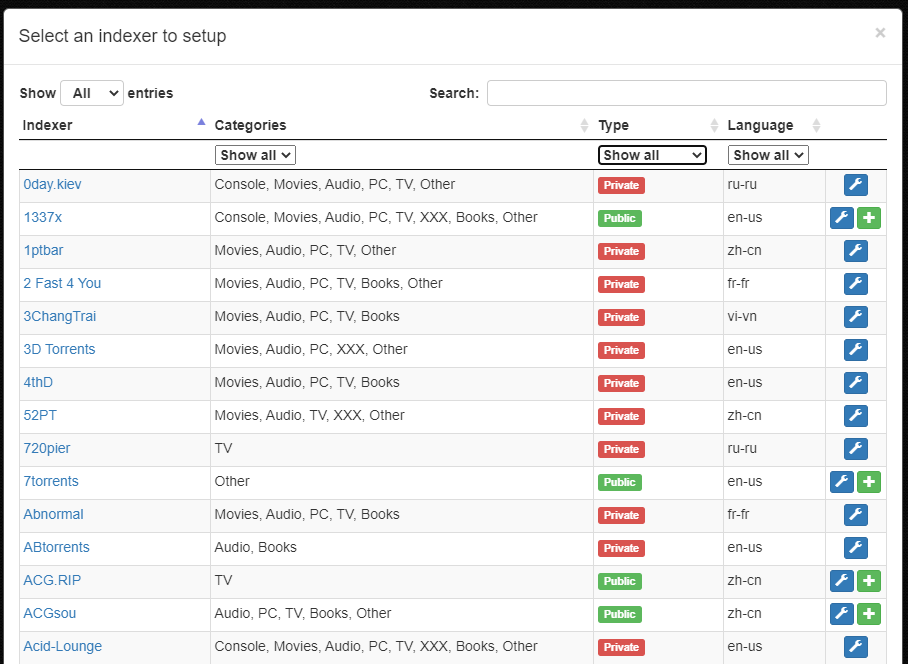
How To Use Jackett With Seedbox'unuz

Step 7. To add a index click on the ‘+’ düğme present in the right most side.
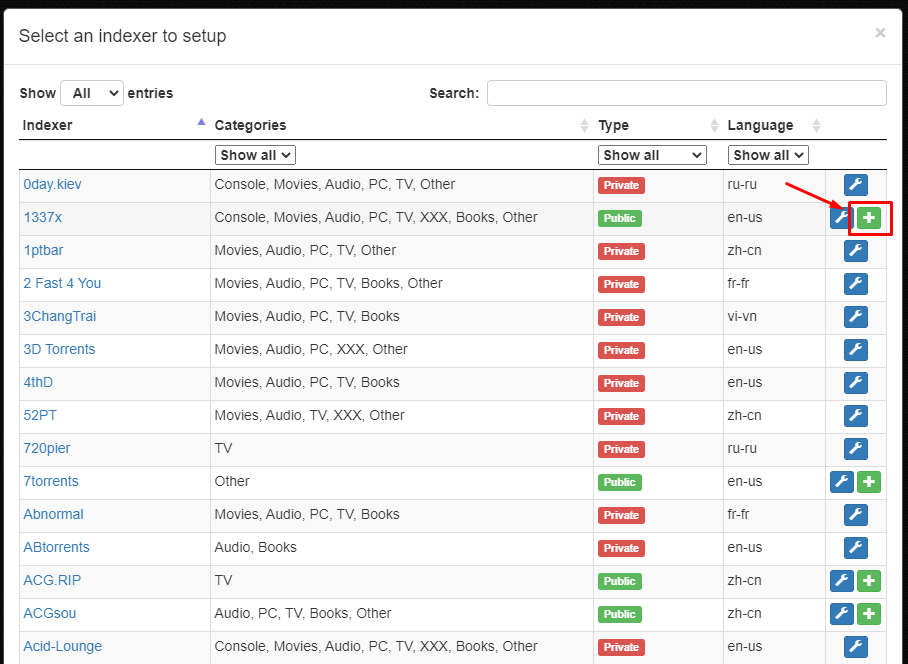
How To Use Jackett With Seedbox'unuz

Step 8. After the successful addition of index.Yapabilirsiniz see the indexer on the main interface of uygulama.
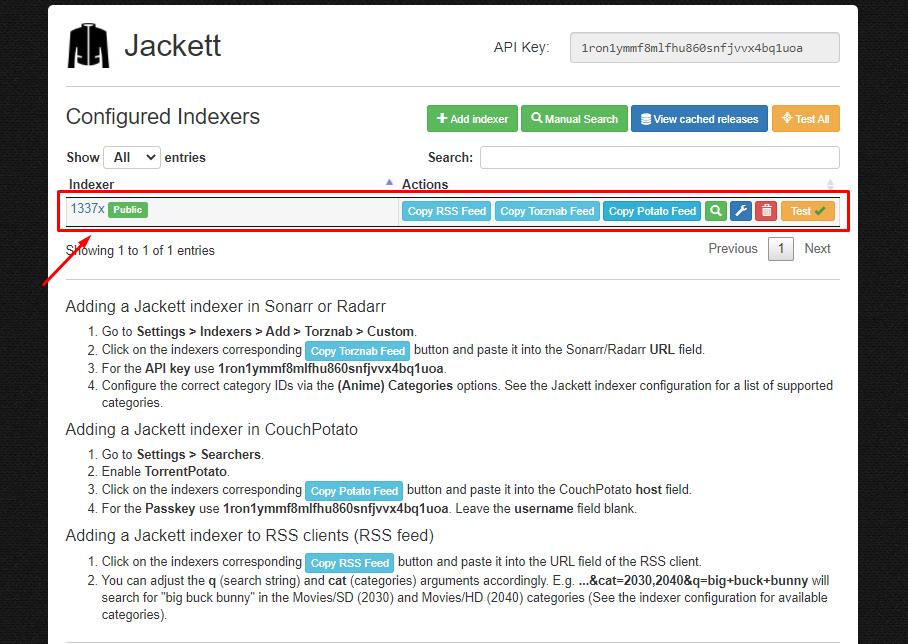
How To Use Jackett With Seedbox'unuz

Step 9. Yapabilirsiniz edit the configuration of uygulama in the ‘Jackett Configuration’.
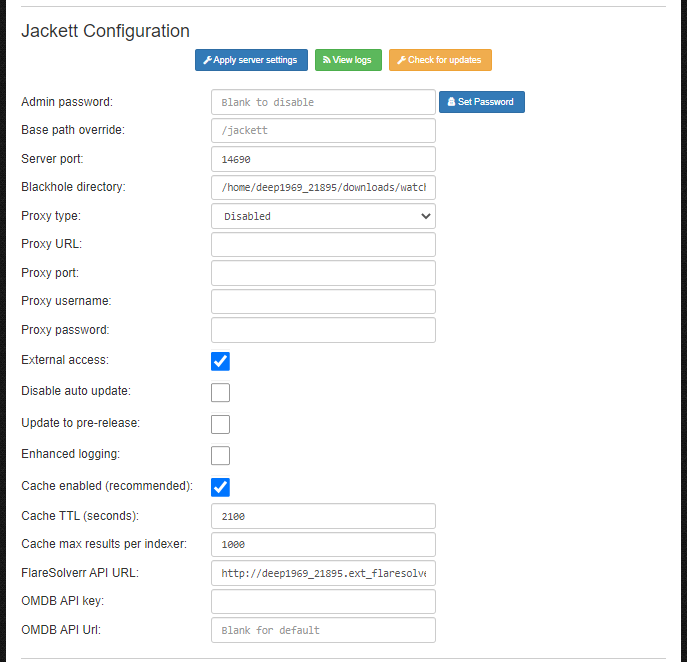
How To Use Jackett With Seedbox'unuz

Adım 10. To add Jackett indexer in Sonarr, Radarr ,Couch Potato and RSS feeds. Refer to the instructions provide in the main interface of uygulama.
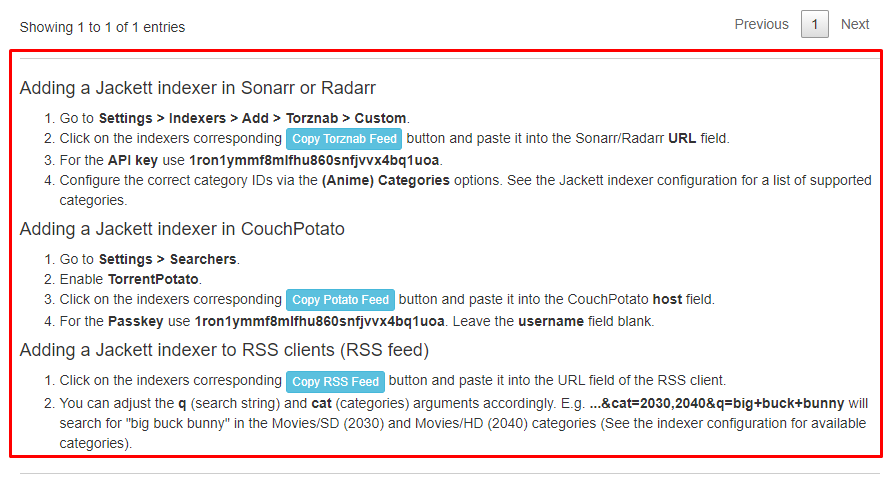
How To Use Jackett With Seedbox'unuz

İlgili Kılavuzlar #

  • Set Up Sonarr
  • Set Up Radarr
  • Set Up autodl-irssi
Updated on 12 Nisan 2026

What are your Feelings

  • Happy
  • Normal
  • Sad

Bu makaleyi paylaş :

  • Facebook
  • X
  • LinkedIn
  • Pinterest
Table of Contents
  • İlgili Kılavuzlar

We create amazing Seedboxes
for everyone to use 😊

Important Links

Scholarship for CS

Refund Policy

Privacy Policy

Terms of service

Cookie Policy

Acceptable Use Policy

Get in Touch

Contact Us

[email protected]

© 2025 Evoseedbox | All rights reserved. By Evo Created with ❤️

  • Nederlands (Hollandaca)
  • English (İngilizce)
  • Français (Fransızca)
  • Deutsch (Almanca)
  • 日本語 (Japonca)
  • 한국어 (Kore dili)
  • Português (Portekizce, Portekiz)
  • Español (İspanyolca)
  • العربية (Arapça)
  • Русский (Rusça)
  • Türkçe
Evoseedbox
  • Türkçe
    • Nederlands (Hollandaca)
    • English (İngilizce)
    • Français (Fransızca)
    • Deutsch (Almanca)
    • 日本語 (Japonca)
    • 한국어 (Kore dili)
    • Português (Portekizce, Portekiz)
    • Español (İspanyolca)
    • العربية (Arapça)
    • Русский (Rusça)
  • Wiki
  • Forum
  • Pricing
Client Area