Evoseedbox Evoseedbox Evoseedbox Evoseedbox
  • 日本語
    • Nederlands (オランダ語)
    • English (英語)
    • Français (フランス語)
    • Deutsch (ドイツ語)
    • 한국어 (韓国語)
    • Português (ポルトガル語)
    • Español (スペイン語)
    • العربية (アラビア語)
    • Русский (ロシア語)
    • Türkçe (トルコ語)
  • エボシードボックスホーム
  • Wiki
  • Forum
  • Pricing
Client Area
View Categories
  • Home
  • Docs
  • 方法: Transfer Files から Seedbox to Google Drive

方法: Transfer Files から Seedbox to Google Drive

1 min read

There are multiple ways to transfer your data from あなたのSeedbox. できます use an FTP connection to download files あなたの device or use the btsync app.

One of the most convenient ways is using the Evoseedbox Google Drive Integration. A few steps and all your chosen files are transferred automatically.

In this article, I will teach you how to transfer files from あなたのSeedbox あなたの Google Drive.


Steps to upload files from seedbox to Google Drive
#

ステップ 1: 選択 all the files that your want to transfer and move/copy them to the “sbToDrive” folder. #

(できます use Filegator for this)
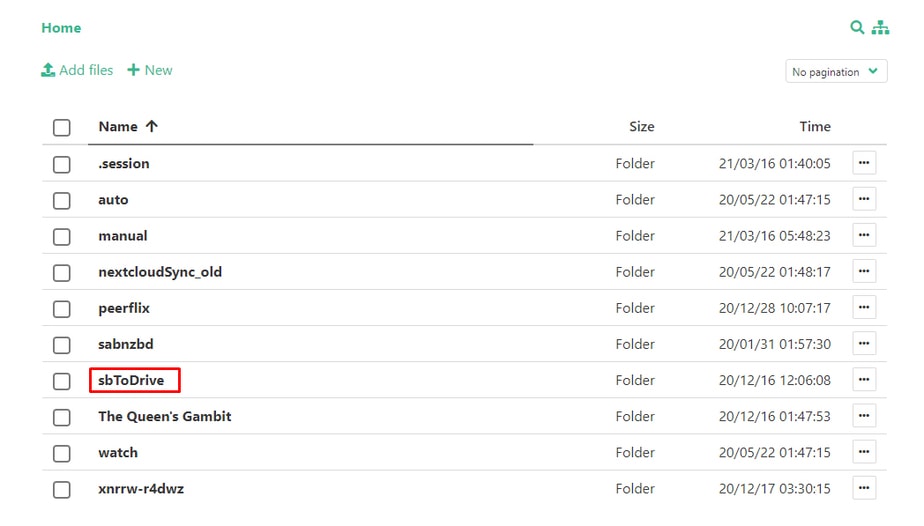
How To Transfer Files From あなたのSeedbox To Your Google Drive

ステップ 2: クリックしてください: the Google Drive ボタン あなたの中の クライアントエリア. #
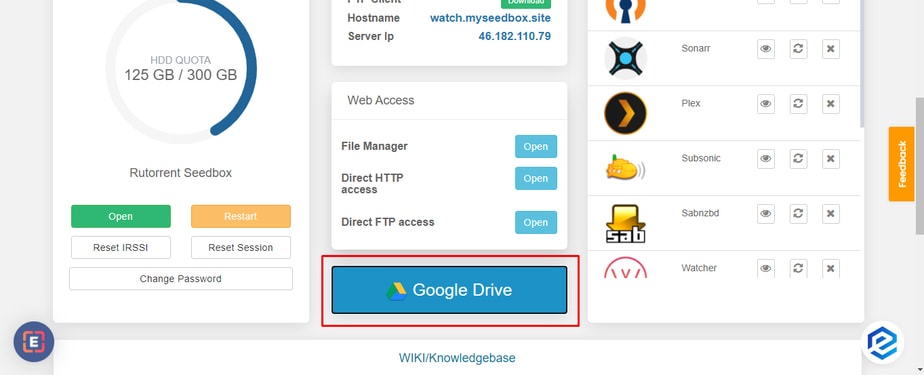
How To Transfer Files From あなたのSeedbox To Your Google Drive

ステップ 3: Click the link provided in the pop-up #
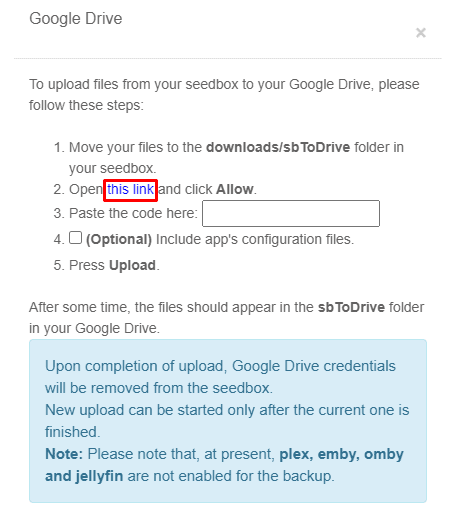
How To Transfer Files From あなたのSeedbox To Your Google Drive

Step 4: 選択 the Google Account you want to use the drive of and click the allow ボタン. #
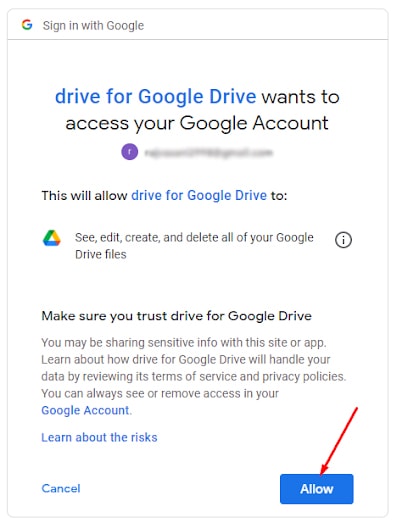
How To Transfer Files From あなたのSeedbox To Your Google Drive

Step 5: A code will appear, copy the code and paste the code in the pop-up. #
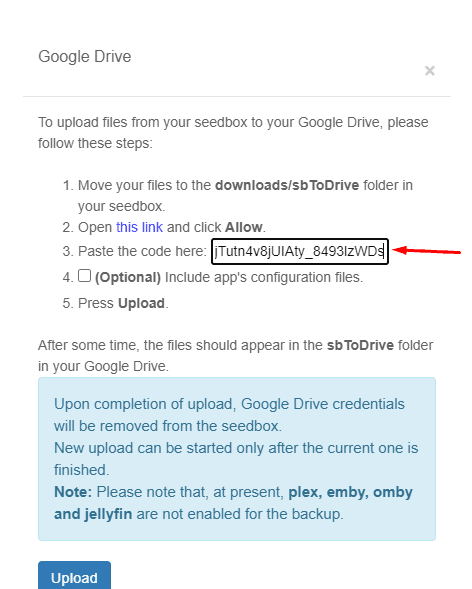
How To Transfer Files From あなたのSeedbox To Your Google Drive

Step 6: できます create a back-up for your app’s configuration, but これは an optional step. #
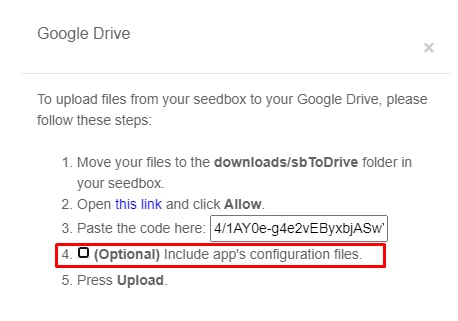
How To Transfer Files From あなたのSeedbox To Your Google Drive

Step 7: クリックしてください: upload, Your files will start transferring and 表示されます see the sbToDrive folder あなたの中の Google drive. #
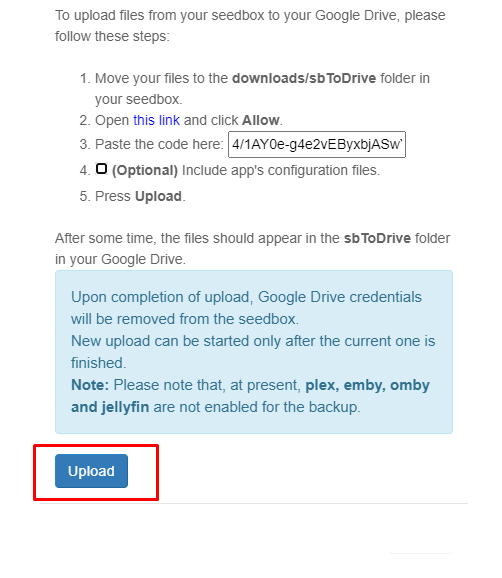
How To Transfer Files From あなたのSeedbox To Your Google Drive

That’s it, in some time, head-on あなたの google drive to view all the files from あなたのSeedbox in the sbToDrive folder.

Updated on 2026年3月16日

What are your Feelings

  • Happy
  • Normal
  • Sad

Share This Article :

  • Facebook
  • X
  • LinkedIn
  • Pinterest
Table of Contents
  • Steps to upload files from seedbox to Google Drive
  • ステップ 1: 選択 all the files that your want to transfer and move/copy them to the “sbToDrive” folder.
  • ステップ 2: クリックしてください: the Google Drive ボタン あなたの中の クライアントエリア.
  • ステップ 3: Click the link provided in the pop-up
  • Step 4: 選択 the Google Account you want to use the drive of and click the allow ボタン.
  • Step 5: A code will appear, copy the code and paste the code in the pop-up.
  • Step 6: できます create a back-up for your app’s configuration, but これは an optional step.
  • Step 7: クリックしてください: upload, Your files will start transferring and 表示されます see the sbToDrive folder あなたの中の Google drive.

We create amazing Seedboxes
for everyone to use 😊

Important Links

Scholarship for CS

Refund Policy

Privacy Policy

Terms of service

Cookie Policy

Acceptable Use Policy

Get in Touch

Contact Us

[email protected]

© 2025 Evoseedbox | All rights reserved. By Evo Created with ❤️

  • Nederlands (オランダ語)
  • English (英語)
  • Français (フランス語)
  • Deutsch (ドイツ語)
  • 日本語
  • 한국어 (韓国語)
  • Português (ポルトガル語)
  • Español (スペイン語)
  • العربية (アラビア語)
  • Русский (ロシア語)
  • Türkçe (トルコ語)
Evoseedbox
  • 日本語
    • Nederlands (オランダ語)
    • English (英語)
    • Français (フランス語)
    • Deutsch (ドイツ語)
    • 한국어 (韓国語)
    • Português (ポルトガル語)
    • Español (スペイン語)
    • العربية (アラビア語)
    • Русский (ロシア語)
    • Türkçe (トルコ語)
  • エボシードボックスホーム
  • Wiki
  • Forum
  • Pricing
Client Area