Downloading Magnetlink from rutorrent search
Step-by-Step Guide to download magnet link torrent from rutorrent search on seedbox.
-
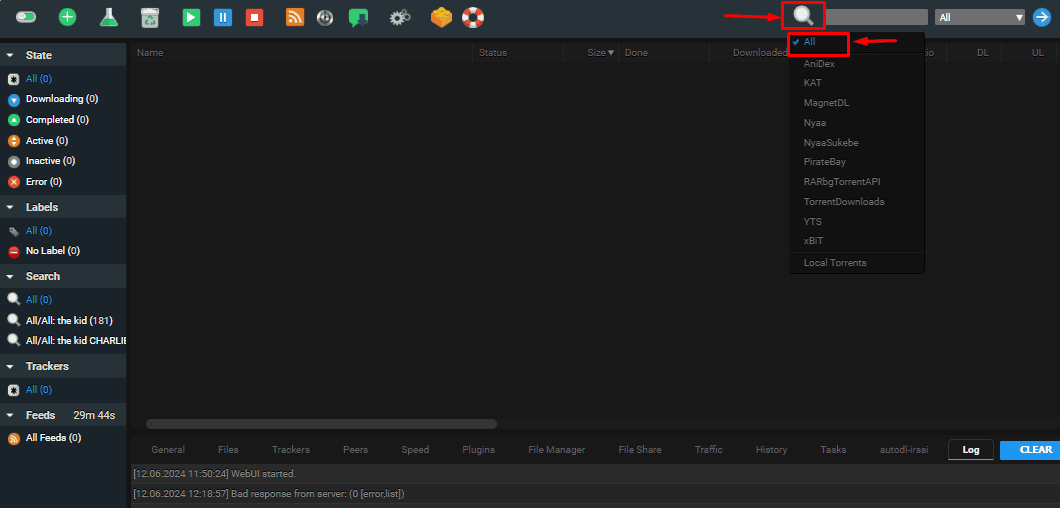
Search for the Torrent
: Ensure to select All by clicking n the search icon and use the search function to find the desired content. For example ehre we are searching teh movie The kid by charlie chaplin.


-
Copy Magnet Link
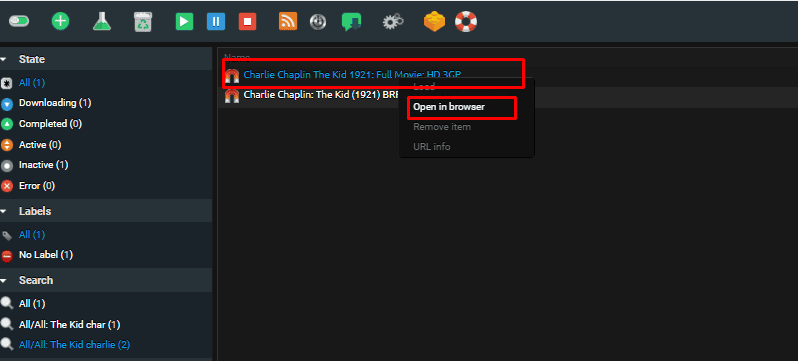
: Right-click on the magnet link and select “Open In browser”

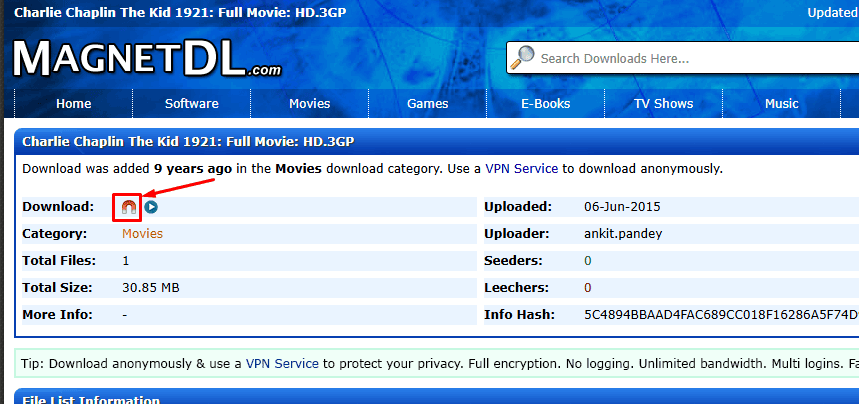
Right click on the magnet icon as shown below
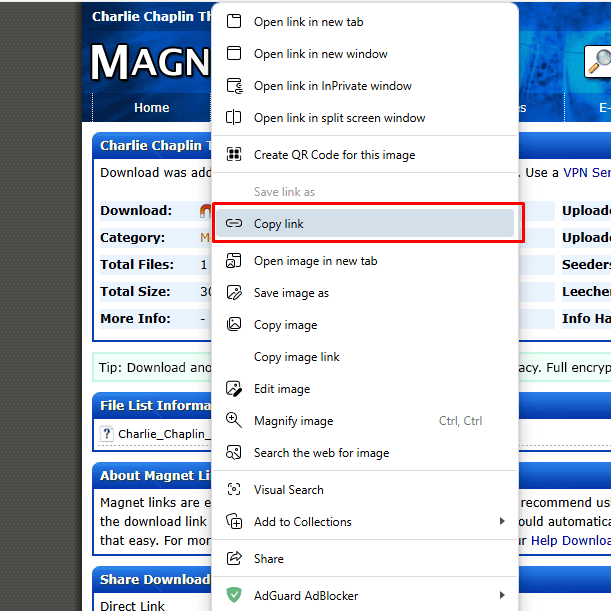
Then click on copy link

-
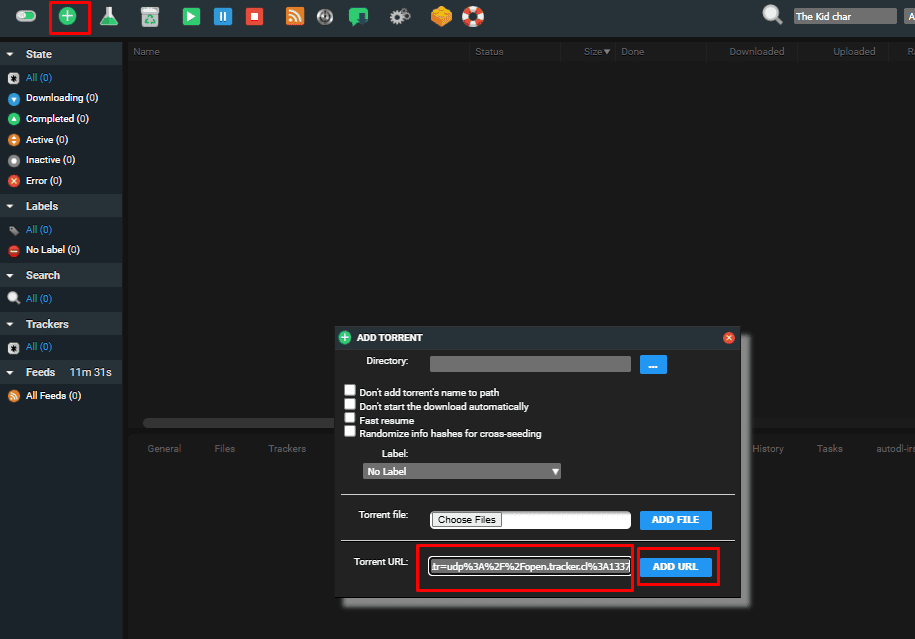
Add Magnet Link to ruTorrent
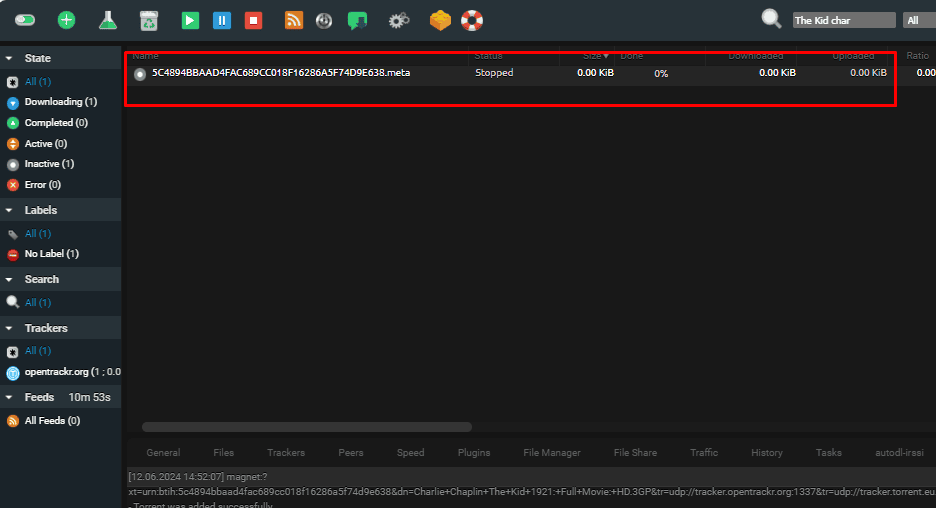
: Go to ruTorrent, click on “Add New Torrent,” and paste the magnet link.

-
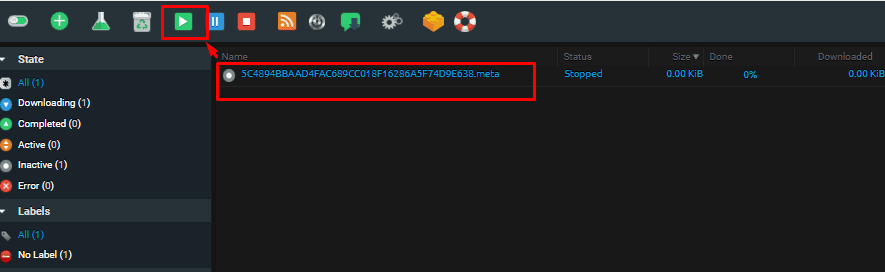
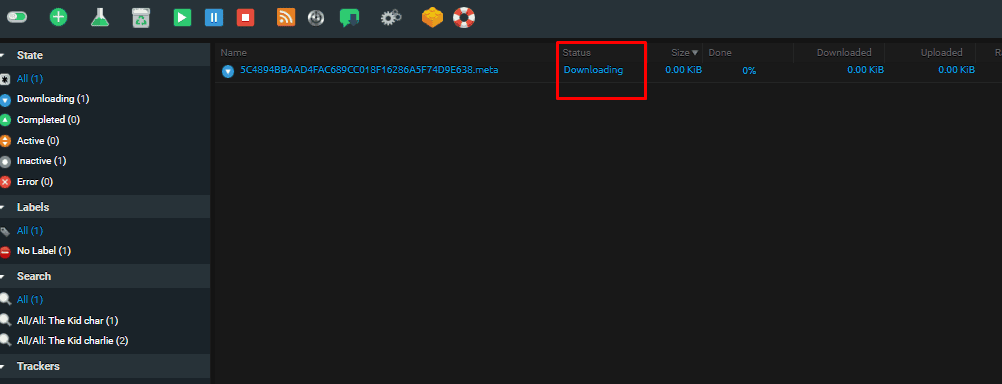
Start Download
: Confirm and start the download process.



Common Issues and Fixes
- Link Not Working: Ensure the magnet link is copied correctly.
- MagnetDl link not opening : Connect to vpn provided by evoseedbox.
How to Download Magnet Links Directly from ruTorrent Search: A Step-by-Step Guide
Learn how to efficiently download magnet links directly from ruTorrent's search function. Our step-by-step guide simplifies the process, ensuring fast and secure torrent downloads with ruTorrent. Discover the benefits and optimize your torrenting experience today
Operating System: Web APP
Application Category: Media, Seedbox
5
Pros
- Simplified Sharing
- Ease of Use: Magnet links are straightforward to share. You can easily copy and paste them into an email or message.
- No Additional Files: Unlike traditional torrent files, magnet links don’t require downloading a separate .torrent file.
- Increased Privacy
- No .torrent File Needed: Magnet links reduce the need to download torrent files, which can sometimes be tracked or flagged.
- Direct Download: The download process starts directly in your torrent client, minimizing exposure to third-party tracking.
- Efficiency
- Quick Start: Once a magnet link is added to ruTorrent, the download process can start immediately, assuming there are active peers.
- Less Overhead: Magnet links streamline the process, reducing the steps needed to start a download.
- Resilience
- Link Durability: Magnet links don’t rely on a single tracker; they can pull data from multiple sources, making them more resilient if a tracker goes down.
- Decentralized: They work well with decentralized networks, enhancing download reliability.
Cons
- Initial Delay
- Metadata Retrieval: Magnet links can take longer to start downloading because they need to retrieve metadata (file information) from peers first.
- Slower Start: This initial delay might be noticeable, especially if there are few peers sharing the file.
- Dependence on Peers
- Peer Availability: Successful downloads rely heavily on the availability and number of peers. Fewer peers can mean slower downloads or incomplete files.
- No Guarantees: There’s no guarantee that the metadata or file pieces will be available quickly if the magnet link isn’t well-seeded.
- Security Concerns
- Link Spoofing: Magnet links can sometimes be spoofed, leading to unintended or malicious downloads. Always ensure you trust the source of the magnet link.
- Exposure: While more private than .torrent files, magnet links still expose your IP address to peers.
- User Experience
- Less Control: Some users find the process of managing and verifying .torrent files more straightforward compared to magnet links.
- UI Limitations: Not all torrent clients or interfaces handle magnet links as seamlessly as ruTorrent, potentially causing confusion or additional steps.
Head of Operations Evoseedbox

About Tim Michels
Tim Michels is a DevOps Engineer with a Master's degree in Computer Science from Vilnius University. Holding a Certified Kubernetes Administrator (CKA) certification, Tim brings deep expertise in Linux, scripting, server management, and digital privacy.
Tim focuses on empowering tech enthusiasts and privacy advocates with step-by-step tutorials that promote self-reliance in the digital world. His work has been featured in popular publications like TorrentFreak, Grey Coder, [invalid URL removed], [invalid URL removed], and his own project, PassVault.me. Tim also actively contributes to respected open-source projects such as Vaultwarden, RuTorrent, GetKuma, RTorrent, and Syncthing.
Outside of technology, Tim enjoys managing media centers, collecting video games, strategy gaming, and even a bit of gardening. His current passion project is AirVault.io, aimed at providing affordable access to open-source digital privacy tools.
