Como Terminate My Service
On this page ▾
Termination of sua seedbox is a simples process. Follow the steps below.
Passo 1: Entrar para o seu evoseedbox área do cliente.
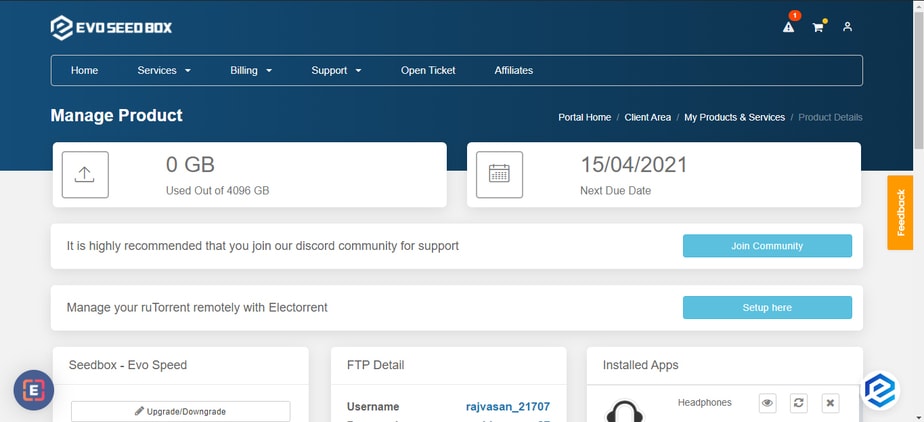
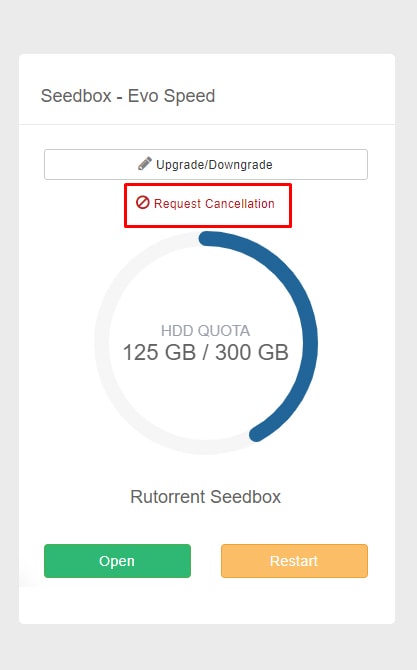
Passo 2: In the Rutorrent seedbox section, you encontrará a request cancellation botão.
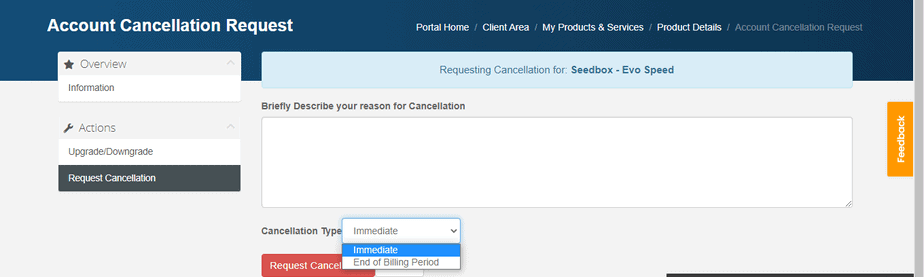
Passo 3: Add your reason for cancellation and select cancellation type. Clique em the Request cancellation botão to proceed.
That’s all you tem que do to terminate your account. Se você are terminating within 7 days of your purchase then you are eligible for a full refund.
Nota: Cancellation/termination of your account will result in the deletion of your data. Portanto, it is advised that you take a backup no seu device.
If você pode’t cancel your account still, then raise a ticket for the same.
Como Cancel Your Evoseedbox Service
Você pode cancel sua seedbox at any time do seu área do cliente. O processo takes less than a minute.
Steps
- Entrar para o seu Evoseedbox área do cliente
- In the ruTorrent Seedbox section, click Request Cancellation
- Selecione your cancellation type:
- Immediate: Service ends now. All data is deleted.
- End of billing period: Service continues until your current paid period ends.
- Add an optional reason for cancellation
- Click Request Cancellation to confirm
Before You Cancel
- Baixar your files first: All data on sua seedbox is permanently deleted upon cancellation
- Check your refund eligibility: Se você are within the 7-day money-back guarantee period, você pode request a full refund
- Consider downgrading: If cost is the issue, você pode switch to a smaller plan instead of cancelling
Put this into practice
EvoSeedbox ships with one-click app installs and up to 10 Gbps per box.


