Evoseedbox Evoseedbox Evoseedbox Evoseedbox
  • Português
    • Nederlands (Holandês)
    • English (Inglês)
    • Français (Francês)
    • Deutsch (Alemão)
    • 日本語 (Japonês)
    • 한국어 (Coreano)
    • Español (Espanhol)
    • العربية (Árabe)
    • Русский (Russo)
    • Türkçe (Turco)
  • Evoseedbox Home
  • Wiki
  • Forum
  • Pricing
Client Area
View Categories
  • Home
  • Docs
  • Como Terminate My Service

Como Terminate My Service

1 min read

Termination of sua seedbox is a simples process. Follow the steps below.

Passo 1: Entrar para o seu evoseedbox área do cliente. #
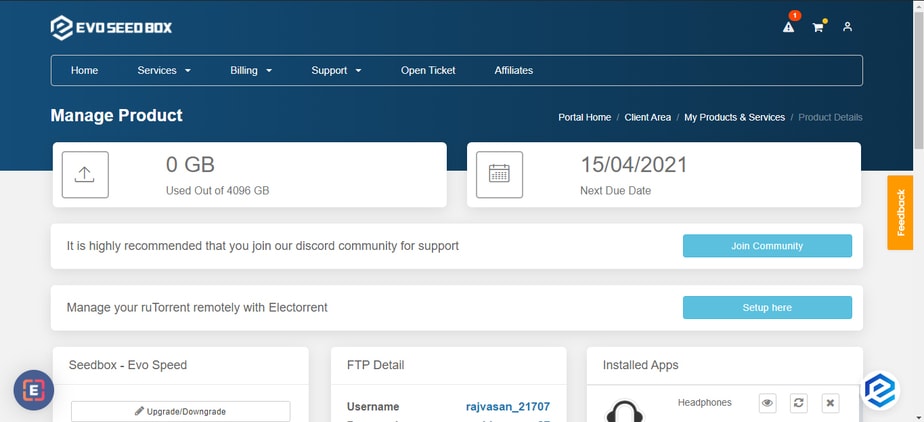
How To Terminate My Service

Passo 2: In the Rutorrent seedbox section, you encontrará a request cancellation botão. #
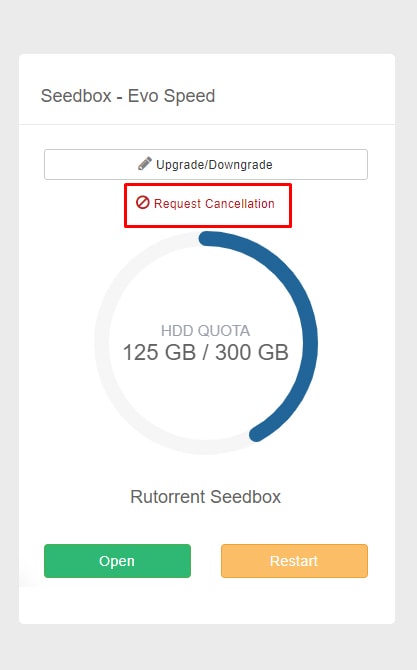
How To Terminate My Service

Passo 3: Add your reason for cancellation and select cancellation type. Clique em the Request cancellation botão to proceed. #
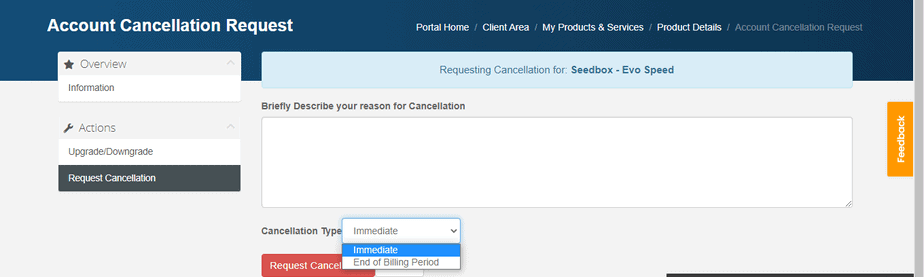
How To Terminate My Service

That’s all you tem que do to terminate your account. Se você are terminating within 7 days of your purchase then you are eligible for a full refund.

Nota: Cancellation/termination of your account will result in the deletion of your data. Portanto, it is advised that you take a backup no seu device.

If você pode’t cancel your account still, then raise a ticket for the same.

Como Cancel Your Evoseedbox Service #

Você pode cancel sua seedbox at any time do seu área do cliente. O processo takes less than a minute.

Steps #

  1. Entrar para o seu Evoseedbox área do cliente
  2. In the ruTorrent Seedbox section, click Request Cancellation
  3. Selecione your cancellation type:
    • Immediate: Service ends now. All data is deleted.
    • End of billing period: Service continues until your current paid period ends.
  4. Add an optional reason for cancellation
  5. Click Request Cancellation to confirm

Before You Cancel #

  • Baixar your files first: All data on sua seedbox is permanently deleted upon cancellation
  • Check your refund eligibility: Se você are within the 7-day money-back guarantee period, você pode request a full refund
  • Consider downgrading: If cost is the issue, você pode switch to a smaller plan instead of cancelling
Updated on 16 de Março, 2026

What are your Feelings

  • Happy
  • Normal
  • Sad

Share This Article :

  • Facebook
  • X
  • LinkedIn
  • Pinterest
Table of Contents
  • Passo 1: Entrar para o seu evoseedbox área do cliente.
  • Passo 2: In the Rutorrent seedbox section, you encontrará a request cancellation botão.
  • Passo 3: Add your reason for cancellation and select cancellation type. Clique em the Request cancellation botão to proceed.
  • Como Cancel Your Evoseedbox Service
    • Steps
  • Before You Cancel

We create amazing Seedboxes
for everyone to use 😊

Important Links

Scholarship for CS

Refund Policy

Privacy Policy

Terms of service

Cookie Policy

Acceptable Use Policy

Get in Touch

Contact Us

[email protected]

© 2025 Evoseedbox | All rights reserved. By Evo Created with ❤️

  • Nederlands (Holandês)
  • English (Inglês)
  • Français (Francês)
  • Deutsch (Alemão)
  • 日本語 (Japonês)
  • 한국어 (Coreano)
  • Português
  • Español (Espanhol)
  • العربية (Árabe)
  • Русский (Russo)
  • Türkçe (Turco)
Evoseedbox
  • Português
    • Nederlands (Holandês)
    • English (Inglês)
    • Français (Francês)
    • Deutsch (Alemão)
    • 日本語 (Japonês)
    • 한국어 (Coreano)
    • Español (Espanhol)
    • العربية (Árabe)
    • Русский (Russo)
    • Türkçe (Turco)
  • Evoseedbox Home
  • Wiki
  • Forum
  • Pricing
Client Area