Termination of あなたのSeedbox is a simple process. Follow the steps below.
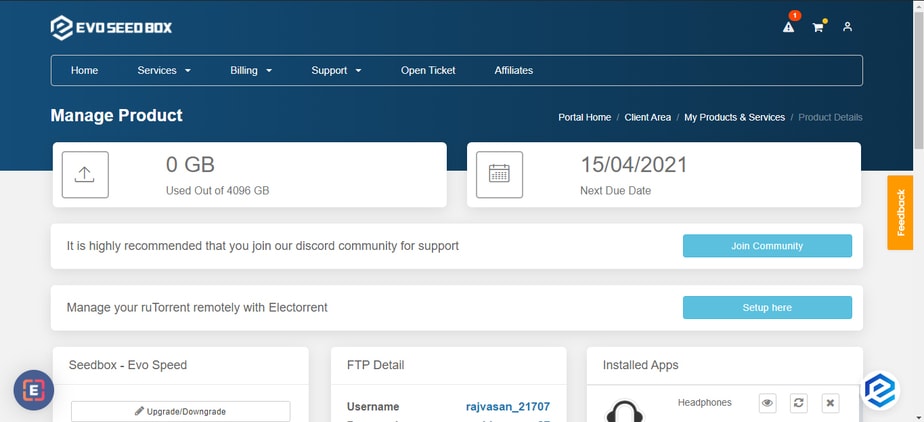
ステップ 1: ログイン あなたの evoseedbox クライアントエリア. #
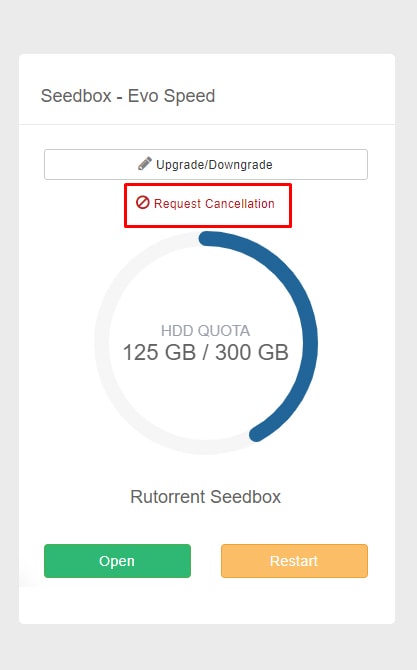
ステップ 2: In the Rutorrent seedbox section, 表示されます find a request cancellation ボタン. #
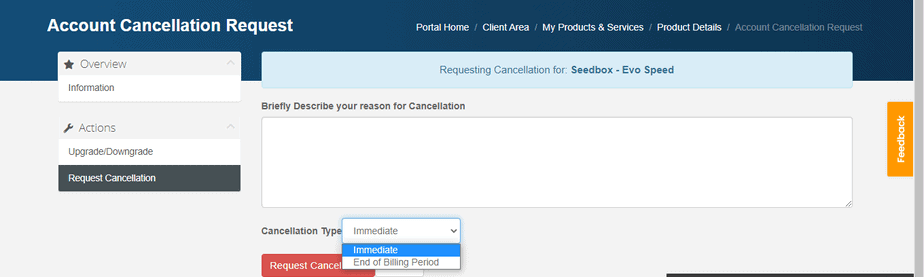
ステップ 3: Add your reason for cancellation and select cancellation type. クリックしてください: the Request cancellation ボタン to proceed. #
That’s all you 必要があります do to terminate your account. もし are terminating within 7 days of your purchase then you are eligible for a full refund.
注意: Cancellation/termination of your account will result in the deletion of your data. そのため, it is advised that you take a backup あなたの device.
If できます’t cancel your account still, then raise a ticket for the same.
方法: Cancel Your Evoseedbox Service #
できます cancel あなたのSeedbox at any time あなたの クライアントエリア. The process takes less than a minute.
Steps #
- ログイン あなたの Evoseedbox クライアントエリア
- In the ruTorrent Seedbox section, click Request Cancellation
- 選択 your cancellation type:
- Immediate: Service ends now. All data is deleted.
- End of billing period: Service continues until your current paid period ends.
- Add an optional reason for cancellation
- Click Request Cancellation to confirm
Before You Cancel #
- ダウンロード your files first: All data on あなたのSeedbox is permanently deleted upon cancellation
- Check your refund eligibility: もし are within the 7-day money-back guarantee period, できます request a full refund
- Consider downgrading: If cost is the issue, できます switch to a smaller plan instead of cancelling


