Evoseedbox Evoseedbox Evoseedbox Evoseedbox
  • Español
    • Nederlands (Holandés)
    • English (Inglés)
    • Français (Francés)
    • Deutsch (Alemán)
    • 日本語 (Japonés)
    • 한국어 (Coreano)
    • Português (Portugués, Portugal)
    • العربية (Árabe)
    • Русский (Ruso)
    • Türkçe (Turco)
  • Evoseedbox Home
  • Wiki
  • Forum
  • Pricing
Client Area
View Categories
  • Home
  • Documentación
  • Cómo Get Maximum Transfer Speed Uso de FTP in FileZilla

Cómo Get Maximum Transfer Speed Uso de FTP in FileZilla

1 minutos de lectura

By following this guide you will be able to get maximum velocidad de descargas as well as you’ll be able to use concurrent downloads which will make downloading multiple files a lot quicker and efficient.

Filezilla recently has earned a lot of popularity in the FTP client applications thanks to its easy-to-use UI  and interactive dashboard which shows both your local machine’s as well as tu seedbox’s file structure.

Like any other application, we want to utilize most of the app’s potential especially download and velocidad de subidas. In File Zilla puede use certain techniques and changes in settings to improve velocidad de descargas.

Let’s see by an example how to set up these settings both for faster velocidad de descargas and concurrent downloads.

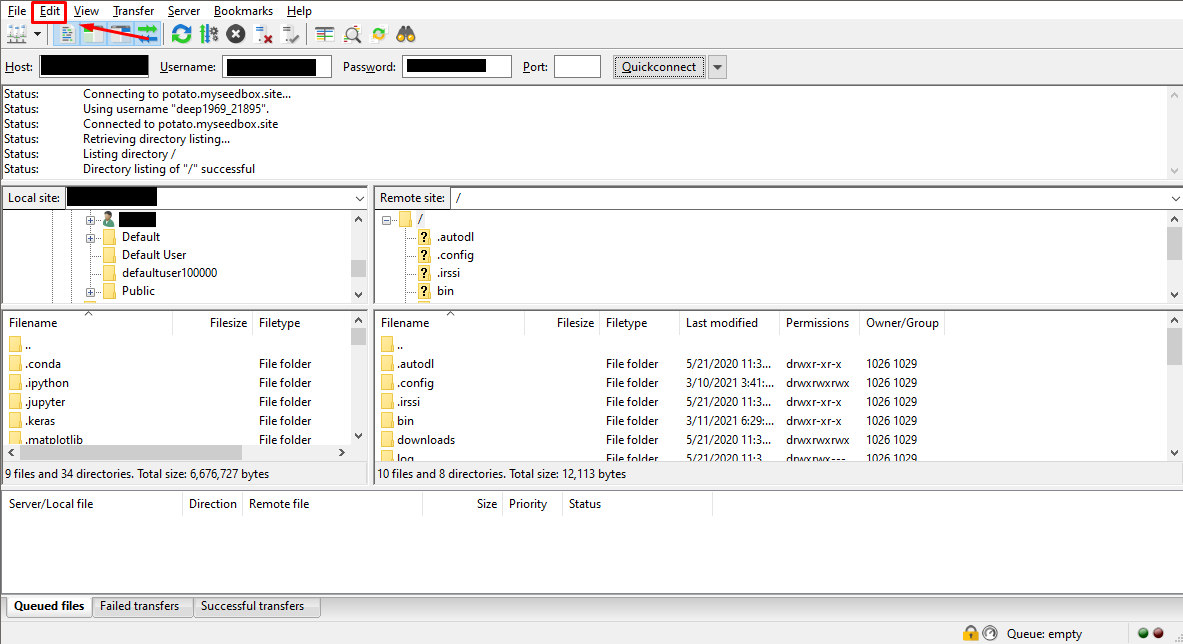
Abrir Filezilla and open the edit tab in the top-left corner.
Cómo Get Maximum Transfer Speed Using Ftp In Filezilla

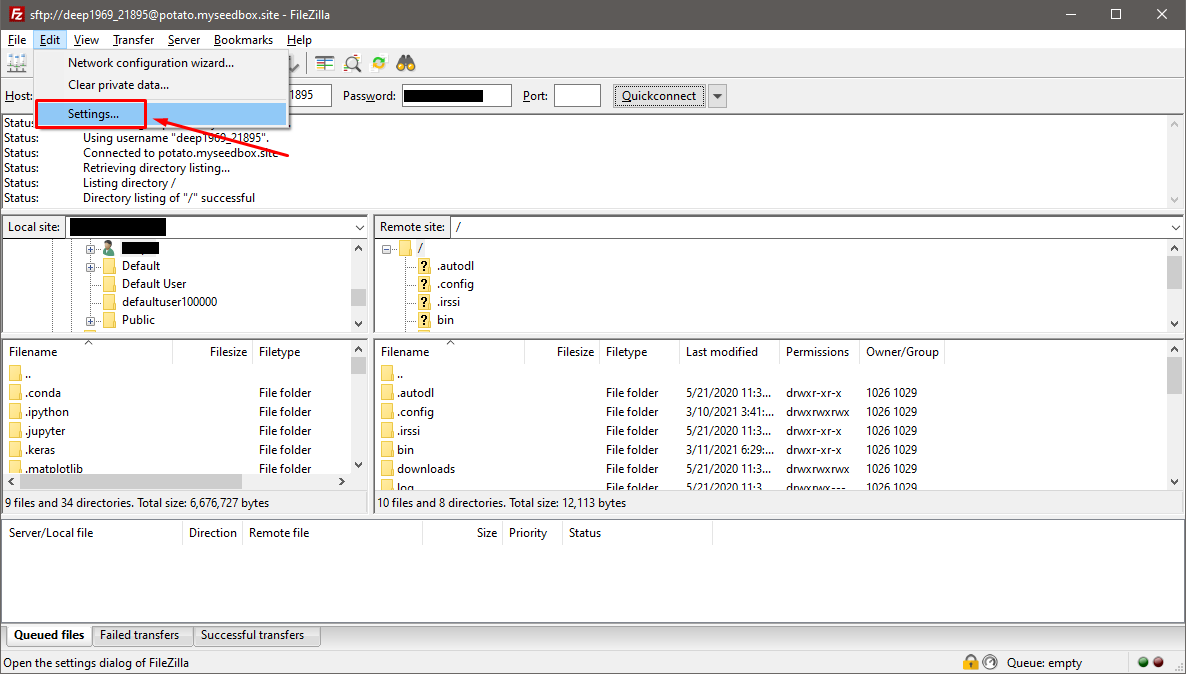
Haga clic en ‘settings’ in the edit drop-down menu
Cómo Get Maximum Transfer Speed Using Ftp In Filezilla

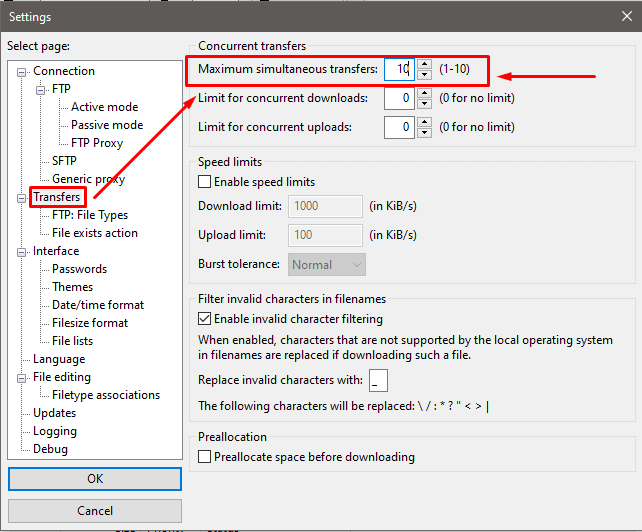
Haga clic en the ‘Transfers’ tab on the left side.
Cómo Get Maximum Transfer Speed Using Ftp In Filezilla

In the ‘Transfers’, the first option verá is the ‘Maximum simultaneous transfers ‘ with its default value is 2 which can go up to a maximum of 10  concurrent downloads at once. Puede modify these settings to adjust your concurrent downloads.

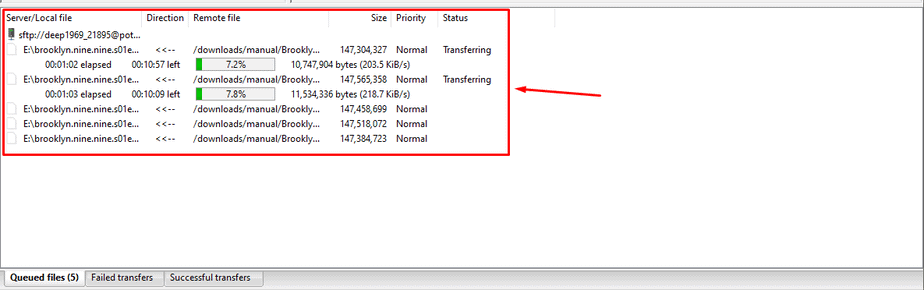
Use these settings and you’ll see 10 files being in queue for download at once.
Cómo Get Maximum Transfer Speed Using Ftp In Filezilla

By using the above settings you will be able to increase the overall number of files being transferred and get maximum velocidad de descarga possible.

It is also advisable that you stop all your active torrents while performing a file transfer as it ca provide an extra speed boost

Updated on 16 de marzo de 2026

What are your Feelings

  • Happy
  • Normal
  • Sad

Comparte este artículo:

  • Facebook
  • X
  • LinkedIn
  • Pinterest

We create amazing Seedboxes
for everyone to use 😊

Important Links

Scholarship for CS

Refund Policy

Privacy Policy

Terms of service

Cookie Policy

Acceptable Use Policy

Get in Touch

Contact Us

[email protected]

© 2025 Evoseedbox | All rights reserved. By Evo Created with ❤️

  • Nederlands (Holandés)
  • English (Inglés)
  • Français (Francés)
  • Deutsch (Alemán)
  • 日本語 (Japonés)
  • 한국어 (Coreano)
  • Português (Portugués, Portugal)
  • Español
  • العربية (Árabe)
  • Русский (Ruso)
  • Türkçe (Turco)
Evoseedbox
  • Español
    • Nederlands (Holandés)
    • English (Inglés)
    • Français (Francés)
    • Deutsch (Alemán)
    • 日本語 (Japonés)
    • 한국어 (Coreano)
    • Português (Portugués, Portugal)
    • العربية (Árabe)
    • Русский (Ruso)
    • Türkçe (Turco)
  • Evoseedbox Home
  • Wiki
  • Forum
  • Pricing
Client Area