Best Seedbox for Seeding (2026)
On this page ▾
There are two very different reasons people buy a seedbox, and they get blurred together constantly. One is racing — being the first to grab a fresh release and hit the top of the snatch list. The other is seeding: keeping torrents uploading around the clock, month after month, so your ratio stays healthy and the content stays alive for everyone else on the tracker. This guide is about the second one. Racing is a sprint that rewards raw speed; seeding is a marathon that rewards uptime, upload allowance, and storage. If you came here for speed-to-first-seed, read our best seedbox for racing guide instead — the priorities are genuinely different.
Seeding is the whole point of a seedbox for most private-tracker members. Your home connection sleeps, throttles uploads, and drops off when you close your laptop. A seedbox sits in a datacenter on a fast, always-on line, so your torrents keep uploading 24/7 without you touching anything. New to the concept? Our beginner’s guide to seedboxes covers the fundamentals.
What makes a seedbox good for seeding
Seeding well is not about peak download speed. It is about staying up and staying resident. Here is what actually matters:
- 24/7 uptime. A seeder that is offline uploads nothing. Every hour your box is down is ratio you are not building and content you are not keeping alive. Uptime is the single most important trait for seeding.
- A generous upload allowance. Seeding is uploading. If your host caps or bills your outbound traffic aggressively, long-term seeding gets expensive fast. You want a large monthly upload allowance so you can seed freely.
- Enough storage to keep torrents resident. You can only seed what is still on disk. The more storage you have, the more torrents stay resident and seedable at once — and old, rare torrents are exactly the ones that earn the most goodwill (and bonus points) on private trackers.
- Reliability and self-healing. A torrent client can stall, crash, or hang silently. If nobody notices, you stop seeding for days without knowing. A box that detects a dead client and restarts it automatically is worth more to a seeder than a slightly faster port.
- DHT/PEX control. Many private trackers require DHT, PEX, and peer exchange to be disabled. Being able to toggle these per-client keeps you compliant and avoids accidental leaks that can get you warned or banned.
Notice what is not on that list: raw port speed. Speed wins races. For pure long-term seeding, a big disk you can fill with resident torrents beats a small, blazing-fast SSD every time.
How EvoSeedbox measures up
We run a fleet of 46 servers, and seeding is what most of our users do with them. At any given moment, roughly 97% of EvoSeedbox accounts have their torrent client running — this is a seeding platform first and foremost, not a box that happens to also seed.
Every plan includes 24/7 uptime, unlimited downloads, and a generous monthly upload allowance so you can seed without watching a meter. Upload allowance scales with the plan:
| Plan | Monthly upload allowance | Price | Best for |
|---|---|---|---|
| Blitz | 2 TB | $5/mo | Getting started, a modest ratio |
| Dash | 12 TB | $26/mo | Heavy seeders, large libraries |
| Plex tiers | 5–20 TB storage | — | Big resident libraries + streaming |
The trait that quietly matters most for seeders is our App Doctor self-healing system. It watches your torrent client across the fleet, and when it finds one stalled or crashed, it restarts it automatically — so a hung client doesn’t silently cost you days of seeding without your knowledge. For a marathon activity like seeding, that difference compounds: it is the gap between “I thought I was seeding” and actually seeding every hour of the month.
Which EvoSeedbox plan for seeding
For pure long-term seeding, prioritize storage and upload allowance over raw port speed. That flips the usual advice: the storage-heavy tiers often serve a dedicated seeder better than a fast SSD racing plan would.
- Just starting out? Blitz at $5/mo gives you 2 TB of monthly upload — plenty to build a healthy ratio on one or two trackers.
- Serious seeder with a big library? Step up to Dash ($26/mo) for 12 TB of upload allowance and room to keep many torrents resident at once.
- Seeding a large media collection you also want to stream? The Plex tiers give you 5–20 TB of storage for a big resident library.
- Chasing new releases for speed, not ratio? That is racing, not seeding — an SSD plan is the right tool. See our racing guide.
See the full lineup on our pricing page. The rule of thumb: a seeder should buy storage and upload headroom; a racer should buy speed.
Tips to seed effectively
- Keep the client on, always. This is what a seedbox is for. Don’t stop and start torrents needlessly — every restart is upload time lost. Let it run.
- Respect each tracker’s DHT/PEX rules. Most private trackers require DHT, PEX, and local peer discovery off. Set this correctly per client before you add torrents — a leak here can get you warned or banned.
- Seed to the ratio and time targets your tracker sets. Many trackers have a minimum seed time (often 72 hours to several days) or a required ratio. Meet it before you remove anything, and understand the rules on your specific tracker — our seedbox for private trackers guide goes deeper.
- Prefer private over public content for ratio-building. Private-tracker torrents keep a stable, well-behaved swarm; public ones behave very differently. If you are unsure of the distinction, read public vs private trackers.
- Keep old and rare torrents resident. The rare torrent nobody else has is where the real ratio and bonus points come from. Storage headroom is what lets you hold onto them instead of pruning.
The seeding settings that actually matter — and where to change them
The advice above is about what to buy. This is about what to change once you have it, because a well-specified box with the defaults left alone still under-seeds.
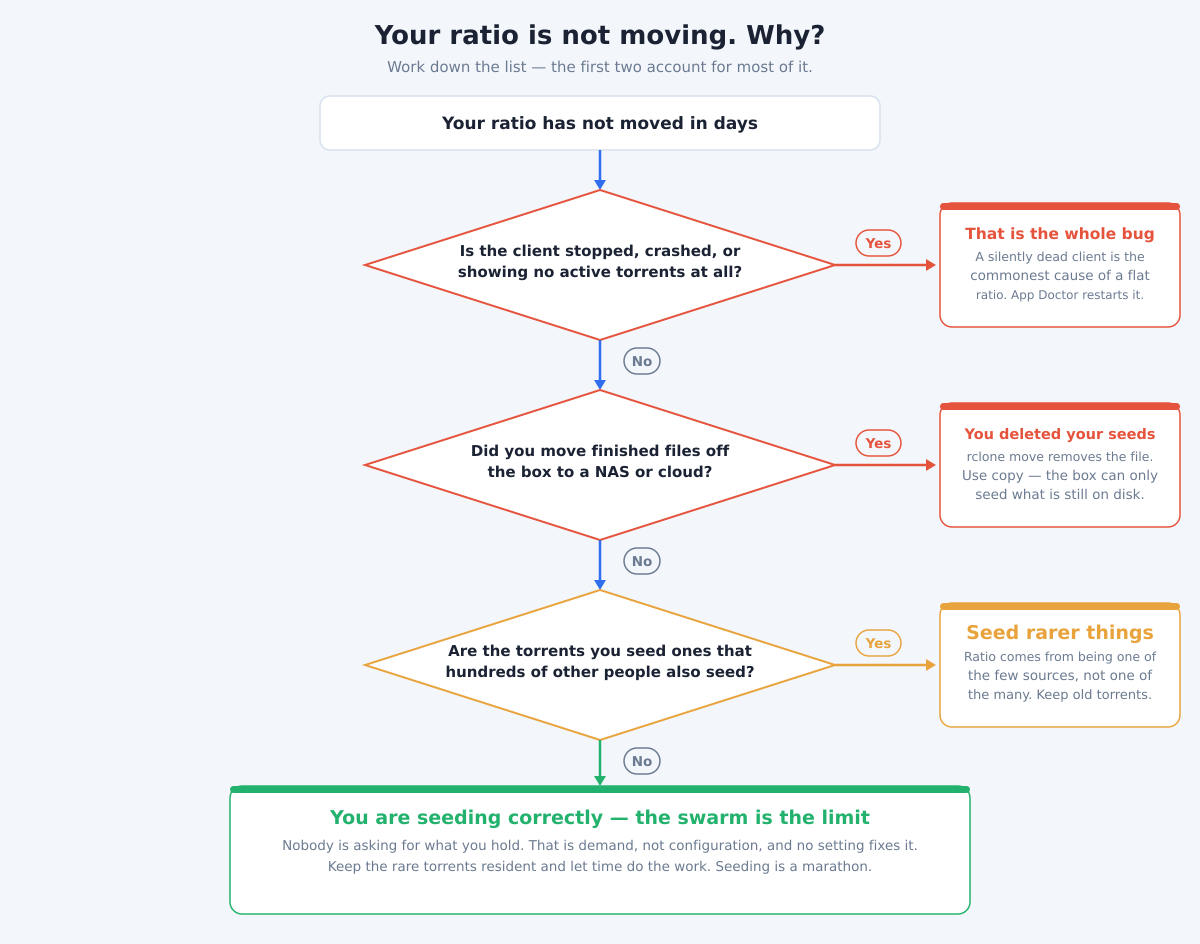
- Raise your upload slots before anything else. In ruTorrent this is Settings → Connection; at the config level,
throttle.max_uploads.setper torrent andthrottle.max_uploads.global.setacross the client. The default is deliberately conservative and it is the most common reason a fast box uploads slowly — you cannot serve twenty peers through five slots, however much bandwidth sits behind them. - Never move finished files off the box — copy them. The single most expensive mistake a seeder makes:
rclone movedeletes the local file once transferred, and the instant it disappears rTorrent stops seeding it. Userclone copy. The box can only seed what is still on disk, and a “tidy” archive job run on a schedule can wipe out months of accumulated ratio overnight without a single error message. - Do not stop and start torrents to “refresh” them. Every restart discards the peer connections you had already established and puts you at the back of the queue while they rebuild. Seeding rewards being boringly continuous. If a torrent looks stuck, check the tracker tab rather than toggling it.
- Keep the rare things, prune the popular ones. When you need space, the instinct is to delete the biggest file. The better rule is to delete the one with the most other seeders, because that is the one nobody will ever ask you for. The obscure torrent with two seeders is where your ratio is actually earned.
- Check the client is genuinely running, not merely installed. A crashed or hung client is invisible from the outside — the panel loads, the torrents are listed, and nothing is being served. App Doctor restarts stalled clients automatically across the fleet, which matters more for seeding than for any other use, because a silent week of downtime costs you ratio you cannot make back.
Get those five right and the plan you chose above will do what it says. Get them wrong and the fastest port in the world still will not move your ratio.
Frequently Asked Questions
What is the difference between seeding and racing?
Seeding is keeping torrents uploading 24/7 over the long term to maintain your ratio and keep content alive. Racing is being the first to grab a brand-new release for maximum upload before the swarm fills up. Seeding rewards uptime, storage, and upload allowance; racing rewards raw speed. For the speed-focused side, see our racing guide.
How much upload allowance do I need for seeding?
It depends on how much you seed. A single tracker and a modest library are comfortable on Blitz’s 2 TB monthly allowance. If you seed a large collection across several trackers, step up to a tier like Dash with 12 TB so you never throttle your own ratio. All plans include unlimited downloads, so only your upload volume drives the choice.
Do I need a fast SSD plan to seed well?
No. Fast SSD storage helps with racing, where speed to first-seed decides everything. For pure long-term seeding, storage capacity and upload allowance matter far more than raw port speed — you want room to keep many torrents resident and the headroom to upload them freely.
What happens if my torrent client crashes while I’m away?
On EvoSeedbox, our App Doctor self-healing system watches your client across all 46 servers and automatically restarts it if it stalls or crashes, so you keep seeding without manual intervention. This matters because a silently dead client can otherwise cost you days of seeding — and ratio — before you notice.
Will seeding on a seedbox get me in trouble with private trackers?
Quite the opposite — trackers love reliable long-term seeders, and a 24/7 seedbox makes you one. The one thing to get right is compliance: disable DHT, PEX, and local peer discovery when your tracker requires it. EvoSeedbox lets you control these per client. See our private tracker guide for specifics.
Can one seedbox seed to multiple private trackers at once?
Yes. A single seedbox can seed torrents from many trackers simultaneously, which is exactly why storage matters — more disk means more torrents resident and seedable at once. Just keep each torrent’s tracker rules (seed time, DHT/PEX settings) in mind, since they can differ from one tracker to the next.
Seeding is a marathon, and the right seedbox is the one that keeps running while you are not watching — always up, with room to grow your library and the upload headroom to feed it. That is exactly what EvoSeedbox is built for. Pick a plan on our pricing page and start building a ratio that keeps climbing 24/7.
{“@context”: “https://schema.org”, “@type”: “FAQPage”, “mainEntity”: [{“@type”: “Question”, “name”: “What is the difference between seeding and racing?”, “acceptedAnswer”: {“@type”: “Answer”, “text”: “Seeding is keeping torrents uploading 24/7 over the long term to maintain your ratio and keep content alive. Racing is being the first to grab a brand-new release for maximum upload before the swarm fills up. Seeding rewards uptime, storage, and upload allowance; racing rewards raw speed. For the speed-focused side, see our racing guide.”}}, {“@type”: “Question”, “name”: “How much upload allowance do I need for seeding?”, “acceptedAnswer”: {“@type”: “Answer”, “text”: “It depends on how much you seed. A single tracker and a modest library are comfortable on Blitz’s 2 TB monthly allowance. If you seed a large collection across several trackers, step up to a tier like Dash with 12 TB so you never throttle your own ratio. All plans include unlimited downloads, so only your upload volume drives the choice.”}}, {“@type”: “Question”, “name”: “Do I need a fast SSD plan to seed well?”, “acceptedAnswer”: {“@type”: “Answer”, “text”: “No. Fast SSD storage helps with racing, where speed to first-seed decides everything. For pure long-term seeding, storage capacity and upload allowance matter far more than raw port speed — you want room to keep many torrents resident and the headroom to upload them freely.”}}, {“@type”: “Question”, “name”: “What happens if my torrent client crashes while I’m away?”, “acceptedAnswer”: {“@type”: “Answer”, “text”: “On EvoSeedbox, our App Doctor self-healing system watches your client across all 46 servers and automatically restarts it if it stalls or crashes, so you keep seeding without manual intervention. This matters because a silently dead client can otherwise cost you days of seeding — and ratio — before you notice.”}}, {“@type”: “Question”, “name”: “Will seeding on a seedbox get me in trouble with private trackers?”, “acceptedAnswer”: {“@type”: “Answer”, “text”: “Quite the opposite — trackers love reliable long-term seeders, and a 24/7 seedbox makes you one. The one thing to get right is compliance: disable DHT, PEX, and local peer discovery when your tracker requires it. EvoSeedbox lets you control these per client. See our private tracker guide for specifics.”}}, {“@type”: “Question”, “name”: “Can one seedbox seed to multiple private trackers at once?”, “acceptedAnswer”: {“@type”: “Answer”, “text”: “Yes. A single seedbox can seed torrents from many trackers simultaneously, which is exactly why storage matters — more disk means more torrents resident and seedable at once. Just keep each torrent’s tracker rules (seed time, DHT/PEX settings) in mind, since they can differ from one tracker to the next.”}}]}
