Best Seedbox for Racing: SSD, Speed & Automation (2026)
On this page ▾
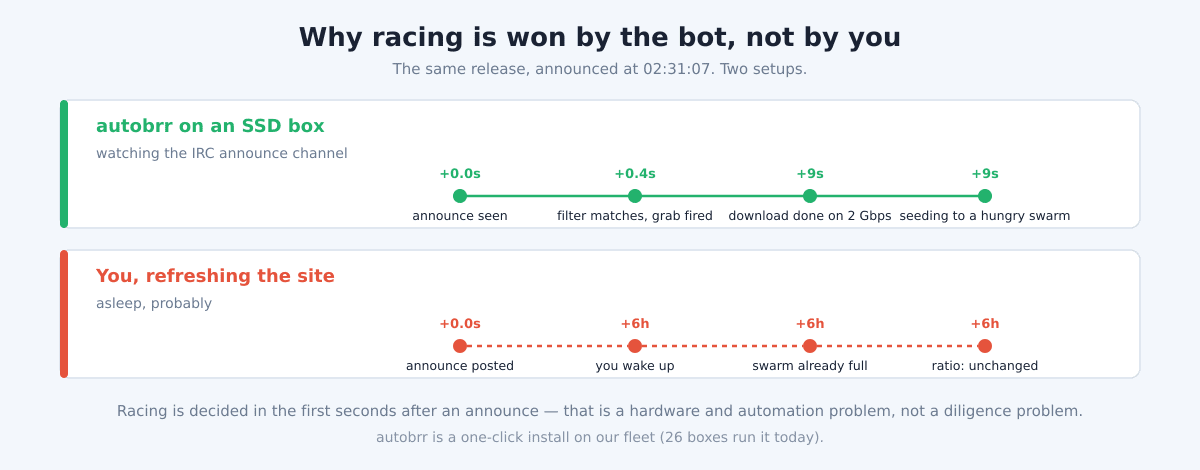
On a private tracker, ratio is currency, and the fastest way to earn it is racing: being one of the first handful of people to grab a brand-new torrent and start seeding it before the swarm fills up. When a release hits the tracker, dozens of leechers appear within seconds. If your client already has the file and is uploading while everyone else is still queuing the download, you collect the bulk of that upload before the torrent goes stale. Racing is won or lost in the first few seconds after a release is announced, which means it is decided almost entirely by hardware and automation, not by how often you refresh the site.
This guide is for experienced private-tracker users who already understand ratio economics and want to know what actually matters in a seedbox built for racing. It is also honest about who does not need this: most seedbox users are fine on standard hardware. Racing is the one narrow case where the expensive stuff earns its keep.
What makes a seedbox good for racing
Racing has a specific and unforgiving set of requirements. Miss any one of them and you lose the race regardless of how good the others are.
- Fast disk (SSD/NVMe). This is the one case where SSD genuinely beats HDD. When ten torrents announce in the same minute, your client is writing many small pieces to many files at once while simultaneously reading them back to upload. A spinning disk’s heads thrash under that random I/O and your download-to-seed time balloons. SSD/NVMe shrugs it off. For general seedbox use, HDD is perfectly fine — for racing, disk latency is often the deciding factor.
- Fast network. A gigabit link fills a fresh torrent quickly; a 2 Gbps or 10 Gbps link fills it faster and, more importantly, lets you upload to many peers at once without saturating. The faster you complete the download, the sooner you flip to seeding while the swarm is still hungry.
- Instant automation. No human can beat an announce bot. The winners run autobrr or autodl-irssi, which sit in the tracker’s IRC announce channel and fire a download the millisecond a matching release is posted. Manual grabbing is not racing; it is arriving late.
- Low latency to peers. Being physically and network-close to the tracker and the initial seeders shaves round-trips off every connection. Milliseconds compound across a full download.
- 24/7 uptime. Releases do not wait for you to be online. A box that is up and watching around the clock catches races at 4 a.m. that you would otherwise never see.
- Headroom. Racing is bursty. You need spare CPU, RAM, and I/O so that when several releases land together, nothing queues. A box running near its limit during quiet hours has nothing left when it counts.
How EvoSeedbox measures up
EvoSeedbox runs a 47-server fleet, and two of its lines are built specifically for the requirements above.
| Line | Disk | Network | Storage / price | Best for |
|---|---|---|---|---|
| SSD racing line | SSD | 2 Gbps | 25 GB from $6/mo up to 150 GB at $30/mo | Ratio racing |
| 10 Gbps line | SSD | 10 Gbps | $15–$60/mo | Heavy racing + high throughput |
The SSD 2 Gbps line is the racing workhorse. Starting at $6/mo, it pairs the fast random I/O that racing demands with a 2 Gbps pipe, so the moment autobrr fires a grab you download and flip to seeding in seconds rather than tens of seconds. If you race on high-volume trackers or want to seed dozens of fresh torrents at once, the 10 Gbps line ($15–$60) gives you the network headroom to keep every one of them saturated.
Why does SSD matter here specifically when we tell most customers HDD is fine? Because general seeding is a sequential, patient workload — a spinning disk streams large sequential reads to peers all day without breaking a sweat. Racing is the opposite: a flurry of concurrent small writes and reads across many files at once, exactly the random-I/O pattern that makes HDD heads thrash and stalls your seed start. SSD removes that bottleneck, and in a race the disk is often the last thing standing between you and first-seed.
On the automation side, autobrr is available as a one-click install (25 installs across the fleet today), and autodl-irssi/irssi is one-click too for trackers or setups where you prefer the classic IRC-autodl path. Every plan ships with unlimited bandwidth — no ratio-killing traffic caps mid-month — and App Doctor, EvoSeedbox’s self-healing layer that detects and restarts a wedged client or app before a race slips past while you are asleep.
How to set up a racing stack
A working racing setup is a short chain, and each link has a guide:
- Pick an SSD plan. Racing lives and dies on disk speed, so start on the SSD 2 Gbps line (or 10 Gbps if you race hard). See pricing.
- Install autobrr. One click from the app menu. Then wire it to your tracker’s IRC announce channel and define your filters — resolution, category, size, freeleech — so it only grabs what actually helps your ratio. Full walkthrough in the autobrr setup wiki.
- Or use autodl-irssi. If your tracker or workflow suits the classic path, set up irssi with autodl-irssi and ruTorrent instead — see setting up irssi with ruTorrent.
- Confirm your tracker profile. Racing only works on trackers that reward fast seeding and expose an IRC announce. Our seedbox for private trackers page covers the private-tracker fit.
Once autobrr is filtering announces and your client is on SSD, the box does the racing for you — 24/7, at machine speed.
What an autobrr filter actually looks like
“Install autobrr” is the easy sentence. The filter is where races are actually won or lost, so here is the concrete version:
- Register your IRC nick with the tracker first. autobrr joins the tracker’s announce channel as you, and most private trackers require your nick to be registered and invited before the announce bot will say anything in front of it. Skipping this is what silently produces “autobrr says connected but never grabs anything.”
- Add the tracker, then check IRC is green. In autobrr: Settings → Indexers to add your tracker (it ships with definitions for the common ones), then Settings → IRC to confirm the network actually connects. Green there means the announce is reaching you.
- Write the filter narrowly — especially the size ceiling. A filter matches on category, resolution and size. The field people forget is maximum size: a filter without one will happily grab a 90 GB remux at 3 a.m. and fill a 25 GB tier before breakfast. If ratio is the entire point, the freeleech-only toggle is the other high-value setting.
- Wire the action to your client with a label. Filter → Actions → add ruTorrent (or your client of choice) and set a label. The label is what routes the file to the right folder and keeps an automated library sane once you are winning several races a night.
- Test broad, then tighten. Start with a deliberately loose filter, watch what it matches for an hour, then narrow it. autobrr’s filter view shows you exactly what matched and why — far easier than debugging silence.
Which plan should you pick
For most racers, the SSD 2 Gbps line at $6/mo (25 GB) is the right entry point: it has the disk and network that racing needs, and unlimited bandwidth so a good week of wins never costs you extra. Step up the storage tier (toward 150 GB at $30) if you seed a large back-catalogue alongside fresh grabs, or move to the 10 Gbps line if you race on multiple busy trackers and want maximum concurrent throughput. Racing rewards uptime, so a slightly larger plan you never have to prune is usually worth more than the cheapest tier you constantly clear out.
An honest note
Racing is a niche. If you are here to keep a handful of long-tail torrents alive, stream your library, or maintain ratio at a relaxed pace, you do not need an SSD box or an announce bot — a standard HDD plan will serve you better for the money, since HDD gives you far more storage per dollar and general seeding never touches the random-I/O ceiling. Reach for the SSD racing line only if you are genuinely competing for first-seed on active trackers. If you are unsure which side of that line you fall on, our choosing a seedbox plan guide walks through the trade-offs without the sales gloss.
Frequently Asked Questions
Do I really need an SSD seedbox to race?
For competitive racing, yes. When several releases announce at once, your client hammers the disk with concurrent small reads and writes, and HDD random I/O is where you lose seconds you can’t afford. For any non-racing use, HDD is fine and cheaper per GB.
What is the difference between autobrr and autodl-irssi?
Both watch a tracker’s IRC announce channel and auto-grab matching releases. autobrr is the modern, web-configured tool with flexible filters and multi-tracker support; autodl-irssi is the classic irssi-based approach that integrates directly with ruTorrent. Both are one-click on EvoSeedbox — pick whichever your tracker and workflow suit.
How fast is “fast enough” for the network?
The SSD 2 Gbps line handles the vast majority of racing well. The 10 Gbps line matters when you race on multiple busy trackers simultaneously and need to keep many fresh torrents saturated at once without the link becoming the bottleneck.
Will racing use a lot of bandwidth, and will I be capped?
Racing does move a lot of data because you seed aggressively right after grabbing. Every EvoSeedbox plan includes unlimited bandwidth, so a heavy racing week never triggers an overage or a mid-month throttle.
What happens if my client crashes during a race?
App Doctor, the self-healing layer on every plan, detects a wedged or stopped client and restarts it automatically — so a crash at 3 a.m. doesn’t quietly cost you every race until morning.
Can I start small and upgrade later?
Yes. Start on the 25 GB SSD tier at $6/mo, confirm your autobrr filters are earning ratio, then scale storage or jump to the 10 Gbps line as your racing grows. Nothing about the setup has to be rebuilt when you move up.
Ready to start winning races? Spin up an SSD racing box in minutes, install autobrr with one click, and let the fleet grab and seed at machine speed while you sleep. See EvoSeedbox pricing and pick your racing plan.
{“@context”: “https://schema.org”, “@type”: “FAQPage”, “mainEntity”: [{“@type”: “Question”, “name”: “Do I really need an SSD seedbox to race?”, “acceptedAnswer”: {“@type”: “Answer”, “text”: “For competitive racing, yes. When several releases announce at once, your client hammers the disk with concurrent small reads and writes, and HDD random I/O is where you lose seconds you can’t afford. For any non-racing use, HDD is fine and cheaper per GB.”}}, {“@type”: “Question”, “name”: “What is the difference between autobrr and autodl-irssi?”, “acceptedAnswer”: {“@type”: “Answer”, “text”: “Both watch a tracker’s IRC announce channel and auto-grab matching releases. autobrr is the modern, web-configured tool with flexible filters and multi-tracker support; autodl-irssi is the classic irssi-based approach that integrates directly with ruTorrent. Both are one-click on EvoSeedbox — pick whichever your tracker and workflow suit.”}}, {“@type”: “Question”, “name”: “How fast is \”fast enough\” for the network?”, “acceptedAnswer”: {“@type”: “Answer”, “text”: “The SSD 2 Gbps line handles the vast majority of racing well. The 10 Gbps line matters when you race on multiple busy trackers simultaneously and need to keep many fresh torrents saturated at once without the link becoming the bottleneck.”}}, {“@type”: “Question”, “name”: “Will racing use a lot of bandwidth, and will I be capped?”, “acceptedAnswer”: {“@type”: “Answer”, “text”: “Racing does move a lot of data because you seed aggressively right after grabbing. Every EvoSeedbox plan includes unlimited bandwidth, so a heavy racing week never triggers an overage or a mid-month throttle.”}}, {“@type”: “Question”, “name”: “What happens if my client crashes during a race?”, “acceptedAnswer”: {“@type”: “Answer”, “text”: “App Doctor, the self-healing layer on every plan, detects a wedged or stopped client and restarts it automatically — so a crash at 3 a.m. doesn’t quietly cost you every race until morning.”}}, {“@type”: “Question”, “name”: “Can I start small and upgrade later?”, “acceptedAnswer”: {“@type”: “Answer”, “text”: “Yes. Start on the 25 GB SSD tier at $6/mo, confirm your autobrr filters are earning ratio, then scale storage or jump to the 10 Gbps line as your racing grows. Nothing about the setup has to be rebuilt when you move up.”}}]}
