Best Seedbox for Beginners (2026)
On this page ▾
Your first seedbox can feel intimidating. The forums are full of talk about 10Gbps ports, ratios, private trackers, and terabytes of storage, and it is easy to assume you need to understand all of it before you start. You don’t. Most of that advice is aimed at power users who have been at this for years. As a beginner, only a handful of things actually matter, and getting those right will save you a lot of frustration. This guide walks through what to look for in your first seedbox, defines the jargon in plain language, and explains why EvoSeedbox is a comfortable place to start.
What beginners should actually prioritise
When you are new, the goal is to get up and running quickly without breaking anything. That means valuing convenience over raw specs. Here is what deserves your attention first.
- Ease of use. You want to click a button and have things work — not edit config files or type commands into a terminal. A good beginner seedbox ships with a web interface you open in your browser.
- One-click apps. Adding a torrent client, a media server, or a download tool should take one click, not an afternoon of setup. Every EvoSeedbox plan includes 50+ one-click apps, so there is no Docker, no command line, and no manual installs.
- Good support and a managed service. Things will occasionally go wrong, and when they do you want someone to help — or better, a system that fixes it before you notice. A managed seedbox means the host handles the server maintenance, updates, and repairs. You just use it.
- Self-healing. EvoSeedbox runs App Doctor, which watches your apps and automatically repairs common problems without you filing a ticket or knowing what went wrong.
- A low starting price. There is no reason to spend a lot to learn. A cheap plan lets you try a seedbox properly, and you can always move up later. EvoSeedbox plans start at $5/month.
- A web interface, no command line. This is worth repeating. If a provider expects you to SSH in and run commands to do basic things, it is not a beginner service. Everything on EvoSeedbox happens through the browser over a secure HTTPS connection, with SFTP available when you want to move files.
If you are still weighing up whether a seedbox is right for you at all, our honest breakdown in should you use a seedbox is a good sanity check before you spend anything.
What beginners can safely ignore for now
Just as important as knowing what to look for is knowing what to skip. These are the features that sound impressive but that a newcomer almost never needs on day one.
- A dedicated server. Dedicated seedboxes give you an entire physical machine to yourself. They are powerful and expensive, and they are overkill when you are still learning the basics. A shared plan is more than enough to start.
- A 10Gbps port. Network port speed determines how fast you can transfer at peak. A 10Gbps connection is spectacular, but it mostly matters for people moving huge volumes constantly. For your first box, a standard connection will already feel dramatically faster than home internet.
- Huge storage. It is tempting to buy terabytes “just in case,” but most beginners fill far less than they expect. Starting with something modest keeps costs down, and every EvoSeedbox plan gives you unlimited downloads regardless of the disk size you pick, so throughput is never the thing you outgrow first.
The theme here is simple: start small. You can always upgrade when you have a real reason to, and by then you will actually understand what you are paying for. Our 7 reasons to own a seedbox covers the genuine benefits without the spec-sheet pressure.
A quick jargon primer
A few terms come up constantly. Here is what they mean, without the gatekeeping.
| Term | What it means |
|---|---|
| Seedbox | A remote server, rented from a host, that downloads and uploads torrents for you around the clock on a fast connection — separate from your home computer, which can stay off. |
| Ratio | The amount you have uploaded (shared) divided by the amount you have downloaded. A ratio of 1.0 means you have given back as much as you took. Because a seedbox stays online and seeds continuously, it makes keeping a healthy ratio easy. |
| Private tracker | An invite-only torrent community with rules, usually including a minimum ratio. They tend to be faster and better organised than public sites, and a seedbox is the standard way to meet their seeding requirements. |
| ruTorrent | A popular torrent client with a friendly web interface. It is what you will use to add torrents and watch them download. EvoSeedbox sets ruTorrent up as the default, so it is ready the moment you log in. |
If you would like a fuller, gentle explanation of the whole concept, the what is a seedbox beginner’s guide is written specifically for people starting from zero.
Why EvoSeedbox is beginner-friendly
EvoSeedbox is built around removing the friction that trips newcomers up. A few things make it a gentle on-ramp.
- One-click apps, no technical skills required. All 50+ apps install with a single click. You never touch Docker, a config file, or a command line.
- App Doctor keeps things running. Instead of leaving you to diagnose why something stopped working, App Doctor detects and self-heals common issues automatically. For a beginner, that is the difference between a hobby and a headache.
- It is fully managed. Across 46 servers, the maintenance, security, and upkeep are handled for you. There is nothing to patch or babysit.
- It starts at $5. The Blitz plan gives you 150GB for $5/month — a genuine, low-risk way to learn without committing to a big bill. When you are ready for more, Plex-capable tiers are there waiting.
Every plan, from the cheapest up, includes the same core: 50+ one-click apps, App Doctor self-healing, unlimited downloads, ruTorrent by default, a browser-based interface, and secure HTTPS and SFTP access. You are not buying a stripped-down version by starting small.
How to get started
Getting going is refreshingly quick. Here is the path most beginners take.
- Read the beginner’s guide if any of the concepts above are still fuzzy — five minutes here saves confusion later.
- Pick a plan. The choosing a seedbox plan guide walks you through matching a plan to how you actually intend to use it, and the full lineup lives on the pricing page. When in doubt, start with the $5 Blitz plan.
- Log in and add your first torrent. The ruTorrent getting started guide shows you exactly how, step by step.
That’s the whole first day. No terminal, no server administration, no waiting on a support queue to get moving.
The five things that actually go wrong in week one
Nothing above prepares you for the specific moment where something does not work. These are the five issues our support queue sees most from new accounts — all five are ordinary, and four of them you can settle yourself in under a minute.
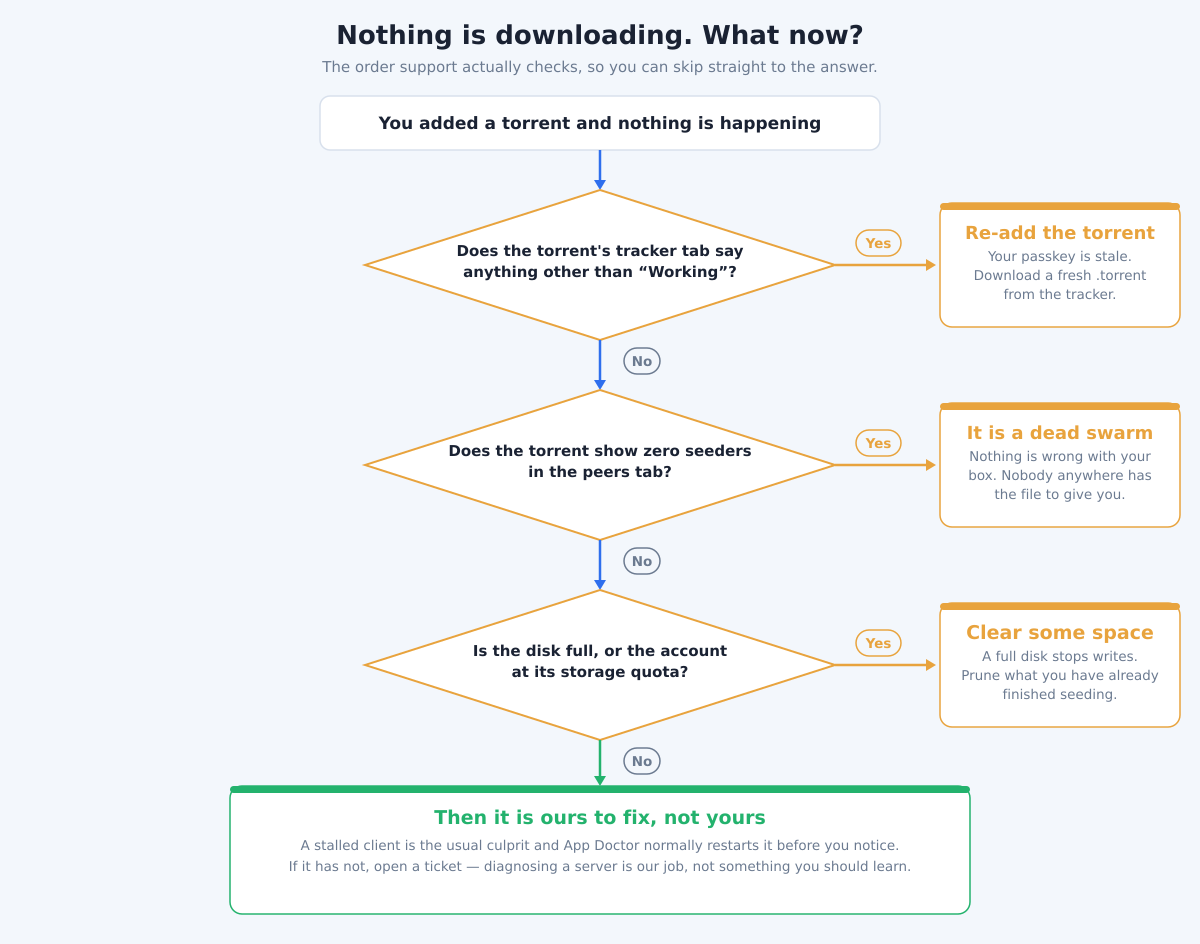
- “The torrent is added but sits at 0%.” Open the torrent’s tracker tab. If it says anything other than Working, the
.torrentfile is stale and your passkey no longer matches — download a fresh copy from the tracker and re-add it. If the tracker is fine and there are simply no seeders, the swarm is dead and nothing on your side will fix it. - “My files are not in the folder.” Almost always a Windows path habit: the file is on the server, under your home directory, and the FTP client is showing a local pane. Check which side of the window you are looking at before assuming a download failed.
- “FTP says access denied.” Nine times out of ten this is a typo in a password pasted with a trailing space, or a client set to plain FTP instead of SFTP on port 22. Re-copy the password from
private/SBinfo.txtand check the protocol dropdown before you open a ticket. - “I installed an app and it shows a 502.” Give it a minute. A freshly installed app can take a moment to start, and App Doctor watches for the ones that genuinely fail and repairs them without you asking. A 502 in the first sixty seconds is usually just impatience.
- “It stopped downloading and I do not know why.” Check your storage. A full disk stops writes, and because the client keeps running it looks like a mysterious stall rather than an obvious “disk full”. Prune something you have finished seeding, or move up a tier.
Notice what is not on that list: anything requiring a command line, and anything you are expected to diagnose at the server level. If you have worked through those five and it is still wrong, it is genuinely ours to fix — open a ticket rather than reading a rTorrent manual on your first week.
Frequently Asked Questions
Do I need any technical skills to use a seedbox?
No. With EvoSeedbox, everything happens in your web browser. Apps install with one click, ruTorrent is set up for you by default, and App Doctor repairs common problems automatically. There is no command line and nothing to configure by hand.
How much storage should a beginner start with?
Less than you think. Most newcomers overestimate how much they will use, so starting small keeps your cost down. The $5 Blitz plan’s 150GB is plenty to learn on, and every plan includes unlimited downloads, so you are never throttled on how much you can move. You can upgrade whenever you genuinely run out of room.
What is the cheapest way to try EvoSeedbox?
The Blitz plan at $5/month is the entry point. It includes the same 50+ one-click apps, App Doctor self-healing, ruTorrent, and secure access as the larger plans — just with less storage — so it is a real, low-risk way to see how a seedbox fits into your setup.
Do I need a private tracker to use a seedbox?
No. A private tracker is an invite-only community with ratio rules, and a seedbox makes meeting those rules easy — but it is not a requirement. You can use a seedbox with public torrents too. Private trackers are simply one popular reason people get a seedbox.
Should I buy a dedicated or 10Gbps seedbox to start?
Not as a beginner. Dedicated servers and 10Gbps ports are powerful but expensive, and they solve problems you are unlikely to have on day one. A shared plan on a standard connection will already feel far faster than home internet. Start small and upgrade only when you have a concrete reason to.
What happens if one of my apps stops working?
App Doctor, which runs on every EvoSeedbox plan, continuously watches your apps and automatically fixes many common issues before you even notice. If something needs a human, the service is fully managed, so support can step in — you are never left to debug a server on your own.
Ready to start? Pick a plan on the EvoSeedbox pricing page — the $5 Blitz plan is a low-risk way to learn — and if you would like help matching a plan to your needs first, walk through the choosing a seedbox plan guide. Your first torrent could be downloading within minutes, no command line required.
{“@context”: “https://schema.org”, “@type”: “FAQPage”, “mainEntity”: [{“@type”: “Question”, “name”: “Do I need any technical skills to use a seedbox?”, “acceptedAnswer”: {“@type”: “Answer”, “text”: “No. With EvoSeedbox, everything happens in your web browser. Apps install with one click, ruTorrent is set up for you by default, and App Doctor repairs common problems automatically. There is no command line and nothing to configure by hand.”}}, {“@type”: “Question”, “name”: “How much storage should a beginner start with?”, “acceptedAnswer”: {“@type”: “Answer”, “text”: “Less than you think. Most newcomers overestimate how much they will use, so starting small keeps your cost down. The $5 Blitz plan’s 150GB is plenty to learn on, and every plan includes unlimited downloads, so you are never throttled on how much you can move. You can upgrade whenever you genuinely run out of room.”}}, {“@type”: “Question”, “name”: “What is the cheapest way to try EvoSeedbox?”, “acceptedAnswer”: {“@type”: “Answer”, “text”: “The Blitz plan at $5/month is the entry point. It includes the same 50+ one-click apps, App Doctor self-healing, ruTorrent, and secure access as the larger plans — just with less storage — so it is a real, low-risk way to see how a seedbox fits into your setup.”}}, {“@type”: “Question”, “name”: “Do I need a private tracker to use a seedbox?”, “acceptedAnswer”: {“@type”: “Answer”, “text”: “No. A private tracker is an invite-only community with ratio rules, and a seedbox makes meeting those rules easy — but it is not a requirement. You can use a seedbox with public torrents too. Private trackers are simply one popular reason people get a seedbox.”}}, {“@type”: “Question”, “name”: “Should I buy a dedicated or 10Gbps seedbox to start?”, “acceptedAnswer”: {“@type”: “Answer”, “text”: “Not as a beginner. Dedicated servers and 10Gbps ports are powerful but expensive, and they solve problems you are unlikely to have on day one. A shared plan on a standard connection will already feel far faster than home internet. Start small and upgrade only when you have a concrete reason to.”}}, {“@type”: “Question”, “name”: “What happens if one of my apps stops working?”, “acceptedAnswer”: {“@type”: “Answer”, “text”: “App Doctor, which runs on every EvoSeedbox plan, continuously watches your apps and automatically fixes many common issues before you even notice. If something needs a human, the service is fully managed, so support can step in — you are never left to debug a server on your own.”}}]}
