7 Reasons to Own a Seedbox (2026)
On this page ▾
A seedbox is a private, always-on server on a fast datacenter connection that downloads and uploads torrents for you, without touching your home computer or network. If you want the one-paragraph version, our beginner’s guide to what a seedbox is covers the basics. Here’s why people actually get one.
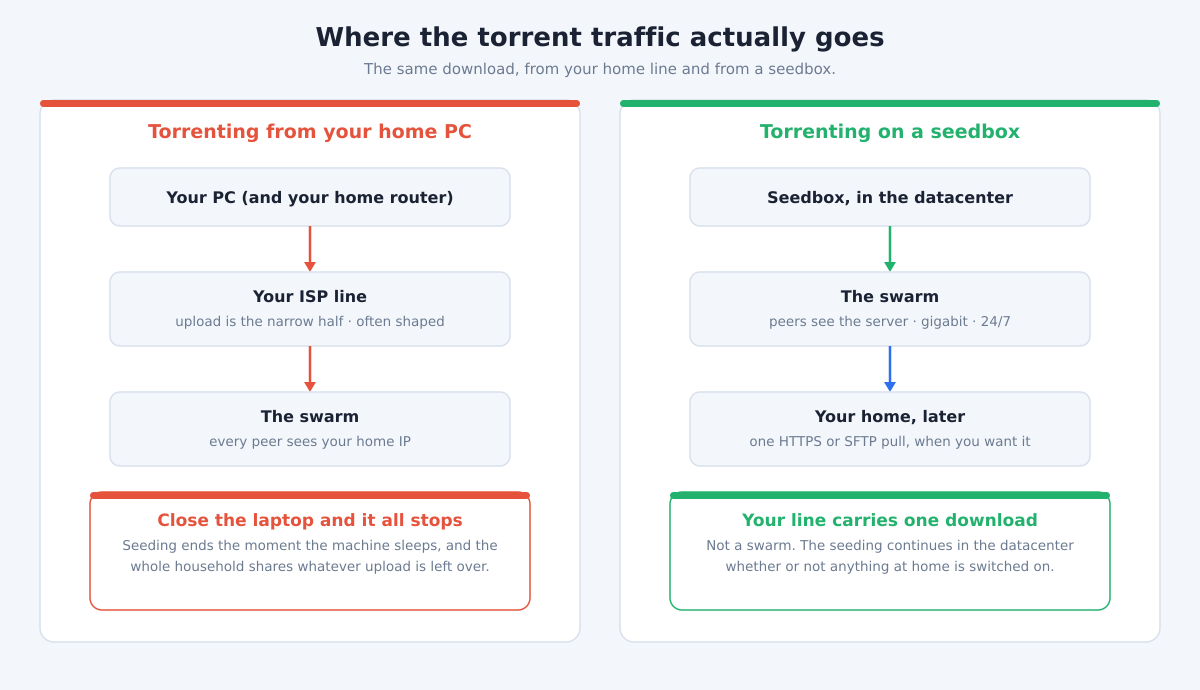
1. Blazing-fast downloads on a datacenter line
Your home connection is built for streaming and browsing, not pulling down large files. A seedbox sits in a datacenter on a gigabit-class line, so a download that ties up your home internet for hours often finishes in seconds. You grab the finished file from the seedbox whenever it suits you, at your own pace, with nothing throttling the transfer on the seedbox side.
2. 24/7 seeding and an effortless ratio on private trackers
Most home machines get switched off overnight, which quietly kills your upload ratio. A seedbox stays online around the clock, so torrents keep seeding while you sleep. That matters most on private trackers, where maintaining ratio is a membership requirement rather than a nicety. About 97% of EvoSeedbox accounts have their torrent client running at any given time, and unlimited datacenter bandwidth on every plan means seeding hard never costs you extra.
3. Your home IP stays out of the swarm
When you torrent from home, your IP address is visible to every other peer in the swarm. A seedbox breaks that link: all the peer connections happen from the datacenter server, so your residential IP never appears in the swarm at all. You still control everything through a private web interface over an encrypted connection, but the public-facing address is the server’s, not yours.
4. No home bandwidth used, no ISP caps or throttling
Because the transfers happen on the seedbox, your home internet isn’t carrying torrent traffic. That means no eating into a monthly data cap, no slowdowns for everyone else on your network, and none of the traffic-shaping some ISPs apply to torrent protocols. The only thing that touches your home line is the final download of the completed file, over ordinary HTTPS or SFTP, which most networks treat like any other file transfer.
5. A 24/7 Plex or Jellyfin media server that streams anywhere
A seedbox isn’t only for downloading. With a one-click Plex or Jellyfin install, it doubles as an always-on media server that streams your library to your TV, phone, or laptop wherever you are, no home server humming in a closet. Because it lives in a datacenter, it has the upstream bandwidth to stream comfortably to people outside your house. See our Plex seedbox guide for how the setup works.
6. Hands-free automation with the *arr stack
The real payoff is automation. Tools like Sonarr, Radarr, and Prowlarr, all available as one-click apps, watch for the shows and films you want, grab them the moment they appear, and file them neatly into your Plex or Jellyfin library. Once it’s set up, your collection fills itself in with no manual searching, downloading, or renaming. EvoSeedbox ships over 50 one-click apps, so building this pipeline is a matter of clicking install rather than wrestling with Docker.
7. It’s cheap and genuinely zero-maintenance
Running your own always-on server usually means patching, monitoring, and fixing things at 2am. A managed seedbox removes that. EvoSeedbox plans start at $5 a month and run up to $60, every app installs in one click, and our App Doctor watches the 46-server fleet and self-heals common problems before you’d ever notice them. You get the server without the sysadmin job.
What the first hour actually looks like
Seven reasons are easy to list. The fair question is what you actually do once the box exists, so here is the honest version — it is shorter than most people expect.
- Your credentials arrive in one file. Every box ships with
private/SBinfo.txtin your home directory, and it holds the panel URL, your username, and the passwords for each service. Nearly every “what is my login?” ticket we answer is someone who has not opened that file yet. - Open the panel and add a torrent. ruTorrent is already installed and running — there is no setup step. Drag a
.torrentfile into the browser window, or paste a magnet link, and it starts. This is the whole workflow for most people, most days. - Pull the finished file down over SFTP, on port 22. Point FileZilla, WinSCP or Cyberduck at your server name with the SBinfo credentials. Choose SFTP, not FTP — the single commonest transfer problem we see is a client left on plain FTP or on the wrong port, which fails with a “permission denied” that has nothing to do with permissions.
- Install the apps you want with one click. Plex, Sonarr, Radarr, Syncthing and the rest install from the panel; no Docker, no compose file, no ports to pick. As a sense of what people actually run: across the fleet there are currently 156 Plex installs, 131 Radarr, 126 Syncthing and 57 Jellyfin. The *arr stack is genuinely the popular path, not a marketing one.
- Then stop touching it. This is the part that surprises people. A seedbox is not a machine you administer — it seeds while you are asleep, and App Doctor repairs the common app failures on its own. If you find yourself logging in daily to check on it, you are working harder than the box requires.
That is the first hour. The reasons above are why people buy one; this is what owning one is actually like.
Is a seedbox right for you?
If you seed on private trackers, run Plex, or just want torrents off your home connection, a seedbox pays for itself quickly. If you’re still weighing it up, read should you use a seedbox and what a seedbox actually does for an honest look at who benefits and who doesn’t.
Frequently Asked Questions
Is using a seedbox legal?
Yes. A seedbox is just a remote server, and the technology itself is completely legal. What matters is what you download with it. Using it for content you’re entitled to, such as Linux distributions, public-domain media, or torrents on trackers you’re a member of, is fine. You’re responsible for respecting copyright law in your own country.
Do I need any technical skills to use one?
Not really. Everything runs through a web interface, and the apps you’d want, from the torrent client to Plex to the *arr stack, install with a single click. If something breaks on the server side, App Doctor usually fixes it automatically, so there’s no command line or server administration involved for day-to-day use.
How much does a seedbox cost?
EvoSeedbox plans range from $5 to $60 a month depending on how much storage and resources you need. Every plan includes unlimited downloads, datacenter bandwidth, and the full set of one-click apps, so even the entry plan is fully featured. You can compare the options on our pricing page.
Will a seedbox improve my ratio on private trackers?
It should, because the server seeds 24/7 on a fast line instead of only when your home PC is on. It won’t magically fix a ratio on a tracker with little demand for what you’re seeding, but for staying online and uploading consistently, a seedbox is the standard tool most private-tracker members rely on.
Can I stream my media while torrents are still downloading?
Yes. The server has plenty of bandwidth and resources to seed and stream at the same time, so your Plex or Jellyfin library stays available even while new downloads and uploads are running in the background. That’s a large part of why people run both on the same box.
Ready to get torrents off your home connection and let a datacenter do the heavy lifting? Browse EvoSeedbox plans starting at $5 a month and have your seedbox running in minutes.
