Seedbox Cron Jobs: Run Your Own Scripts Without Root
On this page ▾
Sooner or later, most people who run a seedbox seriously want it to do something on a schedule. Re-check a feed every few hours. Tidy up finished downloads. Poll an API and grab what’s new. Write a nightly summary of what’s on disk.
And then they hit the wall: a seedbox is not a server you have root on. The usual answers for scheduling work assume you do, and every one of them falls over.
Why the usual answers don’t work on a seedbox
If you have looked this up before, you have probably been told one of these. Here is why each disappoints on shared hardware:
- “Just add a crontab entry.” On a shared seedbox you generally do not get a personal crontab, and even where a shell exists it is a container without a cron daemon running inside it.
- “Write a systemd service.” systemd is the host’s, and the host is not yours. Writing unit files needs root, and a shared box will not hand that out — nor should it.
- “Run it in screen or tmux.” This works right up until it doesn’t. Nothing restarts your script when it crashes, nothing caps how much CPU or memory it eats, and the whole thing evaporates on the next reboot or server move.
- “Use a while-true loop in the background.” Same problem, fewer safety rails.
The honest summary is that seedbox cron jobs have historically been a hack — something you set up by hand, and set up again from scratch every time anything changed underneath you.
What we built instead
We shipped a small job runner called evorun to every server in our fleet. It gives you supervised, resource-capped background jobs on your account without you ever touching root, systemd, or a crontab.
The design goal was blunt: your automation should be your data. A job you set up should survive a reboot, a rebuild, and a migration to another machine, with nothing for you to redo.
A job is one file in your own folder
There is no control panel to learn and no config buried somewhere you cannot reach. A job is a small JSON file that lives in ~/downloads/.evorun/ — inside your own storage, next to your data.
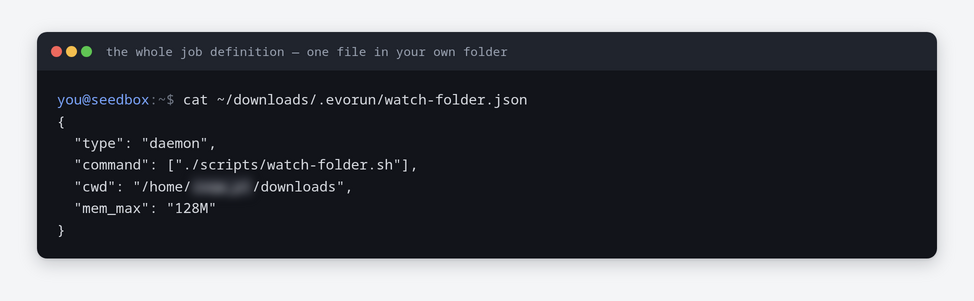
That is the whole thing. You name a command, say whether it should run continuously or on a schedule, and optionally cap its memory. The runner picks it up within a minute.
Seeing what is running
A small command that ships alongside it shows you the state of everything you have defined:
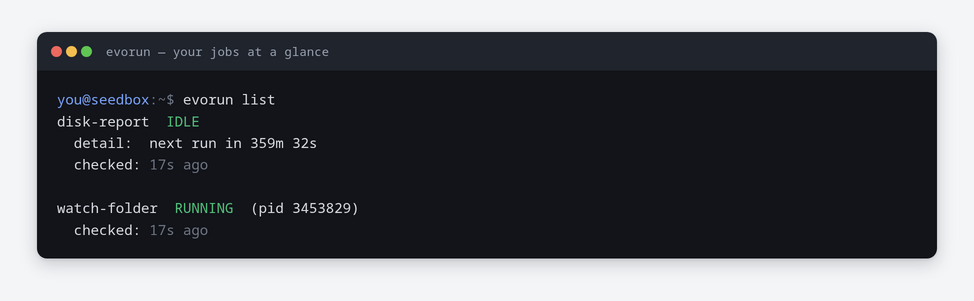
You can also drill into one job and read its output, without hunting through system logs you have no access to:
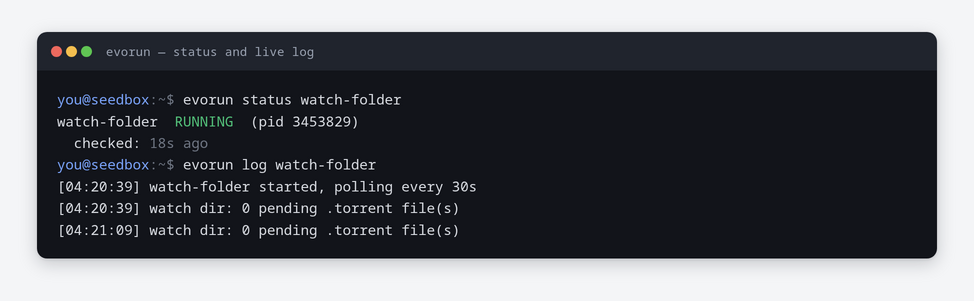
-f to follow it.The commands are list, status, start, stop, restart and log. That is the entire interface.
Two kinds of job
There are exactly two, and picking the right one matters more than it sounds:
- Always-on — a process that should stay up. If it exits, it is restarted with a backoff. Use this for something genuinely long-lived, like a listener.
- Scheduled — runs, does its work, exits, and runs again after the interval you set. Use this for anything that checks, syncs or reports.
Most automation people describe as “a daemon” is really a scheduled job wearing a costume. We measured one real example: it worked for a few seconds, then slept for four hours — a duty cycle of well under one percent. As a scheduled job it does the same work and leaves the server alone in between. If in doubt, choose scheduled.
The part that actually matters: it survives
This is the reason the whole thing exists. Because your job definition lives in your own downloads folder, it travels with your data.
Move an account to a different server and the automation starts itself on the new machine with nothing for the customer to redo. Rebuild a box and it comes back. There is no hand-made file in a privileged corner of the server that a reinstall can quietly take away — which is exactly what used to happen, and exactly the support ticket that prompted us to build this.
The limits, stated plainly
This runs on shared hardware, so it is bounded on purpose. We would rather tell you the numbers than have you discover them:
- Up to 3 job definitions per account, of which 1 may be always-on.
- Scheduled jobs run no more often than every 5 minutes, and a single run is stopped after 30 minutes.
- Each job is capped at 25% of one CPU core and 512 MB of memory.
- Logs are kept and rotated at 50 MB.
- All jobs on a server share one overall ceiling, so no account can crowd out its neighbours.
These are deliberately modest. This is for automation around your seedbox, not for using a seedbox as a compute server.
Getting started
You will need a shell on your account, which means the OpenSSH app — our OpenSSH tutorial walks through enabling it, and key-based login is worth setting up at the same time.
From there, drop a job file like the one above into ~/downloads/.evorun/ — the folder is already waiting for you — and the runner will pick it up on its next pass. The evorun command is on your PATH as soon as the SSH app is enabled.
If what you actually want is to wire your existing apps together rather than write your own script, that is a different tool — see Liteflow for seedbox automation. And if you simply want torrents to stop at a ratio, there is a built-in setting for that and you do not need a job at all.
Questions about what fits inside the limits? Open a ticket and ask — we would rather help you shape a job than have you find the ceiling the hard way.
