When you sign in with evoseedbox, you create an account and opt for a Seedbox. This seedbox is a remote server space with its own имя пользователя and пароль.
Поэтому the FTP учетные данные are not the same as your Evoseedbox учетные данные.
Your FTP учетные данные are доступен in the личный кабинет of вашим seedbox. Using these учетные данные, вы можете access all приложениеlications, connect with вашим seedbox using FTP clients like Filezilla, and much more.
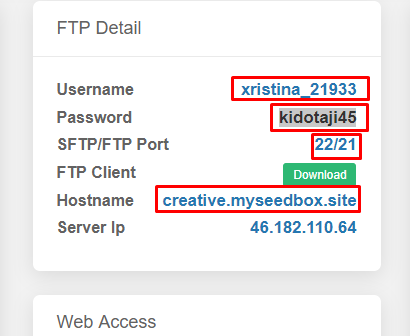
Your FTP/SFTP Connection Details #
FTP (File Transfer Protocol) and SFTP (Secure FTP) allow you to transfer files between вашим seedbox and your local computer. Your FTP учетные данные are separate с вашего Evoseedbox account login.
Where to Find Your FTP Credentials #
- Войти to the Evoseedbox личный кабинет
- Откройте вашим seedbox dashboard
- Your FTP hostname, имя пользователя, and пароль are displayed in the учетные данные section
Connection Settings #
| Setting | Value |
|---|---|
| Protocol | SFTP (recommended) or FTP |
| Host | Your seedbox IP address |
| Port | 22 (SFTP) or 21 (FTP) |
| Username | Same as вашим seedbox app имя пользователя |
| Password | Same as вашим seedbox app пароль |
Which FTP Client to Use #
- FileZilla — Free, cross-platform, most popular choice. See FileZilla Speed Guide.
- WinSCP — Windows-only, supports SFTP and SCP
- LFTP — Command-line tool with segmented downloads for maximum speed
Important: Always Use SFTP #
SFTP encrypts your connection, protecting your files and учетные данные during transfer. Standard FTP sends data unencrypted. Always choose SFTP (port 22) over FTP (port 21) unless you have a specific reason not to.


