FTP Credentials
On this page ▾
Quand you sign in with evoseedbox, you create an account and opt for a Seedbox. This seedbox is a remote server space with its own nom d’utilisateur and mot de passe.
Therefore the FTP identifiants are not the same as your Evoseedbox identifiants.
Your FTP identifiants are disponible in the espace client of votre seedbox. Using these identifiants, vous pouvez access all the applications, connect with votre seedbox using FTP clients like Filezilla, and much more.
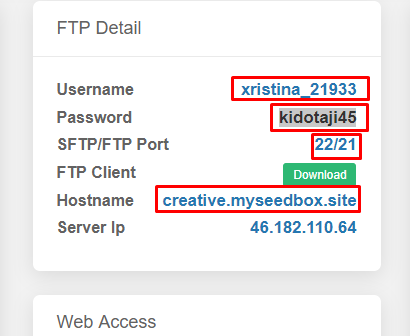
Your FTP/SFTP Connection Details
FTP (File Transfer Protocol) and SFTP (Secure FTP) allow you to transfer files between votre seedbox and your local computer. Your FTP identifiants are separate from your Evoseedbox account login.
Où to Find Your FTP Identifiants
- Se connecter to the Evoseedbox espace client
- Ouvrir votre seedbox dashboard
- Your FTP hostname, nom d’utilisateur, and mot de passe are displayed in the identifiants section
Connection Settings
| Setting | Value |
|---|---|
| Protocol | SFTP (recommended) or FTP |
| Host | Your seedbox IP address |
| Port | 22 (SFTP) or 21 (FTP) |
| Nom d’utilisateur | Same as votre seedbox app nom d’utilisateur |
| Mot de passe | Same as votre seedbox app mot de passe |
Which FTP Client to Use
- FileZilla — Free, cross-platform, most popular choice. See FileZilla Speed Guide.
- WinSCP — Windows-only, supports SFTP and SCP
- LFTP — Command-line tool with segmented downloads for maximum speed
Important: Always Use SFTP
SFTP encrypts your connection, protecting your files and identifiants during transfer. Standard FTP sends data unencrypted. Always choose SFTP (port 22) over FTP (port 21) unless you have a specific reason not to.
Put this into practice
EvoSeedbox ships with one-click app installs and up to 10 Gbps per box.


