Why and when should you restart the Rutorrent?
It is an ideal behavior of um aplicativo that never needs to be restarted but there are some conditions and circumstances where an occasional restart ensures the smooth and error-free operation of Rutorrent client.Some general circumstances when restarting rutorrent is needed
- Torrents are having errors (torrents have become red)
- Plugins like Autotools are not working.
- btsync cannot sync files.
- Timestamp labels like “Created on “ etc are not showing.
- HDD quota limit reached error even you have used HDD under the limit.
The overall process of restarting the rutorrent is quite simples and você pode do it within rutorrent itself.
- Abrir up your rutorrent interface and click on this rutorrent manager icon no seu top panel como mostrado in the screenshot.
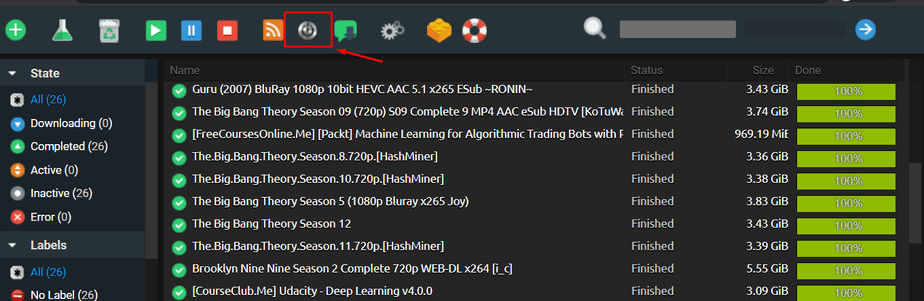
2. Once you click on the botão, rutorrent manager dialogue panel will show up. Once it shows up click on stop and wait for a few seconds and vai stop you rtorrent. It should look algo assim :
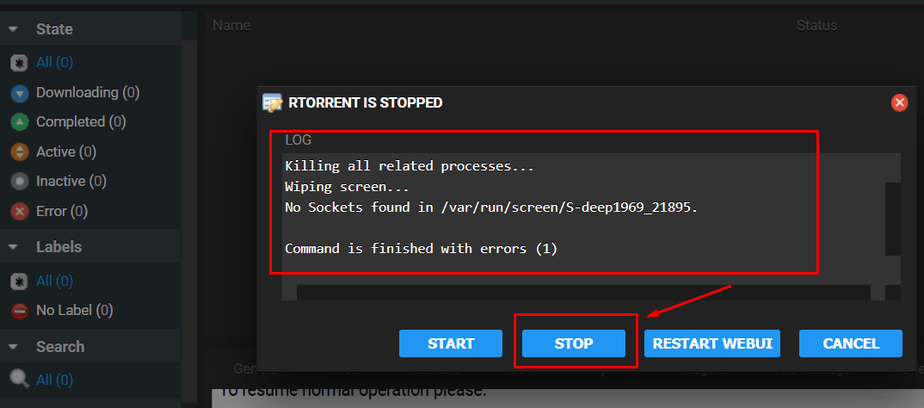
3. Once you click on the botão, rutorrent manager dialogue panel will show up. Once it shows up click on stop and wait for a few seconds and vai stop you rtorrent. It should look algo assim :
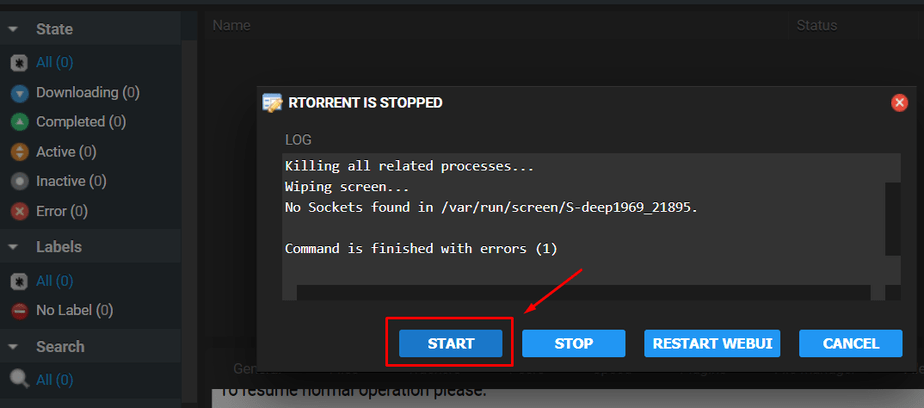
4. That's it your rutorrent will be back online and você pode again use it, it just takes a few seconds and should fix any/most of your rutorrent related errors.


