Do I Need a VPN With a Seedbox? (2026)
On this page ▾
Short answer: if you’re already running a seedbox, you generally do not need a separate VPN for the torrenting itself. This is the single most common misconception we hear from new customers. A VPN and a seedbox solve overlapping problems — and for the part that matters most (keeping your home IP out of the torrent swarm), the seedbox already does the job a torrent VPN is bought for. Below is the honest breakdown of what a seedbox already covers, the few situations where a VPN still adds something, and why you may already have a VPN bundled with your box.
The short version
A seedbox is a remote server in a datacenter that runs your torrent client for you. When it downloads and seeds, the server’s IP address is the one that appears in the swarm — not your home connection. You then reach that server over an encrypted connection (HTTPS in the browser, SFTP for files). So the two things a torrent VPN is normally used for — hiding your real IP from other peers and encrypting the link between you and the traffic — are already handled. For most people, that means no extra VPN subscription is needed just to torrent safely. If you’re new to the concept, our beginner’s guide to seedboxes covers the fundamentals.
What a seedbox already does (that a torrent VPN does)
People buy a torrent VPN for two concrete reasons. A seedbox covers both by design:
- Your home IP never enters the swarm. The torrent client runs on the datacenter server, so the only IP other peers ever see is the server’s. Your home broadband line is not a peer in the swarm at all — it’s simply not part of the transfer. That is exactly the exposure a torrent VPN exists to remove.
- Your connection to the box is encrypted. You control the seedbox through a web panel over HTTPS and move files with SFTP. Anyone watching your home network sees an encrypted session to a server — not torrent traffic, and not what’s inside it.
- The heavy traffic happens off your line. Downloading and seeding occur on the server’s fast datacenter connection. Your ISP sees you pulling completed files down over an ordinary encrypted transfer, at a time of your choosing, not a live torrent swarm running on your home connection.
In other words, the seedbox architecture gives you the privacy outcome a torrent VPN is designed to provide, without you having to route your whole device through a tunnel.
When a VPN still helps
A VPN isn’t useless once you have a seedbox — it just solves a different problem. Here are the honest cases where it still adds value:
1. Tunneling your own device’s general traffic
A VPN protects everything your computer or phone does — browsing, apps, general web use — not just torrents. A seedbox only handles torrent traffic that runs on the server. If your goal is to encrypt your whole device’s internet activity on your home line, that’s a job for a VPN, and it’s a genuinely separate purpose from what a seedbox does.
2. An extra layer over the seedbox’s own IP
By default, the server’s datacenter IP is what appears in the swarm. If you want even that IP masked — a belt-and-suspenders setup where the seedbox’s own outbound traffic runs through a VPN first — you can do it. It’s optional and most users don’t bother, but the option exists if you want an additional hop between the server and the swarm.
3. Reaching your seedbox privately on public Wi-Fi
On untrusted networks — a café, an airport, a hotel — a VPN on your device wraps the connection between you and your seedbox in an extra tunnel. The link is already HTTPS/SFTP encrypted, but a VPN adds a layer and hides even the fact that you’re connecting to a seedbox from whoever runs that Wi-Fi.
You may already have a VPN — it’s built into your seedbox
Here’s the part most comparisons miss: with EvoSeedbox, your seedbox can be your VPN. Every plan includes one-click OpenVPN and WireGuard, so the same server that runs your torrents can also act as your personal VPN endpoint. Flip it on and your device’s traffic routes out through your seedbox’s connection — the exact “tunnel my whole device” use case above, with no third-party VPN subscription to buy.
That covers all three “when a VPN helps” scenarios using hardware you already pay for. Setup is a single click; our WireGuard VPN setup guide walks through it. For most customers this is the whole answer: you don’t need to pay a separate VPN provider, because your seedbox is already one.
Turning on the VPN that is already on your box
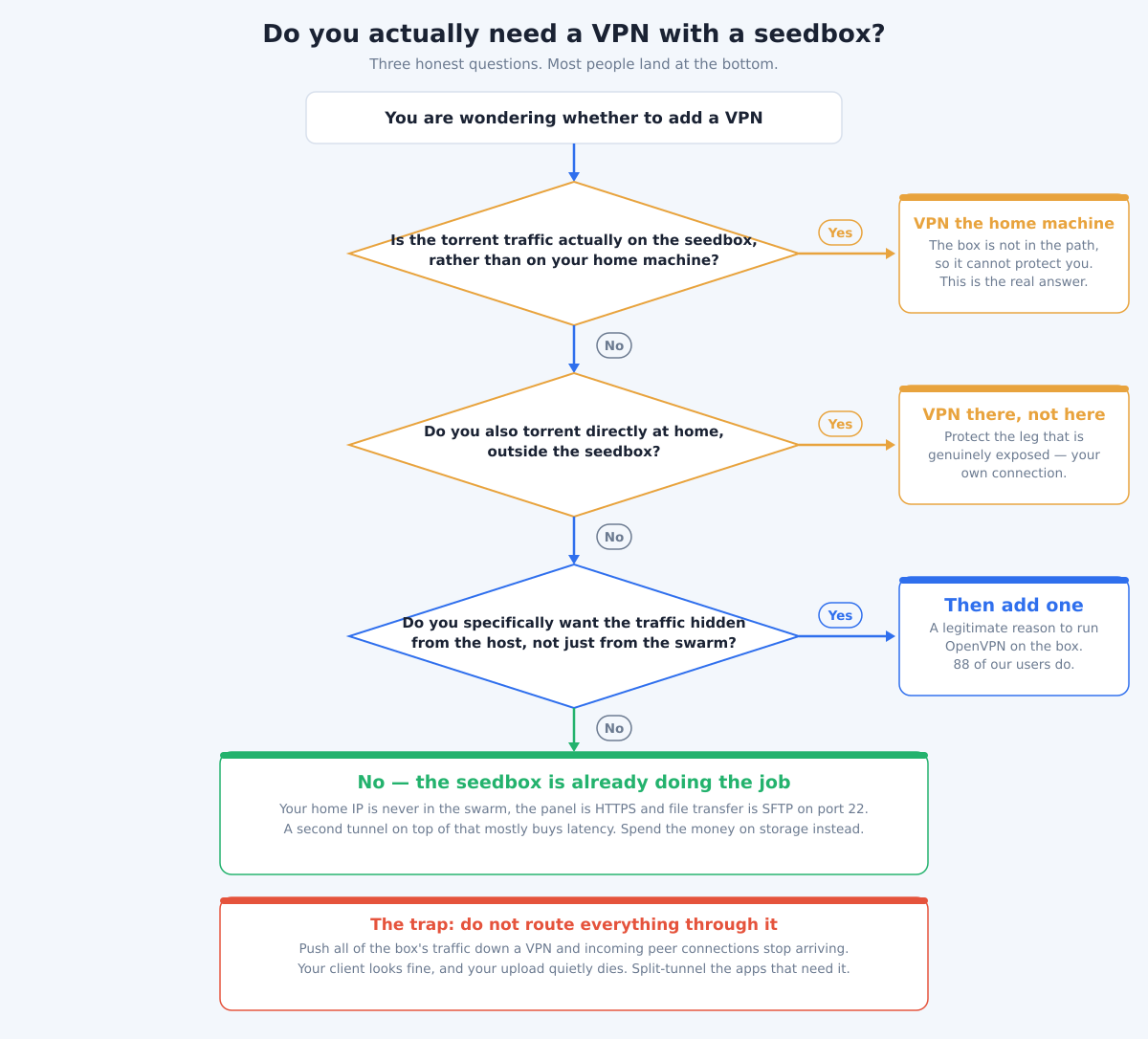
If you worked through the flowchart and landed on “yes, I want one anyway”, you do not need a separate subscription — OpenVPN is a one-click app, and 88 boxes across our fleet run it. What matters is how you point it, because the obvious configuration is the one that breaks seeding.
- Install it from the panel, not by hand. The one-click build already has the routing and permissions set up for a shared box. A hand-rolled tunnel on a seedbox is where the interesting failures come from.
- Do not route the torrent client through it. This is the mistake, and it is worth stating plainly: if all of the box’s traffic goes down a VPN, incoming peer connections stop arriving. Your client still looks completely healthy — it connects out, it shows peers, the tracker says Working — but nobody can reach you, so your upload collapses and your ratio quietly stops moving. It can take weeks to notice.
- Split-tunnel instead. Send only the application that genuinely needs a different exit through the tunnel and leave the torrent client on the server’s own address. Our guide to running a WireGuard tunnel for specific applications walks through the per-app version of this.
- Remember what is already encrypted. The panel is HTTPS and file transfer is SFTP on port 22. On hostile Wi-Fi those are already covered; a VPN adds nothing to the leg you were worried about.
The honest summary: a VPN on a seedbox is a tool for a specific, narrow want — hiding traffic from the host rather than from the swarm. It is not a safety upgrade, and configured carelessly it is a downgrade.
The honest limits
Two things a seedbox — with or without a VPN — will not do, and it’s worth being straight about them:
- It is not an anonymity magic bullet. A seedbox keeps your home IP out of the swarm, but it isn’t a cloak of total anonymity. Your provider knows who you are, and no single tool makes you untraceable. Treat it as strong privacy for the transfer, not invisibility.
- It does not change what’s legal. Moving your torrent traffic to a server doesn’t make downloading copyrighted material legal, and neither does a VPN. The law is the same either way — see our breakdown of whether torrenting and seeding are legal in 2026. Privacy tools protect your data in transit; they don’t rewrite copyright law.
Where to go next
This post answers one narrow question — do you need a VPN as well? Once you have decided you do, the next thing to read is how the two actually fit together: what the WireGuard VPN included with your plan covers, what the seedbox already handles on its own, and why running both is cheaper than paying for them separately. That is covered in seedbox with VPN included: how they work together.
If you are still choosing a seedbox in the first place, our guide to the best seedbox for torrenting covers what to look for.
Frequently Asked Questions
Do I need a VPN if I already have a seedbox?
For the torrenting itself, no. The seedbox already keeps your home IP out of the swarm and gives you an encrypted connection to your files, which is exactly what a torrent VPN is for. A VPN only adds value for separate jobs — tunneling your whole device’s general traffic, or connecting privately on public Wi-Fi.
Does a seedbox hide my IP address like a VPN does?
For torrent traffic, yes — arguably better. Your home IP never joins the swarm at all because the torrent client runs on the datacenter server, so peers only ever see the server’s IP. A VPN hides your IP by tunneling it; a seedbox removes your home line from the equation entirely.
Can my EvoSeedbox act as a VPN?
Yes. Every EvoSeedbox plan includes one-click OpenVPN and WireGuard, so your seedbox doubles as a personal VPN endpoint. You can route your device’s traffic through the same server that runs your torrents — no separate VPN provider required. Our WireGuard setup guide shows how.
Should I run my seedbox’s torrent traffic through a VPN too?
It’s optional. By default the server’s datacenter IP appears in the swarm, which is already separate from your home IP. Routing the server’s outbound traffic through a VPN adds one more layer of masking, but most users don’t need it and skip it. It’s a belt-and-suspenders choice, not a requirement.
Does a seedbox or VPN make torrenting legal?
No. Neither tool changes copyright law — they protect your data and privacy in transit, not the legality of what you download. Downloading copyrighted material without permission is illegal regardless of the tools involved. See our guide to torrenting and seeding legality in 2026.
Is a seedbox enough for privacy on its own?
For keeping your home IP out of the torrent swarm and encrypting your access, yes — that’s the core privacy benefit and a seedbox delivers it without a VPN. Just don’t treat it as total anonymity: your provider still knows who you are, and no single tool makes you untraceable. It’s strong privacy for the transfer, not invisibility.
Ready to torrent without juggling a separate VPN subscription? EvoSeedbox runs on 46 servers with one-click OpenVPN and WireGuard built into every plan, starting at $5/mo — your seedbox and your VPN in one. See plans and pricing and get set up in minutes.
