## 🎬 Как Play Videos in ruTorrent
The MediaStream plugin lets you watch video files directly в вашем browser without downloading them first!
—
## 📋 Quick Start (3 Easy Steps)
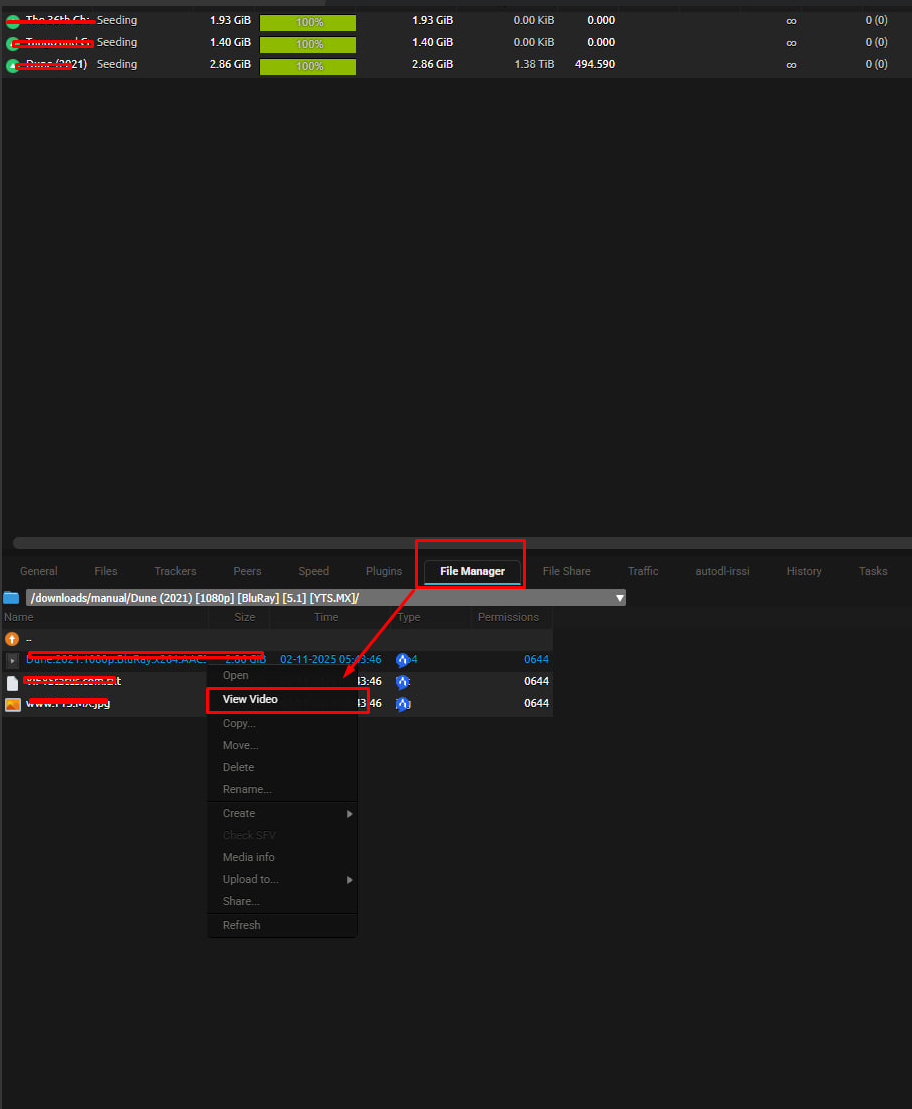
### Шаг 1: Find Your Video1. Click the **FileManager** кнопка in ruTorrent's top toolbar2. Browse through your folders to find a video file3. Look for common video formats: `.mp4`, `.mkv`, `.avi`, `.webm`, etc.
### Шаг 2: Play the Video**Right-click** on any video file and select **"View Video"** из menu

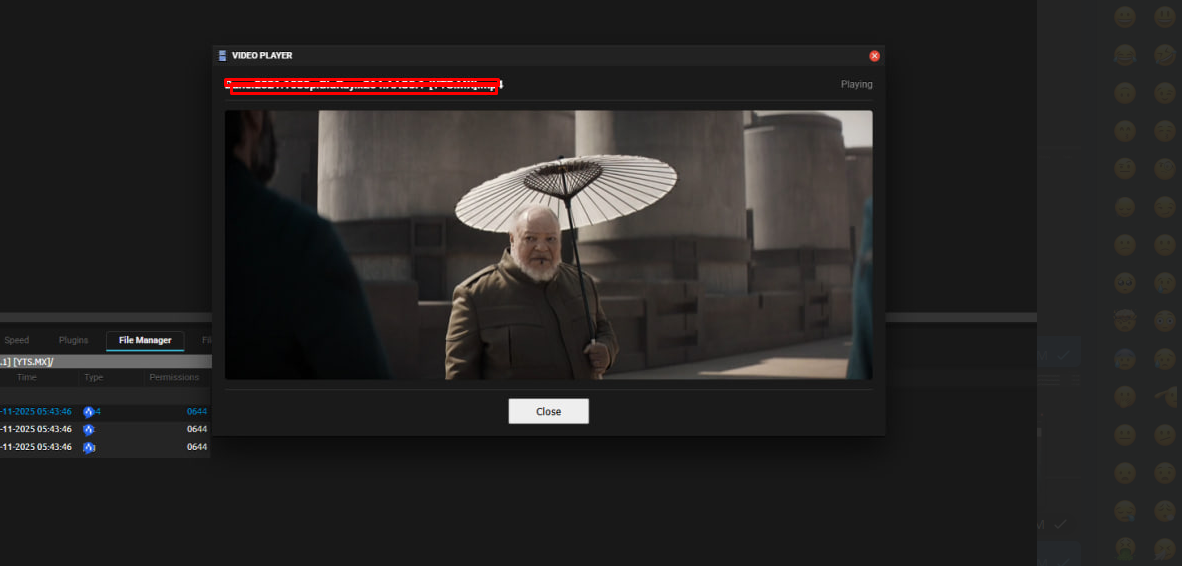
### Шаг 3: Enjoy!— The video player will open in a popup window- Click the **play кнопка** ▶️ to start watching- Use the controls at the bottom to adjust volume, seek, or go fullscreen
—
## 🎮 Player Controls
### Basic Controls| Control | What It Does ||———|—————|| **Play/Pause** ▶️⏸️ | Start or pause the video || **Volume** 🔊 | Adjust sound level (or mute) || **Seek Bar** ━━━━●━━━━ | Jump to any part of the video || **Fullscreen** ⛶ | Watch in fullscreen mode || **Закройте** ✖️ | Закройте the player window |
### Keyboard Shortcuts— **Spacebar**: Play/Pause- **F**: Fullscreen toggle- **M**: Mute/Unmute- **Arrow Keys**: Seek forward/backward- **Escape**: Exit fullscreen
—
## ⚙️ Customizing Your Experience
### Откройтеing Settings1. Перейдите к **ruTorrent Settings** (gear icon ⚙️ in top toolbar)2. Find **"MediaStream"** in the left sidebar3. Adjust your preferences!
### Available Settings
#### 🎨 Player Appearance— **Player Width**: How wide the video window is (default: 800px)- **Player Height**: How tall the video window is (default: 600px)
#### 📹 Video Quality— **Default Quality**: Choose your preferred quality — 🟢 **Auto**: Let the browser decide (recommended) — 🔵 **720p**: HD quality — 🔴 **1080p**: Full HD quality — ⚫ **Original**: No transcoding (highest quality)
#### 🔊 Audio— **Default Volume**: Set your preferred volume level (0-100%)- **Muted by Default**: Start videos muted (useful in offices!)
#### 🎞️ Format Support— **Enable/Disable Formats**: Choose which video formats you хотите play- **Three Categories**: — ✅ **Recommended**: Works great in all browsers (MP4, WebM, Ogg) — ⚠️ **May Work**: Requires proper codecs (MKV, AVI, MOV, etc.) — 🔶 **Limited Support**: Older/specialized formats (FLV, WMV, etc.)
—
## 📂 Supported File Formats
### ✅ Always Works (Recommended)These formats play perfectly in all modern browsers:- **MP4** (.mp4, .m4v) — Most common format- **WebM** (.webm) — Modern web format- **Ogg** (.ogv, .ogg) — Откройте source format
### ⚠️ Usually Works (May Require Codecs)These formats work if your browser supports the video codec inside:- **MKV** (.mkv) — Matroska container- **AVI** (.avi) — Common Windows format- **MOV** (.mov) — QuickTime format- **FLV** (.flv) — Flash video- **WMV** (.wmv) — Windows Media Video- **MPG/MPEG** (.mpg, .mpeg) — MPEG format- **3GP** (.3gp) — Mobile video format- **And many more!**
### 💡 Pro TipIf a video won't play, it's usually a codec issue, not a format issue. Try converting it to MP4 (H.264 codec) for best compatibility.
—
## 🔍 Troubleshooting
### "Video won't play" or shows black screen**Cause**: Your browser doesn't support the video codec
**Решениеs**:1. Try a different browser (Chrome/Edge usually have best support)2. Convert the video to MP4 format with H.264 codec3. Check if the video file is corrupted by downloading it first
### "View Video" option doesn't appear**Cause**: File isn't recognized as a video
**Решениеs**:1. Check if the file extension is enabled in Settings2. Make sure the file actually is a video (not mislabeled)3. Reload ruTorrent page (Ctrl+F5)
### Player window is too small/large**Решение**: Перейдите к Settings → MediaStream and adjust Player Width/Height
### Video is choppy or buffering**Causes**: Network speed, server load, or video bitrate
**Решениеs**:1. Lower the quality setting in Settings2. Wait for more of the file to download3. Try during off-peak hours if server is busy
### No sound**Решениеs**:1. Check if browser tab is muted (look for 🔇 icon on tab)2. Check video player volume control (bottom left)3. Unmute in Settings if "Muted by Default" is enabled4. Some videos don't have audio tracks — download to verify
—
## 🎯 Best Practices
### For Best Performance1. ✅ Use **MP4 files** with H.264 codec when possible2. ✅ Keep player dimensions reasonable (don't go 4K on a 1080p monitor)3. ✅ Use **Auto quality** setting unless you have specific needs4. ✅ Закройте player when done to free up server resources
### For Privacy— 🔒 Remember: Video streaming creates temporary logs on the server- 🔒 Respect your server's пропускная способность and хранилище limits- 🔒 Don't share your streaming links — they're tied на ваш session
### For Multi-User Setups— 👥 Each user has their own settings (they don't affect others)- 👥 Settings are saved per-user automatically- 👥 Вы можете reset to defaults anytime in Settings
—
## 📖 Quick Reference
### Common Workflows
#### "I хотите preview a video before downloading"1. Откройте FileManager2. Right-click video → View Video3. Watch enough to decide4. Закройте player and continue/stop download
#### "I хотите watch a completed download"1. Откройте FileManager2. Navigate to completed downloads3. Right-click video → View Video4. Enjoy in fullscreen!
#### "I хотите check video quality"1. Откройте FileManager2. Right-click video → View Video3. Click fullscreen ⛶4. Assess quality visually
#### "I хотите show someone a clip"1. Откройте FileManager2. Right-click video → View Video3. Use seek bar to find the moment4. Share screen (player only works for you, not shareable links)
—
## 🆘 Still Need Help?
### Check the LogsIf something isn't working, check the ruTorrent log (bottom panel):- Look for **[mediastream]** messages- Note any error messages- Share these with your administrator
### Contact Your AdministratorYour server admin can:- Check server-side logs for streaming errors- Verify file permissions are correct- Установить missing codec support- Adjust streaming buffer sizes for performance
### Report IssuesWhen reporting problems, include:- Video file format and size- Browser name and version- Ошибка message from ruTorrent log- What you expected vs. what happened
—
## 🌟 Pro Tips & Tricks
1. **Multi-Monitor Setup**: Drag player to second monitor and go fullscreen for dedicated viewing2. **Quick Preview**: Double-click to play, spacebar to pause at interesting frames3. **Format Testing**: Try different browsers if playback fails — Firefox vs Chrome vs Edge can differ4. **Bandwidth Management**: Lower quality settings during peak hours5. **Seek Before Loading**: Use seek bar to jump ahead — player will start buffering from that point
—
## 📝 Version Information
**Plugin Version**: 2.0.0 **Last Обновитьd**: November 2025 **Author**: Evoseedbox Team
—
—
## 🙏 Enjoy Your Videos!
Happy streaming! Remember to thank your server administrator for setting this up. 🎬🍿
—
*This guide is for MediaStream Plugin v2.0.0 and above. Если вы're using an older version, some features may not be доступен.*


